






About | See it in action | Show me how | useTriggerState | globalState | stateStorage | Installation
Tired of passing props down the component tree, aren't you?
I know that's sucks.
Sometimes you use Redux or Context API, but it's not always the best solution.
Because you need to create a lot of boilerplate code.
Or even worse, you just need to pass a simple value from one component to another.
And that's why I created React Trigger State.
So, with React Trigger State you can trigger state changes from anywhere in your application.
And what about if the user goes to another page and goes back?
Well, don't worry, because we store the data so you don't need to waste your time!
Don't believe me?
See these stories by clicking here
Others example will be provided throughout the documentation.
Take a look at this diagram:
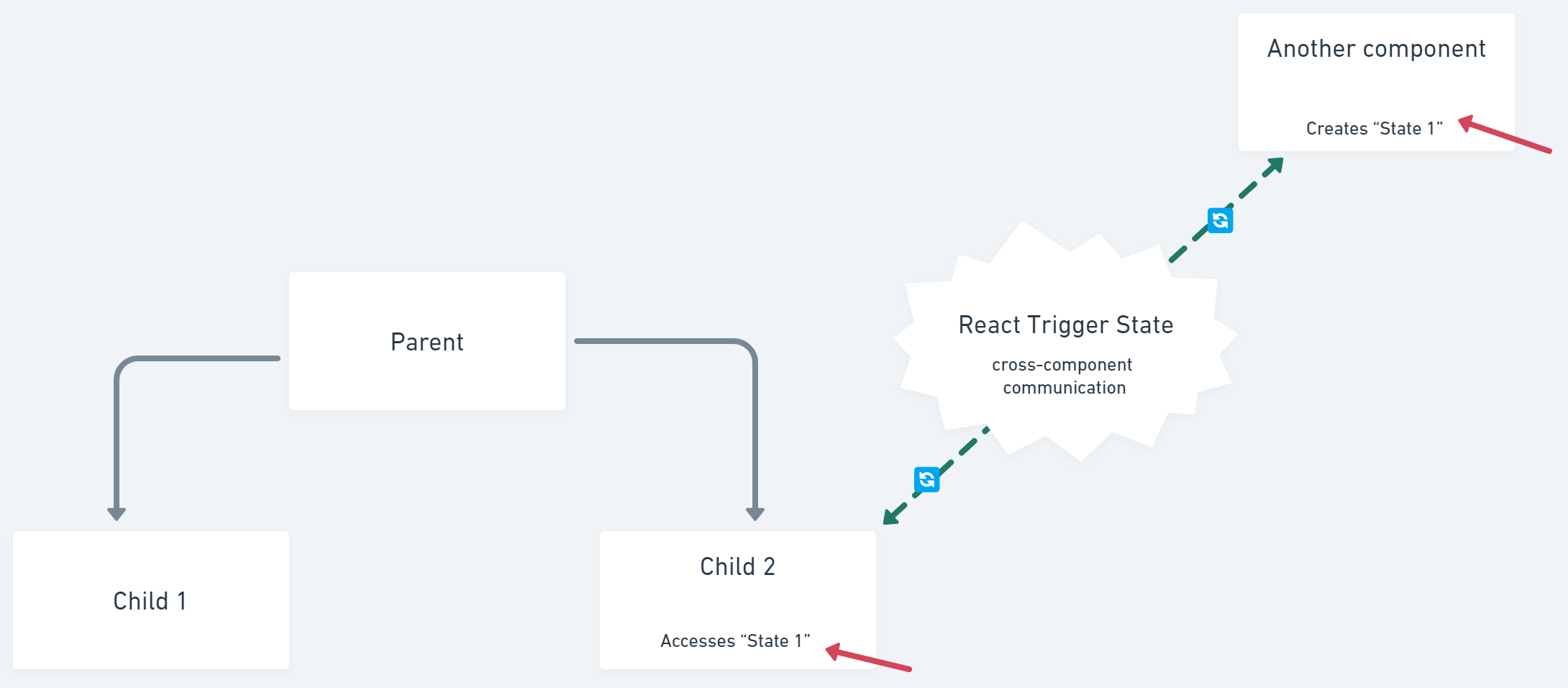
So, with React Trigger State, two components can communicate with each other without having a parent-child relationship.
This hook makes it possible to trigger state changes from anywhere in the application.
First you need to initialize it:
import { useTriggerState } from "react-trigger-state";

// in a component
const [state, setState] = useTriggerState({
  name: "my_first_state",
  initial: "Wow, looks like it's magic!",
});
Then, you can get its value:
import { useTriggerState } from "react-trigger-state";

// in another component
const [state, setState] = useTriggerState({
  name: "my_first_state",
});
Yep, that's only it!
And you can use it like a normal state.
Didn't get it? Ok, try these CodeSandbox examples:
Yep, nice, but what if I don't want to trigger state changes sometimes?
Well, you can use the GlobalState component.
It's a global state that can be accessed from anywhere in the application.
You can create, delete and update it.
And in the next render, all components that use it will be updated.
So you can think of it something like a ref.
Then when you don't want to render the component, you should use the GlobaState component.
import { globalState } from "react-trigger-state";

// in a component
globalState.set("my_first_global_state", "Wow, looks like it's magic!");
Then, you can get its value:
import { globalState } from "react-trigger-state";

// in another component
const value = globalState.get("my_first_global_state");
To see it in action, take a look at this CodeSandbox example:
But what if you want the state to be reactive.
So, if the user changes the value of the state, it will render all components that use it.
Well, you can use the stateStorage component.
It works like a global state, but it's reactive.
So, if you want to use it, you should use the stateStorage component.
import { stateStorage } from "react-trigger-state";

// in a component
stateStorage.set("my_first_state_storage", "put your value here");
Then, you can get its value:
import { stateStorage, useTriggerState } from "react-trigger-state";

// in a function, as it will not be reactive
const value = stateStorage.get("my_first_state_storage");

// or you can use the useTriggerState hook if you want it to be reactive
const [state, setState] = useTriggerState({
  name: "my_first_state_storage",
});
To see it in action, take a look at this CodeSandbox example:
If you found this project interesting...
Why not install it and start using it right now?
NPM
npm i react-trigger-stateYarn
yarn add react-trigger-statePS: please, I'd really appreciate if you could give me a star on the project.