



Most AI agents have the LLM write shell commands and pray. flyto-ai uses 467 pre-built, schema-validated modules instead.





Most AI agents have the LLM generate shell commands or raw code on every run. This means:
- Non-deterministic — the same prompt can produce different commands each time
- No validation — wrong flags, hallucinated APIs, subtle bugs only found at runtime
- Not reusable — each execution is ephemeral, nothing saved for next time
- Expensive — LLM spends tokens figuring out how to execute, not just what to execute
flyto-ai flips the model: the LLM never writes code. It searches and selects from 467 pre-built modules, fills in parameters (validated against schemas), and executes them deterministically. Every run produces a reusable YAML workflow.
❯ scrape the title from example.com

Result: "Example Domain"
name: Scrape Title
params:
  url: "https://example.com"
steps:
  - id: launch
    module: browser.launch
  - id: goto
    module: browser.goto
    params:
      url: "${{params.url}}"
  - id: extract
    module: browser.extract
    params:
selector: "h1"pip install flyto-ai
playwright install chromium # download browser for web automation
export OPENAI_API_KEY=sk-... # or ANTHROPIC_API_KEY
flyto-aiOne install, one command — interactive chat with 467 automation modules, browser automation, and self-learning blueprints.
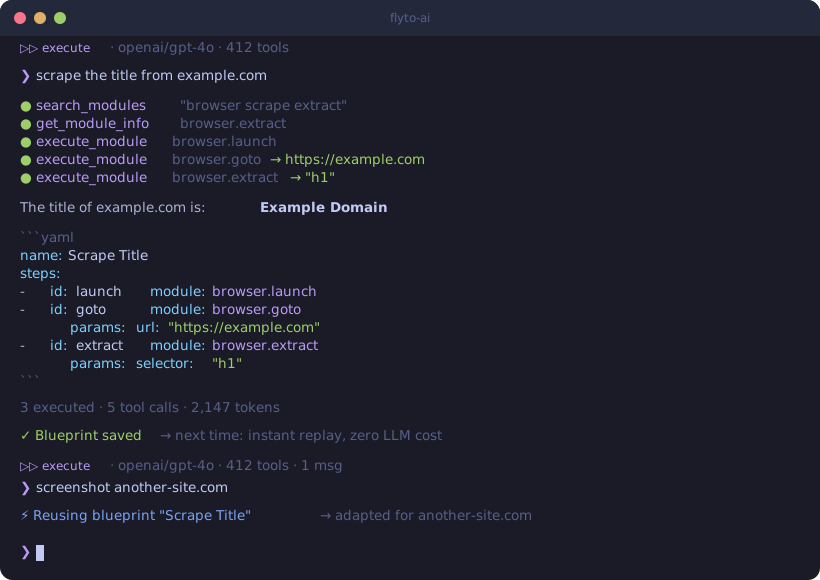
The core difference is what the LLM does during execution:
| Traditional AI agents | flyto-ai | |
|---|---|---|
| LLM's job | Write shell/Python code from scratch | Select modules + fill params |
| Execution | subprocess.run(llm_output) |
execute_module("browser.extract", {validated_params}) |
| Validation | None — errors at runtime | Schema validation before execution |
| Determinism | Same prompt → different code | Same module + params → same result |
| Output | One-time result | Result + reusable YAML workflow |
| Learning | None | Self-learning blueprints (near-zero LLM replay) |
| Cost per replay | Full LLM inference again | ~100-500 tokens (blueprint match + invoke, 60-80% savings) |
❯ extract all product names and prices from example-shop.com/products
name: Scrape Products
params:
  url: "https://example-shop.com/products"
steps:
  - id: launch
    module: browser.launch
  - id: goto
    module: browser.goto
    params:
      url: "${{params.url}}"
  - id: extract
    module: browser.extract
    params:
      selector: ".product"
      fields:
        name: ".product-name"
price: ".product-price"❯ log in to staging.example.com, fill the contact form, and take a screenshot
name: Fill Contact Form
steps:
  - id: launch
    module: browser.launch
  - id: login
    module: browser.login
    params:
      url: "https://staging.example.com/login"
      username_selector: "#email"
      password_selector: "#password"
      submit_selector: "button[type=submit]"
  - id: fill
    module: browser.form
    params:
      url: "https://staging.example.com/contact"
      fields:
        name: "Test User"
        message: "Hello from flyto-ai"
  - id: proof
module: browser.screenshot❯ check if https://api.example.com/health returns 200, if not send a Slack message
name: Health Check Alert
params:
  endpoint: "https://api.example.com/health"
steps:
  - id: check
    module: http.get
    params:
      url: "${{params.endpoint}}"
  - id: notify
    module: notification.slack
    params:
      webhook_url: "${{params.slack_webhook}}"
      message: "Health check failed: ${{steps.check.status_code}}"
condition: "${{steps.check.status_code}} != 200"Powered by flyto-core — 467 automation modules across 55 categories:
| Category | Modules | Examples |
|---|---|---|
| Browser | 39 | launch, goto, click, type, extract, screenshot, wait |
| Atomic | 35 | reusable building-block operations |
| Flow | 23 | conditionals, loops, branching, error handling |
| Cloud | 14 | S3, GCS, cloud storage and APIs |
| Data | 13 | JSON, CSV, parsing, transformation |
| Array | 12 | filter, map, sort, flatten, unique |
| String | 11 | split, replace, template, regex, slugify |
| Productivity | 10 | email, calendar, document integrations |
| Image | 9 | resize, crop, convert, watermark, compress |
| HTTP / API | 9 | GET, POST, download, upload, GraphQL |
| Notification | 9 | email, Slack, Telegram, webhook |
| + 44 more | 200+ | database, crypto, docker, k8s, testing, ... |
Browse available modules:
flyto-ai version # Shows installed module countThe agent remembers what works. Good workflows are automatically saved as blueprints — reusable patterns that make future tasks faster and free.
First time:  "screenshot example.com" → 15s (discover modules, build from scratch)
Second time: "screenshot another.com" → 3s  (reuse learned blueprint, minimal LLM cost)
How it works (closed-loop, no LLM involved):
- Execution succeeds with 3+ steps → auto-saved as blueprint (score 70)
- Blueprint reused successfully → score +5
- Blueprint fails → score -10
- Score < 10 → auto-retired, never suggested again
flyto-ai blueprints                             # View learned blueprints
flyto-ai blueprints --export > blueprints.yaml # Export for sharingUse Claude Code as a coding worker with automatic verification loops:
pip install flyto-ai[agent]   # Installs claude-agent-sdk

# Basic — Claude Code writes code, no verification
flyto-ai code "fix the login form validation" --dir ./my-project

# With verification — screenshot + visual comparison after each fix attempt
flyto-ai code "match the Figma design for the login page" \
  --dir ./my-project \
  --verify screenshot \
  --verify-args '{"url": "http://localhost:3000/login"}' \
  --reference ./figma-login.png \
  --max-attempts 3

# JSON output for CI/CD
flyto-ai code "add unit tests for auth module" --dir ./project --json
How it works:
Phase 1: Gather codebase context from flyto-indexer
Phase 2: Claude Code writes code (with Guardian safety hooks)
Phase 3: Run verification recipe (browser screenshot + text extraction)
Phase 4: LLM visual comparison (actual vs reference)
  → Failed → feed back to Claude Code (Phase 2)
  → Passed → return result
Features:
- Guardian hooks — blocks dangerous operations (rm -rf, .env writes, credential access)
- Evidence trail — every tool call logged to
~/.flyto/evidence/<session>/evidence.jsonl - Budget control —
--budget 5.0caps spending per task - Indexer integration — flyto-indexer provides codebase context + mounts as MCP server
- Session resume — feedback loop reuses the same Claude Code session for full context
# Python API
from flyto_ai import ClaudeCodeAgent, AgentConfig
from flyto_ai.agents import CodeTaskRequest

agent = ClaudeCodeAgent(config=AgentConfig.from_env())
result = await agent.run(CodeTaskRequest(
    message="fix the login page",
    working_dir="/path/to/project",
    verification_recipe="screenshot",
    verification_args={"url": "http://localhost:3000/login"},
    reference_image="./figma-login.png",
))
print(result.ok, result.attempts, result.files_changed)flyto-ai # Interactive chat — executes tasks directly
flyto-ai chat "scrape example.com" # One-shot execute mode
flyto-ai chat "scrape example.com" --plan # YAML-only mode (don't execute)
flyto-ai chat "take screenshot" -p ollama # Use Ollama (no API key needed)
flyto-ai chat "..." --webhook https://... # POST result to webhook
flyto-ai code "fix bug" --dir ./project # Claude Code Agent mode
flyto-ai serve --port 8080 # HTTP server for triggers
flyto-ai blueprints # List learned blueprints
flyto-ai version # Version + dependency statusJust run flyto-ai — multi-turn conversation with up/down arrow history:
$ flyto-ai

  _____ _       _        ____       _    ___
 |  ___| |_   _| |_ ___ |___ \     / \  |_ _|
 | |_  | | | | | __/ _ \  __) |   / _ \  | |
 |  _| | | |_| | || (_) |/ __/   / ___ \ | |
 |_|   |_|\__, |\__\___/|_____|  /_/   \_\___|
           |___/

  v0.6.0  Interactive Mode
  Provider: openai  Model: gpt-4o  Tools: 467

  ⏵⏵ execute · openai/gpt-4o · 467 tools
❯ scrape the title from example.com

  ○ browser.launch
  ○ browser.goto
  ○ browser.extract

  The title of example.com is: **Example Domain**

  3 executed · 5 tool calls

  ⏵⏵ execute · openai/gpt-4o · 467 tools · 1 msgs
❯ now also take a screenshot

❯ /mode
Switched to: plan-only (YAML output)
Commands: /clear, /mode, /history, /version, /help, /exit
Send results anywhere:
flyto-ai chat "scrape example.com" --webhook https://hook.site/xxxAccept triggers from anywhere:
flyto-ai serve --port 8080

# From Slack, n8n, Make, or any HTTP client:
curl -X POST http://localhost:8080/chat \
  -H "Content-Type: application/json" \
  -d '{"message": "take a screenshot of example.com"}'

# Execute mode (default) or plan-only:
curl -X POST http://localhost:8080/chat \
  -H "Content-Type: application/json" \
-d '{"message": "scrape example.com", "mode": "yaml"}'from flyto_ai import Agent, AgentConfig
agent = Agent(config=AgentConfig.from_env())
# Execute mode (default) — runs modules and returns results
result = await agent.chat("extract all links from https://example.com")
print(result.message) # Result + YAML workflow
print(result.execution_results) # Module execution results
# Plan-only mode — generates YAML without executing
result = await agent.chat("extract all links from example.com", mode="yaml")
print(result.message) # YAML workflow onlyWorks with any LLM provider:
export OPENAI_API_KEY=sk-...          # OpenAI models
export ANTHROPIC_API_KEY=sk-ant-...   # Anthropic models
flyto-ai chat "..." -p ollama         # Local models (Llama, Mistral, etc.)
flyto-ai chat "..." --model <name> # Any specific model- Workflows are auditable — YAML is human-readable, reviewable, and version-controllable
- Module policies — whitelist/denylist categories (e.g. block
file.*ordatabase.*) - Sensitive param redaction — API keys and passwords are masked in tool call logs
- Local-first — blueprints stored in local SQLite, nothing sent to third parties
- Webhook output — structured JSON only, no raw credentials in payload
User message
  → LLM (OpenAI / Anthropic / Ollama)
    → Function calling: search_modules, get_module_info, execute_module, ...
      → 467 flyto-core modules (schema-validated, deterministic)
      → Self-learning blueprints (closed-loop, near-zero LLM)
      → Browser page inspection
    → Execute mode: run modules, return results + YAML
    → Plan mode: YAML validation loop (auto-retry on errors)
  → Structured output (results + reusable workflow)

Claude Code Agent (flyto-ai code):
  → Phase 1: flyto-indexer gathers codebase context
  → Phase 2: Claude Agent SDK spawns Claude Code
      → PreToolUse hook: Guardian blocks dangerous ops
      → PostToolUse hook: Evidence trail logging
      → MCP: flyto-indexer available for code intelligence
  → Phase 3: YAML recipe verification (browser automation)
  → Phase 4: LLM visual comparison (screenshot vs Figma)
  → Loop: failed → feedback → Phase 2 | passed → done
Run Claude Code from your phone via Telegram — read/write files, run commands, multi-turn conversation with full context. Also supports flyto-ai agent automation via /agent.
# 1. Install
pip install flyto-ai[agent,serve]
npm install -g @anthropic-ai/claude-code   # Claude Code CLI (required by SDK)

# 2. Set tokens
export TELEGRAM_BOT_TOKEN=123456:ABC-DEF       # from @BotFather
export TELEGRAM_ALLOWED_CHATS=your_chat_id      # optional whitelist
export ANTHROPIC_API_KEY=sk-ant-...

# 3. Start server
flyto-ai serve --host 0.0.0.0 --port 7411 --dir /path/to/your/project

# 4. Register webhook (once)
curl "https://api.telegram.org/bot$TELEGRAM_BOT_TOKEN/setWebhook?url=https://your-domain/telegram"

# 5. Open Telegram → send any message → Claude Code replies with streaming
The --dir flag sets the default working directory for Claude Code. You can change it later with /cd in the chat.
| Command | Description |
|---|---|
| (plain text) | Claude Code — read/write files, run commands, multi-turn conversation |
/agent <msg> |
flyto-ai agent automation (browser, scraper, etc.) |
/cd <path> |
Change Claude Code working directory |
/model <name> |
Switch model (sonnet/opus/haiku) |
/cancel |
Interrupt Claude Code or cancel agent task |
/clear |
Clear session |
/status |
View active/recent tasks |
/cost |
View token spending |
/yaml |
List learned blueprints |
/help |
Show command list |
- Claude Code as default — plain text messages go to Claude Code CLI, with full file read/write, command execution, and persistent multi-turn context
- Real-time streaming — CLI output streams to Telegram by editing the status message in real time
- CLI-agnostic —
CLIProfileabstraction supports any AI CLI (Claude, Codex, Gemini, etc.) - MCP tools built-in — Claude Code inherits your MCP config (flyto-core 467 modules, flyto-indexer, etc.)
- Session resume — each chat maintains a CLI session; context is preserved across messages
- flyto-ai agent via
/agent— browser automation, scraping, and 467-module workflows remain available as a slash command - Persistent job queue — agent tasks survive server restarts, with status tracking
- Mid-execution steering — send a message while an agent task is running to redirect it
| Variable | Purpose | Required |
|---|---|---|
TELEGRAM_BOT_TOKEN |
Bot token from @BotFather | Yes (for /telegram) |
TELEGRAM_ALLOWED_CHATS |
Comma-separated chat_id whitelist | No (empty = allow all) |
The Action Assistant is a 7-layer middleware system that makes browser automation reliable without hardcoding any site-specific logic into the system prompt.
Seven layers of system intelligence that run automatically on every tool call:
- Blueprint Guard — enforces blueprint-first routing; the agent must follow a matching blueprint before improvising
- Snapshot Guard — ensures the agent always has a fresh page snapshot before acting
- Param Auto-Correction — fixes common parameter mistakes (wrong field names, missing required fields) before they reach the module
- Circuit Breaker — detects infinite retry loops on failing or empty modules and stops execution early
- Anti-Bot Detection — recognizes bot-detection pages (Cloudflare, CAPTCHA) and switches strategy
- Selector Healing — when a selector fails, attempts alternative selectors before giving up
- Output Auto-Save — automatically persists structured output (screenshots, extracted data) to disk
- ask_user tool — pauses execution mid-flow to request user credentials, choices, or confirmation. The agent waits for the user's response before continuing.
- Vault auto-fill — encrypted local credential storage. Credentials entered once are securely saved and auto-filled on repeat visits to the same site.
- Preference learning — remembers non-sensitive choices (seat type, meal preference, sort order, etc.) so the agent does not ask again.
- Blueprint-first routing — 33 seed blueprints cover common workflows. The system enforces blueprint selection at the middleware level, not via prompt instructions.
- Zero hardcoded prompt — no module names, no site names, no selectors in the system prompt. All domain knowledge lives in blueprints and middleware.
- Circuit breaker — stops infinite retry when a module keeps failing or returns empty results. Prevents wasted tokens and stuck sessions.
- Credential masking — passwords and secrets are never exposed in LLM context. The vault injects credentials at execution time, after the LLM has selected the action.
| Variable | Description |
|---|---|
FLYTO_AI_PROVIDER |
openai, anthropic, or ollama |
FLYTO_AI_API_KEY |
API key (or use provider-specific vars below) |
FLYTO_AI_MODEL |
Model name override |
OPENAI_API_KEY |
Fallback for OpenAI provider |
ANTHROPIC_API_KEY |
Fallback for Anthropic provider |
FLYTO_AI_BASE_URL |
Custom API endpoint (OpenAI-compatible) |
TELEGRAM_BOT_TOKEN |
Telegram Bot token for /telegram webhook |
TELEGRAM_ALLOWED_CHATS |
Comma-separated Telegram chat_id whitelist |
FLYTO_AI_CC_MAX_BUDGET |
Claude Code Agent max budget in USD (default: 5.0) |
FLYTO_AI_CC_MAX_TURNS |
Claude Code Agent max turns (default: 30) |
FLYTO_AI_CC_MAX_FIX_ATTEMPTS |
Claude Code Agent max fix attempts (default: 3) |
Apache-2.0 — use it commercially, fork it, build on it.