
LCD - Linux Control Dashboard (List > Choose > Do)
It is a simple GNU-Linux program to quickly find and edit configuration files on Linux systems. It saves time hunting through /etc and other system directories, supporting multiple formats, priority configs, multi-column display, and extension filtering. Future versions give even more control.
sudo add-apt-repository ppa:flaneurette/lcd
sudo apt update
sudo apt install lcd
Usage:
lcd            # Show prioritized config files
lcd -all       # Show all config files found in /etc
lcd -q .ext    # Filter by extension, e.g., .yaml, .json, .git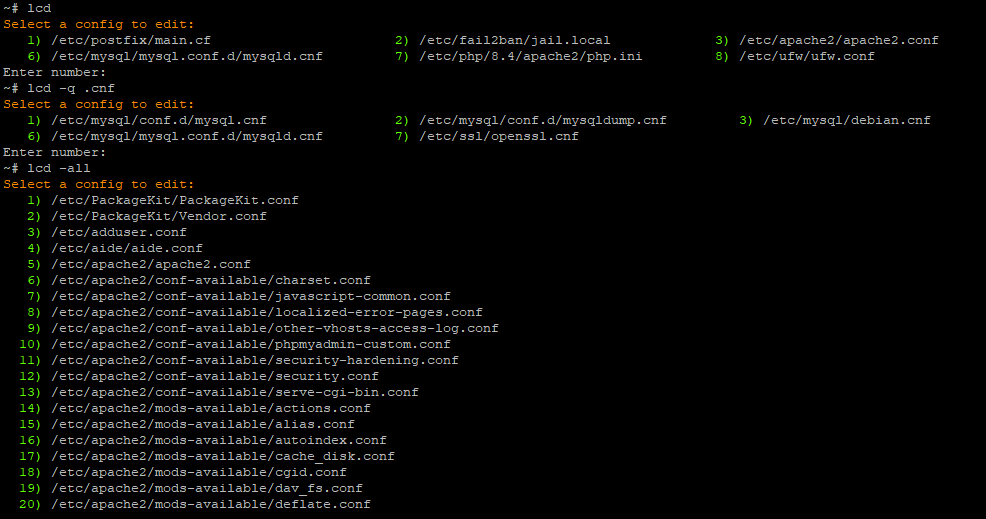
- Lists configuration files in
/etc - Multi-column display for easy viewing
- Priority list for frequently used configs (Postfix, Apache, Fail2Ban, etc.)
- Supports common config extensions:
.conf,.ini,.cf,.local,.cnf,.yaml,.yml,.json,.env,.rules,.list,.service,.socket,.timer - Filter by extension:
lcd -q .ext(e.g.,lcd -q .git) - Full list mode:
lcd -all - Opens selected config in
$EDITOR(defaults tonano, you can change it to anything you like).
Wget the raw package:
wget https://github.com/flaneurette/LCD/raw/refs/heads/main/builds/lcd_1.0-0_all.deb
Install it:
sudo dpkg -i lcd_1.0-0_all.deb
- Clone this repository:
sudo nano /usr/local/bin/lcdPaste the attached lcd.sh script.
- Make it executable:
chmod +x /usr/local/bin/lcd-
Default editor is
$EDITOR, fallback isnano. -
Change colors by setting the
COLORenvironment variable:
export COLOR="\e[38;5;208m" # orange- Change line number color:
NUMCOLOR="\e[38;5;82m" # green- Add or remove priority configs in the script under the
PRIORITYarray
You can add extensions freely.
.conf, .ini, .cf, .local, .cnf, .config, .yaml, .yml, .json, .env, .rules, .list, .service, .socket, .timer
Depends: findutils,
	util-linux
Suggests: systemd,
	iptables
Recommends: nano
MIT License - feel free to use, modify, and share.