This project quickly generates millions of MongoDB documents using Faker + parallel processing, and imports them into MongoDB efficiently using native mongoimport tool.
- ✅ Uses Faker to generate realistic names, emails, addresses, etc.
- ✅ Fully parallelized using multiprocessing
- ✅ Docker Compose setup with MongoDB + auto-import
- ✅ Fast: Utilizes all available CPU cores
- ✅ Easily customizable fields & document count
Copy env-example to a new .env file and adjust:
# Full URI for remote MongoDB (e.g., Atlas), leave empty to use local instance
MONGO_URI=""

# Local mongo container with exposed port (internal is 27017)
MONGO_HOST=mongo
MONGO_PORT=27017

# MongoDB Authentication (Used for both local and external MongoDB)
MONGO_USERNAME=admin
MONGO_PASSWORD=password

# Database & Collection Config
MONGO_DB=testdb
MONGO_COLLECTION=testcol
MONGO_BATCHSIZE=10000

# Data Generation Settings
TOTAL_DOCS=1000000

# Auto-detect CPU cores or set manually
NUM_WORKERS=auto

# Tmux Session Sleep Before Auto Exit
TMUX_EXIT_SLEEP=15Edit document_template.py:
def generate_document(doc_id):
    return {
        "_id": doc_id,
        "name": fake.name(),
        "email": fake.email(),
        # Add or remove fields here!
}- Build and run with
docker-compose upor execute./run.shscript. - Stop the container with
docker compose downor execute./stop.shscript. - Connect to MongoDB instance at
localhostusing provided credentials and port:
mongosh "mongodb://admin:secretpassword@localhost:27017/admin"
use testdb
db.testcol.countDocuments()To view real-time:
- Document generation (multi-core progress bars)
- Import progress & cleanup logs
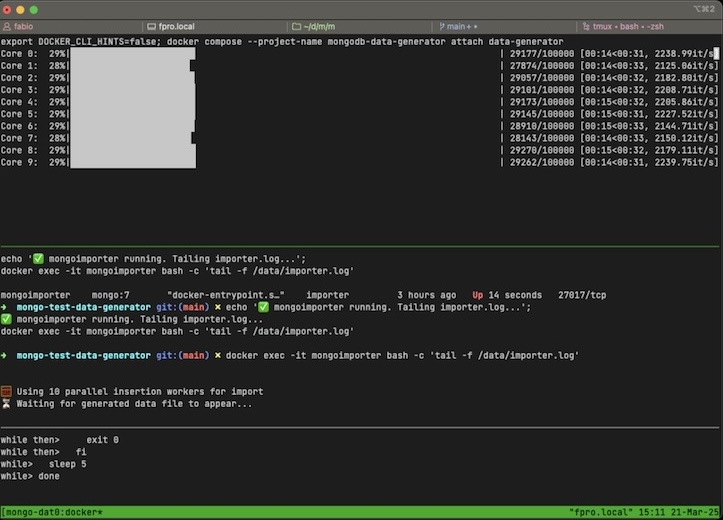
Run:
./show-progress.shtmux is needed to show real time progress output.
Install via brew, apt or other package managers.