
A Blockchain-Powered Platform for Secure Certificate Issuance & Verification


- 📍 Overview
- 👾 Features
- 📁 Project Structure
- 🚀 Getting Started
- 📌 Project Roadmap
- 🔰 Contributing
- 🎗 License
- 🙌 Acknowledgments
CertChain is a decentralized certificate management platform that leverages blockchain technology to ensure secure, transparent, and tamper-proof issuance and verification of digital certificates, hackathon badges, and educational achievements. It seamlessly integrates a Node.js backend, a modern React/TypeScript client, and a suite of Solidity smart contracts to automate and secure the entire certification process.
- Decentralized Verification: Utilize blockchain to ensure every certificate is securely issued and verifiable.
- Smart Contract Automation: Automate certificate issuance, role assignments, and other critical processes via Solidity smart contracts.
- Modular Design: Built-in support for courses, hackathons, projects, and study groups.
- User-Friendly Interface: Responsive client application featuring dashboards for creators, participants, and administrators.
- Robust Data Models: Comprehensive models for users, courses, enrollments, hackathons, and projects.
- Integrated Web3: Seamless integration with blockchain networks for real-time interactions.
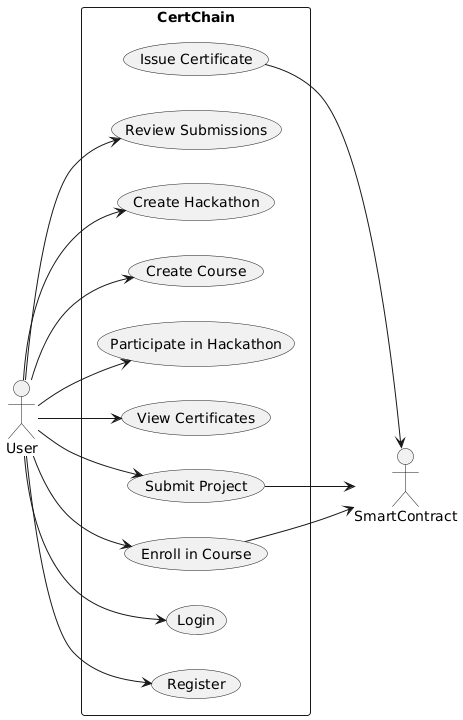
- Use Case Diagram:
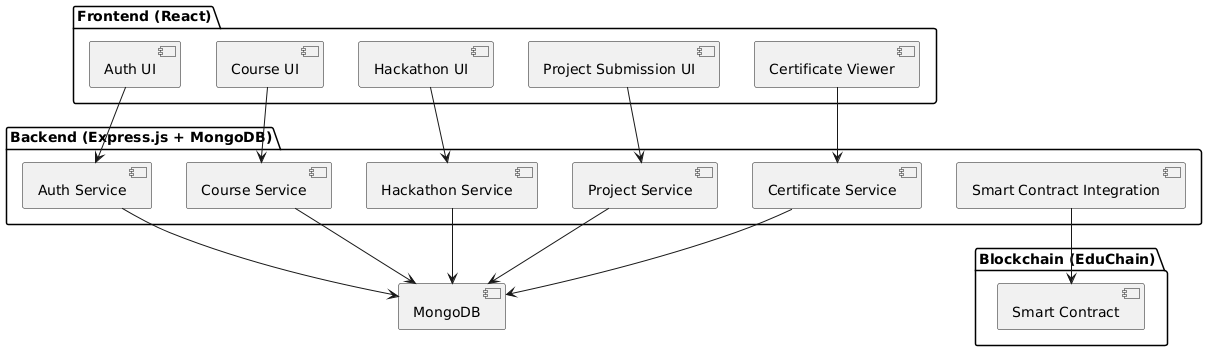
- Components Diagram:
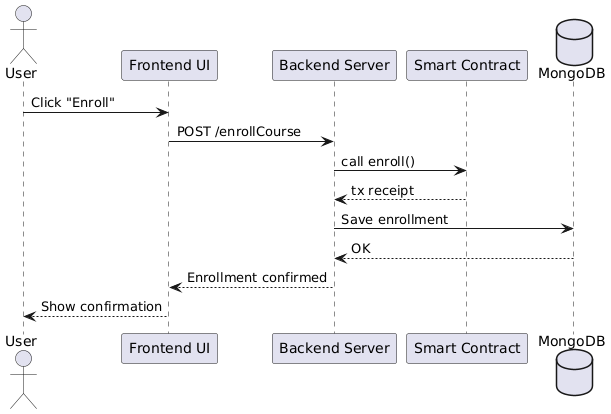
- Sequence Diagram:
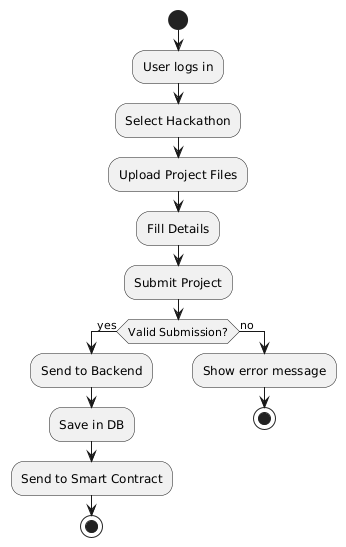
- Activity Diagram:
- Sequence Diagram :
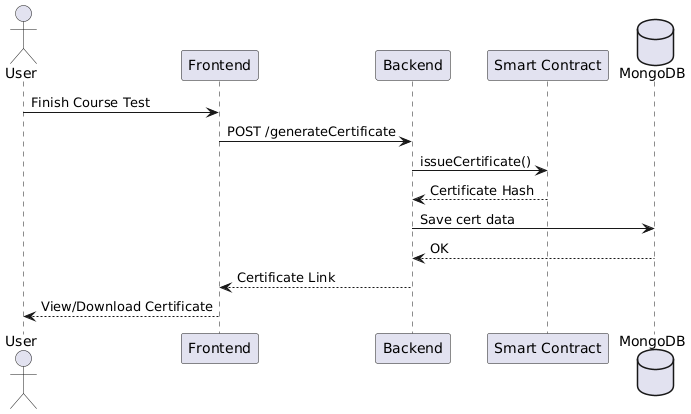
- CodeBase Diagram:
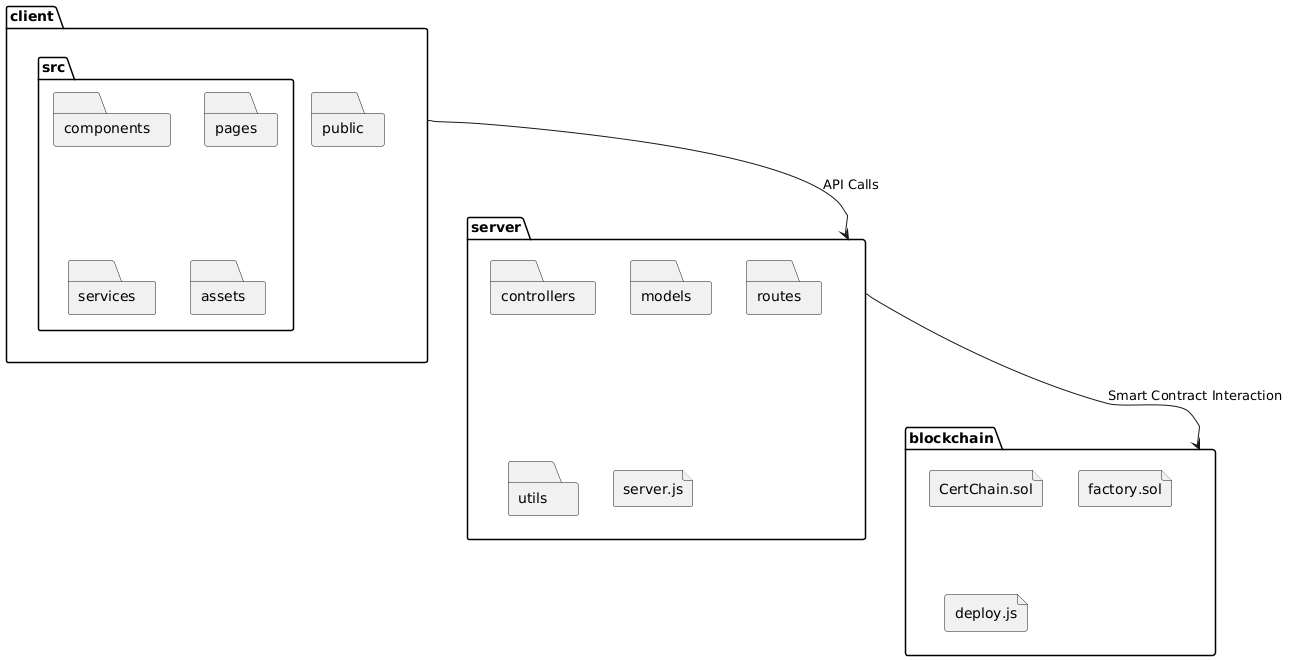


└── CertChain/
    ├── README.md
    ├── backend
    │   ├── .gitignore
    │   ├── app.js
    │   ├── courses2.json
    │   ├── middleware
    │   │   └── authMiddleware.js
    │   ├── models
    │   │   ├── Course.js
    │   │   ├── Enrollment.js
    │   │   ├── Hackathon.js
    │   │   ├── Projects.js
    │   │   └── User.js
    │   ├── package-lock.json
    │   ├── package.json
    │   ├── routes
    │   │   ├── authRoutes.js
    │   │   ├── courseRoutes.js
    │   │   ├── enrollmentRoutes.js
    │   │   ├── hackathonRoutes.js
    │   │   ├── leaderboardRoutes.js
    │   │   ├── pointRoutes.js
    │   │   └── projectRoutes.js
    │   └── web3
    │       ├── abi.json
    │       └── assignRole.js
    ├── client
    │   ├── .gitignore
    │   ├── components.json
    │   ├── eslint.config.js
    │   ├── index.html
    │   ├── package-lock.json
    │   ├── package.json
    │   ├── public
    │   │   ├── Elite.png
    │   │   ├── Legend.png
    │   │   ├── Master.png
    │   │   ├── Pro.png
    │   │   ├── Rookie.png
    │   │   ├── game-ranks.png
    │   │   ├── login-bg.gif
    │   │   ├── logo.jpg
    │   │   ├── logo.png
    │   │   ├── sign.jpg
    │   │   └── vite.svg
    │   ├── src
    │   │   ├── App.tsx
    │   │   ├── Pages
    │   │   │   ├── Acheivements.tsx
    │   │   │   ├── Auth.tsx
    │   │   │   ├── AwardPrizes.tsx
    │   │   │   ├── Cerificate.tsx
    │   │   │   ├── Certificates.tsx
    │   │   │   ├── CompletedCourses.tsx
    │   │   │   ├── CourseDetails.tsx
    │   │   │   ├── CourseLearning.tsx
    │   │   │   ├── Courses.tsx
    │   │   │   ├── CreatedHacks.tsx
    │   │   │   ├── CreatorDashboard.tsx
    │   │   │   ├── EditHackathon.tsx
    │   │   │   ├── Editor.tsx
    │   │   │   ├── EnrolledCourses.tsx
    │   │   │   ├── HackathonCreator.tsx
    │   │   │   ├── HackathonDetails.tsx
    │   │   │   ├── HackathonParticipant.tsx
    │   │   │   ├── Hackathons.tsx
    │   │   │   ├── Home.tsx
    │   │   │   ├── LeaderBoard.tsx
    │   │   │   ├── MyProject.tsx
    │   │   │   ├── ParticipatedHackathons.tsx
    │   │   │   ├── ProjectDashboard.tsx
    │   │   │   ├── SolidityGen.tsx
    │   │   │   └── StudentTest.tsx
    │   │   ├── assets
    │   │   │   └── react.svg
    │   │   ├── components
    │   │   │   ├── CertificateCanvas.tsx
    │   │   │   ├── ConnectWallet.tsx
    │   │   │   ├── ImageSlideShow.tsx
    │   │   │   ├── Navbar.tsx
    │   │   │   ├── RichTextEditor.tsx
    │   │   │   ├── SolidityEditor.tsx
    │   │   │   ├── theme-provider.tsx
    │   │   │   └── ui
    │   │   │       ├── accordion.tsx
    │   │   │       ├── button.tsx
    │   │   │       ├── card.tsx
    │   │   │       ├── input.tsx
    │   │   │       ├── label.tsx
    │   │   │       ├── skeleton.tsx
    │   │   │       ├── table.tsx
    │   │   │       └── textarea.tsx
    │   │   ├── context
    │   │   │   ├── AuthContext.tsx
    │   │   │   └── Web3.tsx
    │   │   ├── contracts
    │   │   │   ├── EduChainCertifications.sol
    │   │   │   │   └── abi.json
    │   │   │   ├── HackathonBadge.sol
    │   │   │   │   └── abi.json
    │   │   │   ├── StudyGroup.sol
    │   │   │   │   └── abi.json
    │   │   │   └── StudyTracker.sol
    │   │   │       └── abi.json
    │   │   ├── index.css
    │   │   ├── lib
    │   │   │   └── utils.ts
    │   │   ├── main.tsx
    │   │   ├── utils
    │   │   │   ├── AnswerExtracter.tsx
    │   │   │   ├── ContractUtils.tsx
    │   │   │   └── ImageUploader.tsx
    │   │   └── vite-env.d.ts
    │   ├── tailwind.config.js
    │   ├── tsconfig.app.json
    │   ├── tsconfig.json
    │   ├── tsconfig.node.json
    │   └── vite.config.ts
    └── contracts
        ├── Certificate.sol
        ├── EduChainCertifications.sol
        ├── HackathonBadge.sol
        ├── SolidityIDELocker.sol
        ├── StudyGroup.sol
└── StudyTracker.solCERTCHAIN/
__root__
README.md Main documentation and project overview.
backend
app.js Main backend server file initializing Express and routing. package-lock.json Auto-generated dependency lock file for Node.js. courses2.json Data file containing course information. package.json Backend project configuration and dependencies. web3
abi.json ABI file for smart contract interactions. assignRole.js Script to assign roles via smart contracts. models
Enrollment.js Model representing user enrollments. Projects.js Model for managing project data. Course.js Model for course information and management. Hackathon.js Model for hackathon events and details. User.js User model for authentication and profile management. routes
projectRoutes.js Handles project-related API endpoints. courseRoutes.js API endpoints for course operations. enrollmentRoutes.js Endpoints for managing course enrollments. authRoutes.js Endpoints for user authentication and authorization. hackathonRoutes.js API endpoints for hackathon management. leaderboardRoutes.js Handles leaderboard data and ranking endpoints. pointRoutes.js Endpoints for managing user points and rewards. middleware
authMiddleware.js Middleware for handling and verifying user authentication.
client
tsconfig.node.json TypeScript configuration for Node-specific settings. package-lock.json Auto-generated dependency lock file for the client. tsconfig.json General TypeScript configuration. tailwind.config.js Configuration for Tailwind CSS. tsconfig.app.json TypeScript configuration specific to the client application. package.json Client project configuration and dependency definitions. vite.config.ts Vite configuration for bundling and development. index.html Main HTML file serving the client application. components.json Configuration file for reusable client components. eslint.config.js ESLint configuration for maintaining code quality. src
main.tsx Entry point for the React client application. index.css Global CSS styles for the application. App.tsx Main React component managing routing and layout. vite-env.d.ts Type definitions for Vite-specific modules. lib
utils.ts Utility functions used across the client. components
CertificateCanvas.tsx Component for rendering digital certificates. ConnectWallet.tsx Enables users to connect their blockchain wallets. ImageSlideShow.tsx Component for displaying an image slideshow. Navbar.tsx Responsive navigation bar for the client. RichTextEditor.tsx Rich text editor component for content creation. SolidityEditor.tsx Editor tailored for writing Solidity smart contracts. theme-provider.tsx Provides theming and styling context to the client. ui
accordion.tsx UI accordion component for expandable content. label.tsx Standard label component for form fields. input.tsx Reusable input component for forms. textarea.tsx Text area component for multi-line input. button.tsx Customizable button component. table.tsx Component for displaying tabular data. skeleton.tsx Skeleton loader component for improved UX during data fetches. card.tsx Card component for grouping related content. context
Web3.tsx Context provider for blockchain/web3 interactions. AuthContext.tsx Context provider for managing user authentication state. Pages
Acheivements.tsx Displays user achievements and milestones. Auth.tsx Authentication page for user sign-in and registration. AwardPrizes.tsx Page for managing and awarding prizes. Cerificate.tsx View page for individual certificate details. Certificates.tsx Page listing all issued certificates. CompletedCourses.tsx Displays courses successfully completed by the user. CourseDetails.tsx Detailed view for individual course content. CourseLearning.tsx Interactive learning page for courses. Courses.tsx Listing page for all available courses. CreatedHacks.tsx Overview of hackathons or projects created by the user. CreatorDashboard.tsx Dashboard for content creators to manage their work. EditHackathon.tsx Page to edit existing hackathon details. Editor.tsx General-purpose editor for content modifications. EnrolledCourses.tsx Lists courses the user is currently enrolled in. HackathonCreator.tsx Page for creating new hackathon events. HackathonDetails.tsx Detailed view of a selected hackathon event. HackathonParticipant.tsx Page for participants in hackathons. Home.tsx The landing page of the application. LeaderBoard.tsx Displays user rankings and leaderboard information. MyProject.tsx Overview of projects associated with the user. ParticipatedHackathons.tsx Lists hackathons the user has participated in. Hackathons.tsx Displays all available hackathon events. AwardPrizes.tsx Manage and display prize awards for events. Courses.tsx General listing of courses available to users. CreatorDashboard.tsx Dashboard for creators to monitor and manage their contributions. EnrolledCourses.tsx Displays courses in which the user is enrolled. ProjectDashboard.tsx Dashboard for managing and tracking project progress. utils
AnswerExtracter.tsx Utility to extract and process answers from user inputs. ImageUploader.tsx Handles image uploading and storage. ContractUtils.tsx Utility functions for interacting with blockchain smart contracts.
contracts
EduChainCertifications.sol Smart contract for managing educational certifications. StudyGroup.sol Smart contract for managing study groups. StudyTracker.sol Smart contract for tracking study progress. HackathonBadge.sol Smart contract for issuing hackathon badges. SolidityIDELocker.sol Smart contract for locking Solidity code within an IDE. Certificate.sol Smart contract for certificate issuance and verification.
Ensure your environment meets the following requirements before getting started:
- Programming Language: TypeScript & JavaScript (Node.js)
- Package Manager: npm
- Blockchain Node/Provider: Access to an Ethereum-compatible network (local or remote)
Build from source:
-
Clone the CertChain repository:
❯ git clone https://github.com/divy-arun-mav/CertChain
-
Navigate to the project directory:
❯ cd CertChain -
Install backend and client dependencies:
For the backend:
❯ cd backend
❯ npm install
For the client:
❯ cd ../client
❯ npm install
To run the CertChain application:
-
Backend:
From thebackendfolder, start the server:❯ npm start
-
Client:
From theclientfolder, launch the client application:❯ npm start
Open your browser and navigate to the indicated local URL (typically http://localhost:3000).
To run tests for the application, execute the following from the relevant folder (backend/client):
❯ npm test- Task 1: Complete the core blockchain integration and certificate issuance feature.
- Task 2: Implement advanced verification and audit trails.
- Task 3: Integrate additional blockchain networks and expand mobile support.
- 💬 Join the Discussions: Share ideas, ask questions, and provide feedback.
- 🐛 Report Issues: Submit bugs or feature requests.
- 💡 Submit Pull Requests: Fork the repository, create a branch, and open a pull request with your improvements.
Contributing Guidelines
- Fork the Repository: Start by forking the project to your GitHub account.
- Clone Locally: Clone the forked repository using:
git clone https://github.com/divy-arun-mav/CertChain
- Create a New Branch: Always work on a new branch:
git checkout -b new-feature-x
- Make Your Changes: Develop and test locally.
- Commit Your Changes: Commit with clear, descriptive messages:
git commit -m 'Implemented new feature x.' - Push to GitHub: Push your changes:
git push origin new-feature-x
- Submit a Pull Request: Create a pull request against the main repository with a detailed description.
- Review: Your changes will be reviewed and merged upon approval.
Contributor Graph
- Thanks to all the contributors and open-source projects that inspired and supported the development of CertChain.
- Special appreciation goes to the communities behind blockchain, Node.js, React, and TypeScript for their continuous innovation and support.