elm-cli-options-parser allows you to build command-line options parsers in Elm.
It uses a syntax similar to Json.Decode.Pipeline, with automatic help text
generation, validation, and JSON Schema output
for MCP tool
definitions and elm-pages script
introspection.
You can
play around with elm-cli-options-parser in a live terminal simulation in Ellie here!
See the examples folder for full end-to-end examples, including how to wire
your Elm options parser up through NodeJS so it can receive the command line input.
Take this git command:
git log --author=dillon --max-count=5 --stat a410067To parse the above command, we could build a Program as follows (this snippet doesn't include the wiring of the OptionsParser-Line options from NodeJS, see the examples folder):
import Cli.Option as Option
import Cli.OptionsParser as OptionsParser exposing (with)
import Cli.OptionsParser.BuilderState as BuilderState
import Cli.Program as Program


type CliOptions
    = Init
    | Clone String
    | Log LogOptions


type alias LogOptions =
    { maybeAuthorPattern : Maybe String
    , maybeMaxCount : Maybe Int
    , statisticsMode : Bool
    , maybeRevisionRange : Maybe String
    , restArgs : List String
    }

programConfig : Program.Config CliOptions
programConfig =
    Program.config
        |> Program.add
            (OptionsParser.buildSubCommand "init" Init
                |> OptionsParser.withDescription "initialize a git repository"
            )
        |> Program.add
            (OptionsParser.buildSubCommand "clone" Clone
                |> with (Option.requiredPositionalArg "repository")
            )
        |> Program.add (OptionsParser.map Log logOptionsParser)


logOptionsParser : OptionsParser.OptionsParser LogOptions BuilderState.NoMoreOptions
logOptionsParser =
    OptionsParser.buildSubCommand "log" LogOptions
        |> with (Option.optionalKeywordArg "author")
        |> with
            (Option.optionalKeywordArg "max-count"
                |> Option.validateMapIfPresent String.toInt
            )
        |> with (Option.flag "stat")
        |> OptionsParser.withOptionalPositionalArg
            (Option.optionalPositionalArg "revision range")
        |> OptionsParser.withRestArgs
            (Option.restArgs "rest args")
{-
Now running:
`git log --author=dillon --max-count=5 --stat a410067`
will yield the following output (with wiring as in the [`examples`](https://github.com/dillonkearns/elm-cli-options-parser/tree/master/examples/src) folder):
-}
matchResult : CliOptions
matchResult =
Log
{ maybeAuthorPattern = Just "dillon"
, maybeMaxCount = Just 5
, statisticsMode = True
, maybeRevisionRange = Just "a410067"
}It will also generate the help text for you, so it's guaranteed to be in sync. The example code above will generate the following help text:
$ ./git --help
git log [--author <author>] [--max-count <max-count>] [--stat] [<revision range>]
Note: the --help option is a built-in command, so no need to write a OptionsParser for that.
The Cli.Option.Typed
module lets you specify the type of each option (string, int, float, etc.) via a
CliDecoder. This gives you:
- JSON Schema generation via
Program.toJsonSchema— for MCP tool definitions, elm-pages script introspection, or any tooling that needs a machine-readable description of your CLI's inputs - Typed JSON input — the same parser handles both traditional CLI args and structured JSON, so LLM agents can invoke your tool programmatically
- CLI validation — typed decoders like
intandfloatautomatically reject malformed input
import Cli.Option.Typed as Option
import Cli.OptionsParser as OptionsParser exposing (with)
import Cli.Program as Program

type alias Options =
    { name : String
    , count : Int
    , verbose : Bool
    }

programConfig : Program.Config Options
programConfig =
    Program.config
        |> Program.add
            (OptionsParser.build Options
                |> with (Option.requiredKeywordArg "name" Option.string)
                |> with (Option.requiredKeywordArg "count" Option.int)
                |> with (Option.flag "verbose")
            )
This parser works with traditional CLI args:
$ mytool --name hello --count 3 --verboseAnd also accepts JSON input (for tool-calling agents):
{ "name": "hello", "count": 3, "verbose": true, "$cli": {} }Program.toJsonSchema "mytool" programConfig generates a JSON Schema with
proper types ("type": "string", "type": "integer", etc.) and x-cli-kind
annotations that describe how each option maps to CLI flags.
Use Cli.Option.Typed when you want JSON schema generation or JSON input support.
Use Cli.Option (the original API shown in the example above) when you only need
traditional CLI argument parsing. It's simpler — no decoder argument needed — and
treats all values as strings, which you then transform with validateMap, map, etc.
Both modules produce the same Option type and work with the same OptionsParser.with pipeline.
The library automatically adds ANSI color codes to help text and error messages when enabled. To enable colors, pass colorMode: true in your flags from JavaScript:
const useColor = !!(process.stdout.isTTY && !process.env.NO_COLOR);

Elm.Main.init({
  flags: {
    argv: process.argv,
    versionMessage: "1.0.0",
    colorMode: useColor
  }
});
This simple approach:
- Disables color when output is piped (not a TTY)
- Respects the
NO_COLORenvironment variable
For more robust detection (CI environments, FORCE_COLOR, etc.):
function detectColorSupport() {
  const env = process.env;
  if ('FORCE_COLOR' in env) {
    return env.FORCE_COLOR !== '0' && env.FORCE_COLOR !== 'false';
  }
  if ('NO_COLOR' in env) return false;
  if (env.TERM === 'dumb') return false;
  if (!process.stdout.isTTY) return false;
  if (env.CI && (env.GITHUB_ACTIONS || env.GITLAB_CI || env.CIRCLECI)) return true;
  return true;
}

const colorMode = detectColorSupport();-
Build in great UX by design For example, single character options like
-vcan be confusing. Are they always confusing? Maybe not, but eliminating the possibility makes things much more explicit and predictable. For example,grep -vis an alias for--invert-match(-Vis the alias for--version). And there is a confusing and somewhat ambiguous syntax for passing arguments to single character flags (for example, you can group multiple flags likegrep -veabc, which is the same asgrep --invert-match --regexp=abc). This is difficult for humans to parse or remember, and this library is opinionated about doing things in a way that is very explicit, unambiguous, and easy to understand.Another example, the
--helpflag should always be there and work in a standard way... so this is baked into the library rather than being an optional or a manual configuration. -
Guaranteed to be in-sync - by automatically generating help messages you know that users are getting the right information. The design of the validation API also ensures that users get focused errors that point to exactly the point of failure and the reason for the failure.
-
Be explicit and unambiguous - like the Elm ethos, this library aims to give you very clear error messages the instant it knows the options can't be parsed, rather than when it discovers it's missing something it requires. For example, if you pass in an unrecognized flag, you will immediately get an error with typo suggestions. Another example, this library enforces that you don't specify an ambiguous mix of optional and required positional args. This could easily be fixed with some convention to move all optional arguments to the very end regardless of what order you specify them in, but this would go against this value of explicitness.
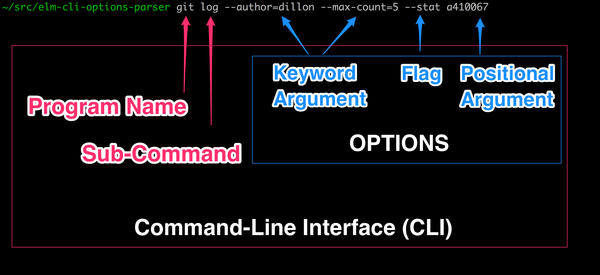
Here is a diagram to clarify the terminology used by this library. Note that
terms can vary across different standards. For example, posix uses the term
option for what this library calls a keyword argument. I chose these terms
because I found them to be the most intuitive and unambiguous.