A parallax background generation method for 2D side-scrollers.
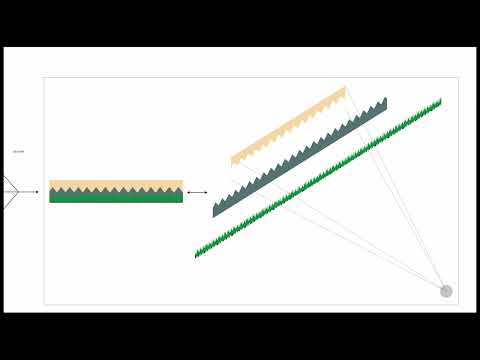
Art assets for games can be time intensive to produce. Whether it's a full 3D world, or simpler 2D background, creating good looking assets takes time and skills that are not always readily available. Time can be saved by using repeating assets, but clear repetition hurts immersion. Procedural generation techniques can help make repetition less uniform, but doesn't remove it entirely. Both cases leave noticeable levels of repetition in the world, and require significant time and skill investments to produce. Video game developers in hobby, game jam, or early prototyping situations may not have access to the required time and skill.
We propose the use of computational photography to produce layered 2D backgrounds without the need for significant artist time or skill. In our pipeline, the user provides segmented photographic input, instead of creating traditional art, and receives game-ready assets. Most time spent is computational run-time, and frees up developers for other work. Photograph inputs are used to move the artistic skill requirement away from the developer as well.
Our method is as follows:
- Depth estimation informed interactive segmentation. (We used the GIMP magic wand.)
- Palette simplification and editing through k-means colour clustering.
- Graphcut texture generation to extend individual layers to desired lengths.
- Optionally filtered down-scaling before generation and up-scaling after to produce a pixelated style.
(References at end of README)
-
Clone this repository
-
Run setup from the repository root directory
bash setup.sh
-
Start Python virtual environment
source ./venv/bin/activate
Use generate.py to perform pixelized background texture generation.
By default, it will transfer the input image(s) into pixel art style and
generate textures horizontally for outputs of 4 times in width.
To use it, it is required to pass in an input image or a directory of images:
python generate.py --input ./samplesSince there are many parameters that can be fine tuned to suit different images, it provides a command line interface with many options available:
-
--helpor simply-hshows a help message and exit. -
--inputor simply-ispecifies the input of a image or a directory with images. This is required. -
--output_diror simply-ospecifies the directory where resulting images are to be saved. -
--output_width_factorspecifies the scale factor to determine the width of resulting image(s). -
--output_height_factorspecifies the scale factor to determine the height of resulting image(s). -
--output_widthspecifies the width of resulting image(s). (Setting this will ignoreoutput_width_factor.) -
--output_heightspecifies the height of resulting image(s). (Setting this will ignoreoutput_height_factor.) -
--n_colorsspeciies the number of dominate colours to be extracted as a palette for the image(s). -
--recolorraises a flag option to turn on palette recolouring for input image(s). -
--superpixel_sizespecifies the size of a 'pixel' after pixelization. -
--pixelization_onlyraises a flag option to run only the pixelization and recolouring part. This will not take the output width and height options and Graphcut generation options into account. -
--directionspecifies the direction of texture generation:0for horizontal1for bi-directional
-
--patch_factorspecifies the factor to determine size of patches used during generation. See below for more details -
--generation_modespecifies the mode for texture generation:1for global subpatch best matching2for row-by-row subpatch best matching3for row-by-row best matching
-
--generation_onlyraises a flag option to run only the Graphcut generation part. This will not take the pixelization and recolouring options into account.
Pixel art background involves many artistic choices to suit your preference, we encourage you to try experimenting different options yourself to generate more interesting results. Here is an example of using these options:
python generate.py \
    -i ./samples \
    -o ./output \
    --output_width_factor 4 \
    --output_height_factor 1 \
    --n_colors 8 \
    --recolor \
    --superpixel_size 3 \
    --direction 0 \
    --patch_factor 8 \
    --generation_mode 2
You may use the help command for an easy access to the explainations:
python generate.py --helpHave fun! :D
To use the texture generation portion of the pipeline by itself, graphCut.py can be called directly with the following signature.
python graphCut.py path_in path_out direction patch_factor mode height_out width_out-
path_inandpath_outare the file paths, including file name and extention. -
directionindicates if the texture generates only horizontally, or both horizontally and vertically.- Horizontal works best and is
0. - Bidirectional is
1.
- Horizontal works best and is
-
patch_factoris used to choose the size of patches used during generation.- A value of
8indicates a subpatch with 1/8 times the width of the input image for horizontal generation. - A value of
8would indicate a subpatch with 1/8 times the width and height of the input image for bidirectional generation.
- A value of
-
modetakes a value between 1 and 3 which relate to different methods of patch selection.- A value of
1means the output is built placing subpatches in a random order. - A value of
2means the output is built by placing subpatches row-by-row. - A value of
3means the output is built using the entire input patch being placed row-by-row.
- A value of
-
height_outandwidth_outare in pixels and determine the output image dimensions.height_outshould match the input image height for horizontal generation.
For example:
python graphCut.py mountainPatch.png mountainOutput.png 0 4 1 300 2000There is also a simple script to clean up the output directory and the virtual environment for your convienience:
bash clean.sh-
Depth Estimation method and implementation from "Boosting Monocular Depth Estimation Models to High-Resolution via Content-Adaptive Multi-Resolution Merging", Miangoleh et al., CVPR 2021
-
Pixelization method inspired by Convert Photo into Pixel Art using Python by Abhijith Chandradas
-
Palette extraction referenced Dominant Color Extraction Dominance and Recoloring by Srijan Anand
-
Texture generation method from "Graphcut Textures: Image and Video Synthesis Using Graph Cuts", Kwatra et al., SIGGRAPH 2003
- Implemented by Yezhen Cong & Niranjan Thakurdesai
-
Photos used in demo by Ricardo Chiarini, Liu Sicheng, Jim Josef, and Cedric VT on Unsplash