
⚠️ IMPORTANT: Please use the blue download button above.
The standard green "Code" button on GitHub contains raw source files and will not launch correctly.
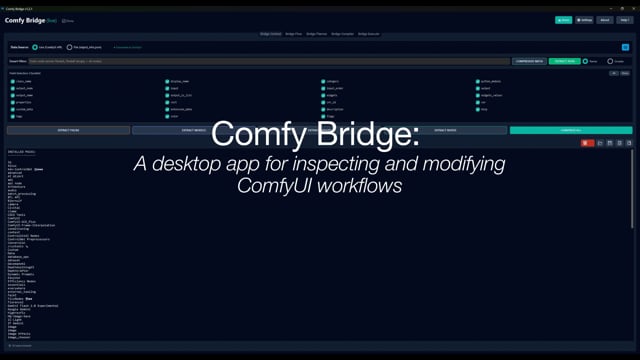
A brief walkthrough showing how Comfy Bridge inspects, plans, and applies changes to ComfyUI workflows using LLMs.
A professional tool for compressing, analyzing, and modifying ComfyUI workflows using AI agents. Comfy Bridge introduces Bridge Planner, a custom GPT responsible for reasoning about changes and translating creative intent into explicit, deterministic, compiler-ready plans. At its core, Bridge Planner asks a single question: given the current workflow state and the user's intent, can this be expressed as a valid, deterministic set of structural operations?
- Hybrid System: 1 external AI agent (ChatGPT) + 2 deterministic Python components
- Live API Integration: Extract node definitions, packs, and models directly from ComfyUI
- BridgeZip Protocol: Significantly compresses ComfyUI workflows while preserving all logic
- Workflow Conversion: Seamless JSON ↔ BridgeZip conversion
- Context Management: Intelligent extraction of workflow data for AI collaboration
- Modern UI: Professional Nordic/Deep Slate aesthetic with intuitive interface
- Python 3.10-3.13 installed and in PATH
- ComfyUI installation (for Live API mode)
- Extract the
ComfyBridge_v1.2.1.zippackage to any folder - Double-click
START.bat - The application will:
- Check for Python installation
- Create a virtual environment automatically
- Install dependencies automatically
- Launch the application
Note: Make sure Python is installed and added to PATH during installation.
If you're developing or modifying the code:
-
Create a virtual environment:
python -m venv venv
venv\Scripts\activate  # Windows
-
Install dependencies:
pip install -r requirements.txt
-
Run the application:
python run_bridge.py
Comfy Bridge automatically creates a config.json file on first run. You can configure settings via the Settings button (⚙️) in the application header:
- ComfyUI URL/Port: Set the ComfyUI API endpoint such as http://127.0.0.1:8000 (default: http://127.0.0.1:8188)
- ComfyUI Image Input Folder: Set the path to your ComfyUI input folder for image uploads
Settings are saved automatically and persist between sessions.
-
Get Node Definitions
- Go to Bridge Context tab
- Use Live Mode (recommended) or File Mode
- Extract definitions, compressed meta, or model index
-
Prepare Workflow
- Export ComfyUI workflow
- Go to Bridge Flow tab
- Convert JSON → BridgeZip (or work with existing BridgeZip)
-
Plan the Change
- Go to Bridge Planner tab
- Request analysis or structural design
- Receive the Compiler Brief
-
Compile the Plan
- Go to Bridge Compiler tab
- Paste the brief + workflow + definitions
- Receive a validated Task Envelope
-
Execute the Change
- Go to Bridge Execute tab
- Paste the envelope
- Receive updated BridgeZip
-
Re-import to ComfyUI
- Inflate via Bridge Flow or directly inside ComfyUI
- Test and iterate
Comfy Bridge uses a hybrid architecture: 1 external AI agent (ChatGPT) for planning, plus 2 deterministic Python components for validation and execution.
-
Bridge Planner (ChatGPT - External AI Agent)
- Analyses workflows
- Interprets user intent
- Designs structural solutions
- Produces the Compiler Brief
-
Bridge Compiler (Python-only - Deterministic Component)
- Validates node classes and slot indices
- Translates the plan into a strict Task Envelope
- Guarantees correct BridgeZip syntax and linking
- Performs no reasoning or execution
-
Bridge Execute (Python-only - Deterministic Component)
- Executes the Task Envelope using the BridgeZip engine
- Applies all modifications
- Outputs a clean, updated BridgeZip workflow
- Operates in strict silent mode
BridgeZip is a compressed workflow format that:
- Preserves node logic, links, widgets, and metadata
- Removes visual layout and redundant UI details
- Significantly reduces token footprint
- Enables efficient AI-based workflow modification
The BridgeZip format is independently implemented, with conceptual inspiration drawn from early community tools exploring LLM-friendly ComfyUI compression.
Comfy_Bridge/
├── run_bridge.py    # Application entry point
├── LICENSE          # Apache 2.0 License
├── README.md        # This file
├── requirements.txt # Python dependencies
├── START.bat        # Windows launcher
├── engine/          # BridgeZip compression engine
├── logic/           # Business logic (filtering, extraction)
├── ui/              # User interface components
│   ├── tabs/        # Tab implementations
│   └── modals/      # Modal dialogs
├── utils/           # Utility functions and helpers
├── scripts/         # Launch scripts
├── assets/          # Application icons
└── demo/            # Sample files for testing
Copyright 2025 Dominic Hawgood
Licensed under the Apache License, Version 2.0 (the "License"); you may not use this file except in compliance with the License. You may obtain a copy of the License at
http://www.apache.org/licenses/LICENSE-2.0
Unless required by applicable law or agreed to in writing, software distributed under the License is distributed on an "AS IS" BASIS, WITHOUT WARRANTIES OR CONDITIONS OF ANY KIND, either express or implied. See the License for the specific language governing permissions and limitations under the License.
This is a personal project created to explore workflow management in more depth. For issues, ideas, or suggestions, please contact the maintainer.
- 1.2.1 - Professional release with hybrid system (1 AI agent + 2 Python components)