Cratis is a bi-directional outliner built using Tauri and SvelteKit. You can create notes using markdown, link to other notes, and view all your notes and their connections in a network graph.
Cratis is an outliner. An outliner is just a specialized type of text editor that is used to create/edit outlines, which are text files which follow a tree structure for organization. Each line is rendered as a bullet point that can be nested for structure.
Cratis allows you to use bi-directional links to connect your notes! Type the name of another note between double square brackets or following a hashtag.
Ex/
[[Another note]]#Testing
Indent your current line by pressing Tab or shift it back a level with Shift+Tab.
Re-order your points with drag and drop.

Cratis automatically creates a daily note that goes into your "journal" every day you open the app. From here, you can insert any thoughts you have throughout the day and start building your network.

View and navigate all your notes and their connections with the network view.
View all references to the current node. This allows you to start building a note from other notes.
Every file in the network is saved locally using markdown format.
Found on YouTube

Use the demo network to see what Cratis is capable of and view a tutorial on how to use it.
Download the network here.
- Unzip the folder to your desired network location
- Launch Cratis
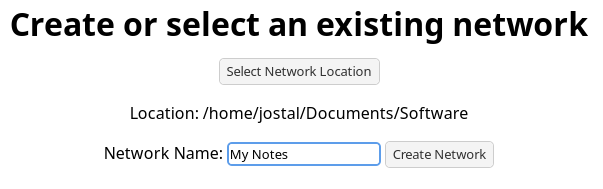
- Select the location you unzipped the demo network to (but not the network itself "My Notes")
- Set the network name to "My Notes" and click the "Create Network" button