

View the GitHub project here or download the latest release here.
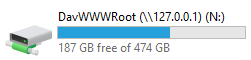
Display your Nuix selected case items as a drive letter (windows). This script when run will mount a drive letter representing the items you have selected.
Prevention of any items exported for discovery that may contain a virus, malware, worms, etc. An antivirus application can be used to scan the drive mount and any items deleted will be added to an exclusion list in your original case named 'deleted'.
Begin by downloading the latest release. Extract the contents of the archive into your Nuix scripts directory. In Windows the script directory is likely going to be either of the following:
%appdata%\Nuix\Scripts- User level script directory%programdata%\Nuix\Scripts- System level script directory
Filter and select the items in your case you want mounted.
Alternatively, select no items to export and the script will mount the entire case.
To do this attempt to do a 'save as...' through the workstation GUI. If there are errors here it would be a good idea to make your source available.
Alternatively, highlight an item and check the Binary tab in the Preview window and see if you have data. If the tab is blank you do not have access to the binary source.
This will prompt for:
IP Address <-- most of the time the server will default to 127.0.0.1 for private access, however you can change it for a network address and allow others access to your case.
A cache will be built (progress dialog) which after a while will finish and a drive letter will be shown to the user. How long? Script processes about 100K items per hour. You mileage may vary.
Drive letter is chosen from N: onwards.
Items are processed and mounted in a serialized folder format (1, 2, 3, etc) with upto 1000 files per folder. This will be done up to a limit of 10,000 folders. So the theoretical maximum numbers of items that can be exported in 10 million items. Your mileage may vary.
When you are finished, disconnect the drive in windows. The script checks every few seconds for the drives presence and when it is no longer used the webDav server will be stopped.
As a failsafe when the case goes into a processing/reloading/closing states the server will also be stopped.
The port is usually going to be port 80, if unavailable the script will choose the next port. Similarly with Drive letter, the default is N: if unavailable the next letter will be chosen
Copyright 2021 Nuix

Licensed under the Apache License, Version 2.0 (the "License");
you may not use this file except in compliance with the License.
You may obtain a copy of the License at

    http://www.apache.org/licenses/LICENSE-2.0

Unless required by applicable law or agreed to in writing, software
distributed under the License is distributed on an "AS IS" BASIS,
WITHOUT WARRANTIES OR CONDITIONS OF ANY KIND, either express or implied.
See the License for the specific language governing permissions and
limitations under the License.