Burrow is an independent open-source project built on the same
moengine as mole.fit (the official Mole for Mac app bymo's author), but it is not affiliated with or endorsed by mole.fit — its own name, mark, palette, and copy are original.If you want it and to fund
mo's development — buy mole.fit ($19).
A free, open-source GUI for the Mole (mo) engine — clean, uninstall, optimize, analyze disk, and watch live system status. Plus long-range history and local MCP access for AI agents. Native on macOS, with a Windows preview implemented under windows/.


Burrow wraps the free, open-source Mole engine in a native desktop app: clean junk, purge dev artifacts, sweep leftover installers, uninstall apps, run safe maintenance, map your disk, and watch live system status — in one window. On top of that it adds things the CLI doesn't have: a long-running history of your machine's metrics in a local store and an MCP server so any AI agent (Claude Code, Cursor, Codex…) can ask "what's been happening on this machine."
macOS is the mature flagship. Windows currently has a native WinUI 3 / .NET 8 preview app, Windows telemetry/history, tray HUD, loopback HTTP, MCP stdio bridge, CI, tests, and unsigned release packaging.
brew install --cask caezium/tap/burrow · Windows: build the preview from source
- Platforms
- Screenshots
- The tools
- Roadmap
- How Burrow compares to other tools
- Settings
- Permissions & Full Disk Access
- Requirements
- Install
- Security & trust
- Use it with your AI agent
- Develop & test
- Architecture
- Attribution & license
| macOS | Windows | |
|---|---|---|
| Status | Stable — flagship | Preview — checked in under windows/ |
| Engine | mo (Go CLI, via Homebrew) |
bundled Mole/PowerShell engine plus Windows fallbacks where needed |
| UI | SwiftUI, translucent menu-bar app | WinUI 3 / .NET 8 |
| Install | brew install --cask caezium/tap/burrow |
build from source; unsigned preview artifacts via windows/scripts/build-release.ps1 |
| Source | macos/ |
windows/ |
Both apps live in this one repo, side by side, sharing this README, the landing site, and release documentation. The Windows preview currently includes a native shell, tool pages, local telemetry/history, loopback HTTP/MCP surfaces, tests, CI, and unsigned local packaging. See the Windows architecture notes and release notes.
 |
 |
 |
 |
 |
 |
 |
 |
 |
 |
 |
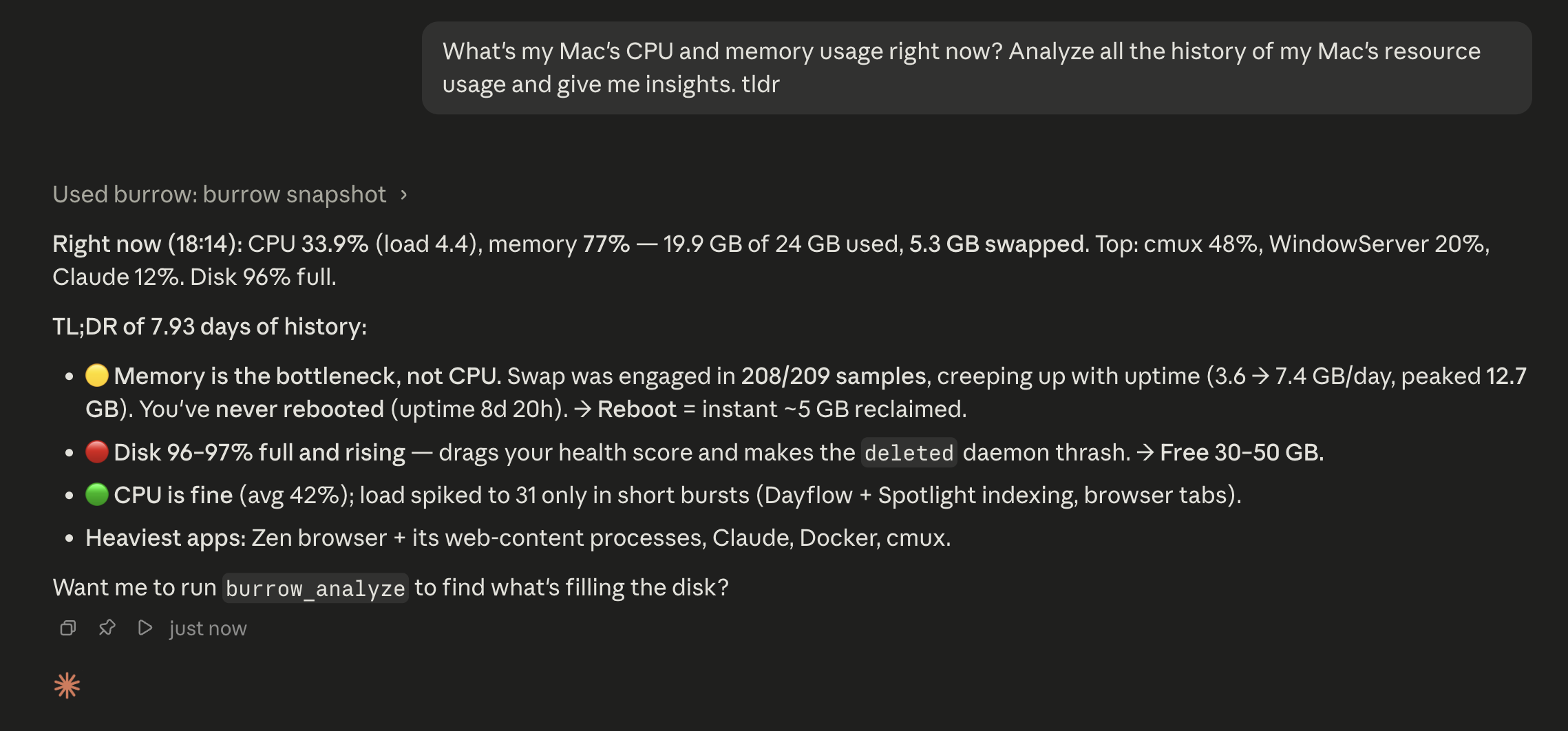
Explain with AI — point an MCP-capable agent (Claude Code, or a local model via LM Studio) at Burrow and ask your Mac in plain language.

 |
 |
 |
 |
 |
| Tool | What it does | mo command |
|---|---|---|
| Status | Live dashboard with per-metric sparklines and a sortable/pinnable process table. | mo status --json |
| Clean | Preview what's reclaimable, then clean for real — categorized cache/log/leftover removal. | mo clean |
| Purge | Reclaim space from dev projects: node_modules, build dirs, target/, __pycache__, and more. |
mo purge |
| Installers | Find and remove leftover .dmg/.pkg installer files in bulk. |
mo installer |
| Optimize | One-tap safe maintenance: rebuild caches, repair metadata, flush DNS, restart Dock/Finder. | mo optimize |
| Software | Installed-app list with search/sort (size, name, recent, source) and multi-select uninstall; a Homebrew Updates tab. | mo uninstall --list, brew outdated |
| Analyze | Squarified treemap of your disk; drill into any folder, reveal in Finder. | mo analyze --json |
Every scan offers a no-risk preview (--dry-run) first, a clear
reclaimed-space summary when it finishes, and a Stop button to abort a
running job.
A live, glanceable read of your Mac's vitals, refreshed continuously:
- CPU — usage, load averages (1/5/15), core count, temperature
- Memory — used %, pressure (normal/warning/critical), swap
- GPU — name and utilisation (Apple Silicon via IOAccelerator)
- Disk — capacity and live read/write I/O rates
- Network — up/down throughput per interface
- Battery — percentage, health, cycle count, time remaining
- Health score — Mole's overall 0–100 rating, with a one-line reason
- Top processes — by CPU or memory, sortable and pinnable
- History — long-range charts (5 m → 90 d) over a local SQLite history of every metric, plus peak-per-process tables. Nothing the CLI keeps.
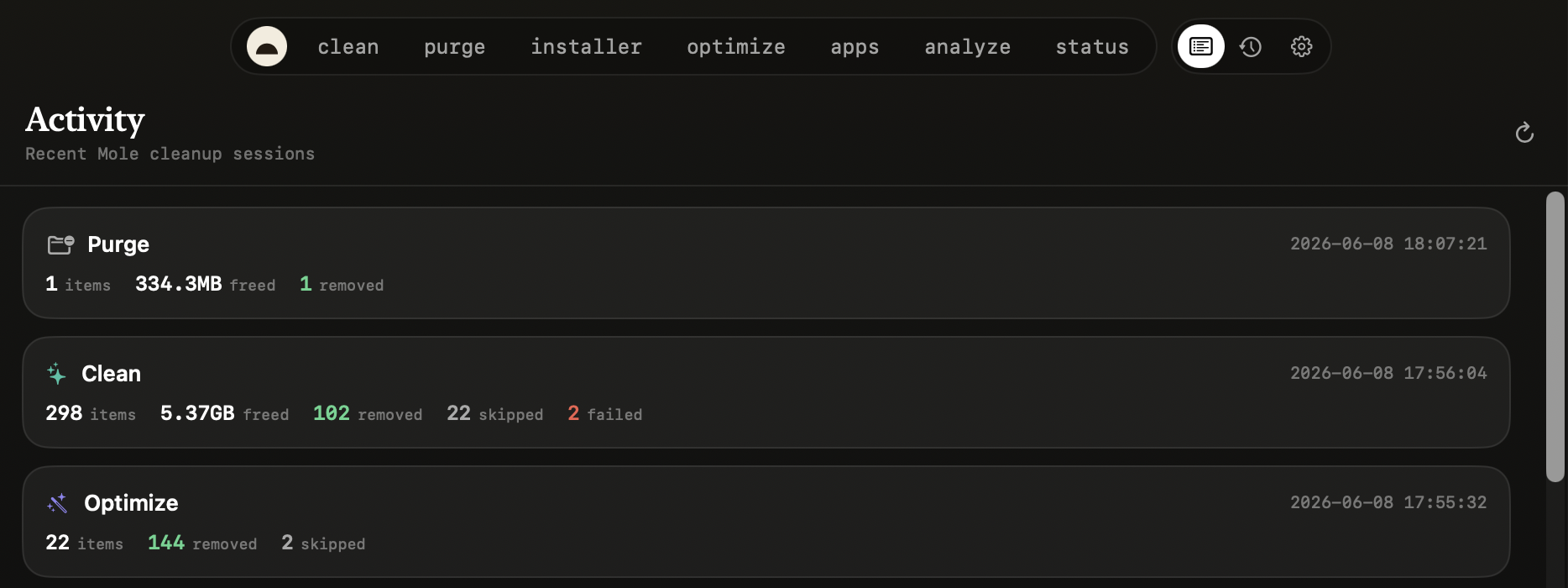
- Activity — a running log of what Burrow has done (cleans, optimizes, scans) and the live status of anything in flight.
- Menu-bar HUD — health hero, metric tiles, top processes, and live job status, all from the menu bar (you can also run as a Dock app instead).
- MCP server — a stdio JSON-RPC server (
burrow mcp/Burrow --mcp) plus an optional localhost HTTP API, so any AI agent can query your Mac's recent state. See Use it with your AI agent.
The checked-in Windows app currently includes:
- A native WinUI 3 / .NET 8 shell with Dashboard, History, Activity, Analyze, Clean, Purge, Installers, Apps, Optimize, and Settings routes.
- Local Windows telemetry sampling for Dashboard, History, tray status, HTTP, and MCP.
- Local JSONL-backed history/activity storage.
- Optimize preview/confirm flows through Mole where available; the Windows Clean route is present but still a guarded pending stub until Mole Windows exposes a stable non-interactive cleanup contract for the GUI.
- Native Windows fallback flows for Analyze, Purge, installer cleanup, and app inventory where the Windows Mole branch is still interactive or lacks JSON.
- A tray icon, live tooltip, tray HUD, status menu, and quick navigation.
- A loopback-only HTTP API (
/health,/info,/snapshot,/metrics) and a stdio MCP bridge with the read-only Burrow tools. - Unit tests, Windows CI, local smoke-test helpers, and an unsigned release script that produces a setup executable, portable ZIP, hashes, and WinGet manifests.
The full board, with status and voting, lives at burrow.henryzh.dev/roadmap. Vote by upvoting an issue, or open a request.
Building
- One-click “Update with Homebrew” — An Update button in the update prompt that runs
brew upgradeand relaunches — the interim before signed auto-update.
Planned
- Signed & notarized macOS builds — A Developer ID signature so Gatekeeper trusts Burrow without the right-click → Open dance.
- In-app auto-update — Once builds are signed, silent background update checks with a one-click install (Sparkle).
- Bundle a pinned
moengine in every release — Engine included in the download, so there's no separate install step on any install path. (#54) - Windows preview → first stable — Data-loss and supply-chain hardening, parity, and test coverage before it loses the “preview” label. (#93)
Considering
- Persistent one-tap “run all” Tune-Up — A saved Smart-Care routine you trigger in one tap from the dashboard. (#77)
Recently shipped: A warm visual redesign, Ports & Get Online, Smart-Care Tune-Up, Homebrew Services & Brewfile, Deeper MCP agent surface (/events, burrow_diff) — see the changelog.
A factual feature/scope comparison. The competitor columns are the macOS
landscape; the Windows column reflects only the checked-in preview.
mole.fit is from the original author of mo — buy it ($19) if you want that
and to fund mo.
| Burrow (macOS) | Burrow (Windows preview) | mole.fit | CleanMyMac | Pearcleaner | mo / ncdu |
|
|---|---|---|---|---|---|---|
| Price | Free | Free | $19 once | Subscription | Free | Free |
| Open source | MIT | MIT | – | – | ✅ | ✅ (mo) |
| Signed / notarized | No — unsigned current release | No — unsigned preview | ✅ | ✅ | ✅ | n/a |
| Junk cleanup | ✅ | partial - Clean route pending | ✅ | ✅ | – | ✅ (mo) |
| Dev-artifact purge | ✅ | ✅ | ✅ | partial | – | ✅ (mo) |
| Leftover-installer sweep | ✅ | ✅ | ✅ | ✅ | – | ✅ (mo) |
| Uninstall + leftovers | ✅ | ✅ | ✅ | ✅ | ✅ (focus) | ✅ (mo) |
| Disk treemap | ✅ | ✅ | ✅ | ✅ | – | ncdu (TUI) |
| Live system monitor | ✅ | ✅ | ✅ | partial | – | – |
| Long-term metric history | ✅ | ✅ (JSON) | – | – | – | – |
| MCP / agent API | ✅ | ✅ | – | – | – | – |
| GUI | ✅ | ✅ | ✅ | ✅ | ✅ | – (terminal) |
Everything is local and takes effect immediately unless noted:
| Setting | What it controls |
|---|---|
| History retention | How long metric history is kept (1 day → 1 year); older rows are pruned hourly. |
| Vacuum after large prunes | Reclaim DB file space after a big prune (off by default). |
| Sampling rate | How often Burrow runs mo status --json (5 s → 5 min). |
| App language | Follow the system, or force English / 简体中文 / 繁體中文 (relaunch). |
| Menu-bar icon | Show the menu-bar item, or run as a regular Dock app instead. |
| MCP / agent access | Copyable stdio config + the tool list for Claude Code, Cursor, Codex, Cline, and any MCP client. |
| Local HTTP query server | Optional loopback REST API + port for dashboards/curl (relaunch). |
| Mole engine | Shows the installed mo version, with a one-click Update Mole. |
Cleaning system and app caches means reading TCC-protected folders, so macOS will prompt — once per folder — unless the app has Full Disk Access. Burrow handles this honestly:
- Before a flood-prone scan it shows a gate explaining the trade-off, with a one-click link to System Settings → Full Disk Access (grant once, no more prompts).
- Don't want to grant it? Scan with admin runs the same scan as root — root bypasses TCC, so it's a single password prompt instead of a flood.
- Burrow only ever reads sizes; it never opens that data itself, and the real cleanup always goes through macOS's own admin dialog.
- macOS 14+
- The Mole CLI —
brew install mole. Hard requirement; Burrow refuses to launch withoutmoon PATH (and offers a guided install if it's missing).
- Windows 10/11
- .NET 8 SDK for local build/test.
- Inno Setup only when running the unsigned release packaging script.
macOS releases are currently unsigned. Each macOS path below clears the Gatekeeper quarantine for you. The full security/trust write-up — network, admin rights, and the trade-offs — is in SECURITY.md.
brew install mole                        # required engine
brew install --cask caezium/tap/burrow # the app (clears quarantine)Download Burrow-x.y.z.zip from
Releases, unzip into
/Applications, then:
xattr -cr /Applications/Burrow.app
open /Applications/Burrow.appbrew install xcodegen mole
git clone https://github.com/caezium/Burrow.git && cd Burrow/macos
xcodegen generate
xcodebuild -project Burrow.xcodeproj -scheme Burrow \
-configuration Release -destination 'generic/platform=macOS' \
-derivedDataPath build \
CODE_SIGN_IDENTITY="" CODE_SIGNING_REQUIRED=NO CODE_SIGNING_ALLOWED=NO build
cp -R build/Build/Products/Release/Burrow.app /Applications/
xattr -cr /Applications/Burrow.app
open /Applications/Burrow.appBurrow lives in the menu bar (it's a menu-bar agent). Click the icon → Open Burrow — or turn the menu-bar icon off in Settings to run it as a Dock app.
git clone https://github.com/caezium/Burrow.git
cd Burrow\windows
dotnet restore .\BurrowWin.sln
dotnet build .\BurrowWin.csproj -c Release -p:Platform=x64 -nr:false -v:minimal
dotnet test .\Tests\BurrowWin.Tests\BurrowWin.Tests.csproj -c Release -v:minimal
To create the checked-in unsigned preview artifacts locally:
.\scripts\build-release.ps1That script builds the app, runs tests, publishes the WinUI payload, creates an
unsigned Inno Setup installer, creates a portable ZIP fallback, writes
SHA256SUMS.txt, and writes WinGet manifests. See
windows/docs/release.md.
Burrow drives the audited mo CLI. The honest privacy picture:
- No accounts, no ads. Your metrics, history, and file contents stay on your machine. The macOS app sends opt-out, anonymous usage analytics and crash reports (no files, paths, metrics, or stored IP — sizes/counts are bucketed); turn it off in Settings. Full list in TELEMETRY.md.
- No background root helper. When Clean/Optimize need admin rights, macOS's
own dialog asks you and Burrow runs that one
mocommand, then exits — you approve every elevation. - Local-only surfaces: the MCP HTTP server is loopback-only
(
127.0.0.1) and history is stored locally. The macOS Updates tab runsbrew outdated, the same checkbrewdoes for itself. - Unsigned preview builds: macOS release zips and Windows preview artifacts are unsigned in the current repo state. Windows direct-download users should expect SmartScreen or stricter Application Control policy prompts.
- The full honest write-up, including macOS admin trade-offs and the "Scan with admin" option, is in SECURITY.md.
Burrow doubles as an MCP server over stdio,
so any MCP-capable agent — Claude Code, Cursor, Codex, Cline, Zed, and
others — can read your machine's recent state. Same server, same {command, args}
shape everywhere.
For macOS, paste this to your coding agent and it'll wire itself in:
Add the Burrow MCP server to my config so you can read my Mac's system history. It's a local stdio MCP server — run it as
burrow mcpif the Homebrew shim is on my PATH, otherwise/Applications/Burrow.app/Contents/MacOS/Burrowwith args["--mcp"]. Add it under my MCP servers, reload, and confirm the toolsburrow_snapshot,burrow_history,burrow_top_processes,burrow_process_usage, andburrow_infoare available. Then tell me my Mac's current CPU and memory.
The config is the same JSON for every agent — only the file differs:
{
  "mcpServers": {
    "burrow": {
      "command": "/Applications/Burrow.app/Contents/MacOS/Burrow",
      "args": ["--mcp"]
    }
  }
}| Agent | Where it goes |
|---|---|
| Claude Code | ~/.claude/settings.json — or claude mcp add burrow -- /Applications/Burrow.app/Contents/MacOS/Burrow --mcp |
| Cursor | ~/.cursor/mcp.json (global) or .cursor/mcp.json (per project) |
| Codex | add a [mcp_servers.burrow] entry in ~/.codex/config.toml |
| Cline / Zed / other | the client's "MCP servers" / mcpServers config |
If you installed via Homebrew, a burrow shim is on your PATH, so you can use
command: "burrow", args: ["mcp"] instead of the bundle path. Reload the agent
and ask in plain language.
Windows preview builds include the stdio bridge in source under
windows/Tools/McpStdioBridge/ and in release artifacts as
Assets\Mcp\burrow-mcp-stdio.exe.
Tools:
burrow_snapshot— the latest full status snapshotburrow_history— a time-series slice of recent snapshotsburrow_top_processes— top processes by peak CPU over a windowburrow_process_usage— rank processes bycpu_time/peak_cpu/avg_cpu/peak_mem, with the window it used echoed backburrow_info— what Burrow is recording, retention, and freshness
There's also an optional localhost HTTP API (127.0.0.1:9277 — /health,
/info, /snapshot, /metrics) for dashboards or curl.
cd macos        # the macOS app lives here (monorepo: macos/ + windows/)
xcodegen generate
xcodebuild -project Burrow.xcodeproj -scheme Burrow \
  -configuration Debug -destination 'platform=macOS' test
The suite covers the parts that matter through public interfaces: DB roundtrip
- range + stride sampler + prune + corruption recovery, Store clamping/defaults,
Maintenance prune, MCP tool routing + the semantic usage ranking, squarified
treemap invariants, the Full Disk Access decision, and
mooutput parsing.
cd windows
dotnet restore .\BurrowWin.sln
dotnet build .\BurrowWin.csproj -c Release -p:Platform=x64 -nr:false -v:minimal
dotnet build .\Tests\BurrowWin.Tests\BurrowWin.Tests.csproj -c Release -nr:false -v:minimal
dotnet test .\Tests\BurrowWin.Tests\BurrowWin.Tests.csproj -c Release --no-build -v:minimal
For local GUI smoke checks:
.\run-local.ps1 -NoBuild -SmokeTest -Restart -RequireHealth -Route settings -TimeoutSeconds 60mo status --json ──> Sampler ──> SQLite (WAL) ──┬─> Status / History (charts)
├─> HTTP QueryServer (:9277)
└─> burrow mcp (stdio) ─> Claude Code / Cursor / Codex
mo analyze --json ──> DiskScanner + squarified Treemap ──────> Analyze
mo clean / purge / installer / optimize ─> CommandRunner (streamed) ─> the tool tabs
mo uninstall --list ─> Software (+ brew outdated for Updates)
One binary, two modes: default is the menu-bar GUI; burrow mcp (or Burrow --mcp) is the stdio MCP server (it forks before SwiftUI claims the process).
The whole UI is one translucent window with a top-pill nav (Brand/Tool
design system); Settings, History, and Activity are panes in that same window.
The Windows app is a WinUI 3 / .NET 8 project in windows/ using
MVVM view models, service-layer Windows/Mole integration, local JSONL history,
loopback HTTP, and a stdio MCP bridge. Mole remains the preferred engine path
where it is safe and non-interactive; Windows-native fallbacks cover current
gaps in the Windows Mole branch. See
windows/docs/windows-architecture.md.
MIT.
- Mole CLI (
mo) is © tw93, MIT. Burrow depends on it at runtime and bundles nothing from it. - Inspired by the mole.fit Mac app (same author as
mo). Burrow is an independent reimplementation with its own brand — no assets, icons, copy, or trade dress are taken from mole.fit. - The history-DB + MCP pattern shares lineage with the same author's
Stats fork (
caezium/stats@henry/history-mcp). - Treemap layout: Bruls, Huijsen & van Wijk (2000), "Squarified Treemaps," re-implemented from scratch in Swift.
Burrow is community-driven. The repo currently contains the macOS app in
macos/ and the Windows preview in windows/. We welcome
bug fixes, tests, documentation improvements, and focused improvements to the
checked-in platform implementations.