

Skip to content

brewkits/hyper_render

⚡ HyperRender

"Render HTML like native text — not like a web browser."

HyperRender is a high-performance, native-feeling content rendering engine for Flutter. Designed for content-heavy apps (News, Blogs, E-books, RSS Readers), it bypasses the Widget Tree Hell of traditional HTML parsers by rendering entire documents inside a Single Custom RenderObject.

Forget OOM crashes. Forget scroll jank. Welcome to 60 FPS.

pub package License: MIT Flutter Benchmarks CSS

Quick Start · Features · Benchmarks · API Reference · When NOT to use


🚨 The Problem with Traditional HTML Renderers

Most Flutter HTML libraries (flutter_widget_from_html, flutter_html) parse HTML and map each tag 1:1 to Flutter widgetsColumn, Row, Padding, Wrap, RichText.

Load a 3,000-word news article with one table and two images? The result is 500+ deeply nested widgets. And then:

Symptom Root Cause
❌ Main thread jank on scroll Widget tree rebuild on every frame
❌ OOM crashes on large documents Each widget holds its own memory
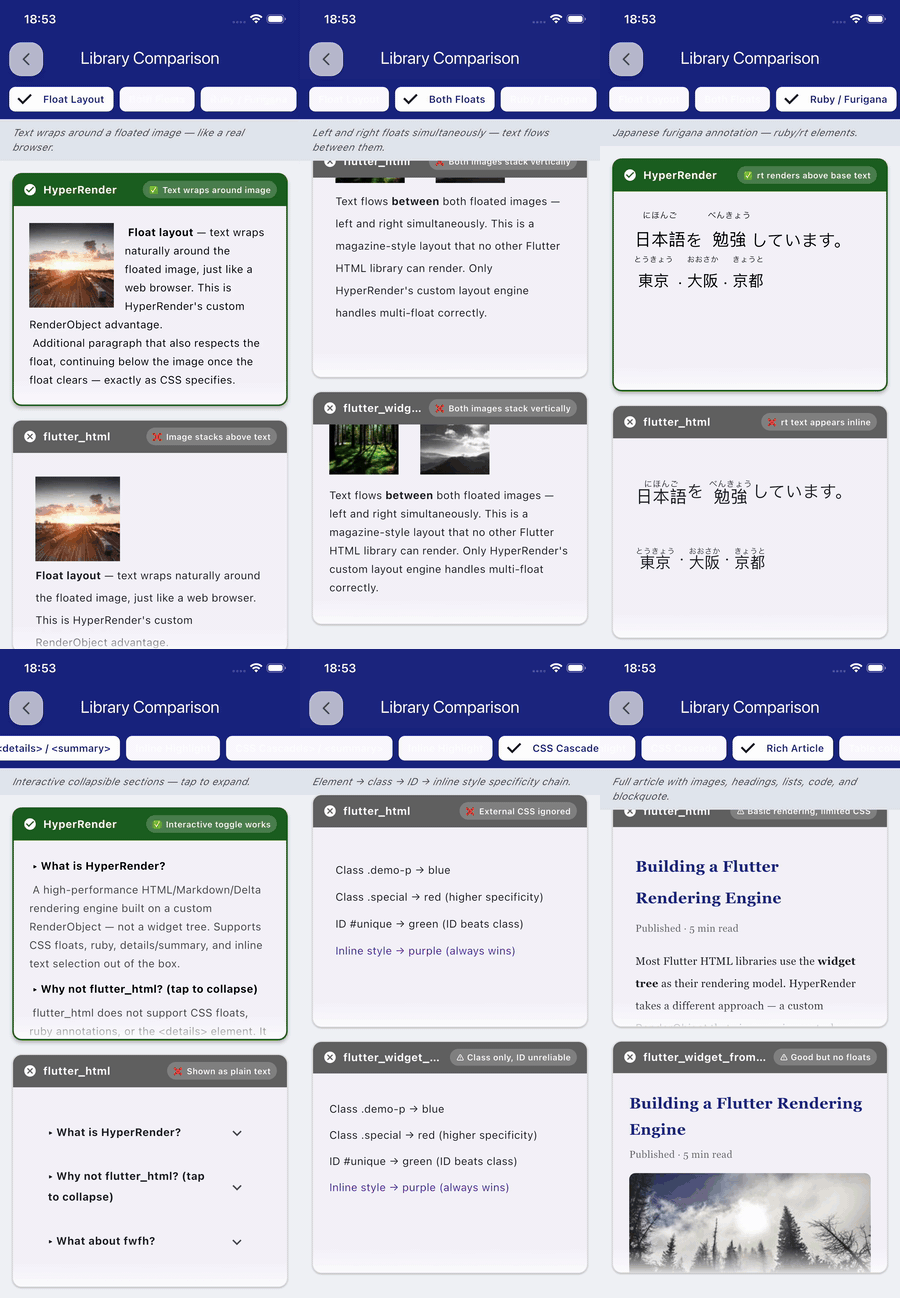
float: left/right impossible Geometry across widget boundaries can't be calculated
❌ Text selection crashes Selection spans multiple independent RichText nodes
❌ Broken CJK typography No cross-widget line-breaking algorithm
<ruby>/<rt> shows raw text Widget tree can't interleave base + annotation spans

This is Widget Tree Hell. It is an architectural limitation, not a fixable bug.

Why float is fundamentally impossible for widget-tree renderers: To wrap text around a floated image, you need to know the image's exact geometry before laying out the adjacent text. In a widget tree, each widget owns its own layout — the Column wrapping the text has no access to the Image widget's coordinates. There is no shared coordinate system. No algorithm can fix this without replacing the widget tree with a unified layout engine.

That is exactly what HyperRender does.


💎 The HyperRender Solution

HyperRender is a monolithic layout engine, not a widget assembler.

Instead of building a widget tree, it parses HTML/CSS into a Unified Document Tree (UDT) and paints everything directly onto the Canvas using a single RenderObject and a continuous InlineSpan tree.

HTML Input  ──►  Adapter  ──►  UDT  ──►  CSS Resolver  ──►  Single RenderObject  ──►  Canvas

Think of the difference between a printing press (one pre-composed plate, single impression) and an assembly line (one worker per tag, synchronization overhead). The press is faster, uses less material, and produces a better result. That's the 500+ widgets → 1 RenderObject difference.

One RenderObject means:

  • Float layout works — the engine controls every pixel's coordinates across the entire document
  • Selection never crashes — the entire document is one continuous span tree
  • True Kinsoku line-breaking — no widget boundary interrupts CJK rules
  • Ruby / Furigana — base text and annotation share the same layout context
  • O(1) CSS rule lookup — tag/class/ID index, not O(n×m) scan
  • View virtualizationListView.builder + RepaintBoundary per chunk

📊 Benchmarks

⚠️ Self-reported — measured on iPhone 13 (iOS 17) + Pixel 6 (Android 13) with a 25,000-character article. Run flutter run --release benchmark/performance_test.dart to reproduce on your hardware.

Metric flutter_html flutter_widget_from_html ⚡ HyperRender
HTML widgets created ~600 ❌ ~500 ❌ ~3–5 render chunks ✅
Parse time 420ms ❌ 250ms ⚠️ 95ms ✅
RAM usage 28 MB ❌ 15 MB ⚠️ 8 MB ✅
Scroll FPS ~35 fps ❌ ~45 fps ⚠️ 60 fps ✅
CSS float ❌ Not possible ❌ Not possible
Text selection ⚠️ Slow, limited ❌ Crashes on large docs ✅ Crash-free
Ruby / Furigana ❌ Raw text ❌ Not supported
<details>/<summary> ✅ Interactive
CSS Variables var()
Flexbox / Grid ⚠️ Partial ✅ Full
Shadows & Filters ✅ Advanced
Backdrop Blur ✅ Glassmorphism
Border Styles ⚠️ Solid only ⚠️ Solid only ✅ Dashed/Dotted

Widgets created: flutter_html / FWFH create one Flutter widget per HTML tag (~500–600 for a 3,000-word article). HyperRender uses ListView.builder virtualization — large documents are split into ~3–5 RenderHyperBox chunks, each painting an entire page-segment directly on Canvas. HTML structure never maps to individual Flutter widgets.

Text selection crash: FWFH v0.17 wraps SelectionArea around multiple independent RichText widgets; selection across widget boundaries fails on large documents (architectural limitation, not a bug).


📦 Quick Start

# pubspec.yaml
dependencies:
  hyper_render: ^2.1.0
import 'package:hyper_render/hyper_render.dart';

// That's all. Sanitization is ON by default.
HyperViewer(
  html: articleHtml,
  onLinkTap: (url) => launchUrl(Uri.parse(url)),
)

✨ Features

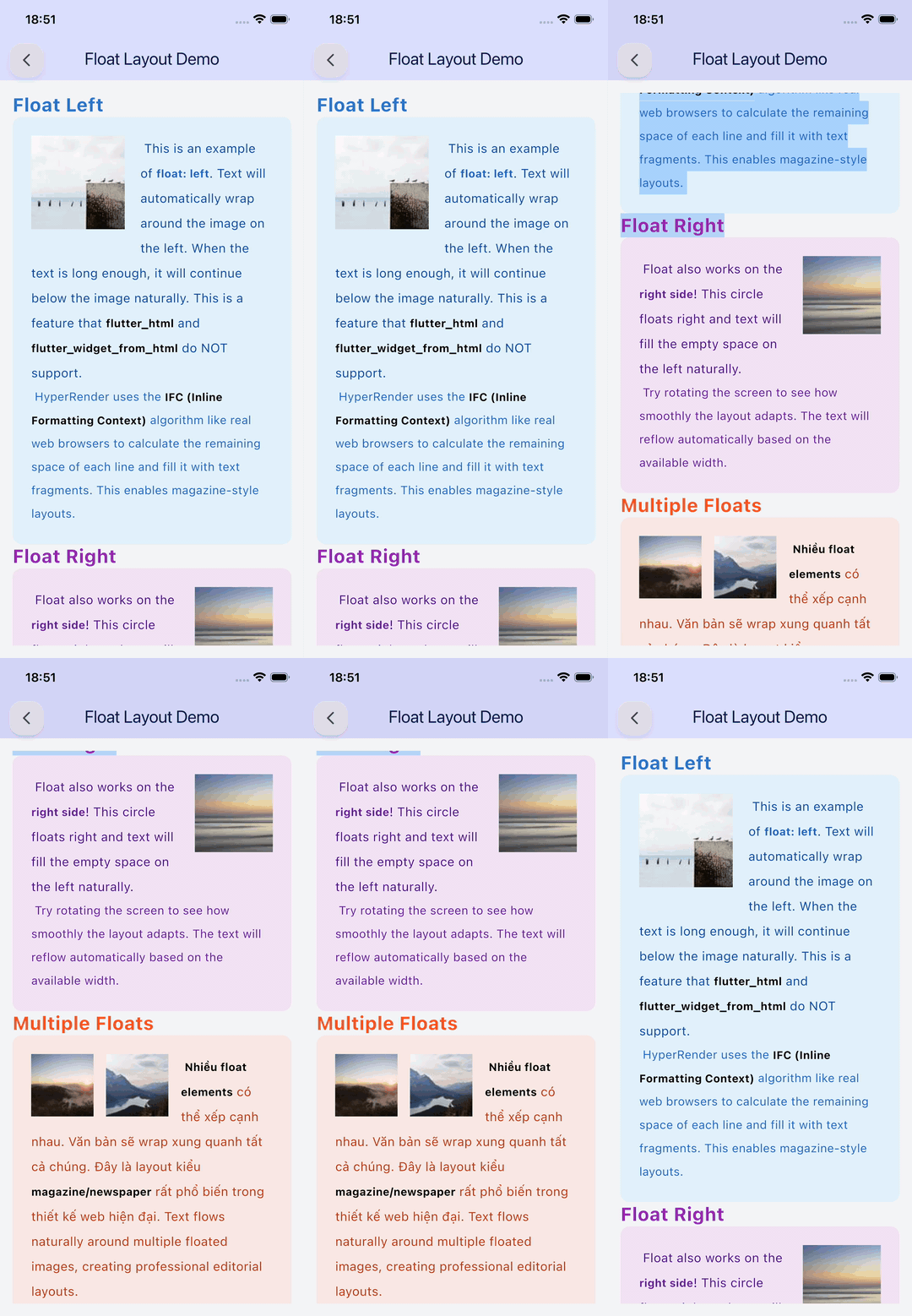
🌟 CSS Float — The Feature No One Else Has

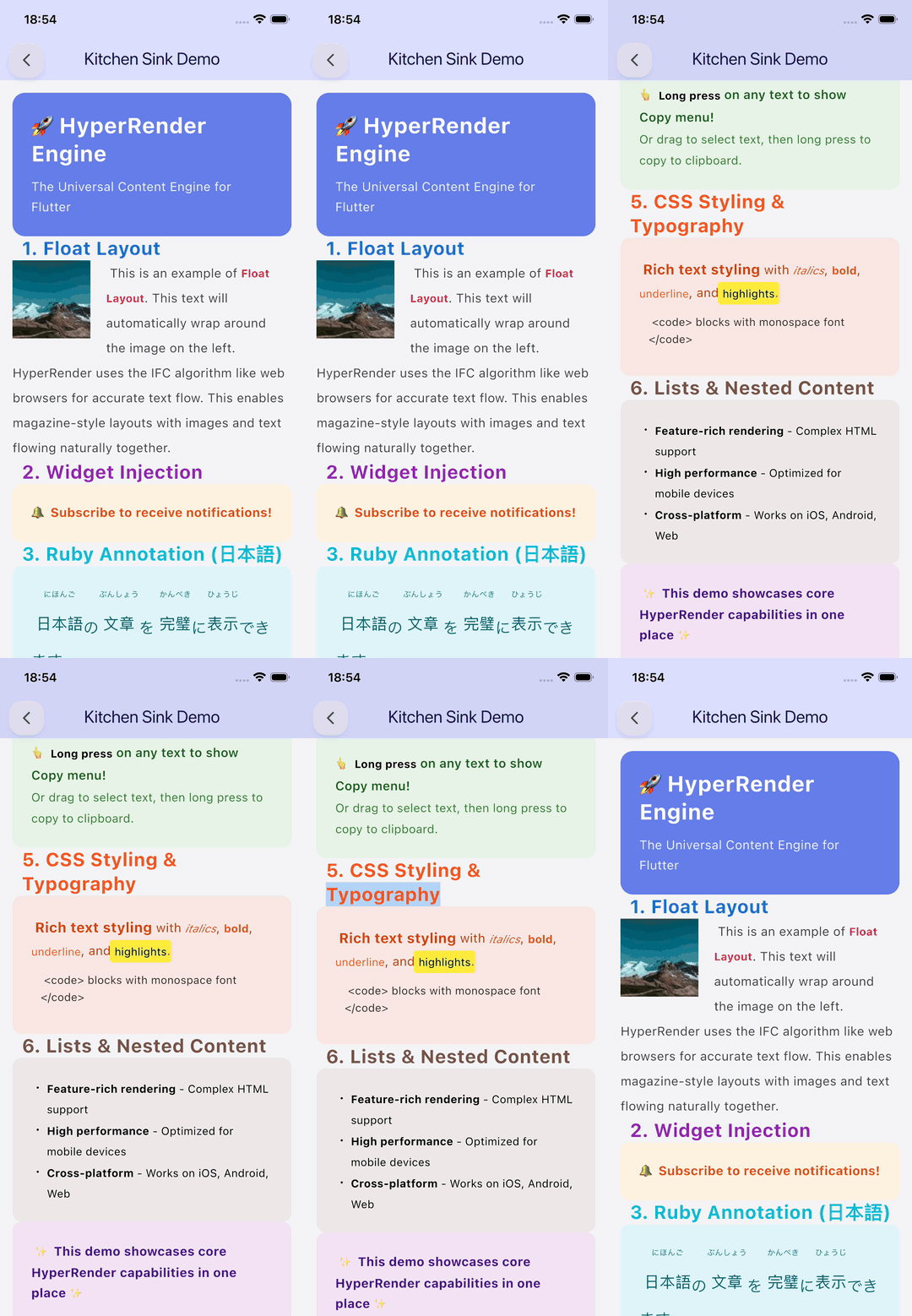
Text wrapping around floated images is an architectural impossibility for widget-tree renderers. HyperRender is the only Flutter HTML library that supports it natively.

HyperViewer(
  html: '''
    <article>
      <img src="https://example.com/photo.jpg"
           style="float: left; width: 200px; margin: 0 16px 8px 0; border-radius: 8px;" />
      <h2>Magazine-style Layout</h2>
      <p>This text flows naturally around the floated image, just like a browser.
         No other Flutter HTML library can do this. Try it and see.</p>
      <p>Additional paragraphs continue to respect the float clearance
         until the image is fully cleared.</p>
    </article>
  ''',
)

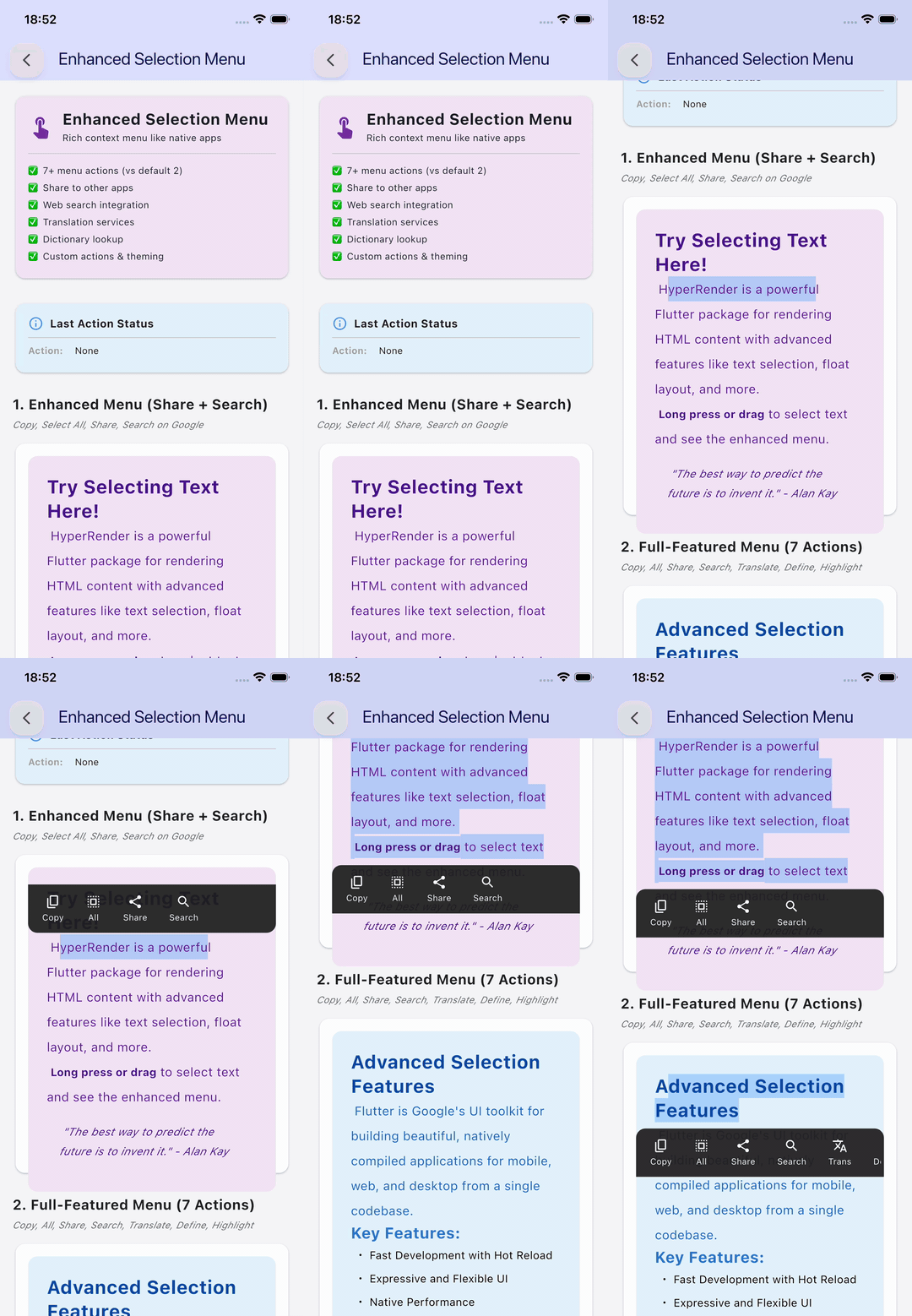
✨ Crash-Free Text Selection

Because the entire document lives inside one continuous span tree, selection works across paragraphs, headings, and table cells — no widget-boundary split, no crashes. Tested up to 100,000-character documents in CI.

HyperViewer(
  html: longArticleHtml,
  selectable: true,           // default: true
  showSelectionMenu: true,    // Copy / Select All menu
  selectionHandleColor: Colors.blue,
)

✨ Visual Effects & Aesthetic Polish (Phase 3 & 4)

HyperRender doesn't just render HTML; it makes it beautiful. Because we control the paint cycle, we can apply advanced visual effects that are difficult or impossible with standard Flutter widgets:

  • Glassmorphism: backdrop-filter: blur(10px) for iOS-style translucent backgrounds.
  • Advanced Shadows: box-shadow and text-shadow with multiple layers and blur.
  • CSS Filters: filter: blur(4px) brightness(1.2) contrast(0.8) for real-time image effects.
  • Gradients: background: linear-gradient(to right, #6a11cb, #2575fc) support.
  • Dashed/Dotted Borders: Professional-looking border-style: dashed and dotted borders.
  • Retina-Ready: Automatically uses FilterQuality.medium for crisp images on high-DPI displays.

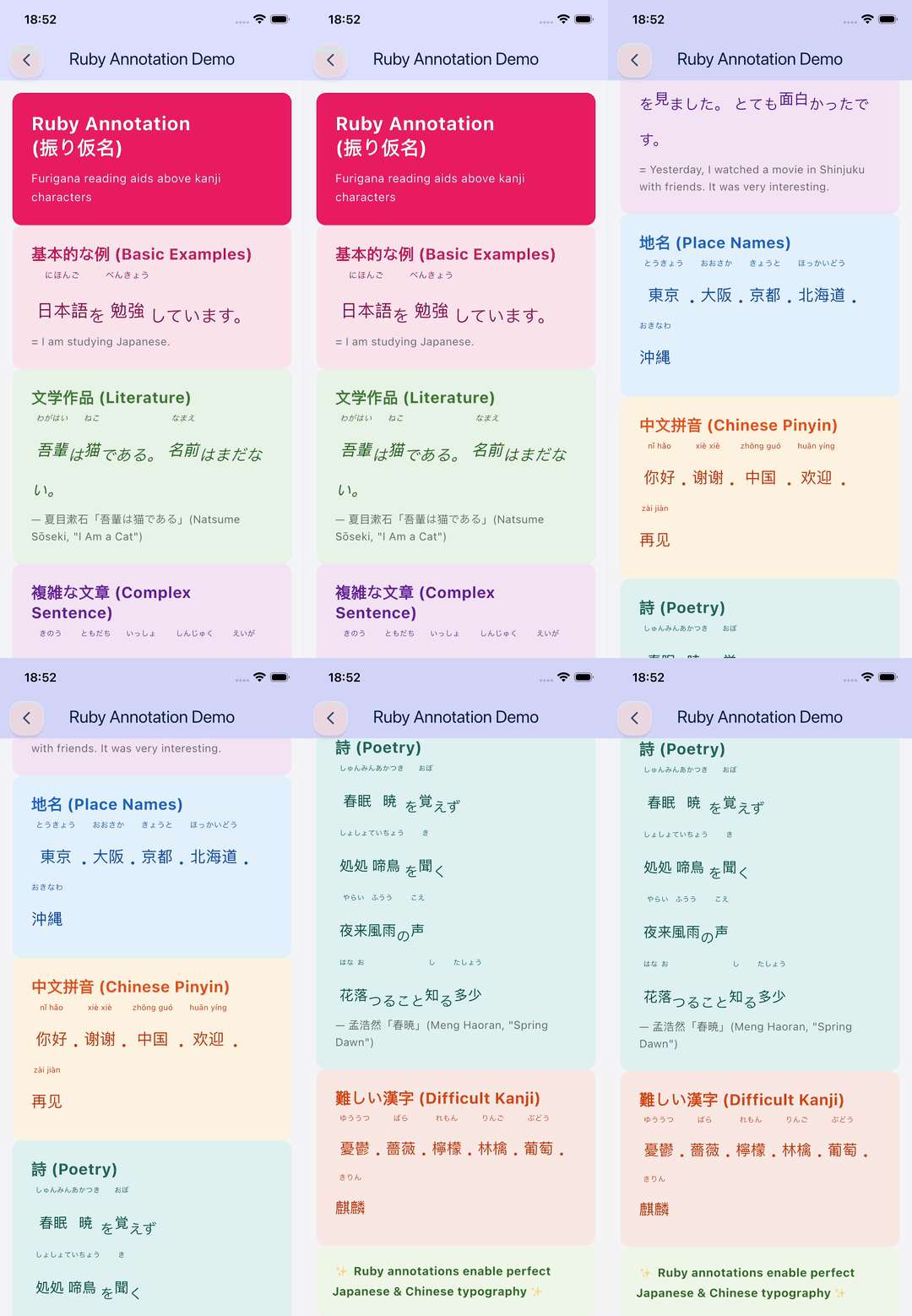
✨ Professional CJK Typography

HyperViewer(
  html: '''
    <p style="font-size: 20px; line-height: 2;">
      <ruby>東京<rt>とうきょう</rt></ruby>で
      <ruby>日本語<rt>にほんご</rt></ruby>を
      <ruby>勉強<rt>べんきょう</rt></ruby>しています。
    </p>
  ''',
)

Furigana renders above the base characters with perfect alignment — not inline as raw text like every other library.


🎨 CSS Variables & calc() (Sprint 3)

HyperViewer(
  html: '''
    <style>
      :root {
        --brand: #6750A4;
        --gap: 16px;
      }
      .card {
        background: var(--brand);
        padding: calc(var(--gap) * 1.5);
        border-radius: 12px;
        color: white;
      }
    </style>
    <div class="card">Themed with CSS custom properties</div>
  ''',
)

🔲 CSS Grid (Sprint 3)

HyperViewer(
  html: '''
    <div style="display: grid; grid-template-columns: 1fr 2fr 1fr; gap: 12px;">
      <div style="background: #E3F2FD; padding: 16px; border-radius: 8px;">Sidebar</div>
      <div style="background: #F3E5F5; padding: 16px; border-radius: 8px;">Main Content</div>
      <div style="background: #E8F5E9; padding: 16px; border-radius: 8px;">Aside</div>
    </div>
  ''',
)

📐 Flexbox

HyperViewer(
  html: '''
    <div style="display: flex; justify-content: space-between;
                align-items: center; gap: 16px; padding: 12px;
                background: #1976D2; border-radius: 8px; color: white;">
      <strong>MyApp</strong>
      <div style="display: flex; gap: 20px;">
        <span>Home</span><span>Blog</span><span>About</span>
      </div>
    </div>
  ''',
)

Supported: flex-direction, justify-content, align-items, align-self, flex-wrap, flex-grow, flex-shrink, flex-basis, gap, row-gap, column-gap.


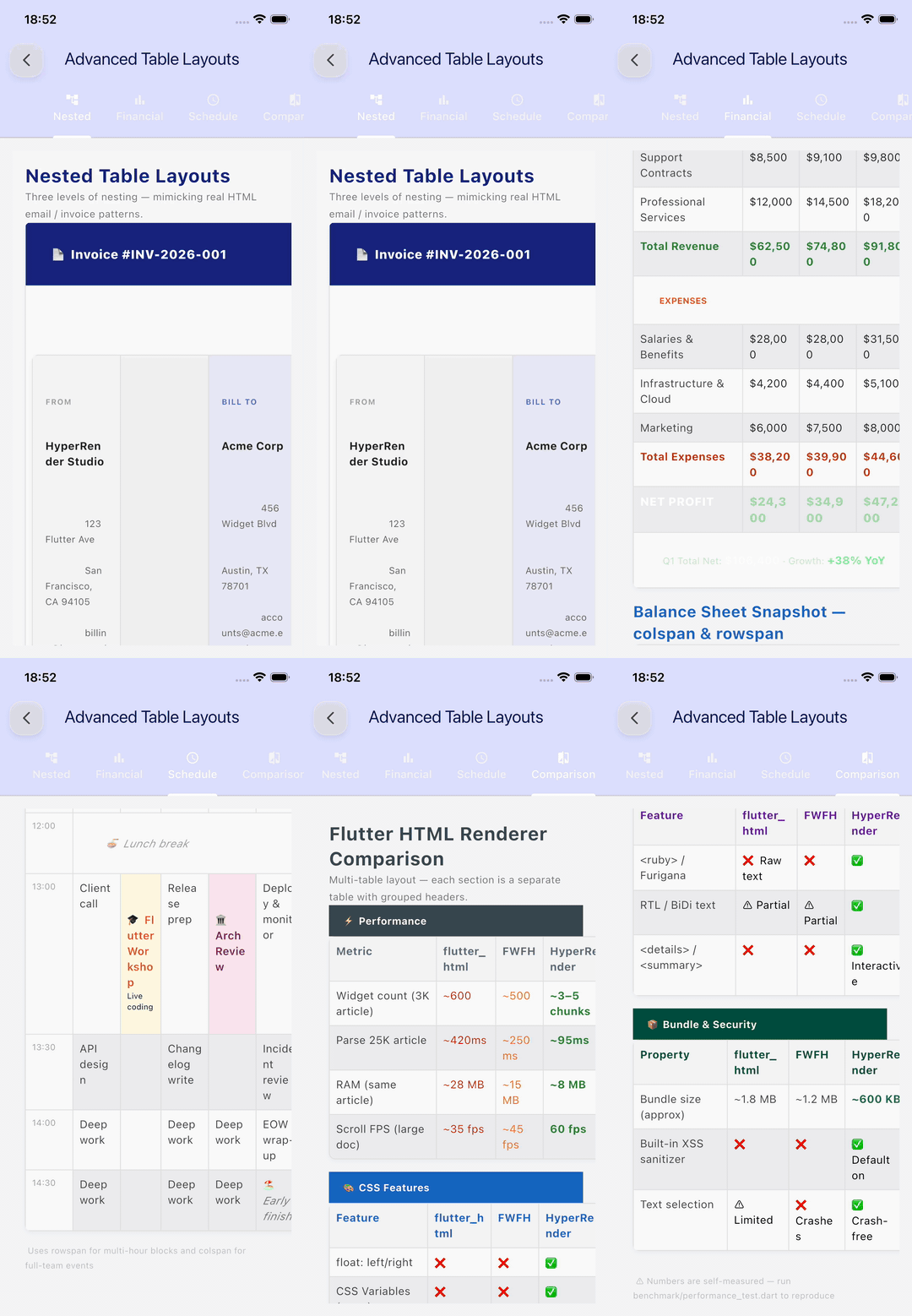
📊 Smart Table Layout

Tables use W3C 2-pass column width algorithm (min-content → distribute surplus), with three overflow strategies via SmartTableWrapper:

// Strategy auto-selected based on table width attribute:
// width:100% → fitWidth, otherwise → autoScale (min 60%)
HyperViewer(html: htmlWithTable)

// Or control manually:
SmartTableWrapper(
  tableNode: myTableNode,
  strategy: TableStrategy.horizontalScroll, // fitWidth | autoScale | horizontalScroll
)

// Build tables programmatically:
final table = TableNode();
final row = TableRowNode();
final cell = TableCellNode(isHeader: true, attributes: {'colspan': '2'});
cell.appendChild(TextNode('Merged Header'));
row.appendChild(cell);
table.appendChild(row);
HyperTable(tableNode: table)

🧮 Formula / LaTeX Rendering

Built-in Unicode renderer for math expressions. Plug in flutter_math_fork for full LaTeX.

// Built-in Unicode rendering (zero dependencies)
FormulaWidget(formula: r'E = mc^2')
FormulaWidget(formula: r'\frac{-b \pm \sqrt{b^2 - 4ac}}{2a}')
FormulaWidget(formula: r'\sum_{n=1}^{\infty} \frac{1}{n^2} = \frac{\pi^2}{6}')

// Swap to flutter_math_fork for full LaTeX:
FormulaWidget(
  formula: r'\int_{-\infty}^{\infty} e^{-x^2} dx = \sqrt{\pi}',
  customBuilder: (context, formula) => Math.tex(formula),
)

Works in Quill Delta embeds:

{ "ops": [
  { "insert": "The energy formula " },
  { "insert": { "formula": "E = mc^2" } },
  { "insert": " was derived by Einstein.\n" }
]}

🔀 Multi-Format Input

// HTML
HyperViewer(html: '<h1>Hello</h1><p>World</p>')

// Quill Delta JSON
HyperViewer.delta(delta: '{"ops":[{"insert":"Hello\\n"}]}')

// Markdown
HyperViewer.markdown(markdown: '# Hello\n\n**Bold** and _italic_.')

// Custom CSS injected on top of document styles
HyperViewer(
  html: articleHtml,
  customCss: 'body { font-size: 18px; line-height: 1.8; } a { color: #6750A4; }',
)

🔭 Hybrid WebView — HtmlHeuristics + fallbackBuilder

Not every HTML document is content. For interactive or JavaScript-heavy HTML, use the built-in heuristics to detect complexity and fall back to a WebView:

// Automatic fallback — no manual detection needed
HyperViewer(
  html: maybeComplexHtml,
  fallbackBuilder: (context) => WebViewWidget(controller: _webViewController),
)

// Manual detection
if (HtmlHeuristics.isComplex(html)) {
  // Use WebView
} else {
  // HyperViewer renders it perfectly
}

// Fine-grained checks:
HtmlHeuristics.hasComplexTables(html)      // colspan > 3, nested tables
HtmlHeuristics.hasUnsupportedCss(html)     // position:fixed, clip-path
HtmlHeuristics.hasUnsupportedElements(html) // <canvas>, <form>, <select>

📸 Screenshot Export (Sprint 3)

final captureKey = GlobalKey();

HyperViewer(
  html: articleHtml,
  captureKey: captureKey,
)

// Capture anytime:
final pngBytes = await captureKey.toPngBytes();  // PNG
final image = await captureKey.toImage();         // ui.Image

📖 <details> / <summary> — Collapsible Sections

<details>
  <summary>Click to expand</summary>
  <p>Hidden content revealed on tap. HyperRender is the only Flutter HTML
     library that supports this element interactively.</p>
</details>

<details open>
  <summary>Open by default</summary>
  <p>This section starts expanded.</p>
</details>

🌐 RTL / BiDi (Sprint 3)

<p dir="rtl">هذا نص عربي من اليمين إلى اليسار</p>
<p dir="ltr">Back to left-to-right text.</p>

🔒 Security

Sanitization is ON by default. HyperViewer strips <script>, event handlers, javascript: URLs, vbscript:, SVG data URIs, and CSS expression() out of the box.

// ✅ Safe by default — sanitize: true is the default
HyperViewer(html: userGeneratedContent)

// ✅ Custom tag allowlist
HyperViewer(
  html: userContent,
  sanitize: true,
  allowedTags: ['p', 'a', 'img', 'strong', 'em', 'ul', 'ol', 'li'],
)

// ⚠️ Opt-out only for fully trusted backend HTML
HyperViewer(html: trustedCmsHtml, sanitize: false)

What gets removed:

  • Tags: <script>, <iframe>, <object>, <embed>, <form>, <input>
  • Attributes: onclick, onerror, onload and all on* handlers
  • URLs: javascript:, vbscript:, data:image/svg+xml (SVG can embed scripts)
  • CSS: expression(...) (IE injection vector)

🏗️ Architecture

HyperRender uses a 4-layer browser-inspired pipeline:

┌─────────────────────────────────────────────────────┐
│        Input  (HTML / Quill Delta / Markdown)       │
└───────────────────────┬─────────────────────────────┘
                        ▼
┌─────────────────────────────────────────────────────┐
│           ADAPTER LAYER  (Input Parsers)            │
│    HtmlAdapter · DeltaAdapter · MarkdownAdapter     │
└───────────────────────┬─────────────────────────────┘
                        ▼
┌─────────────────────────────────────────────────────┐
│         UNIFIED DOCUMENT TREE  (UDT)                │
│  BlockNode · InlineNode · AtomicNode · RubyNode     │
│  TableNode · FlexContainerNode · GridNode           │
└───────────────────────┬─────────────────────────────┘
                        ▼
┌─────────────────────────────────────────────────────┐
│           CSS STYLE RESOLVER                        │
│  User-Agent → <style> rules → Inline → Inheritance │
│  Specificity cascade · CSS Variables · calc()       │
└───────────────────────┬─────────────────────────────┘
                        ▼
┌─────────────────────────────────────────────────────┐
│        SINGLE CUSTOM RenderObject                   │
│  BFC · IFC · Flexbox · Grid · Table · Float         │
│  Direct Canvas painting · Continuous span tree      │
│  Kinsoku line-breaking · Perfect text selection     │
└─────────────────────────────────────────────────────┘

Key innovations:

  • Single RenderObject — entire document painted in one RenderBox; enables float layout and crash-free selection
  • O(1) CSS rule indexing — rules indexed by tag/class/ID; lookup is constant-time regardless of stylesheet size
  • Flat coordinate system — all fragment positions computed in one layout pass; no widget-boundary offset errors
  • RepaintBoundary per chunkListView.builder chunks each with its own GPU layer; cross-chunk repaint never triggers
  • One-shot ImageStreamListener — self-removing on both success and error; no listener leak

📖 API Reference

HyperViewer

// HTML (default constructor)
HyperViewer({
  required String html,
  String? baseUrl,             // Resolve relative URLs
  String? customCss,           // Inject extra CSS (lower priority than document styles)
  bool selectable = true,      // Enable text selection
  bool sanitize = true,        // Strip dangerous tags/attributes (default: ON)
  List<String>? allowedTags,   // Custom allowlist for sanitize: true
  HyperRenderMode mode = HyperRenderMode.auto, // sync | async | auto
  Function(String)? onLinkTap,
  HyperWidgetBuilder? widgetBuilder, // Inject native Flutter widgets by tag/node
  WidgetBuilder? fallbackBuilder,    // Shown when HtmlHeuristics.isComplex()
  GlobalKey? captureKey,       // Screenshot export
  bool enableZoom = false,
  bool showSelectionMenu = true,
  WidgetBuilder? placeholderBuilder, // Async loading state
  String? semanticLabel,
  bool debugShowHyperRenderBounds = false,
})

// Named constructors
HyperViewer.delta(delta: jsonString, ...)
HyperViewer.markdown(markdown: markdownString, ...)

HyperWidgetBuilder — Custom Widget Injection

HyperViewer(
  html: htmlContent,
  widgetBuilder: (context, node) {
    // Intercept any node by tag or attributes
    if (node is AtomicNode && node.tagName == 'iframe') {
      final src = node.attributes['src'] ?? '';
      if (src.contains('youtube.com')) {
        return YoutubePlayerWidget(url: src);
      }
    }
    return null; // Fall through to default rendering
  },
)

HtmlHeuristics

HtmlHeuristics.isComplex(html)           // any of the below
HtmlHeuristics.hasComplexTables(html)    // colspan > 3 or deeply nested
HtmlHeuristics.hasUnsupportedCss(html)   // position:fixed, clip-path, columns
HtmlHeuristics.hasUnsupportedElements(html) // canvas, form, select, input

SmartTableWrapper

SmartTableWrapper(
  tableNode: myTableNode,
  strategy: TableStrategy.fitWidth,        // Shrink columns proportionally
  // strategy: TableStrategy.horizontalScroll, // Preserve widths, scroll
  // strategy: TableStrategy.autoScale,    // FittedBox scale-down
  minScaleFactor: 0.6,                     // Min scale for autoScale
)

FormulaWidget

FormulaWidget(
  formula: r'\frac{-b \pm \sqrt{b^2-4ac}}{2a}',
  style: TextStyle(fontSize: 18),
  customBuilder: (context, formula) => Math.tex(formula), // optional
)

HyperCaptureExtension

final key = GlobalKey();
// ... HyperViewer(captureKey: key)

final bytes = await key.toPngBytes();    // Uint8List PNG
final image = await key.toImage();       // ui.Image

DesignTokens

// Material Design 3 compliant, auto dark-mode
DesignTokens.headingStyle(1)           // H1 TextStyle
DesignTokens.bodyFontSize              // 14.0
DesignTokens.space2                    // 16.0
DesignTokens.spacing(2)                // EdgeInsets.all(16)
DesignTokens.getTextPrimary(context)   // Color (adapts to theme)
DesignTokens.getBackgroundColor(context)

⚠️ When NOT to Use HyperRender

HyperRender is a specialized content engine, not a full browser. Choose the right tool:

Need Use Instead
Execute JavaScript webview_flutter
Interactive web forms webview_flutter
Rich text editor super_editor, fleather
Complex HTML with position:fixed, canvas webview_flutter (via fallbackBuilder)
Maximum CSS coverage (no float/CJK need) flutter_widget_from_html

✅ DO USE for: News apps, Medium-clones, documentation viewers, RSS readers, e-book readers, email clients, CJK content apps — anywhere you need to render large amounts of beautifully formatted content without dropping frames.

Position: HyperRender does not compete with FWFH on CSS property count. FWFH's widget-per-tag model naturally maps many CSS decorative properties to Flutter widgets. HyperRender's differentiator is architectural — it is the only Flutter library capable of float layout, crash-free text selection across large documents, and professional Kinsoku + Ruby CJK typography. These are not missing features we can add — they require a fundamentally different rendering approach.


🗺️ Roadmap

✅ v1–v3 Complete

  • HTML parser → Unified Document Tree (UDT)
  • Full CSS cascade — specificity, inheritance, !important
  • CSS Float layout — text wrapping around images/video (unique)
  • Perfect text selection + copy menu (crash-free)
  • W3C 2-pass table layout (colspan, rowspan, SmartTableWrapper)
  • Flexbox layout (flex-direction, justify-content, align-items, flex-wrap, flex-grow/shrink/basis, gap)
  • CJK Kinsoku line-breaking + Ruby / Furigana (unique)
  • <details> / <summary> collapsible (unique)
  • CSS Variables (--custom-props, var())
  • CSS Grid (display: grid, fr units)
  • Paren-aware inline style tokenizerurl(), calc(), rgb() never truncated
  • CSS calc() (px, em, rem arithmetic)
  • SVG inline rendering (placeholder)
  • RTL / BiDi (dir attribute)
  • Screenshot export (captureKey + HyperCaptureExtension)
  • HtmlHeuristics + fallbackBuilder — hybrid WebView pattern
  • FormulaWidget — Unicode LaTeX + flutter_math_fork hook
  • Quill Delta adapter + formula embeds
  • Markdown adapter
  • HTML sanitization (XSS, vbscript:, SVG data:, CSS expression())
  • Base URL resolution
  • Error boundaries + loading skeletons
  • View virtualization + RepaintBoundary per chunk
  • Design Tokens (Material 3) + dark mode
  • CSS Plugin Architecture (CssParserInterface — swappable parser)
  • Performance monitoring (PerformanceMonitor in hyper_render_core)

🚧 In Progress

  • Full SVG renderer (not just placeholder)
  • Video/audio player integration (video_player plugin)
  • CSS @keyframes animation (currently via HyperAnimatedWidget)

🔮 v4.0 — Browser Engine Tier

These are ambitious, multi-sprint features that push HyperRender into browser-engine territory.

🟡 Vanilla JS Execution via QuickJS

Embed QuickJS — the lightweight JS engine by Fabrice Bellard (~300 KB, no JIT, perfect for sandboxed execution) via Dart FFI.

Architecture plan:

  1. QuickJS via FFI — run the C library directly inside the Flutter process
  2. Synthetic DOM bridge — Dart methods exposed to JS: document.getElementById(), element.style.display = 'none', element.textContent
  3. Scope: Vanilla JS only — form validation, show/hide (accordion), quiz logic. No React/Vue/Angular. No fetch(). No setTimeout() with DOM mutations.
  4. For JavaScript-heavy pages: use fallbackBuilderwebview_flutter
// Future API (v4.0)
HyperViewer(
  html: htmlWithInlineScript,
  enableVanillaJs: true,   // opt-in — off by default for security
  jsWhitelist: ['document', 'console'],
)

🟡 position: absolute/fixed Layout

Enable positioned elements inside a PositioningContext. Required for tooltips, dropdowns, and overlay-style HTML fragments.

🟡 clip-path Support

Polygon and circle clip masks via Flutter's ClipPath widget.

🟢 Print / PDF Export

HyperViewer → paginated pdf output via printing package.

🎯 CSS Strategy

HyperRender follows Graceful Degradation — unknown CSS properties are silently ignored, never crash the renderer. Layout and typography are always correct. Decorative unsupported properties (e.g. mix-blend-mode, backdrop-filter) result in a slightly simpler visual — the content remains perfectly readable at 60 FPS.

The CSS parser backend is swappable via CssParserInterface:

// Default: uses Google's csslib AST parser (handles @media, @keyframes, etc.)
// Zero config — automatic.

// Custom parser (e.g. for a restricted environment):
class MyMinimalParser implements CssParserInterface {
  @override
  List<ParsedCssRule> parseStylesheet(String css) { ... }

  @override
  Map<String, String> parseInlineStyle(String style) { ... }
}

This means community-contributed CSS plugins can extend coverage without touching the core — the same model used by browser engine plugin architectures.


📦 Extension Packages

Package Description Status
hyper_render_core Core UDT, CSS resolver, design tokens ✅ Stable
hyper_render_html HTML adapter ✅ Stable
hyper_render_markdown Markdown adapter ⚠️ Alpha
hyper_render_highlight Syntax highlighting for <code> ✅ Stable
hyper_render_devtools Flutter DevTools extension (UDT inspector) 🧪 Beta

🤝 Contributing

git clone https://github.com/yourusername/hyper_render.git
cd hyper_render
flutter pub get
flutter test           # All tests must pass
cd example && flutter run  # Run the demo app

Read our Architecture Guide and Contributing Guidelines before submitting PRs.


📄 License

MIT License — see LICENSE for details.


🔗 More


Built with ❤️ by the Flutter community

Get Started · View Demo · Report Bug · Request Feature