Extract temperature readings from a fixed-lab video by selecting a polygon ROI over the on-screen thermometer and running OCR at a fixed time interval. Outputs a CSV with exactly three columns: Medicion,Tiempo,temperatura.
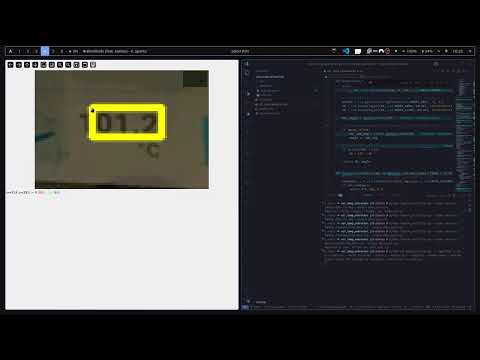
- Point-based semi-freehand polygon ROI selection on the first frame.
- Time-based sampling using precise timestamp seeks (no frame-by-frame loop).
- Fast preprocessing pipeline (grayscale → resize → denoise → Otsu/adaptive → morphology → deskew with optional sweep).
- OCR via PaddleOCR or Tesseract (select with
--model); digits-only post-filtering and parsing. - Optional preview and interactive assist mode to confirm/correct each value.
- CSV export with header:
Medicion,Tiempo,temperatura.
- Python 3.10+
- Python packages:
- Core:
opencv-python,numpy,pillow - OCR engines (choose one or both):
- Paddle:
paddleocr,paddlepaddle - Tesseract:
pytesseract(requires system Tesseract binary)
- Paddle:
- CSV uses Python stdlib (
csv), nopandasrequired.
- Core:
- CPU (Linux/macOS/Windows):
If
pip install --upgrade pip pip install "paddlepaddle>=2.5" paddleocrpaddlepaddlefails, consult: https://www.paddlepaddle.org.cn/en/install/quick
- macOS:
brew install tesseract - Ubuntu/Debian:
sudo apt-get update && sudo apt-get install -y tesseract-ocr - Windows: Install from https://github.com/UB-Mannheim/tesseract/wiki and (optionally) set:
setx TESSERACT_CMD "C:\\Program Files\\Tesseract-OCR\\tesseract.exe"
Create a virtual environment and install dependencies:
python3 -m venv .venv
. .venv/bin/activate   # Windows: .venv\Scripts\activate
pip install --upgrade pip
pip install opencv-python numpy pillow
# Choose OCR engine(s)
pip install "paddlepaddle>=2.5" paddleocr    # for --model paddle
pip install pytesseract # for --model tesseract (requires system Tesseract)Run the CLI with input video, interval in seconds (float allowed), and output CSV path.
# Basic (PaddleOCR)
python ocr_temp_extractor.py -i lab_cooling.mp4 -t 2.0 -o data.csv --model paddle

# Using Tesseract
python ocr_temp_extractor.py -i lab_cooling.mp4 -t 2.0 -o data.csv --model tesseract

# With preview window (non-blocking)
python ocr_temp_extractor.py --input in.avi --interval 0.5 --output /tmp/out.csv --preview

# Interactive assist mode (review/correct each value)
python ocr_temp_extractor.py -i in.mp4 -t 1 -o out.csv --assist

# Handling tilted screens / tricky lighting
# - Rotate ROI, try larger scale, adaptive thresholding and deskew sweep
python ocr_temp_extractor.py -i in.mp4 -t 1 -o out.csv --rotate 5 --scale 2.5 --adaptive --deskew-sweep

# Edge-preserving denoise (slower but can help 7-seg)
python ocr_temp_extractor.py -i in.mp4 -t 1 -o out.csv --bilateral

# Specify OCR language and allow non-digit chars
# - Paddle: lang like 'en'
# - Tesseract: lang like 'eng'
python ocr_temp_extractor.py -i in.mp4 -t 1 -o out.csv --model paddle --lang en --no-digits-only
python ocr_temp_extractor.py -i in.mp4 -t 1 -o out.csv --model tesseract --lang eng --no-digits-onlyOn launching, a window shows the first frame for selecting the temperature display area:
- Modes:
- Polygon: left-click to add points;
pto switch to polygon - Rectangle: press
bto switch, then left-click once to set the first corner, move the mouse, and left-click again to set the opposite corner (no dragging, avoids Qt panning).
- Polygon: left-click to add points;
- Common keys: Backspace/
uundo,rreset, Enter confirm (auto-closes polygon) - The polygon/rectangle is rendered with anti-aliased lines and a semi-transparent fill.
- When
--rotateis provided, the first frame is rotated for selection so ROI aligns with processed frames. - Points are stored in normalized coordinates so they scale to any frame size.
- Header (exact):
Medicion,Tiempo,temperatura Medicion: 1-based index of the measurementTiempo: timestamp inHH:MM:SSfrom the start (zero‑padded)temperatura: parsed float (e.g., 23.500) or empty if OCR fails
Example:
Medicion,Tiempo,temperatura
1,00:00:00,23.500
2,00:00:02,23.375
3,00:00:04,- Shows the thresholded ROI and overlays the raw OCR text and parsed value.
- Press
qto close the preview; processing continues in the background.
Use --assist to review each sampled timestamp interactively:
- A small window shows the processed ROI and the OCR result.
- Keys:
- Enter: accept the current value
e: edit value (typed in terminal), e.g.,23.45s: set empty (missing/failed OCR)q: quit assist for the remaining samples (continues automatically)
- Note: Assist pauses at each sample;
--previewis disabled automatically while assisting.
--scale <float>: Resize before OCR (default2.0). Larger values can improve digit clarity.--adaptive: Use adaptive thresholding (better for uneven illumination) instead of Otsu.--bilateral: Use bilateral filter (slower) instead of Gaussian blur; preserves edges.--deskew-sweep: Try multiple small angles to refine deskew when the screen is slightly tilted.--rotate <deg>: Rotate the ROI by degrees (CCW) before OCR to compensate video tilt.
- The tool seeks by time using
CAP_PROP_POS_MSECto avoid drift. - Minor tilt is corrected via min-area-rect deskew;
--deskew-sweepfurther refines. - If OCR returns extra characters, the parser extracts only the numeric value.
- If a frame cannot be read near the end of the video, processing stops gracefully and writes what was collected.
- PaddleOCR/PaddlePaddle import error: ensure
paddlepaddleandpaddleocrare installed and match your Python/OS. On some systems you may need a specific wheel from the PaddlePaddle site. - Tesseract not found: install it and/or set
TESSERACT_CMD(Windows path example above). - Qt plugin error on Wayland: the script sets
QT_QPA_PLATFORM=xcbautomatically on Linux/Wayland; you can alsoexport QT_QPA_PLATFORM=xcb. - Video won’t open: check the file path and that the codec is supported by OpenCV/FFmpeg.
- Poor OCR accuracy:
- Ensure the ROI tightly bounds the digits.
- Try
--scale,--adaptive,--deskew-sweep, or--bilateral. - Reduce glare/contrast; the pipeline uses Otsu/adaptive + morphology to clean 7‑seg digits.
Run from source:
. .venv/bin/activate
python ocr_temp_extractor.py -i input.mp4 -t 1.0 -o out.csv --previewUse the companion script to flag abnormal temperatures and get suggested replacements (linear interpolation or robust local estimate):
python detect_anomalies.py -i out.csv -r anomalies.csv -c corrected.csv-r/--report: Writes a CSV listing each anomalous or missing point with the reason and suggested value.-c/--corrected: Writes a corrected copy of the input CSV with suggested values filled in for anomalies/missing entries.- Tuning:
--window(default 5),--k-mad(default 3.5),--k-rate(default 5.0).