[Work In Progress - Estimated Beta Launch: April 2026]
Contents:
💡 About
👣 Getting Started: Choose Your Path
📖 Printed Book
🧱 Workshop Modules
✅ Requirements for Interactive Decision Notebooks
Navigating decisions effectively is important, serving as a key differentiator for successful individuals. Therefore, decision-making ability is regarded by executives as one of the most highly desired business skills! However, effective and quality decision-making is not simple. Perhaps the intersection of Decision Theory and Generative AI can help.
This Decision Intelligence Generative AI Workshop is an interactive course that is paired with an upcoming book called "Decision Intelligence with Generative AI". This course was designed with a focus on three key areas:
- Illustration of important Decision-Making concepts
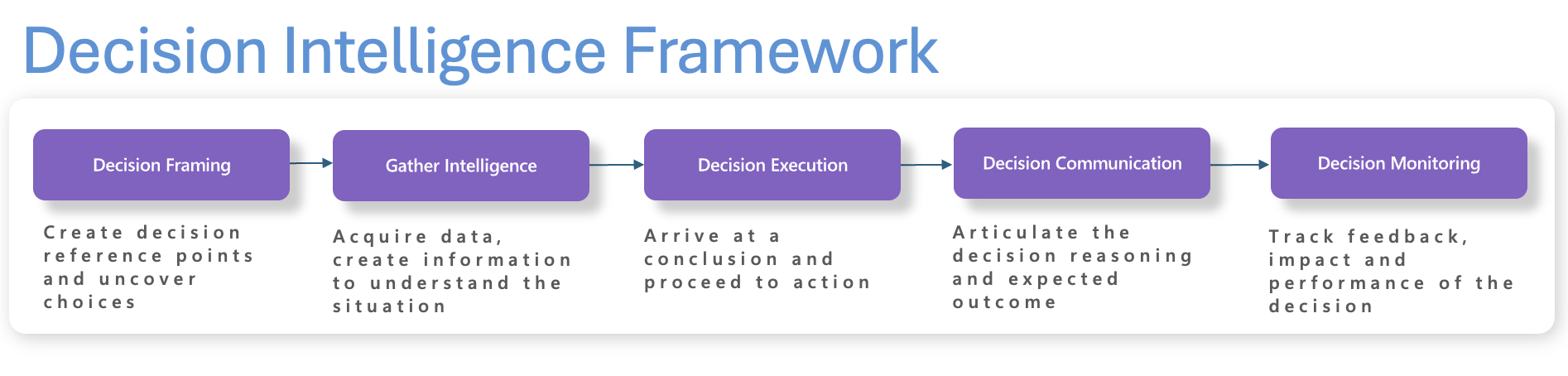
- Introduction of the Decision Intelligence Framework that applies systematic decision-making
- Application of Decision Intelligence theory with Generative AI
- Interactive Notebooks for AI engineers/software engineers to execute the examples with an orchestration framework (Semantic Kernel & OpenAI)
The unique workshop structure with diverse focus areas, allows this workshop to be consumed in several ways. Depending on your persona, familiarity with Decision Theory or AI acumen, you have several paths to get started.
- 👓 Reader Persona - Read-Only (Non-Technical) - Ideal for non-technical users not familiar with Decision Intelligence nor Generative AI
- Nothing to install! No special requirements to read any of the workshop content. All of the text, links & images are available by just navigating to the Notebooks folder and reading the section modules sequentially. Notebooks folder: https://github.com/bartczernicki/DecisionIntelligence.GenAI.Workshop/tree/main/Notebooks
- All Generative AI output is pre-run and available to read in a browser
- Recommend further detailed book resources provided in the workshop to immerse yourself in Decision Theory, Decision-Making, Cognitive Theory etc.
- Recommend companion book "Generative AI with Decision Intelligence" (coming late 2025) for a more complete reading experience and advanced content not in the workshop
- 💻 Technical Persona - Interactive (Technical) - Ideal for technical users that might not be familiar with Decision Intelligence nor Generative AI, but are familiar with Jupyter Notebooks interactivity. The persona can change basic connection strings and make simple code changes.
- All the considerations from the "Read Persona" Getting Started applies
- Set up the Requirements for Interactive Decision Notebooks to add custom interactivity
- Run the workshop Notebook modules sequentially (no coding required!), as the Decision Intelligence & AI concepts "build on" each other
- C#/.NET Code will be executed but simple modifications to decision prompts, agents, configuration files are clear to added decision exploration
- 🧑💻 AI Engineer - Interactive (Advanced Technical) - Ideal for a technical user that is familiar with programming and Generative AI
- Most of the considerations from the "Technical Persona" Getting Started applies
- Set up the Requirements for Interactive Decision Notebooks to add custom interactivity
- Notebook modules do not "build on each other" from a programming dependency; only from a Decision Intelligence concept dependency. Therefore, you can jump in and modify where needed
- Recommended to "Fork and Hack" and gravitate to the Decision Scenarios with most impact (change AI models, try different APIs or knowledge stores, advanced AI programming techniques, port code to your projects etc.). Advanced users are encouraged to fork this repository and try out different models or techniques.
What is the difference between the workshop the printed companion book? The Printed Book has the following features:
- Deeper focus on Decision Intelligence theory with more advanced application of Generative AI rather than a code-first focus.
- Additional advanced real-world examples with Artificial Intelligence.
- Chapters are organized using the Decision Intelligence Framework. A great deal less code illustrated in the book, making it easier to consume for non-technical readers.
- References in text content to further deepen decision-making knowledge.
- Extra Curated Chapters with "Table of Contents Lists" for Easy Lookup of: Decision Intelligence Quotes, Decision Rules, Decision Intelligence Resources.
The Table of Contents below illustrates the structure of the Decision Intelligence with Generative AI Workshop. The workshop is structured on concepts broken down into Notebook modules (chapters). Each Notebook module consists of Decision Intelligence concepts and/or interactive Generative AI features that can be dynamically executed.
⚠️ This workshop is currently being developed in conjunction with the companion book. During this time, there will be frequent changes. Content that is available (even if partially) is noted below. Content that does not have the Availability checkmark is in early stages or not available yet. Please check back for updates!
| Module (Chapter) | Decision Intelligence | Available | Link |
|---|---|---|---|
| 1a - Decision Intelligence - Introducing the Decision Intelligence Framework |
|
✅ | Link |
| 1b - Decision Intelligence - Decision Framing |
|
✅ | Link |
| 1c - Decision Intelligence - Gathering Intelligence |
|
✅ | Link |
| 1d - Decision Intelligence - Decision Execution |
|
✅ | Link |
| 1e - Decision Intelligence - Decision Execution with Intuition |
|
✅ | Link |
| 1f - Decision Intelligence - Decision Execution with Decision Rules |
|
✅ | Link |
| 1g - Decision Intelligence - Decision Execution with Quantitative Methods |
|
✅ | Link |
| 1h - Decision Intelligence - Decision Communication |
|
✅ | Link |
| 1i - Decision Intelligence - Applying the Decision Intelligence Framework | 🛠️ | Link | |
| 1j - Decision Intelligence - Enterprise Decision Intelligence |
|
✅ | Link |
| 2a - Workshop (Setup) - Code Execution Requirements | ✅ | Link | |
| 2b - Workshop (Setup) - About Microsoft AI Extensions | ✅ | Link | |
| 2c - Workshop (Setup) - Microsoft Agent Framework | ✅ | Link | |
| 3a - Workshop (AI Extensions) - Simple Decision Prompts |
|
✅ | Link |
| 3b - Workshop (AI Extensions) - Chat Completion for Decisions |
|
✅ | Link |
| 3c - Workshop (AI Extensions) - Open Source Decision Intelligence |
|
✅ | Link |
| 3d - Workshop (AI Extensions) - Engineering Decisions & Collective Intelligence |
|
✅ | Link |
| 3e - Workshop (AI Extensions) - Workshop (AI Extensions) - Premortem (What-If) Decision Analysis |
|
✅ | Link |
⚠️ The modules below are being updated from Semantic Kernel to Microsoft Extensions for AI and Microsoft Agent Framework.
| Module (Chapter) | Decision Intelligence | Available | Link |
|---|---|---|---|
| 4a - Semantic Kernel - Scale Decision Processes with Plugins |
|
🛠️ | Link |
| 4b - Semantic Kernel - Plugins for Decision Communication |
|
🛠️ | Link |
| 4c - Semantic Kernel - Custom Plugins for Decision Recommendation |
|
🛠️ | Link |
| 4d - Semantic Kernel - Diverse Plugins for Decision Making |
|
🛠️ | Link |
| 5a - OpenAI - Improving Decisions with OpenAI LogProbs | 🛠️ | Link | |
| 5b - OpenAI - Measuring GenAI Probabilistic Accuracy with LogProbs | 🛠️ | Link | |
| 5c - OpenAI - Validating Multiple Decisions with Aggregated Brier Scores | 🛠️ | Link | |
| 6a - Semantic Kernel - Decisions with AI Agent Personas |
|
✅ | Link |
| 6b - Semantic Kernel - Decisions with Multi-AI Agent Personas |
|
✅ | Link |
- Visual Studio Code running on your local workstation or VS Code with GitHub CodeSpaces or Azure Machine Learning Notebooks
- Install VS Code: Download Visual Studio Code
- Use GitHub CodeSpaces: Open in GitHub CodeSpaces
- Azure Machine Learning Notebooks
- Install .NET 10.x SDK:
- Install .NET 10 SDK: https://dotnet.microsoft.com/en-us/download/dotnet/10.0
- Install C# & .NET Visual Studio Code Extensions
- Install Jupyter (JupyterLab)
- Option 1 - Insructions: https://jupyter.org/install
- Option 2 - Anaconda Distribution: https://www.anaconda.com/distribution
- Configure Jupyter Extension to use .NET Kernel
- Open a Terminal and run the following Jupyter command, by default you will only see the Python kernel listed
> jupyter kernelspec list
python3 /opt/homebrew/Cellar/jupyterlab/4.5.4/libexec/lib/python3.14/site-packages/ipykernel/resources- Install .NET Interactive using the following command
> dotnet tool install --global Microsoft.dotnet-interactive- Install .NET Kernel for Jupyter using the following command
> dotnet interactive jupyter install
Installing using jupyter kernelspec module.
Installed ".NET (PowerShell)" kernel.
Installing using jupyter kernelspec module.
Installed ".NET (C#)" kernel.
Installing using jupyter kernelspec module.
Installed ".NET (F#)" kernel.- Verify the installation worked, you should see 3 new .NET kernels added
> jupyter kernelspec list
  python3            /opt/homebrew/Cellar/jupyterlab/4.5.4/libexec/lib/python3.14/site-packages/ipykernel/resources
  .net-csharp        /Users/bart/Library/Jupyter/kernels/.net-csharp
  .net-fsharp        /Users/bart/Library/Jupyter/kernels/.net-fsharp
.net-powershell /Users/bart/Library/Jupyter/kernels/.net-powershell- Clone or fork this GitHub Repository
- Have access to Azure OpenAI or OpenAI (Endpoint, GPT-5.x model recommended)
- When running the notebooks, ensure
.NET (C#)is the selected kernel for your Notebooks. The Notebooks are saved by default to use the .NET kernel.

