A dental practice wants an AI voice agent that answers calls and books patients.
SIMBA Care is the piece that sits between that agent and Cal.com:
-
It exposes one API route (
POST /api/voice) the agent calls to check availability → book → cancel, with clean JSON responses the agent can act on without parsing prose. -
It renders a live admin dashboard (
/dashboard) so staff can watch bookings come in. -
It owns no database. Cal.com is the single source of truth. SIMBA Care is a stateless validation + transformation + presentation layer.
-
Our app's job is to:
- (a) give the voice agent a clean JSON contract to book against.
- (b) give staff a live dashboard to watch those bookings.
Technically, it's a Next.js app: a backend that an AI voice agent calls mid-conversation to check availability, book, and cancel dental appointments against the Cal.com API, a polished read-only admin dashboard for front-desk staff, an interactive API console for reviewers to test it, and a clean landing page tying it all together.
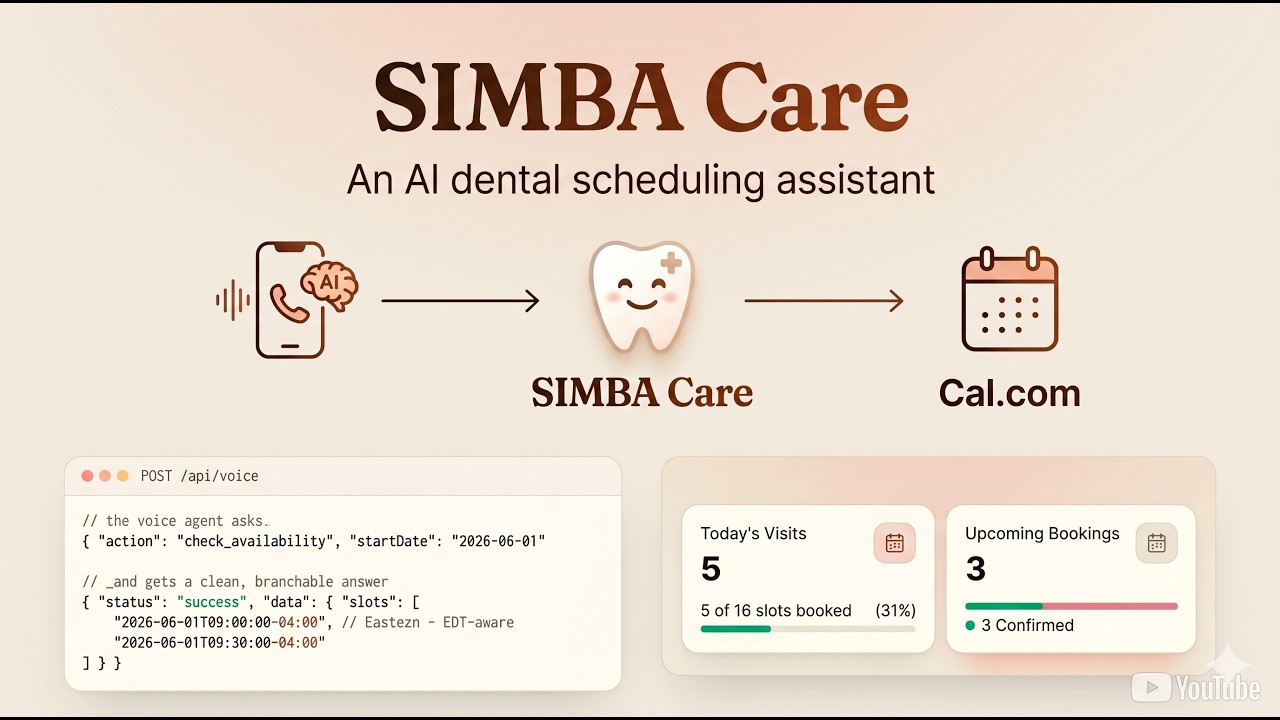
Click the thumbnail to watch the walkthrough.
- Features
- Tech stack
- Directory Structure
- How it Works (Architecture)
- Frontend UI
- Cal.com Integration
- Clone, Setup & Run locally
- Assumptions & Scope
- Contributing
| Area | Feature | Details |
|---|---|---|
| API | Single route | One POST /api/voice handler switches on action — check_availability, create_booking, cancel_booking. |
| API | Consistent envelope | Every response is { status, message?, data? } where status ∈ success | error | unavailable | conflict. |
| API | Input validation | Every payload is validated with Zod before any upstream call; bad input → clean 400. |
| Edge case | No availability | Returns 200 { status: "unavailable", data.alternativeSlots } (looks ahead up to 7 days) — never an error. |
| Edge case | Double booking | Cal.com conflict is caught → 200 { status: "conflict" } so the agent pivots mid-call. |
| Edge case | Timezones | Computes in UTC, converts to America/New_York only at the edges; EST/EDT handled by date-fns-tz (never hardcoded). |
| Edge case | Cancellation | Cancels in Cal.com (frees the slot) and shows the booking as a cancelled ghost card on the dashboard. |
| Resilience | Safe upstream calls | 10s timeout + try/catch on every Cal.com call; 429/timeout/5xx mapped to clean messages; API key never leaked. |
| Dashboard | Live snapshot | Today's visits (capacity meter), upcoming bookings (confirmed/cancelled split), next-patient card with live countdown. |
| Dashboard | Timeline feed | Bookings grouped by day on a timeline spine, a live "now" marker, today highlighted, sticky day headers. |
| Dashboard | Upcoming / Past | Tabs to browse history (last 15 → 30 → 90 → 365 days, on demand). |
| Dashboard | Search & filters | Instant search by name / email / phone + filter by status and treatment. |
| Playground | API console | /playground — fire every action + edge case from the browser, no curl or voice agent needed. |
| Landing | Home page | A polished / landing page that frames the project and routes into the dashboard and the API console. |
| Quality | Tested | 62 unit/route tests (timezone, transforms, filters, schemas, every route branch). |
| Layer | Choice |
|---|---|
| Framework | Next.js 16 (App Router, React Server Components) |
| Language | TypeScript |
| Validation | Zod |
| Dates / timezones | date-fns + date-fns-tz |
| Styling | Tailwind CSS v4 |
| Testing | Vitest |
| Hosting | Vercel |
app/
  api/voice/route.ts      # THE single voice-agent endpoint (POST, switches on action)
  dashboard/              # admin UI: page.tsx + loading.tsx + error.tsx
  playground/             # interactive API console (page.tsx)
  page.tsx                # landing / home page
  not-found.tsx           # creative 404
  globals.css             # the only stylesheet (design tokens + keyframes)
components/
  ui/                     # primitives: card, badge
  dashboard/              # composed feature components (header, stat-card, booking-card, day-group, …)
  playground/             # api-console.tsx
lib/
  cal/
    client.ts             # the ONLY place that fetch()es Cal.com (timeout + error mapping)
    types.ts              # Cal.com request/response types
    transforms.ts         # flatten slots, group bookings, parse treatment/phone
    dashboard.ts          # assembles the dashboard + past-bookings view models
  schemas.ts              # Zod schemas for the voice payloads
  time.ts                 # ALL timezone logic (date-fns-tz)
  filter-bookings.ts      # pure search/filter logic (unit-tested)
  constants.ts            # CLINIC_TZ, CLINIC_HOURS, API versions, past windows
  env.ts                  # validated env access (fail fast on boot)
types/index.ts            # shared app types (ApiResponse, BookingView, …)
tests/                    # vitest: time, transforms, schemas, route, filters
requests.http             # manual API checks for each action + edge case
The rule that keeps it clean:
- only
lib/cal/client.tsever callsfetch()to Cal.com, and onlylib/time.tsdoes timezone math. Everything else speaks to those through typed functions.
SIMBA Care has two entry points (the voice agent's API call and the admin's browser) that funnel through one Cal.com client.
flowchart TD
    subgraph App["SIMBA Care — Next.js"]
        API["POST /api/voice<br/>(single endpoint)"]
        DASH["/dashboard<br/>(Server Component)"]
        ZOD["Zod validation"]
        DDATA["lib/cal/dashboard.ts<br/>(view model)"]
        CLIENT["lib/cal/client.ts<br/>(only fetch to Cal.com)"]
        API --> ZOD --> CLIENT
        DASH --> DDATA --> CLIENT
    end

    VA["AI Voice Agent"] -->|POST JSON| API
    PG["/playground (API console)"] -->|POST JSON| API
    Admin["Clinic admin (browser)"] -->|opens page| DASH
    CLIENT -->|Bearer key + cal-api-version| CAL[("Cal.com v2 API")]
-
Agent sends
POST /api/voicewith a JSON body containing anaction. -
The body is parsed safely and validated with Zod (also enforces a known action). Bad input →
400 { status: "error", message }. -
The handler dispatches on
actionand callslib/cal/client.ts, which adds theBearerkey + per-endpointcal-api-versionheader, applies a timeout, and returns a typed result (never throws, never leaks the key). -
The result is mapped to the common envelope and returned. The agent reads
statusto decide what to say next.
action |
Request (in) | Response (out) |
|---|---|---|
check_availability |
{ startDate, endDate } (YYYY-MM-DD) |
success + data.slots[], or unavailable + data.alternativeSlots[] |
create_booking |
{ start, name, email, number, notes } |
success + data.bookingId, or conflict |
cancel_booking |
{ bookingId, reason } |
success (slot freed) |
Open
GET /api/voicein a browser to get a self-documenting list of the actions and payload shapes.
- The browser requests
/dashboard(a Server Component, re-rendered fresh on each load). lib/cal/dashboard.tsfires two parallel Cal.com reads —status=upcomingandstatus=cancelled— so just-cancelled bookings still appear.lib/cal/transforms.tsreshapes Cal.com's nested response into a cleanBookingView, parses the treatment type, and groups bookings by clinic-local day.- HTML is streamed to the browser; small client islands hydrate the live bits (clock, countdown, search/filter, auto-refresh).
Where the data lives: nowhere in our app. Cal.com holds every booking; SIMBA Care just validates, reshapes, and presents it.
| Case | Behaviour |
|---|---|
| No availability | 200 { status: "unavailable", data.alternativeSlots }. Looks ahead up to 7 days from the next calendar day. |
| Double booking | Cal.com conflict caught → 200 { status: "conflict", message: "That slot was just taken…" }. |
| Timezones | UTC internally; convert to America/New_York only at the edges. date-fns-tz handles EST (-05:00) vs EDT (-04:00). Naive inbound times are treated as clinic-local. |
| Cancellation | Frees the slot in Cal.com and re-renders the booking as a cancelled ghost card (not silently gone). |
| Upstream resilience | 10s timeout + try/catch; 429 → "busy, try again", timeout → 504, network/5xx → 502; key never leaked. |
Try them all without a voice agent:
requests.httpor the Playground.
📸 Screenshots live in
docs/screenshots/.
A polished home page that frames the project in five seconds — an animated tooth mascot, a live request → response snippet of the API, a "how it works" flow, and clear routes into the dashboard and the API console. Same warm theme as the rest of the app, fully responsive.


Read-only, server-rendered, auto-refreshing. What staff see:
-
Header — clickable
SIMBA Carewordmark (→ home), a live clinic clock (ET), and a● Cal.comsync badge (green = live, red = unreachable). -
Metrics strip — Today's Visits (with a capacity meter), Upcoming Bookings (with a confirmed/cancelled split bar), and a Next Patient card with a monogram and a live "in X mins" countdown.
-
Timeline feed — appointments grouped by day on a vertical timeline; today is highlighted and carries a live "now" marker; each row shows the time range, patient name/email/phone, a treatment badge (Root Canal, Cleaning, Extraction, …), and a status badge (
Confirmed/Cancelled). -
Upcoming / Past tabs — browse history in rolling windows (last 15 → 30 → 90 → 365 days).
-
Search & filters — instant search by name / email / phone, plus status and treatment filters.
-
Empty state — "The clinic schedule is clear."
-
Fully responsive (mobile / iPad / desktop). Warm, clinical light theme built on CSS-variable tokens, so re-theming is a one-file change.
A browser UI to exercise the entire
/api/voicecontract without curl or a real voice agent.

The motive: a reviewer shouldn't need a phone, an AI agent, or the terminal to confirm the API works. Every action and edge case is clickable:
-
Forms for all three actions, pre-filled with valid examples.
-
One-click edge-case presets — no availability, double booking, invalid payload (
400), unknown booking (404). -
Status-colored responses with HTTP code + latency, so you see the envelope branching.
-
Chained flow — run availability → click a returned slot → it loads into Create → on success the
bookingIdauto-fills Cancel. -
Copy as curl for any request.
⚠️ It calls the live Cal.com API — Create / Cancel make real bookings (which then show up on/dashboard). That's intentional: it's a true end-to-end demo.
Any unknown route renders a creative, on-brand 404 — a "lost tooth" mascot (the same Fraunces display type as the wordmark) with a route back to the dashboard.

All upstream calls go through lib/cal/client.ts using standard fetch with:
-
Authorization: Bearer <CAL_API_KEY>. -
cal-api-version: <version>— pinned per endpoint (slots2024-09-04, bookings2024-08-13) inlib/constants.ts.
| Variable | Required | Example | Notes |
|---|---|---|---|
CAL_API_KEY |
✅ | cal_live_… |
Cal.com API key (Bearer auth). Server-only — never sent to the client. |
CAL_EVENT_TYPE_ID |
✅ | 5844672 |
Numeric event-type id for the appointment. |
CAL_TIMEZONE |
– | America/New_York |
Clinic IANA timezone (default shown). |
CAL_API_URL |
– | https://api.cal.com/v2 |
Cal.com v2 base URL (default shown). |
Env is validated with Zod on boot (lib/env.ts) — the app fails fast with a readable message if anything is missing, instead of 500-ing on the first request.
One-time Cal.com Setup: the event type must have an availability schedule attached (e.g. Mon–Fri 9–5).
-
Node.js 20+ and npm
-
A Cal.com account with an API key and an event type (cal.com/docs)
git clone https://github.com/ayushkcs/simba-care.git
cd simba-carecp .env.example .env.localOpen .env.local and fill in your Cal.com values (see the env table):
CAL_API_KEY="cal_live_xxxxxxxxxxxxxxxxxxxxxxxx"
CAL_EVENT_TYPE_ID="5844672"
CAL_TIMEZONE="America/New_York"
CAL_API_URL="https://api.cal.com/v2"
.env.localis gitignored — your real key never gets committed.
npm install
npm run dev
Open http://localhost:3000 for the landing page. The dashboard is at /dashboard and the API console at /playground.
| Script | What it does |
|---|---|
npm run dev |
Start the dev server (http://localhost:3000) |
npm run build |
Production build |
npm start |
Serve the production build |
npm test |
Run the test suite (Vitest) |
npm run test:watch |
Run tests in watch mode |
npm run lint |
Lint with ESLint |
npm run format |
Format with Prettier |
-
Push the repo to GitHub.
-
Import it in Vercel (Next.js is auto-detected).
-
Add the env vars under Project → Settings → Environment Variables.
-
Deploy. The endpoint is live at
https://<your-app>.vercel.app/api/voice, the dashboard at/dashboard.
Decisions made while building, so the scope is explicit:
| Assumption | Detail |
|---|---|
| No audio / telephony layer | The voice agent (STT/TTS/call handling) is out of scope. SIMBA Care builds the HTTP + JSON contract that agent would call mid-conversation. |
| One shared event type | All visits map to a single Cal.com event type; the treatment type is inferred from the booking notes (regex), not separate event types. |
| Clinic hours = 9 AM–5 PM ET, 30-min slots | Not specified in the brief — assumed, and used for slot filtering and the capacity meter (16 slots/day). |
| Single clinic / timezone / calendar | One location, America/New_York, one calendar — no multi-provider or multi-location support. |
| No authentication | The dashboard is public and read-only, per the brief ("no auth logic"). Anyone with the URL can view it. |
| Cal.com enforces slot uniqueness | Double-booking prevention relies on Cal.com rejecting conflicts; we surface that as status: "conflict". |
| Naive timestamps are clinic-local | A booking time with no offset is interpreted as America/New_York. |
| Phone defaults to US (+1) | Numbers without a country code are normalized to +1. |
| "Live" = polling | The dashboard auto-refreshes (router.refresh) rather than subscribing to Cal.com webhooks. |
| Past view is bounded | Rolling windows of 15 / 30 / 90 / 365 days, capped at 100 records per status (truncation is surfaced, not silent). |
| en-US locale | Dates, times, and copy assume US English. |
Contributions are welcome.
-
Fork the repo and create a branch:
git checkout -b feature/your-feature. -
Make your change. Keep the architecture intact — Cal.com calls stay in
lib/cal/client.ts, timezone logic stays inlib/time.ts. -
Before opening a PR, make sure all gates pass:
npm run lint npm test npm run build -
Run
npm run formatso the diff stays clean. -
Open a pull request with a clear description of what changed and why.
-
Auth on the dashboard (currently open) — shared-password or SSO for staff.
-
Webhooks from Cal.com → revalidate the dashboard instantly instead of polling.
-
Reschedule action + retry/backoff on
429. -
Server-side search with pagination for large histories.
-
Map treatment type to a dedicated Cal.com field instead of parsing notes.