Releases: aydiler/msigd-gui
Releases · aydiler/msigd-gui
MSI Monitor Control v1.1.1

MSI Monitor Control v1.1.1
Desktop GUI for controlling MSI gaming monitors.
Installation
Windows: Run the .msi installer or extract the .exe
macOS: Mount the .dmg and drag to Applications
Linux: Install the .deb package or run the AppImage
Requirements
- msigd CLI tool must be installed
- USB connection to MSI monitor
MSI Monitor Control v1.1.0
MSI Monitor Control v1.1.0
Desktop GUI for controlling MSI gaming monitors.
Installation
Windows: Run the .msi installer or extract the .exe
macOS: Mount the .dmg and drag to Applications
Linux: Install the .deb package or run the AppImage
Requirements
- msigd CLI tool must be installed
- USB connection to MSI monitor
MSI Monitor Control v1.0.0

MSI Monitor Control v1.0.0
A modern desktop GUI for controlling MSI gaming monitors on Linux.
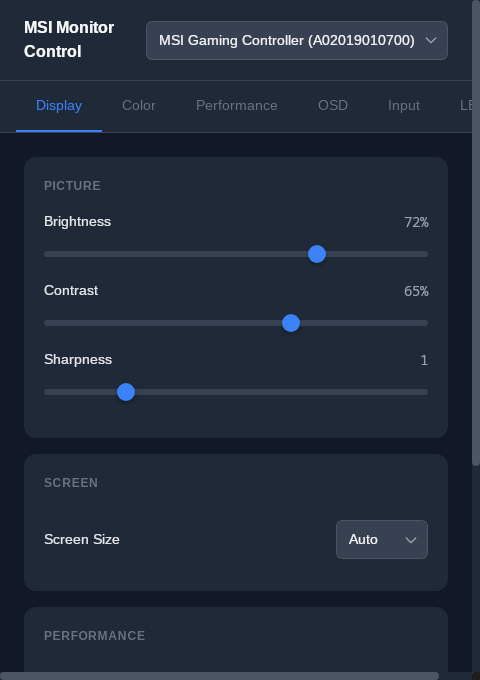
Features
- Display Settings - Brightness, contrast, sharpness, response time
- Color Management - Temperature presets and RGB fine-tuning
- LED Control - MSI Mystic Light RGB modes
- Advanced Options - HDCR, image enhancement, refresh rate OSD
- Multi-Monitor Support - Switch between connected monitors
- Settings Persistence - All settings cached locally
Installation
Arch Linux (AUR)
yay -S msigd-gui      # build from source
yay -S msigd-gui-bin  # prebuilt binary
Debian/Ubuntu
sudo dpkg -i "MSI Monitor Control_1.0.0_amd64.deb"Other Linux
chmod +x msigd-gui
./msigd-gui

# On Wayland
WEBKIT_DISABLE_COMPOSITING_MODE=1 ./msigd-gui
Prerequisites
- msigd CLI tool must be installed
- USB connection to MSI monitor
- udev rules configured for HID access
Downloads
| Package | Format |
|---|---|
MSI Monitor Control_1.0.0_amd64.deb |
Debian/Ubuntu |
msigd-gui |
Standalone binary |