If you need to integrate your website with PayPal REST API, then all you need is to download this library and you are ready to go. There are only two files you need to download and import to your project.
IMPORTANT: Read my blog post about "How to integrate your website with PayPal" here http://code-epicenter.com/how-to-integrate-your-website-with-paypal-using-php/
##Step 1
In the folder called library you will find two files
DPayPal.phpcacert.pem
Copy both files in your project folder, and reference file DPayPal.php using require_once php command
require_once "DPayPal.php"
Please make sure that both files DPayPal.php and cacert.pem are located in the same folder.
If you want to keep the files DPayPal.php and cacert.pem in the different folders, then open the file DPayPal.php and edit the following line
from CURLOPT_CAINFO => dirname(__FILE__) . '/cacert.pem', //CA cert file
to CURLOPT_CAINFO => "PATH TO YOUR cacert.pem file"
##Step 2
Please enter your PayPal API credentials in the DPayPal.php file
protected $username = ""; //PayPal API username
protected $password = ""; //PayPal API password
protected $apiSignature = ""; //PayPal API signature
##Step 3
Set your PayPal working environment. Open DPayPal.php and set PayPal API URL:
If you are going to work with live PayPal API then use the following URL: https://api-3t.paypal.com/nvp
If you are going to work with test PayPal API (sandbox) then use the following URL: https://api-3t.sandbox.paypal.com/nvp
For example, if you want to work with Sandbox API set attribute $payPalAPIUrl located in DPayPal.php file to the https://api-3t.sandbox.paypal.com/nvp like it is demonstrated below:
protected $payPalAPIUrl = "https://api-3t.sandbox.paypal.com/nvp";
#How to use the library
Anywhere in your code create DPayPal object:
require_once 'DPayPal.php'; //Import library
$paypal = new DPayPal(); //Create an object
Now if you want to call SetExpressCheckout PayPal API operation, just call SetExpressCheckout on the $paypal object like it is demonstrated here:
$response = $paypal->SetExpressCheckout($requestParams);
where $requestParams is array which contains key=>value pairs, and $response is response object received by PayPal.
###Advanced example:
IMPORTANT - Before we proceed with an example, please have a look at this PayPal payment flow in order to understand how things are working: https://www.paypalobjects.com/webstatic/en_US/developer/docs/ec/sandboxEC.gif
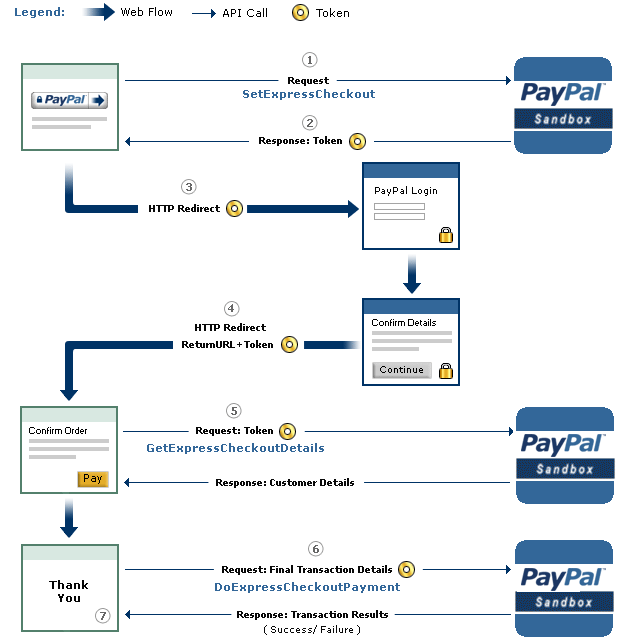
This example explains how to obtain TOKEN from Paypal (steps 1, 2 and 3 from the image above):
$paypal = new DPayPal(); //Create an object

//Generating request parameters for API operation SetExpressCheckout
//All available parameters for this method are available here
//https://developer.paypal.com/docs/classic/api/merchant/SetExpressCheckout_API_Operation_NVP/

$requestParams = array(
    'RETURNURL' => "", //Enter your webiste URL here
    'CANCELURL' => ""//Enter your website URL here
);

$orderParams = array(
    'LOGOIMG' => "", //You can paste here your website logo image which will be displayed to the customer on the PayPal chechout page
    "MAXAMT" => "100", //Set max transaction amount
    "NOSHIPPING" => "1", //I do not want shipping
    "ALLOWNOTE" => "0", //I do not want to allow notes
    "BRANDNAME" => "Here enter your brand name",
    "GIFTRECEIPTENABLE" => "0",
    "GIFTMESSAGEENABLE" => "0"
);
$item = array(
    'PAYMENTREQUEST_0_AMT' => "20",
    'PAYMENTREQUEST_0_CURRENCYCODE' => 'GBP',
    'PAYMENTREQUEST_0_ITEMAMT' => "20",
    'L_PAYMENTREQUEST_0_NAME0' => 'Item name',
    'L_PAYMENTREQUEST_0_DESC0' => 'Item description',
    'L_PAYMENTREQUEST_0_AMT0' => "20",
    'L_PAYMENTREQUEST_0_QTY0' => '1',
        //"PAYMENTREQUEST_0_INVNUM" => $transaction->id - This field is useful if you want to send your internal transaction ID
);

 //Send request and wait for response
 //Now we will call SetExpressCheckout API operation.

$response = $paypal->SetExpressCheckout($requestParams + $orderParams + $item);

//Response is aslo accessible by calling  $paypal->getLastServerResponse()

//Now you will be redirected to the PayPal to enter your customer data
//After that, you will be returned to the RETURN URL
if (is_array($response) && $response['ACK'] == 'Success') { //Request successful
    //Now we have to redirect user to the PayPal
    $token = $response['TOKEN'];

    header('Location: https://www.sandbox.paypal.com/cgi-bin/webscr?cmd=_express-checkout&token=' . urlencode($token));
} else if (is_array($response) && $response['ACK'] == 'Failure') {
    var_dump($response);
    exit;
}
#Other notes
$paypal->GetExpressCheckoutDetails($requestParameters);
####To call DoExpressCheckoutPayment just type:
$paypal->DoExpressCheckoutPayment($requestParameters);
####List of available methods
SetExpressCheckout
GetExpressCheckoutDetails
DoExpressCheckoutPayment
DoAuthorization
DoCapture
DoReauthorization
DoVoid
UpdateAuthorization
BAUpdate
BillOutstandingAmount
CreateBillingAgreement
CreateRecurringPaymentsProfile
DoReferenceTransaction
GetRecurringPaymentsProfileDetails
ManageRecurringPaymentsProfileStatus
UpdateRecurringPaymentsProfile
RefundTransaction
####To call any other PayPal API operation use method sendRequest.
For example let's say we want to call CreateRecurringPaymentsProfile API operation, then we could do it like this:
$paypal->sendRequest($requestParameters,"CreateRecurringPaymentsProfile");
or more generally
$paypal->sendRequest($requestParameters,"MethodName");
####To see errors just type:
$paypal->showErrors();
####To see last response from PayPal just type:
$response=$paypal->getLastServerResponse();
####You can set new credentials by calling set methods:
$paypal->setUsername("new username");

$paypal->setPassword("new pass");

$paypal->setApiSignature("new signature");
####You can disable or enable error reporting by calling:
$paypal->enableErrorReporting();

$paypal->disableErrorReporting();
Hope I helped :)