
Auto-update Docker containers and manage their lifecycle via interactive Telegram bot, Web UI, Discord, or webhooks. Auto-rollback on failed updates. 16 languages. Telegram is optional — runs fully headless.




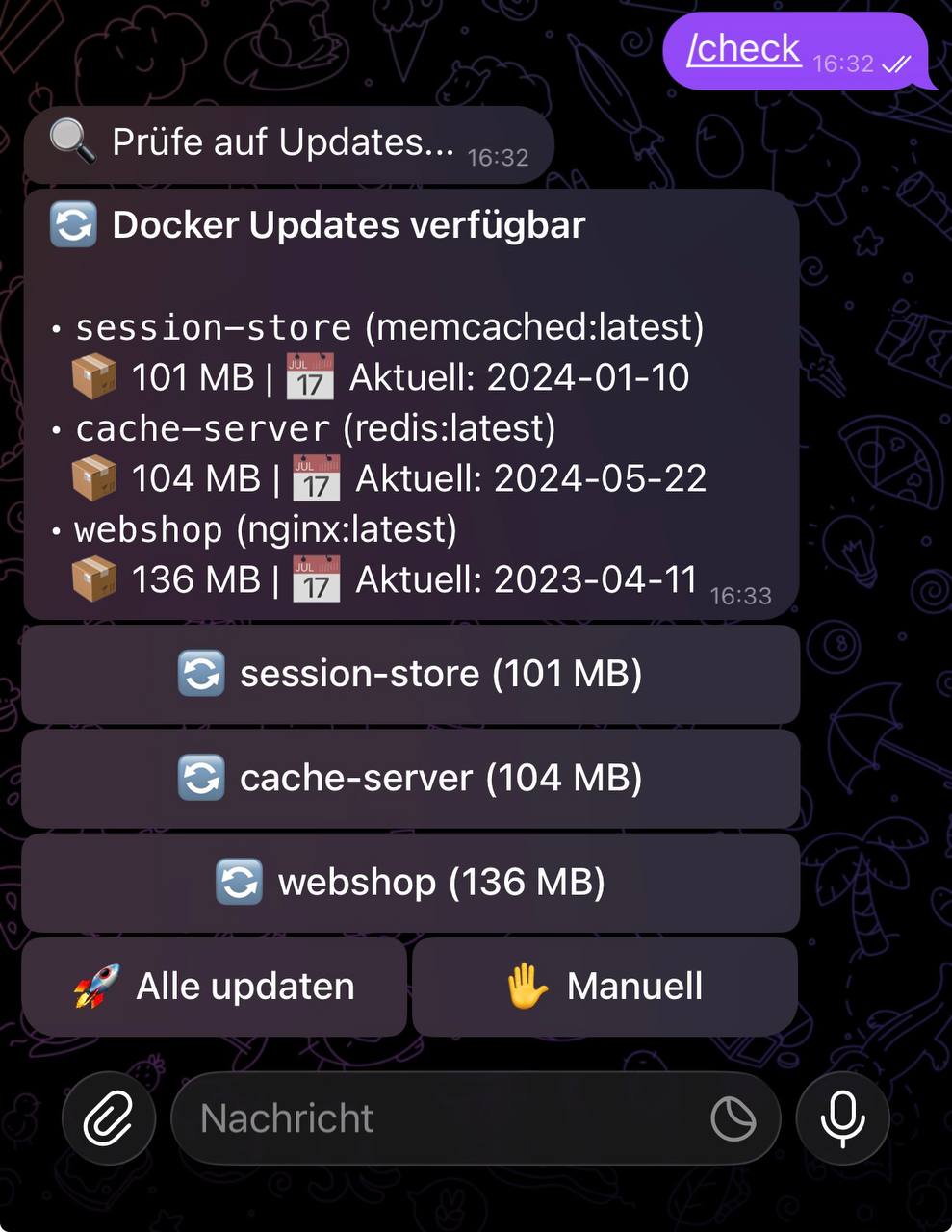
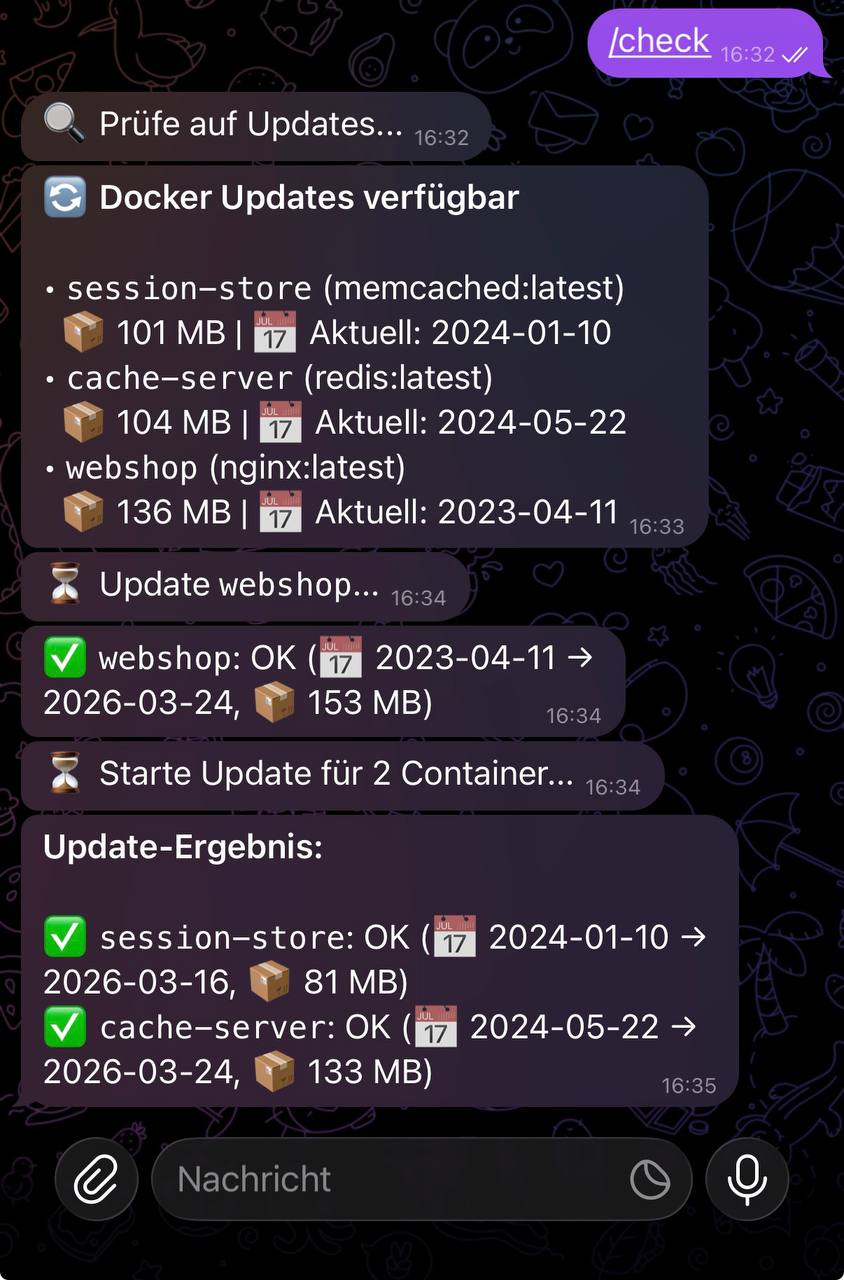
Most Docker auto-update tools either set-and-forget like Watchtower (no human in the loop, no veto) or notify-only like Diun (heads-up but you SSH in to apply it). Docksentry does both, plus interactive control from your phone or browser:
- Tap "Update all" in Telegram or "Bulk update" in the Web UI — updates apply, results stream back
- Container groups — update Gluetun first, restart the Sonarr / Radarr / qBittorrent stack after it's healthy
- Lifecycle commands —
/status nginxshows state + inline[🔁 Restart] [🟥 Stop]buttons. One tap to fix a hung container without leaving the chat - Auto-rollback if the new container fails its healthcheck (respecting the image's own
start_period) - Maintenance mode to pause everything while you tinker with the host (
/maintenance 2h) - Multi-bot setup for several Docker hosts in one Telegram group, each labelled so you can tell them apart
Telegram is optional — Web UI alone is plenty for a single-host setup. Discord and generic webhook channels work in parallel.
- Automatic update detection — compares image digests on a configurable cron schedule
- Web UI — dashboard with status, logs, history, settings, pin/unpin, auto-update toggles, manual update triggers, image cleanup, self-update
- Telegram bot (optional) — full interactive control with inline buttons and 14 commands
- Discord notifications — rich embeds for updates, successes, and failures
- Generic webhooks — JSON POST to Ntfy, Gotify, Home Assistant, or any HTTP endpoint
- Headless mode — run without Telegram; Web UI + Discord/Webhook is enough
- Per-container auto-update — selected containers update without confirmation
- Pin/Freeze containers — exclude containers from updates
- Auto-rollback — failed updates automatically restore the previous container
- Docker Compose support — native
docker compose pull/upfor Compose stacks - Self-update — the bot can update itself automatically
- Persistent settings — Web UI changes survive restarts
- Multi-language — 16 languages, switchable at runtime
- Lightweight — Python standard library only, zero external dependencies
You need at least one of: Web UI, Telegram, Discord webhook, or generic webhook. The most popular setup is Web UI + Telegram.
docker run -d \
  --name docksentry \
  --restart unless-stopped \
  -e WEB_UI=true \
  -e WEB_PORT=8080 \
  -p 8080:8080 \
  -v /var/run/docker.sock:/var/run/docker.sock \
amayer1983/docksentry:latest- Message @BotFather →
/newbot→ copy the token - Send a message to your bot, then open
https://api.telegram.org/bot<TOKEN>/getUpdatesand find yourchat.id - Run:
docker run -d \
  --name docksentry \
  --restart unless-stopped \
  -e BOT_TOKEN=your-bot-token \
  -e CHAT_ID=your-chat-id \
  -e WEB_UI=true \
  -p 8080:8080 \
  -v /var/run/docker.sock:/var/run/docker.sock \
amayer1983/docksentry:latestservices:
docksentry:
image: amayer1983/docksentry:latest
container_name: docksentry
restart: unless-stopped
environment:
- BOT_TOKEN=your-bot-token
- CHAT_ID=your-chat-id
- CRON_SCHEDULE=0 18 * * *
- TZ=Europe/Berlin
volumes:
- /var/run/docker.sock:/var/run/docker.sock
- docksentry_data:/data
security_opt:
- no-new-privileges:true
volumes:
docksentry_data:| Command | Description |
|---|---|
/status |
Container overview with health, uptime, images |
/status <name> |
Per-container detail with inline Stop/Restart/Start buttons |
/check |
Manually trigger an update check |
/updates |
Show pending updates |
/start <name> |
Start a stopped container |
/stop <name> |
Stop a running container |
/restart <name> |
Restart a container |
/logs <name> |
Show last 30 log lines of a container |
/pin <name> |
Pin container — excluded from updates |
/unpin <name> |
Unpin container |
/autoupdate <name> |
Toggle auto-update per container |
/history |
Show update history |
/cleanup |
Remove old unused images |
/selfupdate |
Update the bot itself (latest) |
/selfupdate <version> |
Pin to a specific version (e.g. /selfupdate 1.17.4) |
/selfupdate previous |
Roll back to the previous release |
/changelog |
Show what's new in versions ahead of yours (fetched from GitHub) |
/debug |
Toggle debug mode |
/lang <code> |
Switch language |
/settings |
Show current configuration |
/help |
Show all commands |
Partial name matching:
/pin ngimatchesnginx.
At least one of BOT_TOKEN+CHAT_ID, WEB_UI=true, DISCORD_WEBHOOK, or WEBHOOK_URL must be configured — otherwise Docksentry has no way to notify or be controlled.
| Variable | Default | Description |
|---|---|---|
BOT_TOKEN |
Telegram Bot API token (optional — set together with CHAT_ID to enable Telegram) |
|
CHAT_ID |
Telegram chat ID (optional — set together with BOT_TOKEN) |
|
CRON_SCHEDULE |
0 18 * * * |
Cron expression for scheduled checks |
EXCLUDE_CONTAINERS |
Comma-separated names to exclude | |
AUTO_SELFUPDATE |
false |
Auto-update the bot on each check |
AUTO_CLEANUP |
false |
Run image cleanup after every successful auto-update |
CLEANUP_GRACE_HOURS |
24 |
Cleanup only removes images unused for at least this long (1–8760h) |
CLEANUP_BACKUP_LOCAL_ONLY |
false |
Before deletion, save unused locally-built images (no registry digest) to /data/cleanup-backups/ |
CLEANUP_BACKUP_DAYS |
7 |
How long backup tarballs are kept (1–365 days) |
DISK_WARN_PERCENT |
85 |
Notify when disk usage exceeds this percentage (50–100) |
DISK_WARN_AUTO_CLEANUP |
false |
Automatically run cleanup when disk warning fires |
QUIET_HOURS_START |
Quiet-hours window start (HH:MM). Auto-notifications in this window are dropped. | |
QUIET_HOURS_END |
Quiet-hours window end (HH:MM). Manual command replies always go through. | |
WEEKLY_REPORT_ENABLED |
false |
Send a once-a-week summary report to all configured channels |
WEEKLY_REPORT_WEEKDAY |
0 |
Day of week for the report (0=Mon, 6=Sun) |
WEEKLY_REPORT_HOUR |
9 |
Hour of day for the report (0-23, local time) |
LANGUAGE |
en |
Bot language (16 available) |
WEB_UI |
false |
Enable web dashboard |
WEB_PORT |
8080 |
Web UI port |
WEB_PASSWORD |
Web UI password (Basic Auth) | |
TELEGRAM_TOPIC_ID |
Telegram topic/thread ID (for groups with topics) | |
TELEGRAM_ALLOWED_USERS |
Optional whitelist — comma-separated Telegram user IDs allowed to control the bot. Empty = anyone in the configured chat. See Group / Topic setup below. | |
BOT_LABEL |
Optional prefix prepended to every outgoing notification (Telegram, Discord, webhook). Useful when multiple Docksentry instances share a chat / channel so you can tell which host a message is from. See Multi-bot setup below. Max 32 chars. | |
DISCORD_WEBHOOK |
Discord webhook URL | |
WEBHOOK_URL |
Generic webhook URL (JSON POST) | |
TZ |
Europe/Berlin |
Timezone |
DOCKER_HOST |
Docker API endpoint (for socket proxy) | |
DOCKER_API_VERSION |
Force Docker API version (e.g. 1.43 for Synology/older Docker) |
|
DOCKER_STOP_TIMEOUT |
60 |
Minimum seconds to allow docker stop to take before falling back to docker kill. The effective wait is max(this, container.Config.StopTimeout). Raise for slow-shutdown apps (some DBs, log aggregators). |
DOCKER_USERNAME / DOCKER_PASSWORD |
Docker Hub (or other registry) credentials. Bypasses the anonymous pull rate limit (100 / 6h / IP). We run docker login once at startup. |
|
DOCKER_AUTH_CONFIG |
Path to an existing config.json with stored credentials (alternative to USERNAME/PASSWORD). Mount your host's ~/.docker/config.json read-only and point at it. |
|
DOCKER_REGISTRY |
docker.io |
Registry to log into. Set to ghcr.io, quay.io, an internal Harbor, etc. when using DOCKER_USERNAME/PASSWORD. |
HEALTHCHECK_MAX_STARTING |
600 |
Max seconds to wait for a freshly-updated container to leave starting health-state. Slow apps (GitLab, Nextcloud, Mastodon, large Postgres) may need more. We also respect the image's own Healthcheck.StartPeriod — the effective wait is max(this, start_period × 1.5). If a container is still starting after the wait, Docksentry leaves it running (no rollback) and Docker's own healthcheck takes over. |
DOCKSENTRY_IPV6 |
false |
Enable IPv6 outbound connections (default: IPv4-only to avoid Network unreachable in containers without IPv6 routing) |
All settings except BOT_TOKEN and CHAT_ID can also be changed via the Web UI and persist across restarts. Telegram is fully optional — if BOT_TOKEN/CHAT_ID are unset, Docksentry runs headless (Web UI + Discord/Webhook).
Synology / NAS users: If Docksentry shows 0 containers, add
DOCKER_API_VERSION=1.43to your environment variables.
If you want to use Docksentry in a Telegram group (so multiple people see the notifications) instead of a private chat:
⚠️ Make sure it's a Group, not a Channel. Telegram's "New Channel" creates a broadcast-only chat — admins post, members read, nobody can send/commands. The bot will happily post its startup message there butgetUpdatesalways returns empty because there are no incoming messages. Use New Group in the Telegram app (not New Channel). A working group ID is negative — typically-100…for supergroups or shorter negatives (-52…etc.) for basic groups; both work.
- CHAT_ID is the group ID, not your personal user ID. Find it by sending a message in the group and visiting
https://api.telegram.org/bot<TOKEN>/getUpdates. - Add the bot to the group with permission to post and read messages. Disable group privacy in @BotFather →
/setprivacy→Disable, otherwise the bot only sees messages that mention it directly — so commands like/statuswon't trigger.💡
/setprivacyis per-chat-membership cached. If you toggle it in BotFather after the bot is already in the group, the new setting doesn't apply to that existing membership —docker compose down/upof Docksentry does not clear it. You have to kick the bot from the group and add it again. This trips most people up on first setup. - Topics (Forum groups): if the group has topics enabled, set
TELEGRAM_TOPIC_IDto the topic where the bot should post. The ID is the integer after the last slash in a topic URL (right-click a topic → Copy link). - Restrict who can control the bot (optional but recommended for shared groups): set
TELEGRAM_ALLOWED_USERSto a comma-separated list of personal user IDs. Without it, any group member can click "Update all". Find user IDs the same way as the chat ID —from.idin thegetUpdatesresponse.
environment:
  - BOT_TOKEN=123456:abc...
  - CHAT_ID=-1001234567890           # the group ID
  - TELEGRAM_TOPIC_ID=42             # only needed for Forum groups
- TELEGRAM_ALLOWED_USERS=11111111,22222222 # only these users can issue commandsIf you have several Docker hosts (different boxes, VMs, Proxmox LXCs, …), v2.0's real multi-host support is on the roadmap — but until then you can already control multiple instances from a single Telegram group by running one Docksentry per host and labelling each instance with BOT_LABEL:
# Host pve1
environment:
  - BOT_TOKEN=...token-for-bot-1...
  - CHAT_ID=-1001234567890                  # shared group ID, same for all hosts
  - TELEGRAM_ALLOWED_USERS=11111111         # your own user ID — lock down control
  - BOT_LABEL=🖥 pve1                       # prefixes every notification
# Host pve2
environment:
- BOT_TOKEN=...token-for-bot-2...
- CHAT_ID=-1001234567890 # same group
- TELEGRAM_ALLOWED_USERS=11111111
- BOT_LABEL=🖥 pve2Issue /status in the shared group and each bot replies with its label prefix:
🖥 pve1 · *Container Status:* …
🖥 pve2 · *Container Status:* …
🖥 pve3 · *Container Status:* …
The label also flows into Discord embeds (added to title + footer) and the generic webhook payload (bot_label field), so downstream automations can route per-host.
Setup checklist:
- Create a private Telegram group, add yourself and all bots (one per host).
- For each bot, in @BotFather →
/setprivacy→ Disable, so bots see/commandsin groups (groups have privacy mode on by default, which restricts bots to messages that mention them directly). - Find the group ID (send a message in the group, visit
https://api.telegram.org/bot<TOKEN>/getUpdates, look forchat.id). - Configure each Docksentry instance with the same
CHAT_ID(the group ID) and a distinctBOT_LABEL.
Security note — please read:
- Set
TELEGRAM_ALLOWED_USERSto your own user ID. Without it, any group member can trigger/cleanup,/selfupdate, "Update all", etc. against every host — accidentally adding a colleague to the group would hand them control over everything. - Keep the group private. Disable invite links or rotate them, and audit membership occasionally. The group is now a single point of trust.
- Be aware: privacy-mode off means each bot sees every human message in the group. Don't use the same group for casual chat — keep it ops-only.
- Telegram's own Bot API filters out bot-to-bot communication, so bots can't accidentally trigger each other's commands.
This is a stepping stone, not a replacement for v2.0 multi-host: you still maintain N bot tokens, N Docksentry containers, N updates. But it makes "single chat, all hosts" usable today.
Enable with WEB_UI=true. Provides status dashboard, container logs, update history, and full settings management — all in a dark-themed, mobile-responsive interface.
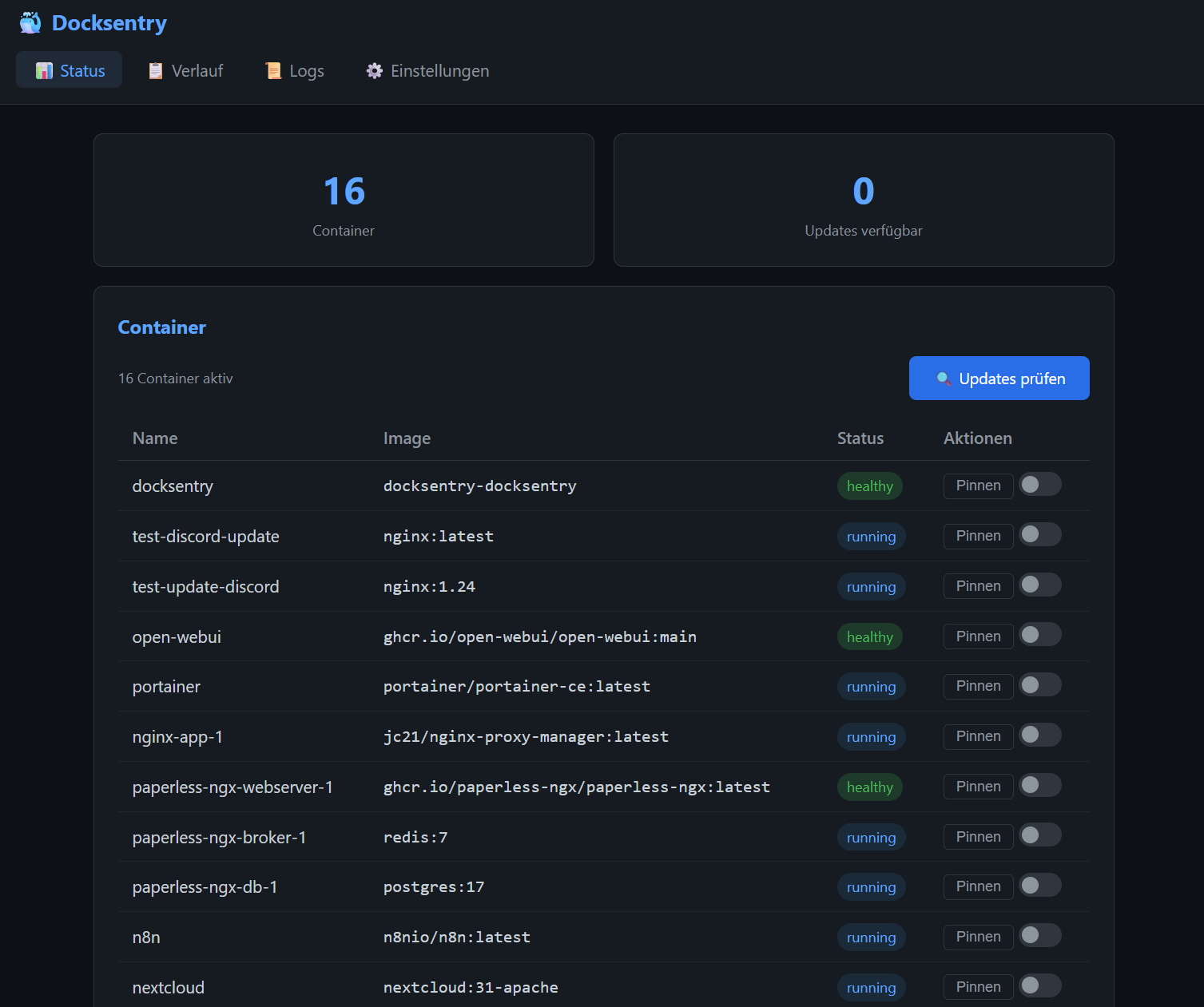
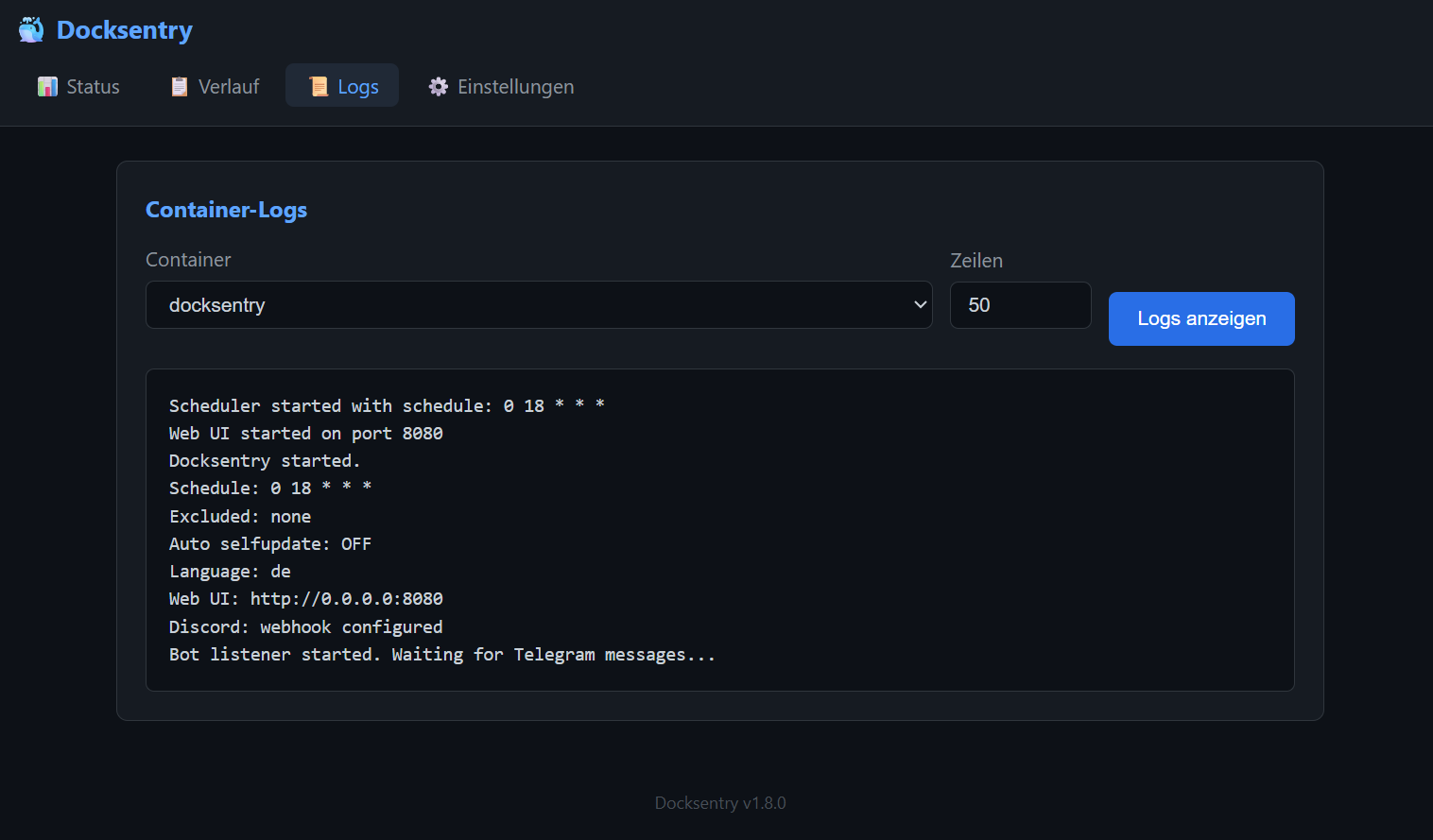
See Web UI Documentation for details.
| Channel | Updates | Results | Interactive |
|---|---|---|---|
| Telegram | buttons | detailed | full control |
| Discord | rich embeds | rich embeds | via Web UI |
| Webhook | JSON | JSON | via Web UI |
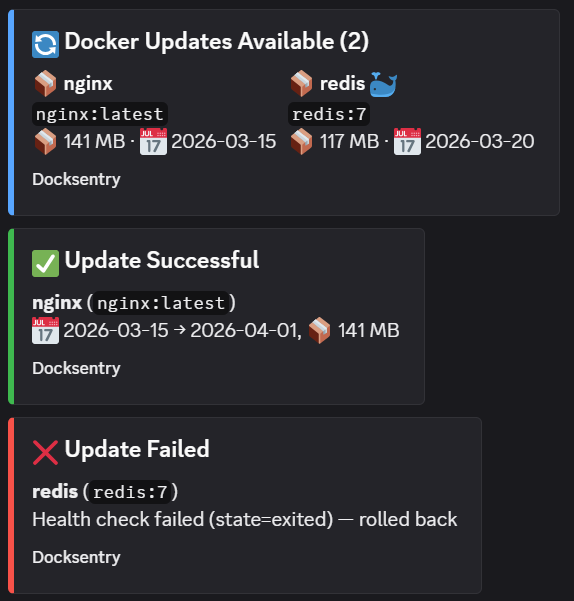
See Notification Setup for Discord and Webhook configuration.
| Topic | Link |
|---|---|
| Update Workflow & Rollback | docs/updates.md |
| Web UI | docs/web-ui.md |
| Notification Channels | docs/notifications.md |
| Docker Compose Support | docs/compose.md |
| Security & Socket Proxy | docs/security.md |
| Multi-Language | docs/languages.md |
Docksentry is actively developed — see the CHANGELOG for what shipped in each release.
v1.x — ongoing. Continued bug fixes and smaller features driven by user feedback in #2. Recent: container groups, maintenance mode, container notes, group/topic auth, restart-dependents for VPN-sidecar stacks.
v2.0 — bigger release, ahead. Two large items planned to land together rather than trickled out:
- Multi-host management — one Docksentry instance managing several Docker hosts, with per-host pending queues, hostname-prefixed notifications, and a host selector in the Web UI.
- Interactive Discord bot — slash-commands, buttons and the same control surface the Telegram bot offers today.
Both need a real release window rather than a weekend hack, so v2.0 will wait until there's enough user feedback and momentum to justify the refactor. If multi-host or the Discord bot is something you'd actually use, the most useful thing you can do is ⭐ the repo or mention Docksentry to someone who'd benefit — that's the signal I'm watching to decide when to start.
Wishlist input and "+1"s welcome on #2.
- Feature ideas? Open an Issue with the label
enhancement - Found a bug? Open an Issue with steps to reproduce
- Translations? Submit a PR for
app/lang/*.json - Vote on the roadmap: Community Roadmap (Issue #2)
Docksentry is free and open source. If it saves you time and you'd like to support continued development, you can sponsor the project on GitHub:

Sponsorships fund: faster bug-fixes, more registry integrations, multi-host support, and keeping the lights on. No feature is paywalled — Docksentry stays free.
MIT License - see LICENSE