






This repo builds the audio engine behind the mpv_audio_kit Flutter package: audio-only build of mpv for every platform: macOS, iOS, Android, Windows and Linux. You drive everything from one command, ./build, a friendly menu where you pick what to build and watch it happen.
Clone this repo next to the Flutter package, then run the menu:
git clone https://github.com/ales-drnz/libmpv-scripts
git clone https://github.com/ales-drnz/mpv_audio_kit   # sibling folder

cd libmpv-scripts
./build                # opens the menu: pick targets, press Build
On Windows run build.cmd instead. The first run fetches the Go dependencies automatically; the first Docker build also builds the Docker image for that platform once (first run) before compiling.
One libmpv per platform and architecture, dropped into builds/release/:
| Platform | Architectures | Output |
|---|---|---|
| macOS | arm64, x86_64 (universal) | libmpv_macos.xcframework.zip |
| iOS | arm64 (device + sim), x86_64 (sim) | libmpv_ios.xcframework.zip |
| Linux | x86_64, aarch64 | libmpv_linux-<arch>.so |
| Windows | x86_64, arm64 | libmpv_windows-<arch>.dll |
| Android | arm64-v8a, armeabi-v7a, x86_64 | libmpv_android-<abi>.so |
Each binary exports only the stable mpv_* C API, has the audio-only patch set baked in, and is stripped of all video decoders. The exact pinned versions of mpv, FFmpeg and every bundled library live in scripts/shared/_versions.sh and on the Dependencies tab.
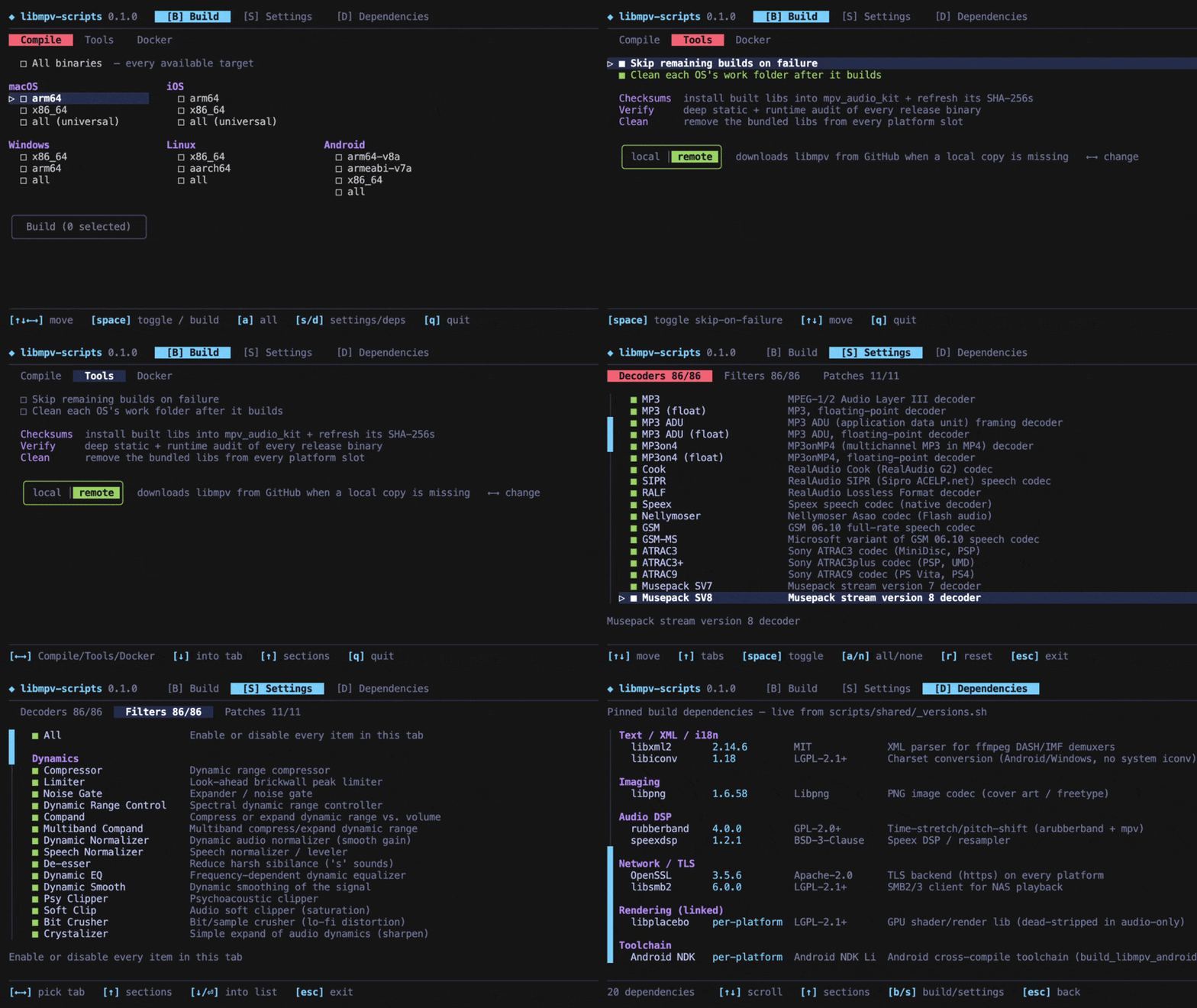
Everything runs from a single Bubble Tea terminal app. Pick targets, watch live progress with per-build spinners, timers and warning and error counts, then verify and install, no flags to memorise.
You only need the tools for the platforms you actually build. Host CPU architecture doesn't matter: each Docker image is built native to your machine and cross-compiles every target arch at native speed. Android on macOS is built natively on the host (the macOS NDK is native Apple Silicon → no Docker, no emulation, fastest) — you can force it through Docker from the Docker tab if you prefer.
| Tool | Needed for | Install |
|---|---|---|
| Go | always, it runs the ./build menu |
brew install go (or go.dev/dl) |
| Docker | Linux, Windows and Android builds | Docker Desktop, just have it running |
| Xcode | macOS and iOS builds (macOS host only) | Mac App Store |
| Android NDK | (none) | nothing: the Android build runs in Docker and fetches the NDK itself |
| Host | Can build |
|---|---|
| macOS | everything: Apple targets via Xcode, the rest via Docker |
| Linux | everything except macOS and iOS (those need a Mac) |
| Windows | everything except macOS and iOS: use build.cmd instead of ./build |
The builder installs its results into the mpv_audio_kit package, so it expects to find it next to this repo:
your-projects/
├── libmpv-scripts/     ← this repo
└── mpv_audio_kit/      ← the Flutter package (clone it here)
Folder somewhere else? Point to it with
MPV_AUDIO_KIT_ROOT=/path/to/mpv_audio_kit ./build.
cd libmpv-scripts
./build
On Windows, run build.cmd instead. The first run fetches the Go dependencies automatically; the first Docker build also builds the Docker image for that platform (once, first run) before compiling.
Move with the arrow keys, toggle a target with Space, then go to the ▶ Build button and press Space to start.
Tip: pick a platform's all to cover its architectures at once (they show checked and dimmed), or All binaries at the very top to select everything.
The app has three tabs, switched with the B, S or D keys (or by moving the cursor up to the tabs). Press Q to quit; any running build is stopped cleanly.
Three sub-tabs, switched with ←/→ (or click): Compile, Tools and Docker.
Compile — pick which platforms and architectures to build and watch live progress, each OS boxed with its arches inside. Each build shows a spinner, a timer, and a running count of warnings and errors; press Enter on one to read its full log (scoped to that build). Pick a platform's all to cover its arches at once, or All binaries at the top for everything; then drop to the Build button.
Tools — top to bottom:
- Two build options: Skip remaining builds on failure and Clean each OS's work folder after it builds (persisted between runs).
- Three one-shot actions: Checksums (install the binaries into
mpv_audio_kit+ refresh its SHA-256s — see §6.2), Verify (deep audit — see §6.3), and Clean (remove the bundled libs frommpv_audio_kit). - A libs source segmented toggle —
local ⇄ remote— styled like the Build button, with the active side coloured. On entering Tools the kit detectsmpv_audio_kit's current source; ←/→ move the selection and Enter confirms the switch (nothing changes on disk until you confirm). See §6.2.
Docker — manage the build images. The toolchains live in a multi-stage Docker image, one stage per platform (linux, windows, android, verify) sharing a common base, so building only what you need keeps only that on disk. The tab lists each image with its on-disk size or missing; Enter builds a missing image (or deletes a present one), and the last row deletes them all. The kit also builds the needed image automatically the first time you compile a platform — so you can build Android today and add Windows later, pulling in just the missing piece. On macOS the tab also has a toggle to force Android through Docker (off by default — Android builds natively there for speed).
Choose which audio decoders, filters and source patches get baked in, grouped by category with a short description for each. Trim aggressively for a smaller binary (a format you turn off won't play). Your choices are saved as your own copy: the curated defaults are never overwritten, and you can reset anytime.
A read-only list of every library that goes into the build (mpv, FFmpeg, OpenSSL, …) with its exact version and license.
Everything below works from the menu; the command-line equivalents are shown for scripting and CI.
Need Xcode. Off a Mac these targets are greyed out; there's no supported way to build them elsewhere.
./build macos            # universal (arm64 + x86_64) xcframework
./build ios              # device + simulator xcframework
./build macos-arm64 # a single archAny host, via Docker. Make sure Docker is running; both arches cross-compile inside the per-platform Docker image (built on first use).
./build linux            # x86_64 + aarch64
./build windows          # x86_64 + arm64
./build linux-x86_64 # one specific targetOn macOS the Android build runs natively on the host (uses the macOS NDK — native Apple Silicon, so full speed, no Docker). No Android Studio needed; the NDK is auto-located (or downloaded). On Linux/Windows it builds in Docker as linux/amd64 (native on an x86_64 host; the container fetches the pinned NDK). You can force the macOS build through Docker too via the Docker tab toggle.
./build android          # arm64-v8a + armeabi-v7a + x86_64
./build android-arm64-v8a./build all # every platform available on this host, then checksumsRun ./build list to see every target name.
./build also works headlessly, handy for scripts and CI. It stops at the first failure, like make.
./build macos verify         # chain targets: build macOS, then verify
./build linux-x86_64         # one target
./build all                  # everything + checksums
./build checksums            # install built binaries into mpv_audio_kit
./build verify               # sanity-check the produced binaries
./build lib-local            # lock mpv_audio_kit to the local libmpv (+ install)
./build lib-remote           # let mpv_audio_kit download libmpv from GitHub Releases
./build lib-clean            # remove the bundled libmpv from mpv_audio_kit
./build list                 # show every target name
./build help # usageForwarded into the Docker builds:
| Variable | Effect |
|---|---|
JOBS=N |
parallel compile jobs (default: all cores) |
ENABLE_LTO_DEPS=0 |
disable link-time optimization on static deps |
FORCE_DOWNLOAD=1 |
re-fetch sources even if cached |
KEEP_BUILD=1 |
keep intermediate build trees for inspection |
WIPE_ALL=1 |
also delete the source-download cache |
You can pin a different upstream version with MPV_VERSION, FFMPEG_VERSION, OPENSSL_VERSION, etc. (see scripts/shared/_versions.sh).
- Finished binaries →
builds/release/ - Full per-build logs →
builds/logs/
Everything under builds/ is regenerated on demand and is not committed to git.
To drop the binaries into the mpv_audio_kit package and refresh its checksums:
./build checksumsThis hashes each binary in builds/release/, copies it into the package's per-platform slot (Frameworks/, jniLibs/, libs/), and rewrites the SHA-256 references in the package's build files (Package.swift, the podspecs, the CMakeLists, build.gradle.kts).
mpv_audio_kit can consume each libmpv either from a local bundled copy or by downloading it from this repo's GitHub Releases. The switch flips every platform at once by commenting/uncommenting the toggleable blocks in the package's build files (delimited by mpvkit: markers — don't hand-edit those). In the Tools tab it's a segmented local ⇄ remote toggle: the kit detects the current source on entry, ←/→ select, Enter confirms.
| Mode / action | Effect | CLI |
|---|---|---|
| local | Installs the built binaries (runs the checksums step) and locks every platform to the local copy — never downloads from GitHub. | ./build lib-local |
| remote | Switches every platform to download each libmpv from GitHub Releases when the local copy is absent or stale. |
./build lib-remote |
| Clean | Removes the bundled libmpv binaries from every platform slot, so a remote build has nothing stale to fall back to. |
./build lib-clean |
Typical flows: local (offline / testing a fresh build); lean repo distributed via Releases → Clean then remote. SwiftPM (iOS/macOS) is a hard either/or, so the switch flips its path: ↔ url:+checksum: form; the other four build systems already prefer the local copy and only download when it's missing — so they read as local only once their bundled binary is removed (Clean).
The Verify action (Tools tab, or ./build verify) runs a deep static + runtime audit of every binary in builds/release/ and shows it as a live report: one row per binary, with its checks grouped into readable categories. Cells fill in with ✓, ⚠, ✗, or ∅ (not-applicable) as each phase completes; press Enter to read the raw log (scoped to the focused binary).
Every binary is reported against the same 14 categories, so the output is consistent and comparable across platforms. Each category is one of: ✓/⚠/✗ (ran and asserted a result), ∅ N/A (intentionally doesn't apply here — always shown with a one-line reason, never a silent gap), or · (informational only). Because the categories are fixed, the per-OS passed tally is always paired with an explainable N/A count rather than a bare number that differs for hidden reasons.
| # | Category | macOS | iOS | Linux | Windows | Android | Reason when N/A |
|---|---|---|---|---|---|---|---|
| 1 | Format / arch | ✓ | ✓ | ✓ | ✓ | ✓ | |
| 2 | Exports (54 mpv_*) |
✓ | ✓ | ✓ | ✓ | ✓ | |
| 3 | mpv patched properties | ✓ | ✓ | ✓ | ✓ | ✓ | |
| 4 | FFmpeg patches | ✓ | ✓ | ✓ | ✓ | ✓ | |
| 5 | Audio decoders | ✓ | ✓ | ✓ | ✓ | ✓ | |
| 6 | Audio filters | ✓ | ✓ | ✓ | ✓ | ✓ | |
| 7 | Audio-only invariant | ✓ | ✓ | ✓ | ✓ | ✓ | |
| 8 | Runtime dependencies | · | · | · | · | · | info; the allowlist assertion is #11 |
| 9 | Dependency versions | ✓ | ✓ | ✓ | ✓ | ✓ | |
| 10 | API surface hash | · | · | · | · | · | info; asserted globally by the cross-platform audit |
| 11 | NEEDED allowlist | ✓ | ✓ | ✓ | ✓ | ✓ | |
| 12 | UND resolvability | ∅ | ∅ | ✓ | ∅ | ✓ | nm/ELF-based; Mach-O & PE imports are bound by their own loader (#13) |
| 13 | Runtime load test | ∅ | ∅ | ✓ | ✓ | ∅ | needs the platform's real loader (Apple dyld; no emulator-less Android path) |
| 14 | Stub detection | ∅ | ∅ | ∅ | ∅ | ✓ | targets Android's JNI_OnLoad → av_jni_set_java_vm chain only |
The static categories (1–11) run on every artifact — including the macOS/iOS xcframeworks, whose inner Mach-O dylib is extracted and inspected, not just the outer .zip. Only the runtime categories (12–14) vary by platform.
The audit runs inside the same Docker container, so it has every cross-toolchain (plus qemu and Wine) needed to inspect and load each platform's binary.
./build is a small Go (Bubble Tea) TUI that orchestrates the per-platform shell scripts in scripts/, with no Makefile in the loop. Apple targets run natively against Xcode; Linux, Windows and Android cross-compile inside Docker, using a multi-stage image (docker/Dockerfile) with one stage per platform on a shared base — the kit builds (and keeps) only the stage a target needs (manage them in the Docker tab). Before compiling, each build applies the audio-only source patches in patches/ to mpv and FFmpeg, then strips the result down to the mpv_* API surface.
Every screen shows its keyboard shortcuts along the bottom, so there's nothing to memorise: just run ./build and follow along.
- "Go not found" → install Go (
brew install go) and re-run. - Linux, Windows or Android build fails immediately → make sure Docker is running.
- macOS or iOS options are greyed out → those need a Mac with Xcode; they can't be built on Windows or Linux.
- "could not locate the mpv_audio_kit repo" → clone
mpv_audio_kitnext to this folder, or setMPV_AUDIO_KIT_ROOT(see §2.1). - First Docker build is slow → it's building that platform's Docker image once; subsequent builds reuse it (shared base layers make later platforms faster). Manage/delete images in the Docker tab.
- Android build is slow on Apple Silicon → make sure it's building natively (the default on macOS), not forced through Docker — check the Docker tab toggle is off. If you do run it in Docker on Apple Silicon, enable Use Rosetta for x86/amd64 emulation (Docker Desktop → Settings → General, plus Use Virtualization framework), since the NDK is x86_64-only.
The build pipeline, the Go TUI and the patches for mpv and ffmpeg were implemented through the use of Claude Code.
Developed by Alessandro Di Ronza