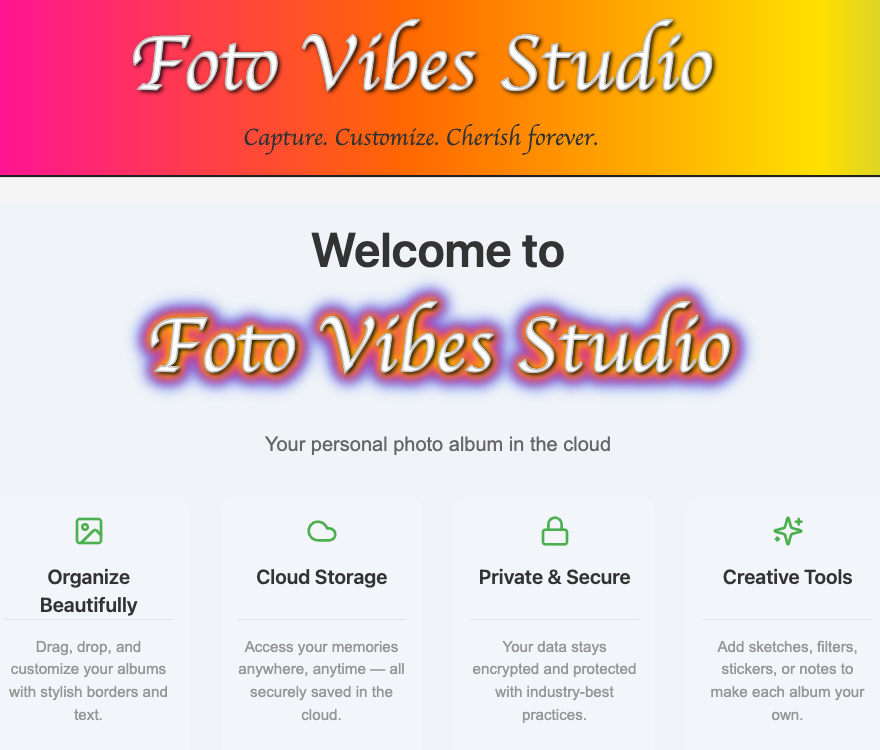


A powerful and intuitive React-based photo editing suite that transforms your digital memories into professional-looking albums. Featuring a comprehensive canvas editor with advanced tools, drag-and-drop functionality, and cloud storage integration.
✅ Intuitive Canvas Editor - Full-featured design workspace
✅ Cloud Sync - Save and access projects anywhere
✅ Advanced Tools - Drawing, text, stickers, and transformations
✅ Responsive Design - Works flawlessly on all devices
✅ Export Options - Save as PNG, JPG, or PDF

- Tech Stack
- Features
- Installation
- Configuration
- Usage Guide
- Deployment
- Development
- Contributing
- FAQ
- Support
| Category      | Technologies                |
| ------------- | --------------------------- |
| **Framework** | React 18, Vite 4            |
| **Language**  | TypeScript 5                |
| **Styling**   | SCSS Modules, CSS Variables |
| **State**     | Zustand, React Context      |
| **Database**  | Firebase Firestore          |
| **Storage**   | Firebase Storage            |
| **Auth**      | Firebase Authentication     |
| **Testing**   | Jest, React Testing Library |
| **Linting**   | ESLint + Prettier           |
| **CI/CD**     | GitHub Actions              |
- Drawing Tools: Pen, Brush, Pencil with customizable colors and sizes
- Media Handling: Upload, crop, rotate, and flip images
- Text Editing: Multiple fonts, colors, and styling options
- Layer Management: Reorder elements with intuitive controls
- Create unlimited albums
- Drag-and-drop page organization
- Customizable backgrounds and borders
- Template system for quick starts
- Google Drive import/export
- Social media sharing
- Cloud auto-save functionality
- Node.js v18+
- npm v9+ or yarn
- Firebase project (for cloud features)
git clone https://github.com/your-username/photo-album-editor.git
cd photo-album-editorCreate a .env file in the project root with:
VITE_FIREBASE_API_KEY=your-key
VITE_FIREBASE_AUTH_DOMAIN=your-project.firebaseapp.com
VITE_FIREBASE_PROJECT_ID=your-project-id
VITE_FIREBASE_STORAGE_BUCKET=your-bucket.appspot.com
VITE_FIREBASE_MESSAGING_SENDER_ID=your-sender-id
VITE_FIREBASE_APP_ID=your-app-idnpm install
# or
yarn install
Enable the following Firebase services:
- Enable Email/Password
- Enable Google Sign-In
rules_version = '2';
service cloud.firestore {
  match /databases/{database}/documents {
    match /users/{userId} {
      allow read, write: if request.auth != null && request.auth.uid == userId;
    }
  }
}npm run dev
npm run build
Project Structure
src/
├── assets/          # Images, icons
├── components/      # React components
├── features/        # Main features
├── firebase/        # Firebase config
├── hooks/           # Custom hooks
├── pages/           # Application pages
├── store/           # State management
├── styles/          # Global styles
└── utils/           # Utility functions
- Go to Firebase Console > Authentication > Sign-in method
- Enable the following providers:
- ✅ Email/Password
- ✅ Google Sign-In
-
Navigate to Firestore Database in Firebase Console
-
Click "Start in test mode" (for development)
-
Create the following collections:
- 📁
users - 📁
albums
- 📁
-
Apply recommended Firestore rules (see above)
- Go to Storage in Firebase Console
- Click “Get Started”
- Create a folder called
uploads(optional but recommended) - Set security rules as needed
Open your browser at:
http://localhost:3000
- Create an account using Email/Password or Google Sign-In
- Start uploading and organizing your albums!
- Firebase errors → Double-check your
.envsettings and Firebase console configuration - Dependency issues → Try deleting
node_modulesand reinstalling:
rm -rf node_modules && npm install- Build errors → Review TypeScript compiler output in the terminal
- 🛠️ Clear setup steps
- 📄 Paste-ready code blocks
- 🔥 Firebase configuration
- 🧱 Project structure overview
- 🚀 First-run guidance
- 🧯 Troubleshooting help
- Add / edit / delete images
- Crop, rotate, resize media
- Add / edit / delete text blocks
- Rich text styling (fonts, size, color, background)
- Drawing tools (pen, brush, pencil)
- Stickers (emoji, images, draggable & rotatable)
- Album customization (border, background, size)
- Integrated photo gallery
- Reset album to defaults
- Centralized toolbar for quick actions
- Undo / Redo stack
- Layer controls (lock, hide, reorder)
- Snap-to-grid & alignment guides
- Shape tools (rectangles, circles, arrows)
- Image filters (grayscale, blur, brightness, sepia)
- Background presets (gradients, patterns, textures)
- Multi-image batch upload
- Drag & drop uploads
- Curved / path-based text
- Text effects (shadow, outline, gradient)
- Sticker packs & clipart library
- Predefined page templates
- Duplicate page or element
- Auto captions for photos
- Themed album styles (wedding, travel, seasonal)
- High-quality print-ready PDF export
- Social media share buttons
- Watermark option
- Export to cloud (Google Drive, Dropbox, OneDrive)
- Real-time multi-user editing
- Commenting & annotations
- Version history & restore
- Pinch-to-zoom & drag-pan gestures
- Floating undo/redo for mobile
- Dark / light mode toggle
- Customizable toolbar (user-defined tools)
fully-featured Photo Album Editor with canvas tools, cloud storage, Firebase auth, and album management. We can brainstorm advanced, useful, and fun features/components to take it further. Here’s a structured list:
1️⃣ Editor Enhancements
Layer Locking & Visibility – Lock specific elements or hide them temporarily.
Undo/Redo Stack – Multiple levels of undo/redo for edits.
Smart Guides & Snap-to-Grid – Helps align objects and text.
Filters & Effects – Apply image filters like grayscale, sepia, blur, brightness/contrast.
Shape Tools – Rectangles, circles, arrows, lines.
Background Removal – Simple AI-powered cutouts or masking tool.
2️⃣ Media Management
Video Support – Add short videos to albums (trim, mute, loop).
GIF Support – Add GIF stickers or images.
Batch Upload – Drag-and-drop multiple files with progress indicators.
Media Search & Sort – Sort images by date, size, tags.
3️⃣ Album Features
Custom Templates – Pre-built page layouts for quick album creation.
Page Duplication – Duplicate an entire page or element.
Page Numbering & Captions – Add automatic page numbers and text captions.
Themes & Presets – Dark/light themes or seasonal album styles.
4️⃣ Collaboration & Cloud
Real-time Collaboration – Multiple users editing same album (Firebase Realtime).
Sharing & Permissions – Invite collaborators, view-only links, or full edit rights.
Cloud Auto-Save – Ensure edits are saved in real time.
Export to Google Drive / Dropbox / OneDrive – Direct cloud export.
5️⃣ Social & Sharing
Social Media Export – Quick share buttons for Instagram, Facebook, Twitter.
Printable PDF Export – With high-quality page layouts.
Watermarking – Add custom watermarks automatically on export.
6️⃣ UI/UX Improvements
Dark Mode / Light Mode Toggle
Customizable Toolbars – Show/hide tools, drag to rearrange.
Quick Undo Buttons – Floating undo/redo buttons for mobile.
Mobile Optimized Canvas – Pinch-to-zoom, drag-to-pan gestures.
7️⃣ Fun / Creative Features
Sticker Packs / Clipart Library – Drag-and-drop pre-made decorations.
Animated Stickers & GIFs – Bring albums to life.
Text Effects – Shadow, outline, gradient, and curve text along paths.
AI Suggestions – Smart cropping, auto-layout suggestions for photos.
8️⃣ Utility & Support
Version History – Track previous album versions and restore.
Autosave Recovery – Recover unsaved changes after crashes.
Album Templates Marketplace – Pre-made page designs (free & premium).
Tagging & Search – Tag images (e.g., “vacation”) and search within albums.