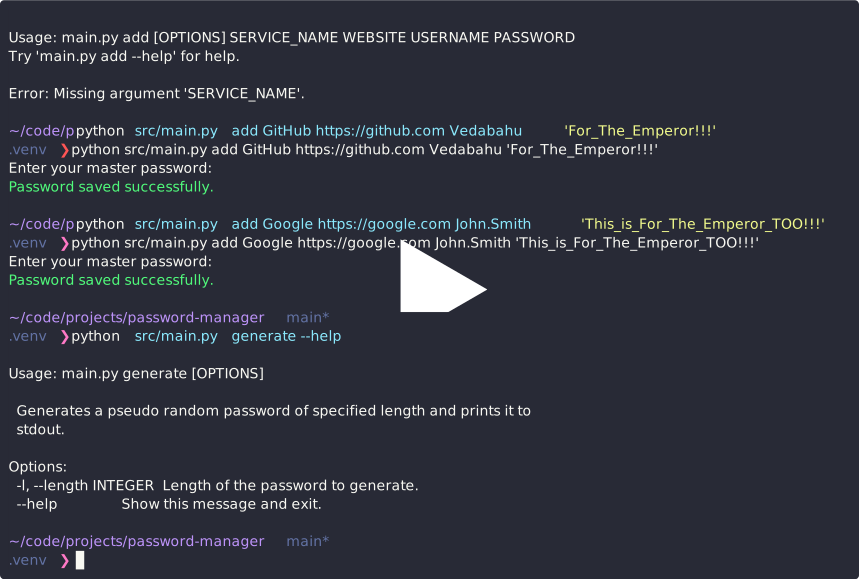
A beginner-friendly password manager built with Python. This project demonstrates basic concepts like encryption, file handling, database management, and user input for securely managing passwords on the command line. Jump to the demo
⚠️ DISCLAIMER:
This password manager is a simple educational project and not intended for production or real-world use. If you need a secure, production-ready password manager, consider using trusted solutions like KeePassXC or Bitwarden.
- Add new password entries (service name, username, password)
- View saved credentials
- Delete entries
- Encrypt and decrypt password storage
- Generate random passwords
- Command-line interface
- Usernames and Passwords are stored in an encrypted format using basic symmetric encryption (e.g., Fernet from
cryptographylibrary with key derived usingArgon2idas the key derivation function). - A master password is used to unlock the manager and decrypt data.
Note: This project is designed for learning purposes. It does not follow advanced security best practices such as key derivation functions (KDFs), secure vault storage, or tamper detection.
- Python 3.13+
uvpackage managercryptographylibraryclickfor CLI development
Automatically install dependencies using uv and run the file:
uv run src/main.pyOpen src/config.py and alter as needed.
DB_NAME: is the vault name that will be usedDB_PATH: is the place where the vault should be placed.
Usage: main.py [OPTIONS] COMMAND [ARGS]...

  A command line password manager

Options:
  --help  Show this message and exit.

Commands:
  add       Add an entry to the database
  generate  Generates a pseudo random password of specified length and...
  init      Initializes the database if it does not exits.
  list      List all the entries without username and password.
  remove    Remove a password based on index
  view      View an individual entry based on index