Conversation


|
The implementation looks good, but the problem is that it does not work on all platforms, for example on macOS in fullscreen mode, it would open a new tab, because you cannot open a secondary window in fullscreen mode above the existing one there. |

|
awesome, am very interest !!! |
Fixed errors using MacOS trying to create a tooltip

|
I've tested tooltips in MacOS fullscreen and they seem to work as expected. Converting PR to a draft to fix some |

|
I see accessibility issues with the color scheme shown. In general, tooltips seem to be designed to stand out visually. So what about inverting colors? But maybe the colors shown in the first image of the initial comment are not up-to-date? Would you please add a new screenshot in that case? Thanks. |
|
@Wolf-SO you're right, I hadn't updated the screenshot yet. The image has now been changed to show the higher contrast to the default colors of the theme. |


|
nice can it track mouse movement to update location in real-time? |
- Fix .configure() not working
- Fix tooltips sometimes not disappearing
- Add is_visible() method to return visibility status
|
@IshanJ25 It's not built in to the tooltip, but it can still be done. Ex: import customtkinter
import threading
import time
app = customtkinter.CTk()
def track_mouse():
tooltip_1.configure(delay=0)
while app.winfo_exists():
if tooltip_1.is_visible():
tooltip_1.geometry(f'{app.winfo_pointerx()+1}+{app.winfo_pointery()+1}')
time.sleep(0.02)
frame_1 = customtkinter.CTkFrame(master=app)
frame_1.pack(pady=20, padx=60, fill="both", expand=True)
button_1 = customtkinter.CTkButton(master=frame_1)
button_1.pack(pady=10, padx=10)
tooltip_1 = customtkinter.CTkTooltip(master=button_1)
tooltip_follow_thread = threading.Thread(target=track_mouse)
tooltip_follow_thread.start()
app.mainloop() |

|
Hi, The difference is that I've used a CTkFrame properly placed instead of a CTkTopLevel. I plan to make it available in a next release. |


|
Akascape has a really nice tooltip, worth a look. CTkToolTip |

|
Coincidentally, someone else just pointed out the same widget in #2254, and it turned out that it is mixing Tk and CTk widgets, resulting in an Exception. |
8 participants


I have added tooltips which appear when your mouse hovers over a widget. These can be very useful for describing the purposes of widgets such as buttons, without using the widget's text to describe it. This is possible using Toplevels and transparent colors to give the tooltip rounded edges.
Here is a more practical example, where tooltips are used to indicate the usage of a button represented only with an icon:
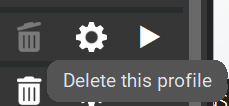
Allowing for a clean and modern user interface.
Please consider adding this as I think many people would find it useful