A browser extension that makes it easier to add TV shows to your local SickChill installation.
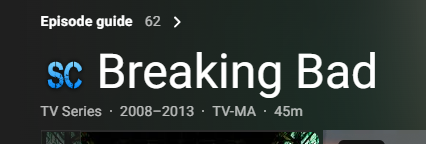
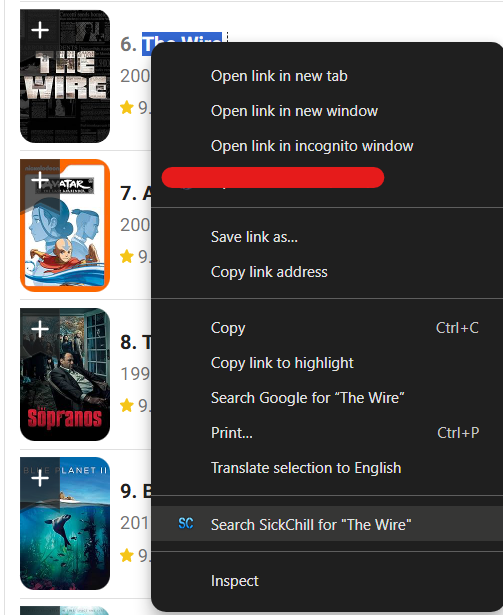
This is a "helper" extension designed to streamline the process of adding new shows to SickChill. The extension identifies TV shows on supported websites (like IMDb) by injecting a small SickChill icon next to the title. Alternatively, you can highlight any text, right-click, and add the show via the context menu. A click on either of these takes you directly to the "Add Show" page in your SickChill, with the show's name already pre-filled in the search bar.
Visit the project's homepage for a more detailed overview.
- Quick Link: Injects an 'Add to SickChill' link on user-configured show pages.
- Context Menu Support: Highlight any show's name on any page, right-click, and add it directly to SickChill.
- Automated Search: Opens the 'Add Show' page in SickChill and starts the search automatically.
- Flexible Setup: Supports custom rules for site recognition via the options page.
- Data Management: Includes functionality to back up and restore your settings.
For this extension to work, you must have a running installation of SickChill.
You have two options for installation:
Please be aware that there may be some delay between new features being available and the plugin being updated on the store.
- Clone or download this repository.
- Open Chrome and navigate to
chrome://extensions. - Enable "Developer mode" in the top right corner.
- Click "Load unpacked".
- Navigate to and select the
./pluginfolder from this repository.
After installation, you need to configure the extension to connect to your SickChill installation.
- Open Options: Right-click the extension icon in your browser and select "Options".
- General Settings: Fill in your SickChill URL (internal/external) and your API key.
- Configure Sites: To get started quickly, you can download a pre-configured settings file for IMDb:
- Download getting_started.json.
- On the options page, go to "Data Management", click "Restore Settings", and select the file you just downloaded. Note: This will overwrite your current settings.
Important: The source code for the browser extension itself is located in the ./plugin directory. The other files in the root of the repository (like index.html, images, etc.) belong to the project's homepage.
Feedback and suggestions for improvement are always welcome!
If you find this extension useful, please consider supporting its development with a small donation.

Please report bugs or suggest features under the 'Issues' tab in this repository. Pull requests are also welcome.
The icon and the name "SickChill" are borrowed from the official SickChill project and belong to their respective owners. This extension is an independent and unofficial project.