
A beautiful, free, open-source personal game library for Windows.
Track, organize, rate and launch every game you own — Steam, Epic, GOG, Ubisoft Connect, and custom — from one sleek desktop app.




v1.2.1 adds Ubisoft Connect as a full first-class platform and introduces collapsible library sections.
| Feature | Description |
|---|---|
| Ubisoft Connect | Added alongside Steam, Epic Games, and GOG as a default platform |
| Ubisoft Auto-Scan | Reads Windows registry (HKLM\SOFTWARE\WOW6432Node\Ubisoft\Launcher\Installs) to detect installed games and executables |
| Ubisoft Launch | Launches games directly via ubisoft://launch/{id} protocol with full playtime tracking |
| Ubisoft Platform Badge | Sidebar filter, spin wheel filter, stats chart, library growth chart, and Year in Review all support Ubisoft |
| Filter Builder Support | Ubisoft Connect available as a platform option in the advanced filter builder |
| Game Detail Panel | Shows Ubisoft Game ID in the info section |
| Collapsible Sections | Play Next and Recently Played rows can be collapsed with one click — preference persists across sessions |
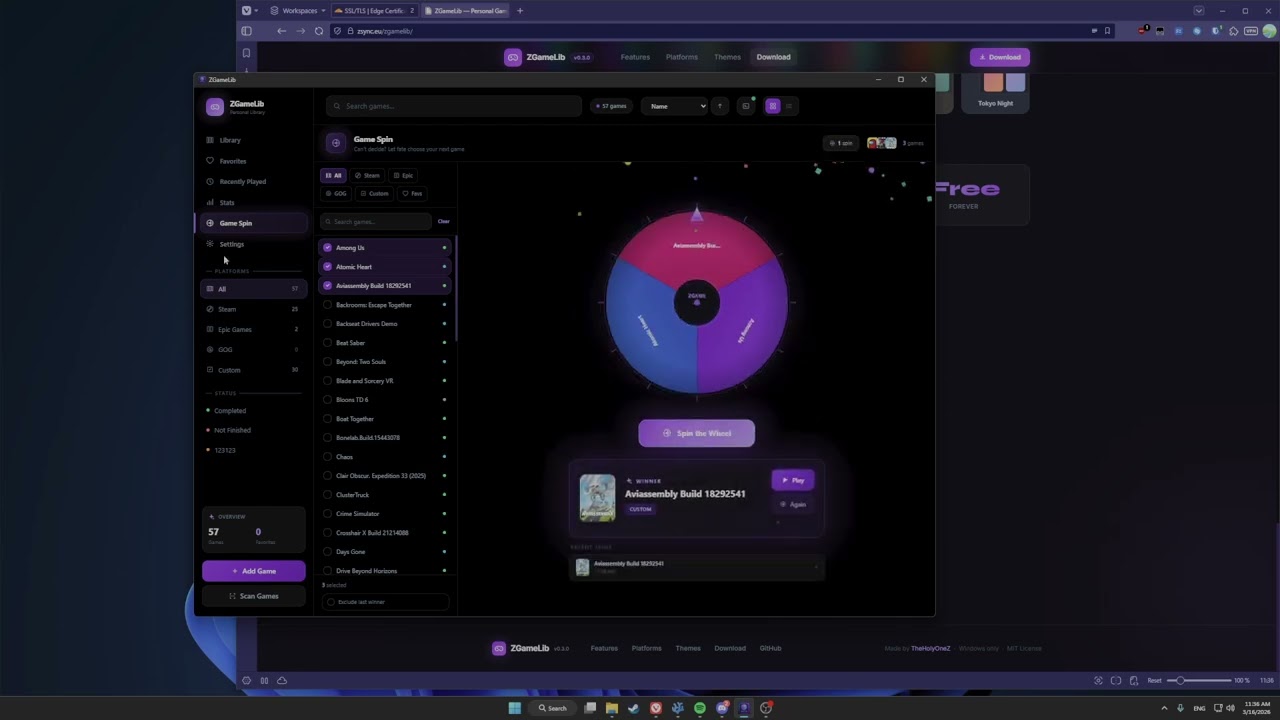
Recorded on v0.3.0. Latest version includes game session management, onboarding tour, Year in Review, smart recommendations, and many more improvements.


| Installer | Format | Notes |
|---|---|---|
| ZGameLib_1.2.1_x64_en-US.msi | .msi |
Recommended — Windows Installer |
| ZGameLib_1.2.1_x64-setup.exe | .exe |
NSIS alternative installer |
Windows SmartScreen: On first launch you may see "Windows protected your PC" — click More info → Run anyway. This is expected for unsigned indie apps.
- What's New in v1.2.1
- Features
- Keyboard Shortcuts
- Tech Stack
- Architecture
- Database Schema
- Scanner Details
- External Integrations
- Project Structure
- Building from Source
- License
The signature 1.0 feature. On first launch, users pick a tour mode — ZGameLib then walks through the entire UI automatically.
Tour Modes
| Mode | Steps | Time | Description |
|---|---|---|---|
| Quick Start | 10 | ~2 min | Just the essentials to get started |
| Standard Tour | 23 | ~5 min | All major features at a surface level |
| Deep Dive | 37 | ~10 min | Every tab, every setting, every trick |
Tour Engine
- Animated spotlight overlay — SVG mask-based cutout with accent glow ring, double pulse rings, and radial gradient highlight; auto-scrolls off-screen targets into view before measuring
- Live UI demonstrations — each step actually opens the real UI element: scan dropdown expands and highlights its options, context menu appears on game cards via synthetic right-click, Add Game modal opens, game detail tabs switch automatically, settings page scrolls to each section
- Full coverage — dedicated steps for Bulk IGDB, Remove Duplicates, Scan Log, HLTB, IGDB in detail panel, Game Spin, Collections, Stats, Wrapped, and all Settings sections
- Auto-scan on welcome — scan runs automatically when the tour starts so games populate while the user watches
- Chapter system (Deep Dive) — 37 steps organized into 9 labeled chapters with gradient indicator strip: Start · Getting Games In · The Library · Filtering · Game Cards · Game Detail · Pages · Settings · Finish
- Cinematic finale — tour ends with a fly-through purple heart animation and "Made By TheHolyOneZ" credit
afterRenderhook system — context menu and overlays open after the spotlight is stable, preventing scroll-triggered dismissal- Keyboard navigation — Enter/→ advances, ← goes back, Escape skips
- Re-triggerable — "Take the Tour" in Settings → About re-runs any mode at any time
- Onboarding reset on upgrade — users upgrading from 0.x automatically receive the tour on first 1.0.0 launch
|
Auto-scanning
Uninstalled Steam Games
Duplicate Management
Cover Art Resolution Chain
|
Views & Sorting
Filtering
Per-Page Search Bar
Context Menu & Health
Bulk IGDB Scan
Command Palette (
Batch Multi-Select
Collections
Weekly Playtime Goal
Contextual Empty State
|
|
🟦 Steam
|
⬛ Epic Games
|
🔵 Ubisoft Connect
|
|
⬜ GOG / Custom
|
Playtime Tracking
- A background thread watches the game's install directory for running processes via
CreateToolhelp32Snapshot+QueryFullProcessImageNameW— no console flicker, ~10× faster than subprocess polling - Multi-process games (launcher stub → real exe) are handled with an adaptive grace window: 300 s for the initial launcher handoff, then 30 s once the real game is confirmed running
- Records elapsed minutes and saves a session row when the game exits; fires a
game-session-endedevent to the frontend so playtime updates instantly without a manual refresh - Updates
last_playedtimestamp on launch - Falls back to timeout-based tracking when no install directory is resolvable — session stays active until manually stopped
- Game-already-running detection — if you try to launch a game while another is tracked, an in-app confirm dialog offers "Stop & Launch" to kill the running game (
TerminateProcess) and start the new one - Live "Playing" indicator — the play button shows a pulsing green "Playing" state while a game session is active
- Idle detection — polls
GetForegroundWindowevery 30 s; if the game window loses focus for 5+ consecutive minutes, that idle period is excluded from the session total; brief alt-tabs are ignored; can be toggled off in Settings → Behavior - Steam Playtime Sync — enter your Steam API Key and SteamID64 in Settings → Integrations; sync only increases local values, never decreases
- Minimize on launch — ZGameLib hides to tray with a 400 ms delay (for window focus handoff), then auto-restores when the game exits
A slide-in drawer (500 px wide) that opens without navigating away from your library.
|
Info Tab
|
Screenshots Tab (label shows count, e.g. "Screenshots (6)")
History Tab (label shows count, e.g. "History (3)")
Mods Tab
|
Notes
- Timestamped notes per game — full history preserved
- Inline editor per note (edit / delete)
- Markdown preview — per-note toggle between edit (pencil) and rendered preview (eye icon); renders full Markdown with sanitization
- New note textarea at the bottom
- Ctrl + Enter to save a new note
Cover
- Click the cover image → full-size lightbox overlay with spring animation
- Hover the cover → "Change Cover" button appears for replacing it
- Cover search: browse Steam's portrait database by name, click to apply instantly
Supports both major Unity modding frameworks, integrated directly in the game detail panel.
|
BepInEx (C# mods for Unity Mono games)
|
MelonLoader (IL2CPP & Mono mods)
|
Shared Mod Management
- List view of all installed
.dllmods with file sizes - Add a mod: native file picker → copies DLL to the correct folder
- Remove a mod: single click, immediate
- Open mods folder directly in Windows Explorer
Can't decide what to play? Let the wheel decide.
|
Wheel
|
Controls & Result
|
Stats Dashboard (/stats)
| Card | What it shows |
|---|---|
| Total Games | Full library count |
| Total Playtime | Summed across all games |
| Average Rating | Mean of rated games |
| Favorites | Count of hearted games |
| Completed | Count with Completed status |
| Rated | Count with any rating |
All stat cards are clickable — each navigates to the Library with the relevant filter or sort pre-applied.
- Platform breakdown — horizontal proportion bars (clickable, filters library)
- Status breakdown — pill badges per custom status with counts (clickable)
- Rating distribution — horizontal bar chart showing game count per rating (1–10)
- Completion rate — circular SVG progress ring
- Top 5 rated games — ranked list with cover thumbnails
- Playtime — Last 12 Weeks — bar chart grouped by ISO week; bars grow from bottom with staggered entrance animation; hover for exact hours; weeks labeled every other column to avoid crowding
- Lowest Rated — up to 5 games with a rating ≤ 4, scores highlighted in red
- Most Neglected — up to 5 games with zero recorded playtime, sorted by time in library, with "Added X days ago" label
- Library Growth — stacked bar chart showing how many games were added per calendar month, bars colored by platform; legend at the bottom
- Staggered entrance animations
Year in Review (/wrapped)
- Accessible from the sidebar and
Wshortcut - Year selector — defaults to current year; only shows years that have session data
- 9 animated stat cards (Framer Motion staggered entry):
- Hero: total hours across total sessions
- Most Played: game cover, name, platform badge, total hours this year
- Top Rated: highest-rated game played or added in the year
- New Additions: games added to the library this year
- Completed: games marked completed this year
- Longest Session: formatted as hours + minutes
- Busiest Month: month name with 12-bar chart of all months' session counts
- Platform Split: SVG donut chart of platform distribution
- Games Explored: distinct games with at least one session
- Empty state when no session data exists for the selected year
A "Play Next" strip that surfaces backlog games the user is most likely to enjoy.
- Algorithm (frontend-only, all data local):
- Taste profile = tag union + genre of all games rated ≥ 8
- Score = matching tags × 2 + genre match × 3
- Tiebreak: longest time in library (most neglected wins)
- Only surfaces games with
status = none/backlogandplaytime_mins < 30
- Strip — collapsible horizontal scroll row below the Pinned row, above the main grid; up to 5 cards
- Hint label — each card shows "X matching tags" so the user knows why it was surfaced
- Per-card dismiss — × button hides that game for the session (no persistent blacklist)
- Threshold guard — only renders when library has ≥ 3 games rated ≥ 8 AND ≥ 3 eligible suggestions
| # | Theme | Accent | Base Background |
|---|---|---|---|
| 1 | Dark (default) | 🟣 Purple | #07060b |
| 2 | AMOLED | 🟣 Purple | #000000 pure black |
| 3 | Nord | 🔵 Frost blue | #2e3440 |
| 4 | Catppuccin Mocha | 🪻 Mauve / Lavender | #1e1e2e |
| 5 | Dracula | 🌸 Pink / Red | #282a36 |
| 6 | Gruvbox | 🟠 Warm orange | #282828 |
| 7 | Tokyo Night | 💙 Blue cyan | #1a1b26 |
| + | Custom | Any color | Any color |
Custom Theme Creator — pick one accent color and a background; ZGameLib auto-generates all 8 accent shades (200–900) via HSL math. The entire app previews live as you adjust colors. Save with a name, edit or delete anytime.
All themes are implemented as CSS custom properties (--accent-200 through --accent-900). Every accent color, gradient, glow, glass effect, and border throughout the entire UI responds to the active theme.
CSS Design System (click to expand)
Glass Effects
.glass—backdrop-filter: blur(20px)with frosted border.glass-strong— enhanced opacity variant.glass-sidebar— sidebar-specific frosted panel
Glow Effects
.glow-purple— accent-colored box shadow.glow-sm— subtle glow for hover states.glow-inner— inward glow for inputs
Cards
.card-lift— hover translate-Y transform.card-shine— gradient shine overlay on hover.border-gradient— animated gradient border
Buttons
.btn-primary— gradient fill with glow.btn-ghost— glass morphism border style.btn-icon— compact square icon button
Inputs
.input-glass— semi-transparent with accent border on focus
Animations
fadeIn,slideUp,scaleIn,shimmerkeyframes- Default easing via Framer Motion throughout
Measurements
- Card border radius:
14px - Modal border radius:
20px - Sidebar glass blur:
20px
- System tray icon — left-click to show/focus; right-click menu: Show · Quit
- Close to tray — ✕ hides the window rather than exiting
- Launch on Windows startup — writes
HKEY_CURRENT_USER\...\Run\ZGameLibvia the Windows registry - Start minimized — launches directly to tray without showing the window
- Window position memory — window position and size saved on close and restored exactly on next launch
- Playtime reminder — on startup, a notification is shown if your longest-neglected game (≥ 30 days since last play) is detected; toggle in Settings → Behavior
- What's New modal — shown automatically on first launch after an update; "What's New" button in Settings → About re-opens it anytime
- All data lives in SQLite at
%APPDATA%\zgamelib\zgamelib.db— no external services - Export library — full JSON dump: ratings, tags, notes, playtime, cover paths, statuses, collections
- Export as CSV — spreadsheet-compatible export with proper quoting (id, name, platform, status, rating, playtime, date, tags)
- Export Filtered — export only the currently visible/filtered subset as JSON
- Import / restore — JSON file re-import; skips exact duplicates
- Trash bin — deleted games are soft-deleted and recoverable from Settings → Data; permanent delete available
- Portable mode — by default the database lives in
%APPDATA%\zgamelib\. To enable portable mode (e.g. for a USB drive):- Go to the folder containing
zgamelib.exe - Create an empty file named
portable.flagthere (right-click → New → Text Document → rename it, or runNew-Item portable.flagin PowerShell) - Launch the app — the database and settings will now be stored in the same folder as the exe
Make sure the file is named exactly
portable.flagwith no.txtextension. If Windows is hiding extensions, check via View → Show → File name extensions. - Go to the folder containing
- Zero telemetry. Zero accounts. Zero cloud.
- Export library JSON uses v3 format — includes
collectionsandcollection_games; backwards-compatible with older exports on import - The only network calls made are: cover art fetching (Steam CDN / GOG / Steam SearchApps), HLTB lookup (on user request), IGDB metadata fetch via Twitch OAuth (on user request), mod installer downloads from GitHub, and the update check against
zsync.eu— all explicitly user-initiated or one-time at startup
| Key | Action |
|---|---|
| / | Focus the search bar on any page |
| N | Open the Add Game modal |
| F | Toggle favorite on the currently open game |
| S | Focus the Scan Games dropdown button |
| W | Navigate to the Year in Review page |
| H | Toggle visibility of hidden/duplicate games |
| 1–9, 0 | Quick-rate the open game detail (0 = 10 stars); only fires when the detail panel is open |
| Escape | Close the detail panel, command palette, or any overlay |
| ? | Show / hide the keyboard shortcuts help overlay |
| Ctrl + K | Open the command palette (fuzzy game search + 6 quick actions) |
| Ctrl + Enter | Save a new note in the notes editor |
| Ctrl + Z | Undo last game deletion (triggers the undo countdown if one is pending) |
| Layer | Technology | Version |
|---|---|---|
| Desktop shell | Tauri 2 — Rust + WebView2 | 2.x |
| Frontend framework | React + TypeScript | 18.3.1 |
| Build tool | Vite | 6.0.3 |
| Styling | Tailwind CSS + CSS custom properties | 3.4.14 |
| Animations | Framer Motion | 11.11.11 |
| State management | Zustand | 5.0.1 |
| Server state / caching | TanStack Query (React Query) | 5.59.0 |
| UI primitives | Radix UI — Dialog, Dropdown, Select, Slider, Tooltip, Popover | latest |
| Icons | Lucide React | 0.460.0 |
| Routing | React Router | v6 |
| Database | SQLite via rusqlite — bundled, no install required |
0.32 |
| HTTP (Rust) | ureq — cover art, APIs, update checks |
latest |
| Windows APIs | winreg — Steam/Epic/GOG registry reads + startup entry |
latest |
| Async runtime | Tokio | latest |
| Archive handling | zip — BepInEx / MelonLoader extraction |
latest |
All Rust crates: tauri 2 · rusqlite · serde · serde_json · uuid · chrono · walkdir · tokio · anyhow · dirs · open · ureq · zip · winreg · base64
┌──────────────────────────────────────────────────────────────┐
│                   Frontend  (React + TypeScript)              │
│                                                              │
│   Pages                 Components              Stores       │
│   ─────                 ──────────              ──────       │
│   / Library             Layout (Sidebar,        useGameStore │
│   /favorites            Topbar, PageSearch)     · games[]    │
│   /recent               Library (GameCard,      · filters    │
│   /stats                GameGrid,               · sort       │
│   /wrapped              GameListRow)            · viewMode   │
│   /spin                 GameDetail (drawer)     · hiddenIds  │
│   /collections          ModLoaderPanel                       │
│   /settings             Spin Wheel (SVG)        useUIStore   │
│                         Stats Dashboard         · toasts     │
│                         Wrapped (Year Review)   · modals     │
│                         Recommendations         · statuses   │
│                         OnboardingTour          · logs       │
│                         AddGameModal            · update     │
│                         CoverSearchModal                     │
│                                                              │
│   Hooks: useGames (TanStack Query mutations)                 │
│          useCover (smart cover cache, max 4 concurrent)      │
│          useFilteredGames (memoized filter + sort)           │
└──────────────────────────┬───────────────────────────────────┘
                           │  Tauri IPC  (invoke / listen events)
┌──────────────────────────▼───────────────────────────────────┐
│                   Backend  (Rust + Tauri 2)                   │
│                                                              │
│   commands/games.rs     — Game & Note CRUD                   │
│   commands/scanner.rs   — Steam / Epic / GOG / custom scan   │
│   commands/launcher.rs  — process spawn, playtime tracking   │
│   commands/modloader.rs — BepInEx / MelonLoader management   │
│   commands/settings.rs  — settings, import/export, updates   │
│                                                              │
│   db/schema.rs          — CREATE TABLE + INDEX statements    │
│   db/queries.rs         — all SQL read/write operations      │
│   models.rs             — shared Rust structs                │
│   lib.rs                — Tauri builder, tray, IPC reg.      │
└──────────────────────────┬───────────────────────────────────┘
                           │
┌──────────────────────────▼───────────────────────────────────┐
│           SQLite  (%APPDATA%\zgamelib\zgamelib.db)            │
│    tables:  games · notes · settings · sessions              │
│             collections · collection_games                   │
└──────────────────────────────────────────────────────────────┘
useGameStore — full shape
games: Game[]
selectedGameId: string | null
search: string
sortKey: 'name' | 'rating' | 'last_played' | 'date_added' | 'playtime_mins' | 'sort_order'
sortAsc: boolean
viewMode: 'grid' | 'list'
filters: {
  platform: 'all' | 'steam' | 'epic' | 'gog' | 'custom'
  status: GameStatus | 'all'
  favoritesOnly: boolean
  minRating: number
  tags: string[]
}
hiddenIds: string[]
showHidden: boolean
selectedIds: string[]

setGames · updateGame · removeGame · addGame
setSelectedGameId · setSearch · setSortKey · setSortAsc
setViewMode · setFilter · resetFilters
hideGames · toggleShowHidden · restoreAllHidden
toggleSelected · clearSelected
useUIStore — full shape
toasts: Toast[]
isAddGameOpen: boolean
isDetailOpen: boolean
isScanning: boolean
confirmDialog: { open, title, onConfirm } | null
customStatuses: StatusConfig[]
logs: LogEntry[]
logPanelOpen: boolean
pendingUpdate: Update | null
isCommandPaletteOpen: boolean
tourOpen: boolean
tourMode: 'fast' | 'standard' | 'detailed' | null
isModeSelectorOpen: boolean

addToast · removeToast
setAddGameOpen · setDetailOpen · setScanning
openConfirm · closeConfirm
setCustomStatuses
addLog · clearLogs · setLogPanelOpen
setPendingUpdate
setCommandPaletteOpen
setTourOpen · setTourMode · setModeSelectorOpen| Column | Type | Constraint | Description |
|---|---|---|---|
id |
TEXT | PK | UUID |
name |
TEXT | NOT NULL | Display name |
platform |
TEXT | steam | epic | gog | custom |
|
exe_path |
TEXT | Absolute path to executable | |
install_dir |
TEXT | Game root directory | |
cover_path |
TEXT | Local path or remote URL | |
description |
TEXT | User-editable description | |
rating |
REAL | 0–10 (0 = unrated) |
|
status |
TEXT | none | backlog | playing | completed | dropped | on_hold |
|
is_favorite |
BOOL | Favorites flag | |
playtime_mins |
INTEGER | Tracked playtime in minutes | |
last_played |
TEXT | ISO 8601 timestamp | |
date_added |
TEXT | ISO 8601 timestamp | |
steam_app_id |
INTEGER | UNIQUE | Steam numeric app ID |
epic_app_name |
TEXT | UNIQUE | Epic catalog item ID |
tags |
TEXT | JSON array of strings | |
sort_order |
INTEGER | Manual drag-sort order | |
deleted_at |
TEXT | ISO 8601 — set when soft-deleted; NULL = active |
|
is_pinned |
INTEGER | NOT NULL DEFAULT 0 | Pinned to top of library |
custom_fields |
TEXT | NOT NULL DEFAULT '{}' | JSON map of user-defined key/value metadata |
hltb_main_mins |
INTEGER | HowLongToBeat main story time in minutes | |
hltb_extra_mins |
INTEGER | HowLongToBeat completionist time in minutes | |
genre |
TEXT | IGDB genre (first match) | |
developer |
TEXT | IGDB developer company name | |
publisher |
TEXT | IGDB publisher company name | |
release_year |
INTEGER | IGDB first release year | |
igdb_skipped |
INTEGER | NOT NULL DEFAULT 0 | 1 when user cleared IGDB data |
not_installed |
INTEGER | NOT NULL DEFAULT 0 | 1 for games owned but not installed |
Indexes: platform · is_favorite · status · last_played
| Column | Type | Constraint | Description |
|---|---|---|---|
id |
TEXT | PK | UUID |
name |
TEXT | NOT NULL | Display name (max 100 chars) |
created_at |
TEXT | NOT NULL | ISO 8601 |
description |
TEXT | Optional notes / description |
| Column | Type | Constraint | Description |
|---|---|---|---|
collection_id |
TEXT | FK → collections.id ON DELETE CASCADE |
|
game_id |
TEXT | FK → games.id ON DELETE CASCADE |
Primary key: (collection_id, game_id)
| Column | Type | Description |
|---|---|---|
id |
TEXT PK | UUID |
game_id |
TEXT FK | References games.id |
content |
TEXT | Note body |
created_at |
TEXT | ISO 8601 |
updated_at |
TEXT | ISO 8601 |
Index: game_id
| Column | Type | Description |
|---|---|---|
id |
TEXT PK | UUID |
game_id |
TEXT FK | References games.id |
started_at |
TEXT | ISO 8601 — session start time |
ended_at |
TEXT | ISO 8601 — session end time |
duration_mins |
INTEGER | Rounded minutes played |
Index: game_id
| Key | Values | Default | Description |
|---|---|---|---|
theme |
dark | amoled | nord | catppuccin | dracula | gruvbox | tokyonight | custom-{id} |
dark |
UI theme |
custom_themes |
JSON array | [] |
User-created themes |
pagination_enabled |
true | false |
false |
Split library into pages |
pagination_page_size |
6–200 |
24 |
Games per page when pagination is on |
default_view |
grid | list |
grid |
Default library view |
grid_columns |
0 (auto) | 3–6 |
6 |
Grid column count; 0 = auto-fill |
steam_path |
path string | auto | Steam install override |
epic_path |
path string | auto | Epic manifests path override |
custom_statuses |
JSON array | built-ins | User-defined status list |
auto_scan |
true | false |
false |
Scan all platforms on startup |
show_playtime_on_cards |
true | false |
true |
Show playtime badge on game cards |
minimize_on_launch |
true | false |
true |
Hide window when launching a game |
start_minimized |
true | false |
false |
Launch to tray silently |
close_to_tray |
true | false |
true |
✕ hides rather than exits |
autostart |
true | false |
false |
Register in Windows startup |
playtime_reminders |
true | false |
true |
Show neglected-game reminder on startup |
steam_api_key |
string | null |
Steam Web API key |
steam_id_64 |
string | null |
Steam SteamID64 |
exclude_idle_time |
true | false |
true |
Deduct idle periods ≥5 min from session |
include_uninstalled_steam |
true | false |
false |
Pull owned uninstalled Steam games on startup |
onboarding_completed |
true | false |
false |
Whether the onboarding tour has been completed |
onboarding_tour_mode |
fast | standard | detailed | "" |
"" |
Tour mode chosen at first launch |
last_seen_version |
version string | "" |
Used for What's New modal detection |
Reads libraryfolders.vdf to discover all Steam library locations, then parses every steamapps/appmanifest_*.acf manifest file. Cover art fetched from:
https://cdn.steamstatic.com/steam/apps/{appId}/library_600x900.jpg
Reads C:\ProgramData\Epic\EpicGamesLauncher\Data\Manifests\*.item JSON files. Each manifest contains AppName, DisplayName, InstallLocation, and LaunchExecutable. Launched via:
com.epicgames.launcher://apps/{AppName}?action=launch&silent=true
Reads HKEY_LOCAL_MACHINE\SOFTWARE\GOG.com\Games from the Windows registry. Cover art fetched from:
https://api.gog.com/products/{id}
Falls back to Steam SearchApps if GOG's API returns nothing useful.
Walks up to 6 directory levels deep using this priority chain:
| Priority | Rule |
|---|---|
| 1 | Exe name fuzzy-matches the folder / game name |
| 2 | Known launcher pattern (launcher.exe, gamelaunch.exe, etc.) |
| 3 | Root-level exe (depth 1) |
| 4 | Largest exe in tree (must be > 5 MB) |
| 5 | UE4/UE5 Shipping exe — last resort fallback |
Minimum size threshold: 500 KB (filters out helper tools)
Skip-list (names always ignored): UnityCrashHandler, CrashReporter, CEFHelper, vcredist, dxsetup, dotnet, VC_redist, EAC, BEService, steamwebhelper, unins, setup, install, update, and more.
Skipped directories: saves · logs · screenshots · redist · __redist · support · tools
| Service | Used For | Triggered By |
|---|---|---|
| Steam CDN | Portrait cover art for Steam games | Auto on scan |
| Steam SearchApps API | Cover search by name (Epic / GOG / Custom) | Auto + Cover Search modal |
Steam Web API (IPlayerService/GetOwnedGames) |
Playtime sync; Pull Uninstalled | User clicks Sync or Pull Uninstalled |
| GOG Product API | Cover art + metadata for GOG games | Auto on scan |
| GitHub Releases API | Latest BepInEx x64 ZIP download | User clicks Install BepInEx |
| GitHub Releases API | Latest MelonLoader x64 ZIP download | User clicks Install MelonLoader |
| HowLongToBeat | Time-to-beat estimates (main story + completionist) | User clicks clock icon in Game Detail |
| IGDB (via Twitch OAuth) | Genre · developer · publisher · release year | User clicks IGDB button or bulk scan |
| Tauri Updater | Checks https://zsync.eu/zgamelib/update.json |
App startup |
ZGameLib/
│
├── build-release.ps1               # PowerShell production build script (recommended)
├── package.json                    # npm deps + scripts
├── vite.config.ts                  # Vite dev server on port 1420
├── tailwind.config.ts              # Custom accent color system, animations
├── tsconfig.json                   # TypeScript compiler config
├── index.html                      # HTML entry, Inter font
│
├── src/                            # React + TypeScript frontend
│   ├── main.tsx                    # React entry point, QueryClient setup
│   ├── App.tsx                     # Router definition + Layout wrapper
│   ├── index.css                   # Global styles, all 7 themes as CSS vars
│   │
│   ├── pages/
│   │   ├── Library.tsx             # Main view: Recommendations + Pinned + game grid/list
│   │   ├── Favorites.tsx           # is_favorite=true filtered view
│   │   ├── RecentlyPlayed.tsx      # last_played DESC, 12 games, time-ago badges
│   │   ├── Stats.tsx               # Statistics dashboard with animated cards
│   │   ├── Wrapped.tsx             # Year in Review — 9 animated stat cards + charts
│   │   ├── Spin.tsx                # SVG randomizer wheel with history & controls
│   │   ├── Collections.tsx         # Collections index + per-collection game grid
│   │   └── Settings.tsx            # Full settings: theme, behavior, statuses, data, about
│   │
│   ├── components/
│   │   ├── layout/
│   │   │   ├── Layout.tsx          # Root shell: sidebar + topbar + outlet + portals
│   │   │   ├── Sidebar.tsx         # Nav links, platform/status filters, overview stats
│   │   │   ├── Topbar.tsx          # Log panel, Remove Duplicates, IGDB scan, Scan, Add Game
│   │   │   └── PageSearch.tsx      # Per-page search + sort + view toggle bar
│   │   │
│   │   ├── library/
│   │   │   ├── GameCard.tsx        # 3:4 cover, overlay Play/Fav/Folder, platform badge, 🔥 on ≥8
│   │   │   ├── GameGrid.tsx        # Responsive CSS grid, handles both view modes + BatchActionBar
│   │   │   ├── GameListRow.tsx     # Compact row: thumbnail, name+status, tags, playtime, rating
│   │   │   ├── BatchActionBar.tsx  # Floating bottom bar for batch status/rating/tag/delete actions
│   │   │   ├── PinnedRow.tsx       # Horizontal strip of pinned games shown above the main grid
│   │   │   ├── Recommendations.tsx # Smart "Play Next" horizontal strip with taste-based scoring
│   │   │   ├── FilterBuilder.tsx   # Advanced filter builder: unlimited rules, AND/OR logic, 8 fields
│   │   │   └── RecentlyPlayed.tsx  # Horizontal scrollable carousel (max 12 games)
│   │   │
│   │   ├── game/
│   │   │   ├── GameDetail.tsx      # Slide-in drawer with Info / Screenshots / History / Mods tabs
│   │   │   ├── GameNotes.tsx       # Note list + inline edit + new note (Ctrl+Enter to save)
│   │   │   └── ModLoaderPanel.tsx  # BepInEx/MelonLoader install, mod list, add/remove
│   │   │
│   │   ├── onboarding/
│   │   │   ├── OnboardingTour.tsx  # Root controller: step index, keyboard nav, finale trigger
│   │   │   ├── TourSpotlight.tsx   # SVG mask overlay with glow ring, pulse rings, auto-scroll
│   │   │   ├── TourCard.tsx        # Glass-morphism floating card with progress bar and chapter strip
│   │   │   ├── TourModeSelector.tsx# Full-screen mode picker (Quick / Standard / Deep Dive)
│   │   │   ├── TourFinale.tsx      # Cinematic ending: message screen → heart fly-through → credit
│   │   │   └── steps.ts            # All step definitions, FAST_IDS, STANDARD_IDS, DOM helpers
│   │   │
│   │   ├── modals/
│   │   │   ├── AddGameModal.tsx    # Single exe picker or bulk folder scan
│   │   │   ├── CoverSearchModal.tsx# Search Steam by name, 4-col grid, click to apply
│   │   │   ├── WhatsNewModal.tsx   # In-app release notes modal (auto on version bump)
│   │   │   └── ConfirmModal.tsx    # Yes/No dialog with error-style accent
│   │   │
│   │   └── ui/
│   │       ├── Badge.tsx           # Platform / tag pill badges
│   │       ├── PlatformBadge.tsx   # Icon + label badge for Steam / Epic / GOG / Custom
│   │       ├── StarRating.tsx      # Interactive 10-star rating widget
│   │       ├── Icons.tsx           # 40+ custom SVG icons
│   │       ├── GameContextMenu.tsx # Right-click portal menu: Play, Folder, Fav, Pin, Copy, Details
│   │       ├── CommandPalette.tsx  # Ctrl+K overlay: fuzzy game search + 6 quick actions
│   │       ├── Toast.tsx           # Bottom-right toasts (3.5 s auto-dismiss)
│   │       ├── LogPanel.tsx        # Right-side scan log (max 500 entries, auto-scroll)
│   │       ├── EmptyState.tsx      # Centered placeholder with action button
│   │       ├── GlassCard.tsx       # Frosted glass effect card wrapper
│   │       └── ErrorBoundary.tsx   # React error boundary with fallback UI
│   │
│   ├── store/
│   │   ├── useGameStore.ts         # Games, filters, sort, view, hiddenIds (Zustand)
│   │   └── useUIStore.ts           # Toasts, modals, statuses, logs, update, tour state (Zustand)
│   │
│   ├── hooks/
│   │   ├── useGames.ts             # TanStack Query mutations + scan operations
│   │   └── useCover.ts             # Smart cover loader: cache, queue (max 4 concurrent), cancel
│   │
│   └── lib/
│       ├── tauri.ts                # Typed wrappers for every Tauri IPC command
│       ├── types.ts                # TypeScript interfaces: Game, Note, AppSettings, StatusConfig…
│       └── utils.ts                # Formatters, platform color maps, time-ago, constants
│
└── src-tauri/                      # Tauri + Rust backend
    ├── tauri.conf.json             # App ID, window (1400×900, min 1000×700), CSP, updater, bundle
    ├── Cargo.toml                  # Rust crate deps
    ├── build.rs                    # Tauri build script
    │
    └── src/
        ├── main.rs                 # Entry point — calls lib::run()
        ├── lib.rs                  # Tauri builder, system tray, window events, IPC registration
        ├── models.rs               # Game, Note, AppSettings, CoverCandidate, YearInReview structs
        │
        ├── commands/
        │   ├── games.rs            # CRUD for games, notes, sessions; trash/restore/purge; toggle pin
        │   ├── scanner.rs          # Steam/Epic/GOG/custom scan, cover fetch, bulk cover auto-fetch
        │   ├── launcher.rs         # Process spawn, playtime + session tracking, minimize/restore
        │   ├── modloader.rs        # BepInEx + MelonLoader install/uninstall + mod management
        │   ├── settings.rs         # get/save settings, export/import, update check, Steam sync, Wrapped
        │   └── logger.rs           # Static in-memory error buffer + rotating file log (1 MB / 3 files)
        │
        └── db/
            ├── schema.rs           # CREATE TABLE + CREATE INDEX statements
            └── queries.rs          # All SQL operations (CRUD, filter, upsert)
- Rust stable toolchain (MSVC target —
x86_64-pc-windows-msvc) - Node.js 18+
- npm (bundled with Node)
- Windows 10 or 11 with WebView2 runtime (pre-installed on Win11; available via Windows Update or direct download on Win10)
git clone https://github.com/TheHolyOneZ/ZGameLib.git
cd ZGameLib
npm install
npx tauri dev
Rust source changes trigger a full backend recompile. Frontend changes hot-reload instantly.
.\build-release.ps1Outputs installers to src-tauri/target/release/bundle/:
msi/ZGameLib_1.2.0_x64_en-US.msinsis/ZGameLib_1.2.0_x64-setup.exe
MIT © TheHolyOneZ