Windows RAW 9100 Network Print Server and TCP/IP Printer Server for local USB printers.


English | 繁體中文
PrtEasyServer is a Windows RAW 9100 network print server for local USB printers and Windows-installed printers. It turns a Windows PC into a lightweight TCP/IP printer server, so client PCs can install shared printers through a standard IP port without SMB printer sharing, Windows network neighborhood prompts, or account/password dialogs.
- The installer BAT no longer launches PowerShell through Base64-encoded script content.
- It now uses a readable UTF-8 embedded PowerShell script that is extracted and executed at runtime.
- Chinese and English installer messages are preserved while improving readability and reducing suspicious script patterns.
- Added a built-in web page for downloading both the installer BAT and the matching driver package.
- Added automatic driver-package handling so the client PC can try driver installation before falling back to manual setup.
- Added bilingual web page and installer messaging, multi-printer management polish, and improved build metadata for the packaged EXE.
- Initial public release of PrtEasyServer.
- Shared local Windows printers over RAW 9100 TCP/IP ports without SMB printer sharing.
- Included the desktop management UI, startup support, tray behavior, and the basic printer setup workflow.
- Share one or more local printers at the same time
- Windows RAW 9100 print server for standard TCP/IP printer port setup
- TCP/IP printer server flow for local USB printers and Windows-installed printers
- No SMB printer sharing, no network neighborhood password prompt
- Built-in web page for printer list, installer BAT download, and driver package download
- Installer BAT is generated dynamically for each shared printer
- Bilingual desktop UI, web page, and installer messages
- Hostname-first printer connection flow for changing LAN IP environments
- Auto firewall rule check when app starts or services start
- Minimize to tray and startup support
- Turn a Windows PC into a local network print server
- Share a USB printer as a RAW 9100 network printer
- Install printers on client PCs through a TCP/IP port instead of SMB sharing
- Avoid Windows shared-printer credential prompts in office or home LAN environments
- Keep printer connections stable by preferring hostname-based setup when LAN IP changes


Click the preview below to watch the YouTube demo:
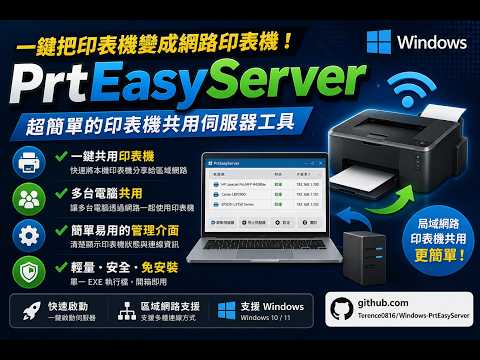

- YouTube: https://youtu.be/uwNWGIuaMrA
- Latest releases: Releases
- Official
v1.1.1.0download: PrtEasyServer.exe - The release page also shows the current download count for the official build
Windows RAW 9100 print server, Windows network print server, TCP/IP printer server, local printer sharing, USB printer over network, IP printer setup, no SMB printer sharing, RAW 9100 printer host, network printer installer BAT, GitHub print server project
This project is based on PrinterOne by xtieume.
Original project: https://github.com/xtieume/PrinterOne
Original attribution:
- Original Copyright (c) 2025 xtieume@gmail.com
- This repository contains modifications, UI changes, multilingual support, web installer download flow, multi-printer support, and packaging updates by Terence0816
This repository is released under the MIT License. See LICENSE.
PrtEasyServer 是一個 Windows RAW 9100 網路印表機伺服器,可把本機 USB 印表機或已安裝在 Windows 上的印表機轉成 TCP/IP 網路印表機。它讓使用者能透過標準 IP 連接埠安裝印表機,不需要使用 Windows 網芳或 SMB 印表機分享,也不需要碰到帳號密碼提示。
- 安裝 BAT 不再使用 Base64 編碼的 PowerShell 啟動方式。
- 改為可讀的 UTF-8 明文嵌入式 PowerShell 腳本,執行時再抽出使用。
- 保留中英文安裝訊息,同時讓內容更容易檢查,也降低部分可疑腳本特徵。
- 新增內建網頁,可直接下載安裝 BAT 與對應的驅動程式封裝。
- 新增驅動程式自動安裝流程,讓用戶端可先嘗試自動安裝,再視情況回退手動安裝。
- 補強中英文網頁、安裝訊息、多印表機管理細節,以及 EXE 打包版本資訊。
- PrtEasyServer 首次公開版本。
- 可將本機 Windows 印表機透過 RAW 9100 方式分享成 TCP/IP 網路印表機,不需 SMB 印表機分享。
- 內含桌面管理介面、系統匣/開機啟動支援,以及基本的印表機安裝流程。
- 可同時分享多台本機印表機
- 採用 Windows RAW 9100 列印服務,適合標準 TCP/IP 連接埠安裝
- 可將 USB 印表機或本機已安裝印表機快速轉成 TCP/IP 網路印表機
- 不使用 SMB 印表機分享,不會跳出網芳帳密問題
- 內建網頁頁面,可直接下載安裝 BAT 與驅動程式
- 介面、網頁、安裝訊息支援中文與英文
- 以主機名稱為優先建立連線,較適合內部 IP 會變動的環境
- 程式啟動或伺服器啟動時可自動檢查防火牆規則
- 支援最小化到系統匣與開機自動啟動
- 需要把 Windows 電腦變成網路印表機伺服器
- 想把 USB 印表機快速分享成 RAW 9100 IP 印表機
- 希望用 TCP/IP 連接埠安裝印表機,而不是使用 SMB 分享
- 不想讓使用者碰到共享印表機的帳號密碼驗證
- 區網 IP 可能變動,但仍希望主機名稱連線維持穩定


點擊下方預覽圖即可開啟 YouTube 示範影片:
- YouTube 影片連結:https://youtu.be/uwNWGIuaMrA
- 版本下載頁面:Releases
- 正式版
v1.1.1.0:PrtEasyServer.exe - GitHub 發行頁右側與上方徽章都可以看到目前的下載次數
Windows 印表機伺服器、網路印表機伺服器、RAW 9100、TCP/IP 印表機伺服器、USB 印表機分享、IP 印表機安裝、無 SMB 分享、無網芳帳密、印表機安裝 BAT、Windows 網路列印
本專案基於 PrinterOne 修改而成。
原始專案:https://github.com/xtieume/PrinterOne
原作資訊:
- Original Copyright (c) 2025 xtieume@gmail.com
- 本專案由 Terence0816 進行後續修改,包含介面調整、多語系、內建網頁、安裝 BAT、多印表機支援與封裝調整
本儲存庫目前使用 MIT License,詳見 LICENSE。