This project is a backend system for managing books, students, and book issuance for college library, with a React frontend.
- Backend: FastAPI (Python)
- Database: PostgreSQL (Aiven Cloud)
- ORM: SQLAlchemy
- Frontend: React (with Vite)
- Styling: Tailwind CSS
- Validation: Pydantic
Library-Management-System/
 │
 ├───backend/
 │   │   .env
 │   │   requirements.txt
 │   │
 │   └───app/
 │       │   dependencies.py
 │       │   main.py
 │       │   __init__.py
 │       │
 │       ├───core/
 │       │      config.py
 │       │      scheduler.py
 │       │      __init__.py
 │       │
 │       ├───crud/
 │       │      crud_book.py
 │       │      crud_book_issue.py
 │       │      crud_student.py
 │       │      __init__.py
 │       │
 │       ├───db/
 │       │      base_class.py
 │       │      database.py
 │       │      init_db.py
 │       │      session.py
 │       │      __init__.py
 │       │
 │       ├───email-templates/
 │       │       due_soon_reminder.html
 │       │       overdue_reminder.html
 │       │
 │       ├───models/
 │       │      book.py
 │       │      book_issue.py
 │       │      common.py
 │       │      student.py
 │       │      __init__.py
 │       │
 │       ├───routers/
 │       │   │   ai_assistant.py
 │       │   │   book_issue_routes.py
 │       │   │   book_routes.py
 │       │   │   health_check.py
 │       │   │   stats_routes.py
 │       │   │   student_routes.py
 │       │   │   __init__.py
 │       │   │
 │       │   ├───ai_assistant/
 │       │         ai_assistant_routes.py
 │       │         __init__.py
 │       │
 │       ├───schemas/
 │       │       ai_assistant.py
 │       │       book.py
 │       │       issue.py
 │       │       student.py
 │       │       __init__.py
 │       │
 │       ├───services/
 │       │       ai_assistant_service.py
 │       │       email_service.py
 │       │       library_analytics_service.py
 │       │       __init__.py
 │       │
 │       ├───utils/
 │               email_utils.py
 │
 ├───frontend/
       │    .env
       │    .gitignore
       |    eslint.config.js
       │    index.html
       │    package.json
       │    package-lock.json
       │    postcss.config.cjs
       │    tailwind.config.cjs
       |    vite.config.cjs
       ├───src/
       │   App.css
       │   App.jsx
       │   index.css
       │   main.jsx
       │
       ├───assets
       │   │
       │   └───textures
       │           leather.jpg
       │           linen.jpg
       │           parchment.jpg
       │
       ├───components
       │       AIAssistant.jsx
       │       BookCard.jsx
       │       ChatInterface.jsx
       │       Navbar.jsx
       │       ResponsiveContainer.jsx
       │
       ├───pages
       │       AddBookPage.jsx
       │       AddStudentPage.jsx
       │       AiAssistantPage.jsx
       │       BookDetailPage.jsx
       │       BooksPage.jsx
       │       EditBookPage.jsx
       │       EditStudentPage.jsx
       │       HomePage.jsx
       │       IssueBookPage.jsx
       │       StudentIssuedBooksPage.jsx
       │       StudentsPage.jsx
       │
       ├───services
               apiClient.js
- Python 3.9+
- Node.js (v18+) and npm/yarn
- Access to the Aiven PostgreSQL database (credentials in
backend/.env) - Access to the Gemini API
- Access to Mailjet API
To enable email notifications, the following environment variables must be set in your .env file (located in the backend/ directory or your deployment environment):
First create an account in Mailjet. Then, get the api and secret keys.
- MAIL_USERNAME=your_api_key
- MAIL_PASSWORD=your_secret_key
- MAIL_FROM=your_registered_mail
- MAIL_PORT=587
- MAIL_SERVER=in-v3.mailjet.com
- MAIL_FROM_NAME=Any Suitable Name
- TEMPLATE_FOLDER=./app/email-templates
git clone https://github.com/Subrojyoti/AI-Library-Management-System.git
cd AI-Library-Management-System- Navigate to the
backend/directory:cd backend - Create a Python virtual environment:
python -m venv .venv - Activate the virtual environment:
.venv/Scripts/activate - Install dependencies:
pip install -r requirements.txt - Create a
.envfile in thebackend/directory by copyingbackend/.env.examplewith proper credentials
- Navigate to the
frontend/directory:cd frontend - Install dependencies:
npm install(oryarn install) - Create a
.envfile in thefrontend/directory by copyingfrontend/.env.example
Create two terminals
-
Teminal 1: Navigate to
backend/directory and run FAST API applicationuvicorn app.main:app --reload -
Terminal 2: Navigate to
frontend/directory and run the React applicationnpm run dev
Frontend will be available at http://localhost:5173 (or other port specified by vite)
API endpoints will be available at http://localhost:8000/api/v1
Swagger UI will be available at http://localhost:8000/docs
Get Book by id:
- GET request
- API available as /api/v1/books/{book_id}
- Parameters: book_id
curl -X GET http://localhost:8000/api/v1/books/1
Response (example)
{
  "author": "Douglas Adams",
  "category": "Science Fiction",
  "created_at": "2023-01-01T10:00:00Z",
  "id": 1,
  "isbn": "9780345391803",
  "num_copies_available": 5,
  "num_copies_total": 5,
  "title": "The Hitchhiker's Guide to the Galaxy",
  "updated_at": "2023-01-01T10:00:00Z"
}
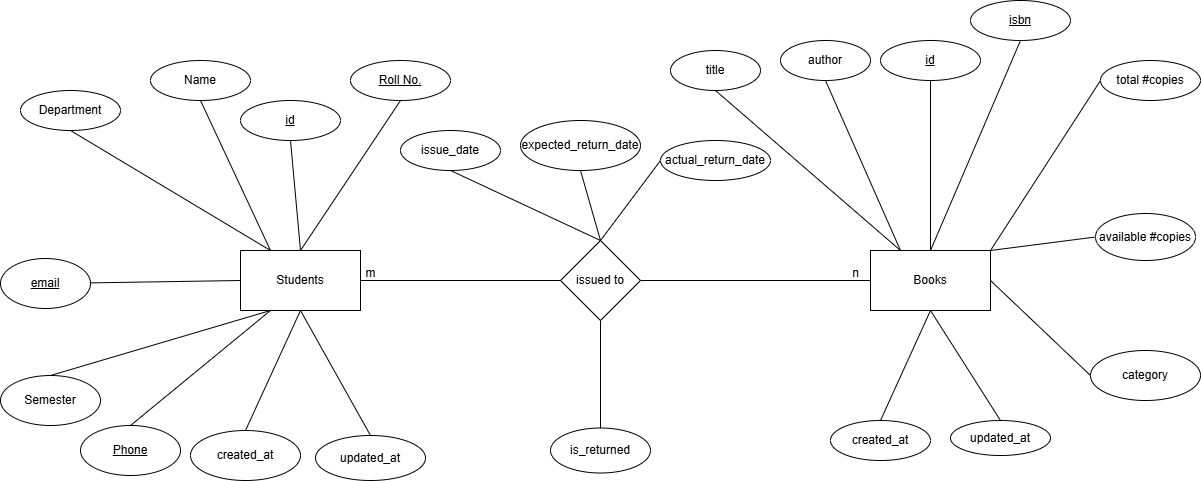
- Students
o	id (int, primary key, auto-incremented)
o	name (string)
o	roll_number(string, unique)
o	department(string)
o	semester(int)
o	phone(string, unique)
o	email(string, unique)
o	created_at(datetime, auto-generated)
o	updated_at(datetime, auto-generated)
- Books
o	id(int, primary key)
o	title(string)
o	author(string)
o	isbn(string, unique)
o	num_copies_total(int)
o	num_copies_available(int)
o	category(string)
o	created_at(datetime, auto-generated)
o	updated_at(datetime, auto-generated)
- Book issue
o	book_id(int, foreign key)
o	student_id(int, foreign key)
o	issue_date(datetime)
o	expected_return_date(date)
o	actual_return_date(datetime, nullable)
o	is_returned(bool)
The system includes a bonus feature to track overdue books and send email reminders to students.
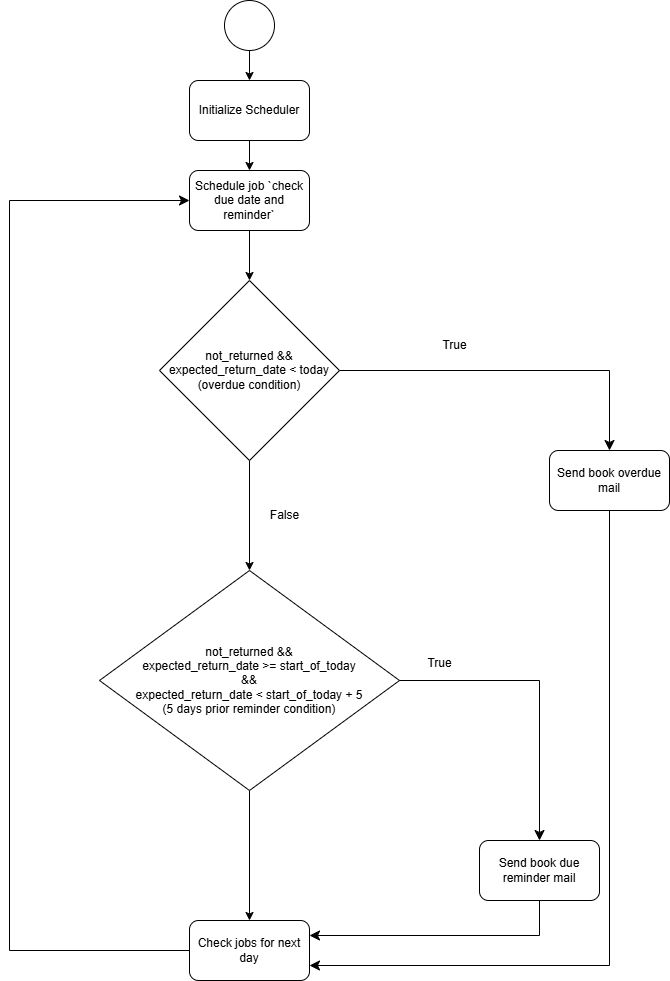
- Scheduling:
APScheduleris used to run a daily job to check for overdue and due-soon books.- The scheduler (
AsyncIOScheduler) is initialized and managed within the FastAPI application's lifespan events (seeapp/main.pyandapp/core/scheduler.py). - A single job (
check_due_dates_and_send_reminders) is scheduled to run daily (default: 4:30 AM UTC (i.e 10:00 AM IST)).
- The scheduler (
- Email Notifications:
fastapi-mailis used for sending HTML email reminders.- Email utility functions are located in
app/utils/email_utils.py. - Email templates (Jinja2 HTML) are stored in the
app/templates/directory:overdue_reminder.html: For books that are past their due date.due_soon_reminder.html: For books due within a configurable window (next 5 days, including today).
- Email utility functions are located in
- Logic:
- CRUD functions in
app/crud/crud_book_issue.py(get_overdue_book_issues,get_due_soon_book_issues) identify relevant book issues. - The scheduled job processes these issues and triggers email sending.
- CRUD functions in
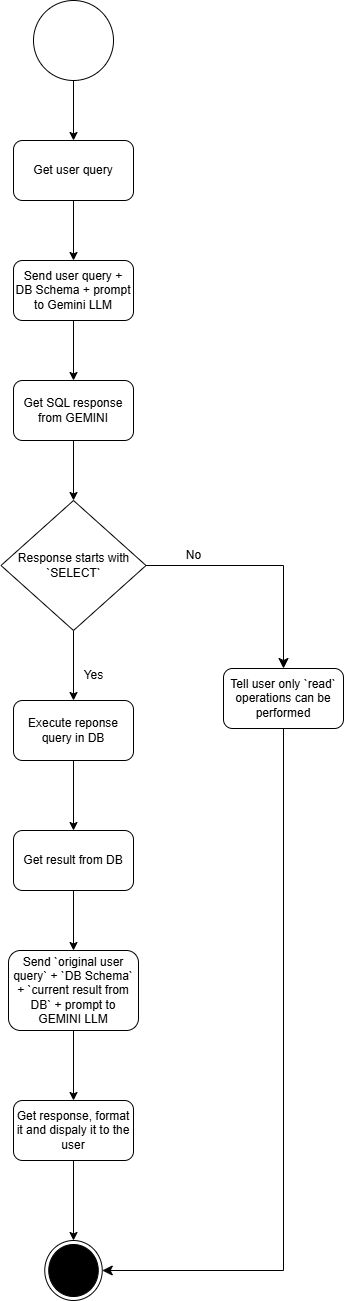
- How many books are overdue ?
- Any Biology related books ?
- Which department borrowed the most books ?
- etc.
For the question, How many new books are added this week ?,
according to my current system implementation, I would need to make another table.
Books Log table, that keeps track of entry of books/copies into the library system. It should store fields book_id, isbn, copies_added, date_of_entry. This table schema will be used as prompt for the AI agent to generate the response, rest of the logic will be same as others.
The Backend (Fast API) is deployed on Render. The Frontend (React) is deployed on Vercel.
The Library Mangement System Application can be accessed at https://ai-library-management-system.vercel.app