Reusable NSTableCellViews #15
Conversation


|
Some rambling thoughts: Cool idea! While this project diverges further for a purely SwiftUI based interface, I think it would be nice to seriously consider performance. I have several thoughts around this, especially considering what a cleaner API would could look like, and the future of this project. Maybe it's worth creating an issue for it. I am really considering moving away from an NSView based content. I think we have most of the tools in place to have a row based on a hosting view. It works better with the newer version of macOS, previous versions of macOS did not change the text color on a highlighted cell, but I think we can make it work. With that said, I am not opposed to a breaking change in the future if it is founded on a strictly better API. |
|
When it comes to the API, I think I would prefer something along the lines of: OutlineView(
data,
selection: $selection,
children: \.children,
separatorInsets: separatorInsets,
cellIdentifier: { fileItem in "My configurable cell identifier, as I may have multiple types of views." }
buildRow: { identifier in FileItemView() }
configureRow: { fileItem, rowView in
(rowView as? FileItemView)?.configure(with: fileItem)
}
)I don't particularly like that we don't have a well typed view in the |

|
So are you describing two different ideas for going forward with this? 1- switching to SwiftUI row views in a NSHostingView, or 2- three closures for cellIdentifier, buildRow, and configureRow? I could get behind either of those, I think 🙂 I love being able to use SwiftUI views because of how much easier it is to put together a view (obviously). The only major difficulty I can think of off the top of my head is that I do love the simplicity of a NSTableCellView's text field being editable (press enter, and the text focuses and starts editing). That certainly wouldn't be impossible to do in SwiftUI, just not as built-in as the NSTableCellView's text field. The multiple closures route works, too, although I wonder at what point are we adding too many different initializers and too much complication? 😆 If we had a generic constraint on RowView and used SwiftUI, wouldn't it be possible to have something like... ...buildRow: { fileItem in RowView(item) }
...
struct RowView: View {
body: some View {
switch item {
case type1: return ViewType1(item)
case type2: return ViewType2(item)
.... etc.
}
}
}I haven't tried anything like this, so maybe it wouldn't work? |
Yes. The first one is idealistic, the second one is pragmatic. I think it comes down to what you think is more useful to have. I would prefer having a SwiftUI view. I think there isn't anything technical preventing us from having that API today (including backwards compatibility; though we will probably need some additional modifiers on top to change the text color on older versions of macOS). And now that I think about it, a SwiftUI view would also resolve the other bug which requires the realod API, and limit the number of initializers (we might remove the NSView based inits). It would be nice to give it a try. public struct OutlineView<Data: Sequence, Drop: DropReceiver, Content: View>: NSViewControllerRepresentable {
[...]
var content: (Data.Element) -> Content
[...]
struct RowView: View {
var isSelected: Bool
var content: () -> Content
var body: some View {
content()
.foregroundColor(isSelected ? .white : nil)
}
}
[...]
}You can construct a RowView like so: RowView(isSelected: isSelected) {
content(item)
}Each NSView for the row will hold a With that said, having something that works for the clients (including you) today, is much more important than not going ahead with it because we can't have an ideal API.
If we were using SwiftUI views, we would handle the reuse of the cells internally in the package (updating the rootView of the NSHostingView on each update). |
|
I'm definitely interested in trying the SwiftUI route. I've had some time open up recently, so I could start working on it. How would you suggest getting started? Probably a separate branch from this one? And probably the simplest thing would be to only replace (in the public initializers) this: content: @escaping (Data.Element) -> NSViewwith this: content: @escaping (Data.Element) -> Contentalong with your code snippets with the |
|
Well, this is promising. Just to test this, I started a new branch and convert the
That's with the following initializer in the OutlineViewExample project: OutlineView(
data,
selection: $selection,
children: \.children,
separatorInsets: { fileItem in
NSEdgeInsets(
top: 0,
left: 23,
bottom: 0,
right: 0)
}
) { fileItem in
Text(fileItem.description)
.font(fileItem.children == nil ? .body : .largeTitle)
.italic()
}That's also with almost no testing, and I don't have a pre-MacOS13 machine to see how it behaves in those environments, but it sure looks promising. |
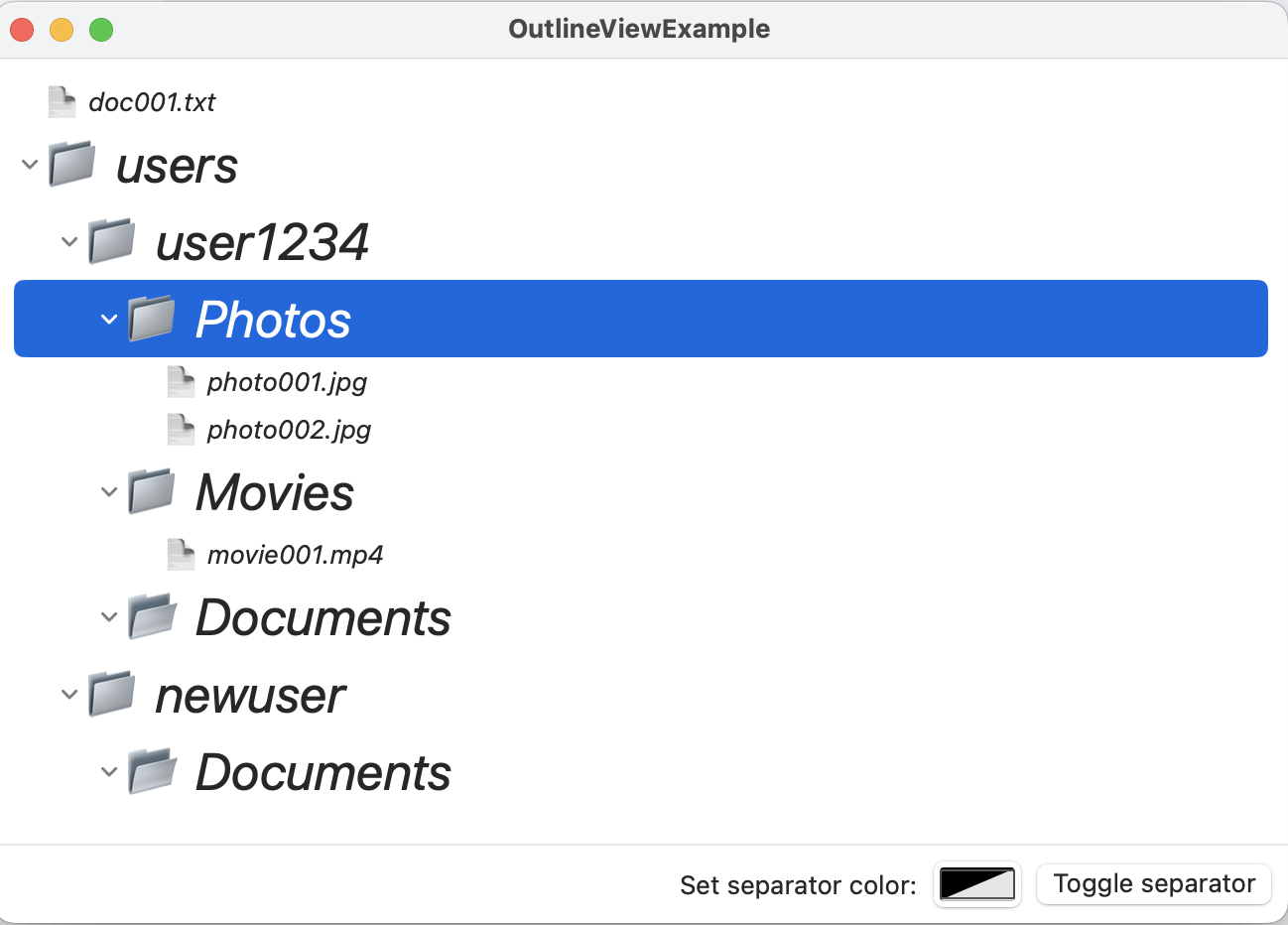
|
Have you tried adding a SwiftUI text field? Would like to know how it compares to the cell view's text field like you mentioned in one of your previous comments. |
|
I did try a quick test with editable text fields, and it's not very good. The text fields become focused as soon as the row they're in is selected, and you can't turn off editing mode. I think it's going to take something more involved to get the text editing to work correctly, but it's also likely that that could be something handled in the Here are a few SO posts where I found similar problems regarding the text editing in Lists: https://stackoverflow.com/q/72254298/1275947 and https://stackoverflow.com/q/57576128/1275947 |
2 participants


As I mentioned in #12
NSOutlineViewDelegaterecommends reusing cell views. I simplified my original code to use reusable cells into one that allows implementations ofOutlineViewto use either the existing single-use views (content: (Data.Element) -> NSView) or a closure that handles view reuse.The new option for
contentparameter inOutlineViewinitializers looks something like this:I provided new initializers for
OutlineView, which brings the number of different initializers up to 16 (oof!), but by doing so I was able to make the update without breaking earlier versions. I haven't updated the example app in this PR or updated theREADME.mdfile, though I'll do those if you are interested in merging.