By Rohan Muppa, ECE @ Purdue
Talk to your Brightspace courses with AI. Ask about grades, due dates, announcements, and more. Works with Claude, ChatGPT, Cursor, and Windsurf.
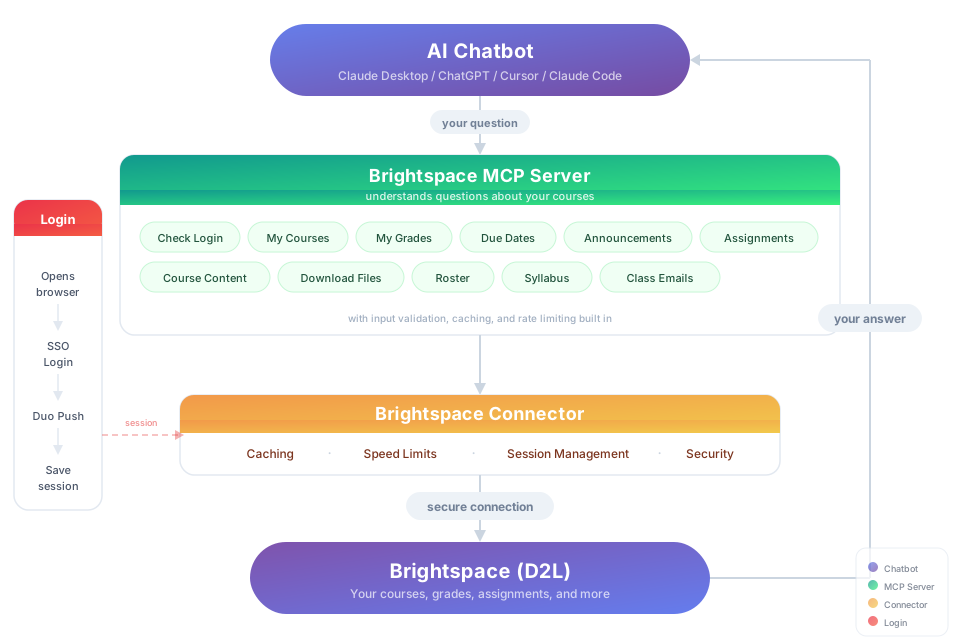
This is an MCP (Model Context Protocol) server that connects your AI to D2L Brightspace so it can pull your grades, assignments, syllabus, and course content on demand.
Works with any school that uses D2L Brightspace, including Purdue, USC, and hundreds more.
"Download my lecture slides and turn them into interactive flashcards" "Grab every assignment rubric and build me a visual dashboard of what I need to hit for an A"
You need: Node.js 18+ (download the LTS version)
Option 1: Let your AI do it
Paste this into Claude Code, Cursor, Windsurf, Copilot, Codex, or any AI coding assistant:
Install brightspace-mcp-server for me by following
https://github.com/RohanMuppa/brightspace-mcp-server/blob/main/LLMs.md
(use --purdue if I'm at Purdue).
Option 2: Run it yourself
npx brightspace-mcp-server setupPurdue students can add --purdue to skip entering the school URL:
npx brightspace-mcp-server setup --purdueThe wizard walks you through login, MFA, and auto configures Claude Desktop and Cursor. Restart your AI client when it finishes.
Using a different client? Configure it manually.
Search your client's docs for how to add an MCP server. The server command to register is:
npx -y brightspace-mcp-server@latest
On Windows, npx must be wrapped: cmd /c npx -y brightspace-mcp-server@latest
You still need to run npx brightspace-mcp-server setup first to save your credentials.
Sessions re-authenticate automatically. If auto-reauth fails (e.g., you missed the Duo push):
npx brightspace-mcp-server auth| Topic | Examples |
|---|---|
| Grades | "Am I passing all my classes?" · "Compare my grades across all courses" |
| Assignments | "What's due in the next 48 hours?" · "Summarize every assignment I haven't turned in yet" |
| Announcements | "Did any professor post something important today?" · "What did my CS prof announce this week?" |
| Course content | "Find the midterm review slides" · "Download every PDF from Module 5" |
| Roster | "Who are the TAs for ECE 264?" · "Get me my instructor's email" |
| Discussions | "What are people saying in the final project thread?" · "Summarize the latest discussion posts" |
| Planning | "Build me a study schedule based on my upcoming due dates" · "Which class needs the most attention right now?" |
- Credentials stay on your machine at
~/.brightspace-mcp/config.json(restricted permissions) - Session tokens are encrypted (AES-256-GCM)
- All traffic to Brightspace is HTTPS
- Nothing is sent anywhere except your school's login page
Want to add your school, build a new tool, or fix something? Fork the repo, make your changes, and open a pull request. If it gets merged, it ships to every user automatically.
git clone https://github.com/RohanMuppa/brightspace-mcp-server.git
cd brightspace-mcp-server
npm install
npm run dev
Add your school: Add a preset to SCHOOL_PRESETS in src/setup.ts. If your school's login flow is different, add a handler in src/auth/.
Add a new tool: Create a file in src/tools/, add the schema in schemas.ts, export it in src/tools/index.ts, and register it in src/index.ts. Use any existing tool as a template.
Run your own version: You can also fork and run it independently. Clone it, build it, and point your AI client to the local build/index.js instead of using npx. No npm needed. Just know that forks don't receive updates from this repo automatically. If your changes could help others, consider opening a PR.
Licensed under the MIT License.
Automatic. Every time your AI client starts a session, it runs npx brightspace-mcp-server@latest which pulls the newest version from npm. No action needed.
If you ever suspect you're on an old version, run npm cache clean --force to clear the cache.
Proudly made for Boilermakers by Rohan Muppa 🚂
Report a bug · MIT · Copyright 2026 Rohan Muppa