
A time tracker for developers who want the speed of a CLI and the convenience of a menu-bar app — without sending your data to a third party.




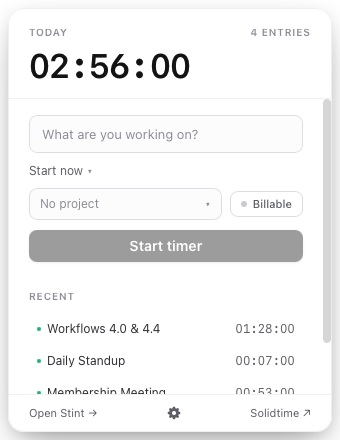
brew tap reyemtech/tap
brew install --cask stint
Launch Stint.app from your Applications folder — it lives in your menu bar. Point it at your Solidtime instance and start tracking:
stint config set solidtime.url https://time.your-org.com
stint start "designing the sync model"
stint stop
stint today          # see what you logged
That's it. Your time is stored locally in SQLite and synced to your own Solidtime server in the background.
Prefer a standalone CLI? No GUI needed:
curl -fsSL https://stint.reyem.tech/install.sh | shToggl / Clockify send your data to someone else's server and don't have a serious CLI. Watson / tt are terminal-only with no menu bar, calendar integration, or sync. Hamster is unmaintained.
stint is the time tracker you'd write for yourself:
- Two surfaces, one database. CLI when you're in the terminal, GUI when
you want to glance at the menu bar. Both share
~/Library/Application Support/stint/stint.db. Start a timer in the terminal and see it update in the menu bar within a second. - Local-first. Every mutation writes to SQLite immediately. Sync happens in the background — offline is fine, queue drains when you reconnect.
- Self-hosted. Your data stays on your Solidtime instance. No monthly SaaS bill, no third-party API dependency.
- Calendar-aware. Connect Google Calendar, Microsoft, or CalDAV — read events and log them with one click. stint learns your project defaults so you barely have to type.
- OAuth + PAT. Personal access tokens for quick setup, OAuth 2.0 PKCE for automatic token rotation. Your choice per instance.
| ⌨️ CLI + 🖥️ GUI | Track from the terminal or the menu bar. Same data, same database, instant cross-surface updates. |
| 📡 Local-first sync | Offline-safe. Writes queue locally and flush with exponential backoff when connectivity returns. |
| 📅 Calendar import | Read-only Google, Microsoft, and CalDAV. Convert events to time entries. Per-calendar include/exclude. |
| 🔐 OAuth + PAT | Personal access tokens or OAuth 2.0 PKCE against your Solidtime instance. Tokens stored in macOS Keychain. |
| ♻️ Crash recovery | Journaled queue won't lose entries. Recovery worker patches gaps on restart. |
| 🔄 Live updates | Timer state polls every 1s. stint start in the terminal, see it in the menu bar instantly. |
| 📦 Self-updating | Auto-update via tauri-plugin-updater. stint update for CLI-only installs. |
| 🏠 Self-hosted | Your Solidtime, your rules. No data leaves your infrastructure. |
flowchart TB
    subgraph Mac ["Your Mac"]
        direction TB
        CLI["stint CLI<br/>(clap, thin)"]
        subgraph App ["Stint.app"]
            Tauri["Tauri 2 (Rust)<br/>IPC commands"]
            UI["SolidJS + Tailwind<br/>(Vite HMR)"]
        end
        subgraph Core ["stint-core (shared library)"]
            SQLite[("SQLite Store")]
            Sync["Sync Queue"]
            Timer["Timer Service"]
            SC["Solidtime Client<br/>(HTTP)"]
            Cal["Calendar Integration<br/>(Google / MS / CalDAV)"]
        end
        Keychain["macOS Keychain<br/>(secrets / OAuth)"]

        CLI --> Core
        Tauri --> Core
        UI <--> Tauri
        SQLite <--> Sync
        SQLite <--> Timer
        Timer <--> SC
        SC <--> Sync
        SQLite <--> Cal
        Core <--> Keychain
    end

    Solidtime["Solidtime API<br/>(self-hosted)"]

    SC <--> Solidtime
Key design decisions:
stint-coreis the only place business logic lives. CLI and Tauri commands are thin wrappers: parse input → call core → format output.- SQLite is the source of truth. The Solidtime server is a sync target, not the primary store. Offline work never blocks.
- Secrets never touch disk unencrypted. OAuth tokens, PATs, and calendar
credentials live in macOS Keychain under
tech.reyem.stint.*. - Sync is a queue, not a transaction. Mutations write locally first, then enqueue for upload. The worker drains with exponential backoff. If a mutation conflicts on the server, the queue entry is abandoned and surfaced.
Full documentation lives at stint.reyem.tech:
- Installation & setup
- CLI reference
- GUI walkthrough
- Solidtime OAuth setup
- Calendar configuration
- Troubleshooting
brew install pnpm rust
cargo install tauri-cli --version "^2.0" --locked
pnpm installcargo build --workspace
cargo test --workspace -- --test-threads=1
cargo clippy --workspace --all-targets -- -D warnings# CLI
cargo run -p stint-cli -- start "debugging sync"
# GUI (Tauri + Vite HMR)
cd crates/stint-app && cargo tauri dev
# UI only (Vite without Tauri shell)
cd ui && pnpm devcrates/
stint-core/ # Business logic: store, sync, timer, Solidtime client
stint-cli/ # CLI binary (thin clap wrappers)
stint-app/ # Tauri 2 binary (windows, tray, IPC)
ui/ # SolidJS + Tailwind frontend
site/ # Astro documentation site
docs/superpowers/ # Design specs & implementation plans
- TDD for
stint-core— write the failing test, then the implementation. - Integration over unit for store-level code — tests run against a real SQLite tempdir.
- Wiremock for HTTP — Solidtime API tests never touch a real server.
assert_cmdfor CLI — end-to-end binary tests.
- Commits: Conventional Commits
with scopes (
feat(core):,fix(sync):,chore(ui):, …). - Branching:
phase-Nbranches frommain, merged via merge commit, tagged asphase-N-complete. - Code style: idiomatic Rust, no
unwrapin production paths, typed errors at the library boundary. SolidJS signals only — no class components.
stint is developed in phases. Each phase has a written spec, a plan, and
a phase-N branch. See the open issues
and phase roadmap for what's next.
- Read the design spec.
- Fork the repo and create a branch from
main. - Write tests first for core changes.
- Open a PR. CI runs lint, test, and typecheck.
Small bug fixes and doc improvements are always welcome without a phase branch.
| Phase | Scope | Status |
|---|---|---|
| 1 | CLI + sync + crash recovery | ✅ shipped |
| 2 | Tauri GUI + SolidJS UI | ✅ shipped |
| 2.5 | CI baseline (lint / test / typecheck) | ✅ shipped |
| 3a | OAuth 2.0 foundation + Solidtime OAuth | ✅ shipped |
| 3b | Calendar (Google + MS + CalDAV) | ✅ shipped |
| 3c | Solidtime down-sync | ✅ shipped |
| 3.5 | Test coverage uplift | ✅ shipped |
| 3d | UX polish + sync resilience | ✅ shipped |
| 4 | Distribution (Homebrew cask + signing + release CD) | ✅ shipped |
| 5 | Documentation site (GitHub Pages) | ✅ shipped |
| 6a | verbs façade + MCP + HTTP API + URL scheme + skill installer | ✅ shipped |
| 6b | Spotlight + App Intents + Focus filter | |
| 6c | Raycast + Alfred + WidgetKit + idle detection | ✅ shipped |
MIT © Reyem Technologies Inc.
reyem.tech · GitHub · Docs