Professional Qt/QML desktop application for visualizing and analyzing rendered image sequence comparisons. This tool provides an interactive interface for comparing FreeDView renderer outputs, identifying visual differences, and managing batch rendering operations.
- Interactive Visualization: Three-page interface for event selection, side-by-side comparison, and detailed analysis
- Frame-by-Frame Analysis: Smooth scrubbing through image sequences with synchronized timeline chart
- Multi-Window Comparison: Side-by-side view of original, test, and difference images with synchronized zoom/pan
- Alpha Channel Analysis: Single-window view with A/B toggle for detailed mask inspection
- Version Management: Filter and compare different FreeDView render versions
- Performance Optimized: Double-buffered image loading, LRU cache, background XML parsing
- Thread-Safe Architecture: Proper mutex usage, queued connections, background workers
- Batch Rendering Integration: Executes external freeDView_tester Python script for automated rendering
- Real-Time Progress Tracking: Progress bars and status updates for long-running operations
- Search and Filter: Table view with search functionality and version-based filtering
Quick Start:
qmake renderCompare.pro
make
./renderCompare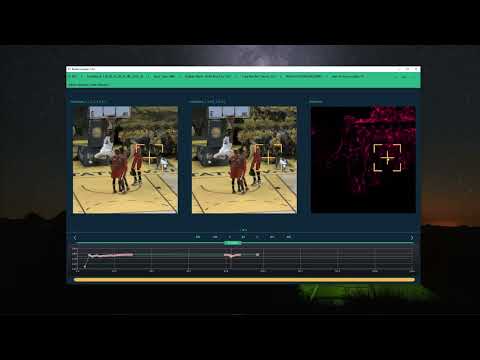
Click the thumbnail above to watch the demo video on YouTube.
 |
 |
 |
 |
 |
 |
 |
 |
 |
Render Compare is a Qt/QML desktop application designed to visualize and analyze the comparison results generated by the freeDView_tester tool. It provides an interactive interface for browsing diff images, alpha masks, and XML reports, enabling visual inspection of render differences between FreeDView versions.
This tool was inspired by a custom internal utility I developed for my team during my tenure as a CG Engineer at Intel. While the original tool served specific automated testing needs, this personal project was rebuilt entirely from scratch to create a generalized, high-performance visual comparison environment.
The system follows a clean architecture with clear separation of concerns:
- C++ Backend: Data management, XML parsing, image path resolution, external process execution
- QML Frontend: UI components, user interactions, visual presentation
- File-Based Communication: Integrates with freeDView_tester output via XML files
This architecture allows the UI to remain responsive during heavy operations (XML parsing, image loading) while providing a smooth, interactive user experience.
The application uses a swipe-based navigation system with three main views:
The main interface for selecting and managing event sets.
Features:
- Sortable and filterable table displaying all test events
- Search functionality (Ctrl+F) for quick filtering
- FreeDView version dropdown for filtering by render version
- Progress bars for ongoing render comparison operations
- Status indicators (Ready, Rendered not compare, Not Ready)
- Double-click to open event set for comparison
- Context menu for editing notes, opening in Explorer, running tests
Data Displayed:
- Event ID, Name, Sport Type, Stadium Name, Category Name
- Number of frames, Minimum value (SSIM), Notes
- Thumbnail preview, Status
Side-by-side comparison of original, test, and difference images.
Features:
- Window A: Original/expected render (imageA)
- Window B: Test/actual render (imageB)
- Window C: Difference visualization (imageC) with HOT colormap
- Synchronized zoom and pan across all three windows
- Synchronized image marks (crosshairs) for precise comparison
- FreeDView version labels showing which versions are being compared
- Individual image effect controls (hue, saturation, lightness) for each window
- Interactive timeline chart with frame navigation
- Frame threshold visualization (red scatter points for frames below threshold)
Use Case: Best for identifying where differences occur and comparing overall visual quality.
Detailed inspection view with alpha mask overlay and A/B toggle.
Features:
- Large single-window view for detailed inspection
- Alpha mask (imageD) overlay with adjustable opacity
- Toggle between original (imageA) and test (imageB) renders (click text or middle mouse button)
- FreeDView version labels
- Full zoom and pan capabilities
- Image effect controls (hue, saturation, lightness, opacity)
- Interactive timeline chart (shared with Page 1)
- Smooth frame scrubbing with double-buffered image loading
Use Case: Best for detailed analysis of specific frames and alpha channel inspection.
The system follows a modular architecture with clear separation between C++ backend and QML frontend:
Purpose: Provides data model for table view, loads XML files in background
Key Features:
- Extends
QStandardItemModelfor QML TableView integration - Background loading via
XmlDataLoaderandQThread - Caching of parsed XML data to avoid re-parsing
- Role-based data access for QML bindings
- Thread-safe data updates via queued connections
Threading Model:
- XML parsing runs in background thread (
XmlDataLoader) - Main thread receives data via signals when parsing completes
- Mutex protection for shared data structures
Purpose: Manages image paths and implements LRU cache for QPixmap objects
Key Features:
- Provides file paths to QML (QML handles native image loading)
- LRU cache for QPixmap objects (configurable size)
- Thread pool for background image operations
- Path resolution based on image type (A, B, C, D)
- Relative path resolution from XML files
Design Decision: Provides paths rather than QML ImageProvider for better performance and flexibility.
Purpose: Reads configuration from renderCompare.ini file
Key Features:
- Automatic INI file discovery (multiple fallback paths)
- Exposes configuration via Q_PROPERTY for QML access
- Path resolution for relative paths
- Error handling for missing or invalid INI files
Purpose: Executes external freeDView_tester Python script via QProcess
Key Features:
- Progress tracking via stdout parsing
- Per-test progress updates (keyed by testKey)
- Error handling and signal propagation
- Supports multiple test phases (all, compare, prepare-ui)
- Process management (start, stop, kill)
Purpose: Provides sorting and filtering for table view
Key Features:
- Extends
QSortFilterProxyModel - Custom filtering logic for render versions
- Search functionality across all columns
- Dynamic filter updates
Main.qml (Root)
├── SplitView
│   ├── TableView (Page 0: Event Selection)
│   │   ├── MainTableViewHeader.qml (Search, filter, controls)
│   │   ├── TableviewHandlers.qml (State management, signals)
│   │   ├── TableviewTable.qml (Table display, context menu)
│   │   └── TableviewDialogs.qml (Edit, error dialogs)
│   └── TheSwipeView.qml (Navigation Container)
│       ├── TopLayout_zero.qml (Page 0: Table View)
│       ├── TopLayout_three.qml (Page 1: 3-Window Comparison)
│       │   ├── ImageItem.qml (×3: A, B, C)
│       │   └── InfoHeader.qml (Event metadata, frame stats)
│       └── TopLayout_one.qml (Page 2: Single Window)
│           ├── ImageItem.qml (D with A/B toggle)
│           └── InfoHeader.qml (Event metadata, frame stats)
└── TimelineChart.qml (Shared across pages 1 & 2)
ImageItem.qml: Reusable image display component with zoom, pan, and effects
- Zoom and pan with mouse/touch gestures
- Image mark synchronization across views
- Context menu for image effects (hue, saturation, lightness, opacity)
- Smooth animations
TimelineChart.qml: Interactive timeline chart for frame visualization
- Scatter plot with frame values
- Interactive timeline slider
- Zoom and pan functionality
- Threshold-based filtering
- Navigation to problematic frames
ReloadedAllImages.qml: Image management with double-buffered loading
- Dynamic loading of image components (ImageFileAB, ImageFileC, ImageFileD)
- Double-buffered image loading for smooth frame scrubbing
- Integration with ImageLoaderManager
- Pass-through for image effect controls
User double-clicks row
    ↓
TopLayout_zero.qml::openSelectedSet()
    ↓
Main.qml::openProjectUpdate()
    ↓
TheSwipeView::initializeImageViews()
    ↓
ImageItem::startLoadAllImages()
    ↓
ReloadedAllImages::startLoadAllImages()
    ↓
ImageLoaderManager::getImageFilePath() (for each frame)
    ↓
QML Image component loads from file path
User moves timeline slider
    ↓
TimelineChart::moveMarks()
    ↓
Main.qml::changeIndex()
    ↓
TheSwipeView::indexUpdate()
    ↓
TopLayout_three/one::indexUpdate()
    ↓
ImageItem::indexUpdate()
    ↓
ReloadedAllImages::indexUpdate()
    ↓
ImageFileAB/C/D::indexUpdate() (double-buffered loading)
User presses middle mouse button
    ↓
ImageItem::onClicked() (Qt.MiddleButton)
    ↓
ReloadedAllImages::imageSwitchOnTypeD()
    ↓
ImageFileD::imageSwitc()
    ↓
Toggle opacity between buffer1ImageHoldA and buffer1ImageHoldB
    ↓
Load newly visible version if not already loaded (lazy loading)
flowchart TD
    MAIN{"Main.qml (Root)"}

    %% Splitting to force horizontal side-by-side layout
    MAIN === TABLE
    MAIN === SWIPE

    subgraph TABLE ["TableView (Page 0)"]
        THEAD["MainTableView Header"]
        TTAB["TableviewTable<br/>- Sortable<br/>- Filterable<br/>- Searchable"]
        THAND["Tableview Handlers"]

        THEAD ~~~ TTAB ~~~ THAND
    end

    subgraph SWIPE ["TheSwipeView (Navigation)"]
        TOP3["TopLayout_three (Page 1)<br/>[ ImageA | ImageB | ImageC ]"]
        TOP1["TopLayout_one (Page 2)<br/>[ ImageItem (D) + A/B Toggle ]"]
        CHART["TimelineChart<br/>(Shared)"]

        TOP3 ~~~ TOP1 ~~~ CHART
    end

    %% C++ Backend Nodes
    XML["XmlDataModel (C++ Backend)<br/>- XML Parsing<br/>- Data Model<br/>- Threading"]
    LOADER["ImageLoader Manager (C++ Backend)<br/>- Path Resolution<br/>- LRU Cache<br/>- Thread Pool"]
    RUNNER["TesterRunner (C++ Backend)<br/>- QProcess<br/>- Progress Track<br/>- Error Handle"]

    %% Connecting Frontend to Backend
    TABLE ==> XML
    TABLE ==> LOADER
    SWIPE ==> LOADER
    SWIPE ==> RUNNER

    %% Styling
    style MAIN fill:#2D3748,stroke:#63B3ED,stroke-width:2px,color:#FFFFFF

    style TABLE fill:none,stroke:#68D391,stroke-width:2px,color:#E2E8F0
    style SWIPE fill:none,stroke:#68D391,stroke-width:2px,color:#E2E8F0

    style THEAD fill:#253237,stroke:#63B3ED,color:#E2E8F0
    style TTAB fill:#253237,stroke:#63B3ED,color:#E2E8F0
    style THAND fill:#253237,stroke:#63B3ED,color:#E2E8F0

    style TOP3 fill:#253237,stroke:#63B3ED,color:#E2E8F0
    style TOP1 fill:#253237,stroke:#63B3ED,color:#E2E8F0
    style CHART fill:#253237,stroke:#63B3ED,color:#E2E8F0

    style XML fill:#2D3748,stroke:#F6AD55,stroke-width:2px,color:#FFFFFF
    style LOADER fill:#2D3748,stroke:#F6AD55,stroke-width:2px,color:#FFFFFF
    style RUNNER fill:#2D3748,stroke:#F6AD55,stroke-width:2px,color:#FFFFFF
📁 renderCompare/
│
├── 📁 src/                    # C++ source code
│   ├── 📄 main.cpp            # Application entry point
│   ├── 📄 xmldatamodel.h/cpp  # XML data model and parsing
│   ├── 📄 xmldataloader.h/cpp # Background XML loader
│   ├── 📄 imageloadermanager.h/cpp  # Image path management and cache
│   ├── 📄 inireader.h/cpp     # INI configuration reader
│   ├── 📄 sortfilterproxymodel.h/cpp  # Table sorting/filtering
│   ├── 📄 freeDView_tester_runner.h/cpp  # External process execution
│   └── 📄 logger.h            # Logging macros
│
├── 📁 qml/                    # QML UI components
│   ├── 📄 Main.qml            # Root component
│   ├── 📄 TheSwipeView.qml    # Navigation container
│   ├── 📄 TopLayout_zero.qml  # Page 0: Table view
│   ├── 📄 TopLayout_three.qml # Page 1: 3-window comparison
│   ├── 📄 TopLayout_one.qml   # Page 2: Single window
│   ├── 📄 ImageItem.qml       # Reusable image component
│   ├── 📄 ReloadedAllImages.qml  # Image management wrapper
│   ├── 📄 ImageFileAB.qml     # Original/test render display
│   ├── 📄 ImageFileC.qml      # Difference image display
│   ├── 📄 ImageFileD.qml      # Alpha mask display
│   ├── 📄 TimelineChart.qml   # Interactive timeline
│   ├── 📄 TableviewTable.qml  # Table display
│   ├── 📄 TableviewHandlers.qml  # Table state management
│   ├── 📄 MainTableViewHeader.qml  # Table header controls
│   ├── 📄 InfoHeader.qml      # Event metadata display
│   ├── 📄 ErrorDialog.qml     # Error dialog component
│   ├── 📄 LogWindow.qml       # Log viewer
│   ├── 📄 Theme.qml           # Centralized theming (singleton)
│   ├── 📄 Constants.qml       # Application constants (singleton)
│   ├── 📄 Logger.qml          # Logging system (singleton)
│   └── 📄 utils.js            # JavaScript utilities
│
├── 📁 resources/              # Embedded resources
│   └── 📁 images/             # UI icons and images
│
├── 📄 renderCompare.pro       # QMake project file
├── 📄 resources.qrc           # Qt resource file
├── 📄 renderCompare.ini.example  # Configuration template
└── 📄 README.md # This file- Qt 5.12+ or Qt 6.x (tested with Qt 5.15 and Qt 6.2+)
- Qt Modules Required:
- Qt Core
- Qt XML
- Qt GUI / Widgets
- Qt QML / Quick
- Qt Quick Controls 2
- Qt Charts
- Qt Concurrent
- C++ Compiler:
- Windows: MSVC 2017+ or MinGW
- Linux: GCC 5.4+ or Clang 3.8+
- macOS: Clang (Xcode)
- qmake: Included with Qt installation
- Python 3.8+ (for freeDView_tester integration, optional)
-
Clone or download the project:
git clone <repository-url>
cd renderCompare
-
Install Qt:
- Download and install Qt from qt.io
- Ensure required modules are installed (see Prerequisites)
-
Configure the INI file:
- Copy
renderCompare.ini.exampletorenderCompare.ini - Edit
renderCompare.iniwith your paths:[freeDView_tester] setTestPath = /path/to/testSets_results freeDViewTesterPath = /path/to/freeDView_tester
- See Configuration section for detailed parameter descriptions
- Copy
-
Build the project:
qmake renderCompare.pro make # or nmake on Windows with MSVC -
Run the application:
./renderCompare # or renderCompare.exe on Windows
- Application should start and display the table view
- Check that
uiData.xmlis loaded (should see events in table) - Verify INI file paths are correct (check log window if issues occur)
-
Start Application: Launch
renderCompare- it automatically loads data fromrenderCompare.ini -
Browse Events:
- Table view displays all available test events
- Use search field (Ctrl+F) to filter by event name, sport type, etc.
- Use version dropdown to filter by FreeDView render version
-
Open Event Set:
- Double-click a row to open the event set for comparison
- Application navigates to Page 1 (3-window comparison view)
-
Compare Renders:
- Page 1: View side-by-side comparison of original, test, and difference
- Page 2: Switch to single-window view for detailed alpha mask analysis
- Use timeline slider to scrub through frames
- Click on chart scatter points to jump to specific frames
-
Analyze Differences:
- Adjust image effects (hue, saturation, lightness) via context menu
- Zoom and pan images (mouse wheel + drag)
- Toggle between render versions (Page 2, middle mouse button)
- Set frame threshold to highlight problematic frames
-
Manage Tests:
- Right-click table row for context menu options
- Edit notes for test events
- Run render comparison operations (if freeDView_tester is configured)
- Open test folder in Explorer
| Shortcut | Action |
|---|---|
| Ctrl+F | Focus search field |
| Double-click row | Open event set for comparison |
| Middle mouse button (Page 2) | Toggle between render versions (A/B) |
| Mouse wheel | Zoom in/out on images |
| Click + drag | Pan images |
| Escape | Close dialogs |
Right-click on any image to open context menu with effect controls:
- Hue: Adjust color hue (-180 to +180)
- Saturation: Adjust color saturation (0 to 200%)
- Lightness: Adjust brightness (-100 to +100)
- Opacity (Page 2 only): Adjust alpha mask opacity (0 to 100%)
- Set minimum frame value threshold in table header
- Frames below threshold appear as red scatter points in timeline chart
- Click on red points to jump to problematic frames
- Useful for identifying frames with low SSIM scores
- Use dropdown in table header to filter by FreeDView version
- "All Render Versions" shows all tests
- Selecting a specific version shows only tests for that version comparison
- Version names extracted from folder structure (e.g.,
freedview_1.2.1.6_1.0.0.5_VS_freedview_1.2.1.6_1.0.0.8)
If freeDView_tester is configured:
- Select multiple rows (Ctrl+Click)
- Right-click and choose "Run All Phases" or "Run Phase 3"
- Progress bars show rendering/comparison progress
- Status updates in real-time
- Click log icon button in table header (upper right) to open separate log window
- View color-coded messages: INFO (green), DEBUG (gray), WARNING (yellow), ERROR (red)
- Filter by log level using checkboxes
- Logs all UI interactions, image operations, timeline controls, and external tool output
- Useful for debugging and monitoring application behavior
The tool is configured via renderCompare.ini:
[freeDView_tester]
# Path to testSets_results directory (where uiData.xml and comparison results are located)
setTestPath = /path/to/testSets_results

# Path to freeDView_tester Python tool (for batch rendering operations)
# See: https://github.com/PerryGu/FreeDView_tester
freeDViewTesterPath = /path/to/freeDView_tester| Parameter | Description | Example |
|---|---|---|
setTestPath |
Base path to testSets_results directory containing uiData.xml and comparison results |
D:\freeDView_tester\testSets_results |
freeDViewTesterPath |
Path to freeDView_tester Python tool directory (optional, for batch rendering) | D:\freeDView_tester |
The application automatically searches for renderCompare.ini in multiple locations:
- Same directory as executable (for deployment)
- One directory up from executable (build directory)
- Project root directory (for development)
- Current working directory
This allows the same executable to work in different deployment scenarios without modification.
The application expects the following structure in setTestPath:
testSets_results/
├── uiData.xml                    # Aggregated data for all tests (generated by [freeDView_tester](https://github.com/PerryGu/FreeDView_tester) Phase 4)
└── SportType/                    # e.g., NFL, MLB, NBA
    └── EventName/                # e.g., E17_01_07_16_01_25_LIVE_05
        └── SetName/              # e.g., S170123190428
            └── F####/            # Frame folder, e.g., F0224
                └── freedview_version1_VS_version2/
                    ├── freedview_version1/    # Original render images
                    ├── freedview_version2/    # Test render images
                    └── results/
                        ├── compareResult.xml  # Comparison data (relative paths)
                        ├── diff_images/       # Difference images
                        └── alpha_images/      # Alpha mask images
Note: All paths in XML files are stored as relative paths (relative to testSets_results root) for cross-platform compatibility and data portability.
The main data file that contains aggregated information about all test events. Located in the testSets_results root directory.
Click to expand uiData.xml example
<?xml version="1.0" encoding="UTF-8"?>
<uiData>
    <renderVersions>
        <version>freedview_1.2.1.6_1.0.0.5_VS_freedview_1.2.1.6_1.0.0.8</version>
        <version>freedview_1.2.1.6_1.0.0.5_VS_freedview_1.2.1.6_1.0.0.9</version>
    </renderVersions>
    <entries>
        <entry>
            <id>001</id>
            <eventName>E15_08_10_19_51_35_LIVE_10</eventName>
            <sportType>MLB</sportType>
            <stadiumName>Dodgers</stadiumName>
            <categoryName>Regular</categoryName>
            <numberOfFrames>62</numberOfFrames>
            <minValue>0.9279</minValue>
            <numFramesUnderMin>5</numFramesUnderMin>
            <thumbnailPath>MLB\Dodgers\E15_08_10_19_51_35_LIVE_10\S170123190428\F0001\freedview_1.2.1.6_1.0.0.5_VS_freedview_1.2.1.6_1.0.0.8\results\diff_images\F0001.png</thumbnailPath>
            <status>Ready</status>
            <notes></notes>
            <renderVersions>freedview_1.2.1.6_1.0.0.5_VS_freedview_1.2.1.6_1.0.0.8</renderVersions>
        </entry>
        <entry>
            <id>002</id>
            <eventName>E16_05_11_20_56_48_LIVE_22</eventName>
            <sportType>NBA</sportType>
            <stadiumName>NCAA Final Four 2017</stadiumName>
            <categoryName>Playoff</categoryName>
            <numberOfFrames>211</numberOfFrames>
            <minValue>0.5492</minValue>
            <numFramesUnderMin>107</numFramesUnderMin>
            <thumbnailPath>NBA\NCAA Final Four 2017\E16_05_11_20_56_48_LIVE_22\S170123190428\F0001\freedview_1.2.1.6_1.0.0.5_VS_freedview_1.2.1.6_1.0.0.8\results\diff_images\F0001.png</thumbnailPath>
            <status>Ready</status>
            <notes>Test notes here</notes>
            <renderVersions>freedview_1.2.1.6_1.0.0.5_VS_freedview_1.2.1.6_1.0.0.8</renderVersions>
        </entry>
    </entries>
</uiData>Individual comparison data file for each test event. Located in results/ subdirectory of each test set.
<?xml version="1.0"?>
<root>
    <sourcePath>MLB\Dodgers\E15_08_10_19_51_35_LIVE_10\S170123190428\F0001\freedview_1.2.1.6_1.0.0.5_VS_freedview_1.2.1.6_1.0.0.8\freedview_1.2.1.6_1.0.0.5</sourcePath>
    <testPath>MLB\Dodgers\E15_08_10_19_51_35_LIVE_10\S170123190428\F0001\freedview_1.2.1.6_1.0.0.5_VS_freedview_1.2.1.6_1.0.0.8\freedview_1.2.1.6_1.0.0.8</testPath>
    <diffPath>MLB\Dodgers\E15_08_10_19_51_35_LIVE_10\S170123190428\F0001\freedview_1.2.1.6_1.0.0.5_VS_freedview_1.2.1.6_1.0.0.8\results\diff_images</diffPath>
    <alphaPath>MLB\Dodgers\E15_08_10_19_51_35_LIVE_10\S170123190428\F0001\freedview_1.2.1.6_1.0.0.5_VS_freedview_1.2.1.6_1.0.0.8\results\alpha_images</alphaPath>
    <origFreeDView>freedview_1.2.1.6_1.0.0.5</origFreeDView>
    <testFreeDView>freedview_1.2.1.6_1.0.0.8</testFreeDView>
    <eventName>E15_08_10_19_51_35_LIVE_10</eventName>
    <sportType>MLB</sportType>
    <stadiumName>Dodgers</stadiumName>
    <categoryName></categoryName>
    <startFrame>0</startFrame>
    <endFrame>61</endFrame>
    <minVal>0.9279</minVal>
    <maxVal>1.0000</maxVal>
    <frames>
        <frame>
            <frameIndex>0</frameIndex>
            <value>0.9876</value>
        </frame>
        <frame>
            <frameIndex>1</frameIndex>
            <value>0.9543</value>
        </frame>
        <frame>
            <frameIndex>2</frameIndex>
            <value>0.9279</value>
        </frame>
    </frames>
</root>
Key Points:
- All paths in XML files are relative to
testSets_resultsroot directory uiData.xmlcontains aggregated data for the table viewcompareResult.xmlcontains frame-by-frame comparison data for the timeline chart- Frame indices in
compareResult.xmlare typically 0-indexed - Status values:
"Ready","Rendered not compare","Not Ready"
-
Double-Buffered Image Loading: Prevents flicker during rapid frame scrubbing
- Two image buffers alternate
- New images load into back buffer
- Swap when ready, keeping old image visible
-
LRU Image Cache: ImageLoaderManager maintains Least Recently Used cache
- Configurable cache size
- Automatic eviction of least recently used items
- Reduces repeated file I/O
-
Background XML Parsing: XML files parsed in background thread
- UI remains responsive during loading
- Progress indication via signals
- Caching prevents re-parsing
-
Lazy Image Loading (Page 2): Only loads visible version plus mask
- Reduces from 3 images to 2 images per frame
- ~33% faster scrubbing on single-window view
- Loads other version when user switches
-
Thread Pool Management: Limited concurrent image operations
- Prevents memory issues
- Configurable thread count (default: 4)
- Frame Scrubbing: < 50ms per frame change
- Memory Usage: Minimal (~24MB for active images)
- Startup Time: Fast (no preloading overhead)
- Image Loading: Smooth transitions with double-buffering
- XML Parsing: Background processing, non-blocking UI
- Qt Core: Basic functionality, threading, file I/O
- Qt XML: XML parsing and manipulation
- Qt GUI/Widgets: Application framework
- Qt QML/Quick: UI framework
- Qt Quick Controls 2: UI components
- Qt Charts: Data visualization (timeline chart)
- Qt Concurrent: Thread pool management
- freeDView_tester: Python tool for batch rendering and comparison
- Required only for batch rendering operations
- Not required for visualization-only usage
- See the freeDView_tester README for details
- Operating System: Windows 7+, Linux, macOS
- RAM: 4GB minimum, 8GB recommended
- Disk Space: Minimal (~50MB for application)
- Display: 1280x720 minimum resolution recommended
Issue: "Failed to load QML file"
- Verify Qt installation includes all required modules
- Check that
resources.qrcincludes all QML files - Verify QML import paths are correct
Issue: "INI file not found"
- Create
renderCompare.inifromrenderCompare.ini.example - Verify INI file is in correct location (see INI File Discovery)
- Check file permissions
Issue: "No events displayed in table"
- Verify
setTestPathin INI file points totestSets_resultsdirectory - Check that
uiData.xmlexists intestSets_resultsroot - Verify
uiData.xmlis valid XML (run freeDView_tester Phase 4 if missing) - Check log window for error messages
Issue: "Images not displaying"
- Verify image paths in XML files are correct (relative to
testSets_results) - Check that image files exist at specified paths
- Verify file permissions
- Check log window for image loading errors
Issue: "Slow frame scrubbing"
- Check disk I/O performance (SSD recommended)
- Verify images are not on network drive
- Reduce image cache size if memory constrained
- Close other applications to free up resources
Issue: "High memory usage"
- Reduce thread pool size in
main.cpp(default: 4) - Reduce image cache size in
ImageLoaderManager - Close unused event sets
Issue: "Batch rendering not working"
- Verify
freeDViewTesterPathin INI file is correct - Check that Python is installed and accessible
- Verify freeDView_tester dependencies are installed
- Check log window for Python script errors
Issue: "Progress bars not updating"
- Verify freeDView_tester is outputting progress to stdout
- Check that test keys match expected format
- Verify INI file configuration for freeDView_tester
Issue: "Timeline chart not displaying"
- Verify Qt Charts module is installed
- Check that XML data contains frame values
- Verify chart data binding is correct
Issue: "Images not synchronizing"
- Check that all ImageItem components are properly connected
- Verify image mark synchronization signals
- Check log window for binding errors
This application is designed to work with the freeDView_tester Python tool, which generates the comparison data that this UI visualizes. The freeDView_tester tool:
- Localizes JSON configuration files
- Executes FreeDView renderer for multiple versions
- Compares rendered images and generates diff/alpha images
- Creates XML reports with comparison metrics
- Aggregates data into
uiData.xmlfor UI consumption
See the freeDView_tester README for detailed information about the testing pipeline.
Current Version: 1.0.0
Qt Compatibility: Qt 5.12+ / Qt 6.x
Platform: Windows (tested), Linux/Mac (should work)
Production-ready tool.
Designed for visualizing and analyzing FreeDView render comparison results.
Features comprehensive error handling, logging, and performance optimizations.
Perry Guy - Technical Artist & CG Engineer
Extensive experience in 3D Graphics, Tool Development, and Performance Optimization.
📧 Email: perryguy2@gmail.com
YouTube Channel: @ThePerryGuy
This project is licensed under the MIT License. See the LICENSE file for details.