Repository files navigation
Install jupyter notebook: pip install jupyter
Run jupyter notebook: jupyter notebook
Other installations for training: refer to BNN_tutorial_wine.ipynb
Introduction to the Bayesian Neural Network
Theory part: read BNN_introduction.ipynb or BNN_introduction.html
Tutorial: read and follow BNN_tutorial_wine.ipynb or BNN_tutorial_wine.html
github desktop 설치 이후 본인 git 계정 로그인 후 화면에서 상단 file>clone repository 선택
Choose 누른 이후에 Local path(내 컴퓨터에 저장할 경로 = vscode에서도 이 폴더에 접근해야함) 선택
이후 PNUVV에 들어가서 작업할 레포지토리 선택 (지금의 경우에는 BNN 연습을 위한 레포지토리)
clone 후 로컬(내 컴퓨터)에 폴더와 폴더 내에 있던 내용이 생겼나 확인
필수 두번째 for own purpose 선택 이후 continue 선
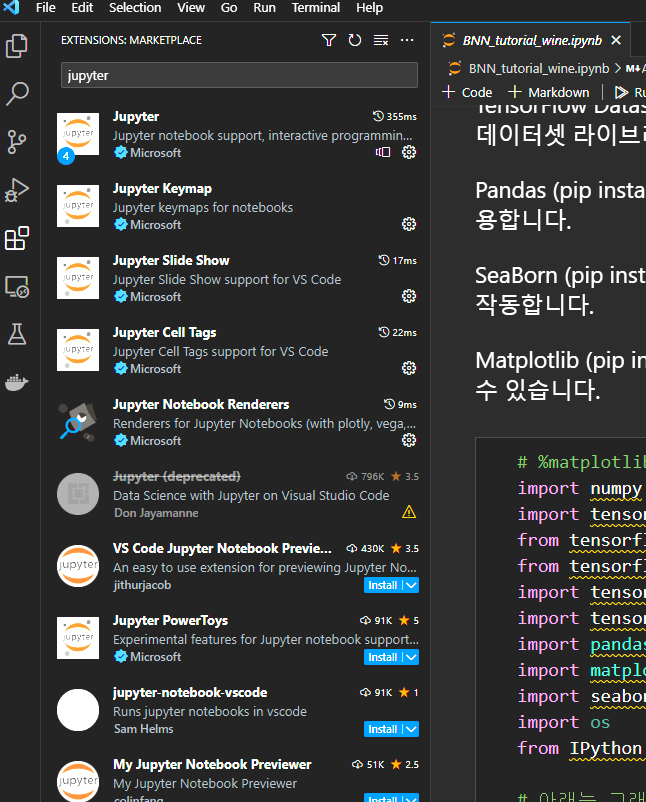
vsCode에서 파일>폴더열기 해당 폴더 선택 좌측 네모상자 4개(extension) 클릭후 jupyter 관련 extension 설치
코드 좌측에 run(재생마크) 가 뜨면 클릭해보기 이후 사용자 환경마다 안내 메세지가 뜰텐데 여기서 해보고 진행이 안된다면 연락부탁
About
Translate to Korean and Add description for teammates
Resources
Stars
Watchers
Forks
Languages
HTML
55.3%
Jupyter Notebook
44.7%
You can’t perform that action at this time.