



Git-Alias CLI provides a command-line interface to replicate the Git aliases defined in this package.
This allows them to be run both as a Python package (installed as g or git-alias) and directly using uvx.
This is a companion script for the useReq/req 🤖✨.
Quick Start | Feature Highlights | Upgrading or Removing | CLI Examples
🚧 DRAFT: Preliminary Version 📝 - Work in Progress 🏗️ 🚧
-
Supports Conventional Commit Standards compatible with release-changelog-builder-action.
-
Auto-amending
wipcommand for day-to-day "work in progress" commits. -
Common aliases for repetitive tasks like
add --all(aa) and more. -
Acts like a
.gitconfig[alias] section, providing all standard Git commands with a fallback mechanism. -
Customizable three-branch workflow:
master,develop, andwork. -
Conventional commit aliases support
<module>: <description>syntax (example:g new api: add endpoint) and also accept<description>only, using.g.conf.default_commit_module(defaultcore). -
Standardized commits with specific commands like:
g new core: foo bar.Use these commands for common activities such as:new: Implement new features.implement: Implement features or larger changes.refactor: Refactor existing code without changing behavior.fix: Bug fixes.change: Software changes.docs: Add/modify documentation.style: Styling modifications.revert: Revert changes.rollback: Restore branch content to a previous commit/tag by creating a dedicated rollbackrevertcommit.misc: Miscellaneous tasks.cover: Add/adjust tests to improve coverage.
-
Provides
major,minor, andpatchrelease commands that auto-generate aCHANGELOG.md, create a tag ondevelop(patch) ormaster(major/minor).Command Branch Changelog Type patch work -> develop Include patch versions minor work -> develop -> master Minor versions only major work -> develop -> master Minor versions only -
Provides
backupcommand to run release preflight checks, mergeworkintodevelop, pushdevelop, and return towork. -
Provides visual diff aliases for repository comparisons, including
dcd(developvswork),dcm(mastervswork), andddm(mastervsdevelop). -
Provides worktree aliases:
wt(git worktree list),wtl(git worktree list ...),wtp(git worktree prune ...), andwtd(worktree delete with paired branch cleanup and optional--force). -
Provides file listing aliases:
lslists tracked files andlsilists ignored files, both with argument passthrough. -
Provides an overview alias:
oprints a structured repository summary with working-tree status, branch divergence/alignment sections, and a branch table that lists configured branches first and then all other local/remote branches with latest commit subjects. -
Version management commands:
verchecks version consistency (supports--verbose/--debug),chver <major.minor.patch>updates files matched byver_rules, andchangeloggeneratesCHANGELOG.md(supports--include-patch,--force-write,--print-only,--disable-history). -
Self-upgrading feature.
-
Includes a quick overview command
o: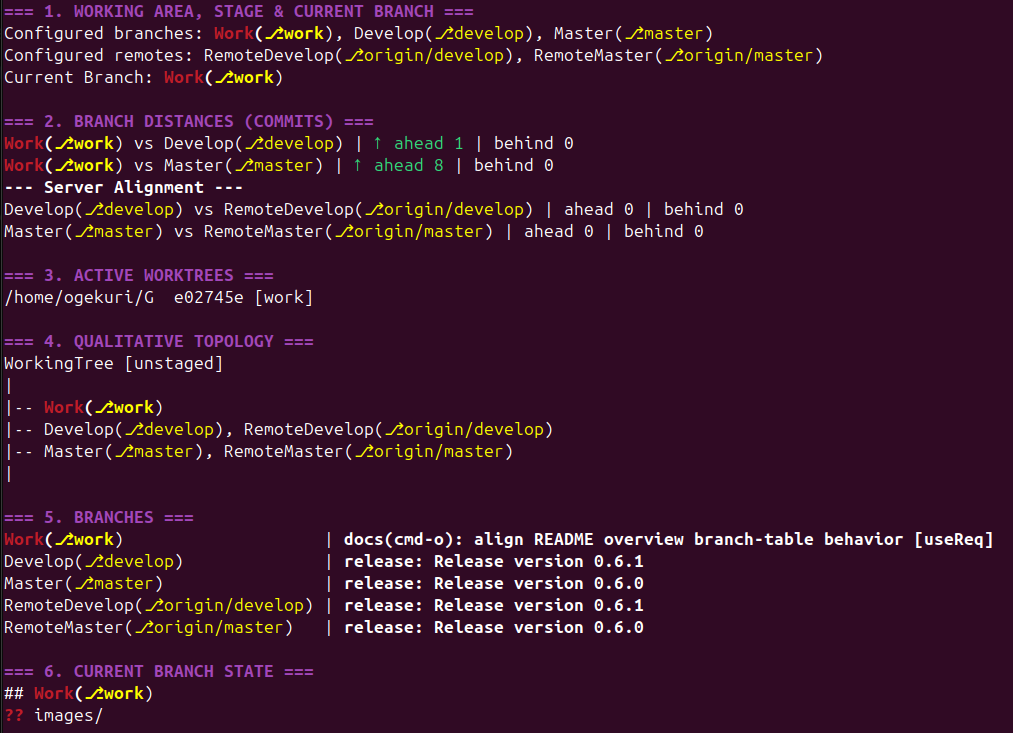
-
Includes git-foresta command
l: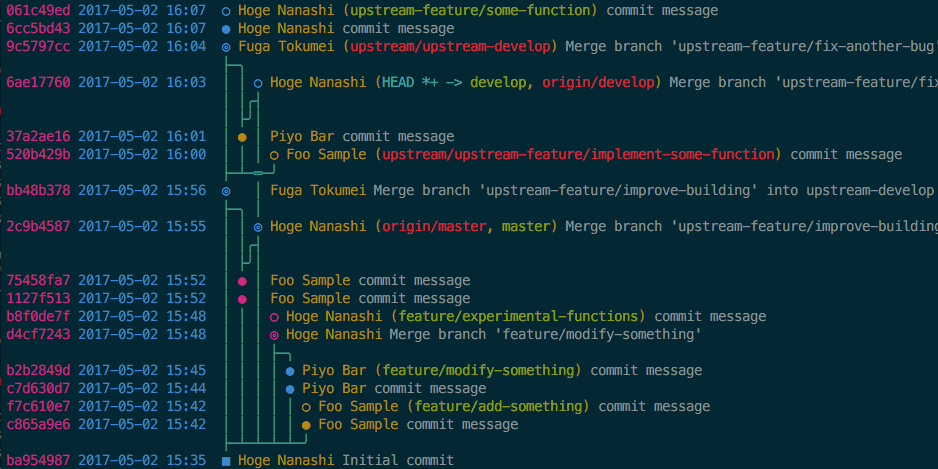
- Astral
uvtool is required for project execution (uv tool,uvx, anduv runflows). - A separate external or system-managed Python virtual environment is not required.
- When needed, you can generate a transient
requirements.txtfile with:uv export --format requirements-txt > requirements.txt
- Use supported environment:
linux - Install the
uvtool from: https://docs.astral.sh/uv/getting-started/installation/
- Install or Upgrade
uv tool install git-alias --force --from git+https://github.com/Ogekuri/G.git- Run Directly from the Repository
uvx --from git+https://github.com/Ogekuri/G.git git-alias <command> [args...]g --write-config- Customize repository-local
.g.confwithmaster,develop,work,default_commit_module, andver_rules. - Customize global
$HOME/.g/g.confwithedit_command,gp_command, andgr_command. - Running
g --write-confignormalizes both files to these key sets and migrates legacy globaleditortoedit_command.
g st
g aa
g wipg aa
g new core: foo barWhen your work branch is fully committed, release a new version with:
g minorThe command must run from the work branch with a clean working tree; it bumps versions per ver_rules, creates a temporary local annotated v<next> tag only for changelog generation, deletes that temporary tag after changelog generation, and creates the definitive tag immediately before push (patch: on develop with git push origin <develop> --tags; major/minor: on master with git push origin <master> --tags after develop integration).
Upgrade or uninstall the Git-Alias CLI:
g --upgrade/git-alias --upgrade: Upgrades the tool to the latest version from the GitHub repository.g --uninstall/git-alias --uninstall: Uninstalls the tool.g --write-config/git-alias --write-config: Inserts missing defaults into repository.g.confand global$HOME/.g/g.conf.g --ver/g --version/git-alias --ver/git-alias --version: Prints the CLI version.g --help/git-alias --help: Prints management commands, configuration parameters, and the alias list; useg --help <command>for a single command.
When a CLI command is added, modified, or removed, this README is updated to reflect user-facing usage changes. Internal logic-only refactoring that does not change command behavior does not require README updates.
Some CLI examples:
g: PrintsPlease provide a command or --helpandUsage: g <command> [options].g --help/git-alias --help: Prints management commands, configuration parameters, and the alias list; useg --help <command>for a single command.g lg --help: Shows the help text for thelgalias.g cm "Message": Runsgit commitwith the provided message.g new api: add endpoint: Createsnew(api): add endpoint; omitapi:to use.g.conf.default_commit_module.g backup: Merges configuredworkintodevelop, pushesdevelop, and checks out back towork.g rollback v1.2.3: Reverts commits afterv1.2.3and createsrevert: Roll back branch to v1.2.3 (<hash>)..g dcd: Runsgit difftool -d <develop> <work>using configured branch names.g dcm: Runsgit difftool -d <master> <work>using configured branch names.g ddm: Runsgit difftool -d <master> <develop>using configured branch names.g bd --force feature/demo: Removes the associated worktree first when present, then force-deletesfeature/demo.g wt: Runsgit worktree list.g wtd --force ../repo-worktree: Force-removes the target worktree; when it is associated to a local branch, the worktree is deleted before the branch.g ls -z: Lists tracked files usinggit ls-files --exclude-standard.g lsi -z: Lists ignored files usinggit ls-files -i --exclude-standard.g o: Prints a verbose overview with status, branch distances, active worktrees, and a qualitative ASCII topology tree.g ver --verbose: Verifies version consistency with detailed output.g chver 1.2.3: Updates the project version to 1.2.3 usingver_rules.g changelog --print-only: Prints the generated changelog without writingCHANGELOG.md.
Special thanks to Jan Engelhardt and Takaaki Kasai, authors of the Perl git-foresta program, integrated in G.