



Zero friction. Zero config. 100% Interactive.
⚡ Launch. Select. Play. The elegant model manager for OpenClaw.


Built by Nex-ZMH,an energy industry AI explorer from a remote mountain village of China in February 2026.
⚡️Quick Routes: Getting Started · Features · Installation ·
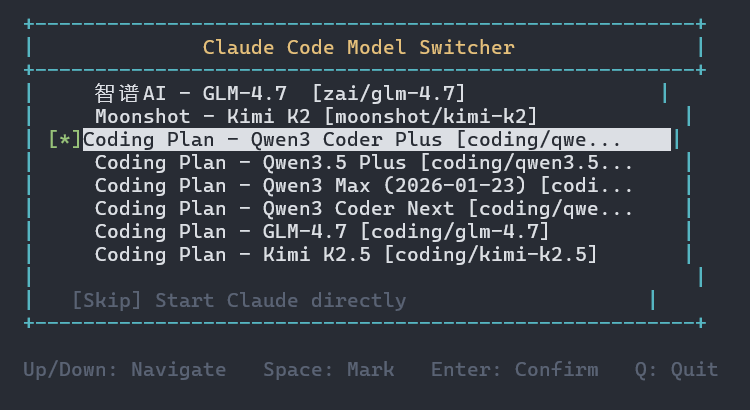
2026.2.23 updated,this project tool can also be used for model selection with Claude code.
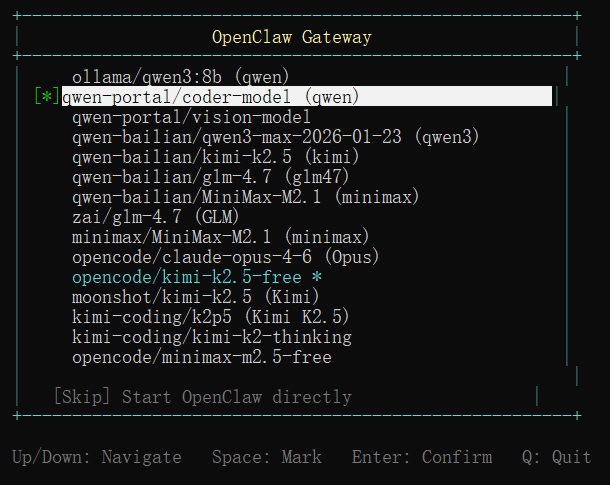
OpenClaw Model Manager — An elegant, interactive model manager that transforms your OpenClaw experience. Featuring a polished terminal UI, it automatically detects available models from openclaw.json and empowers you to seamlessly switch configurations at launch — no manual file editing required.
- 🎮 Interactive Selection — Navigate effortlessly with arrow keys, mark with Space, confirm with Enter
- ⚡ Zero-Config Automation — Auto-detects models and synchronizes with
openclaw.jsonin real-time - 🖥️ Beautiful TUI — Clean, intuitive terminal interface for a premium CLI experience
- 🔧 Scripting Ready — Full command-line argument support for power users and automation
- 🌐 Cross-Platform — Windows ready, Linux & macOS coming soon
# Clone the repository
git clone https://github.com/Nex-ZMH/openclaw-model-manager.git

# Navigate to directory
cd openclaw-model-manager

# Run installer
.\install.ps1
Restart your terminal after installation.
openclaw gatewayThis will display an interactive menu:
  +-------------------------------------------------------+
  |               OpenClaw Gateway                        |
  +-------------------------------------------------------+
  | [*] ollama/qwen3:8b                                   |
  | [ ] qwen-portal/coder-model *                         |
  | [ ] qwen-bailian/kimi-k2.5 (kimi)                     |
  | [ ] qwen-bailian/glm-4.7 (glm47)                      |
  |                                                       |
  |   [Skip] Start OpenClaw directly                      |
  +-------------------------------------------------------+

  Up/Down: Navigate   Space: Mark   Enter: Confirm   Q: Quit
| Key | Action |
|---|---|
| ↑/↓ | Navigate through models |
| Space | Mark/Unmark model |
| Enter | Confirm selection and start |
| Q | Quit without starting |
openclaw gateway                  # Interactive selection
openclaw gateway --skip           # Skip selection, start directly
openclaw gateway --noselect       # Same as --skip
openclaw gateway --model <id>     # Directly select model
openclaw gateway --list           # List available models
openclaw gateway --help # Show help# Select model interactively
openclaw gateway
# Start with a specific model
openclaw gateway --model qwen-bailian/kimi-k2.5
# List all configured models
openclaw gateway --list
# Start without changing model
openclaw gateway --skip.\uninstall.ps1Or:
irm https://raw.githubusercontent.com/Nex-ZMH/openclaw-model-manager/main/uninstall.ps1 | iex- OpenClaw installed globally via npm
- PowerShell 5.1+ (Windows)
- Node.js
The manager reads model configurations from ~/.openclaw/openclaw.json and modifies the agents.defaults.model.primary field when you select a model.
- Linux support (bash script)
- macOS support
- Model search/filter
- Recent models history
OpenClaw Model Manager — 一款优雅的交互式模型切换工具,为您的 OpenClaw 使用体验带来全新升级。它拥有精致的终端界面,能够自动从 openclaw.json 中检测可用模型,让您在启动时轻松切换配置,无需手动编辑文件。
- 🎮 交互式选择 — 使用方向键轻松导航,空格键标记,回车键确认
- ⚡ 零配置自动化切换 — 自动检测
openclaw.json并实时同步模型配置 - 🖥️ **精美 TUI ** — 清洁直观的终端界面,提供优质的命令行体验
- 🔧 脚本友好 — 完整的命令行参数支持,满足高级用户和自动化需求
- 🌐 跨平台支持 — 已支持 Windows,Linux 和 macOS 版本即将推出
建议将该工具安装在.openclaw目录下,方便直接调用。
# 克隆仓库
git clone https://github.com/Nex-ZMH/openclaw-model-manager.git

# 进入目录
cd openclaw-model-manager

# 运行安装脚本
.\install.ps1
重启终端即可生效。
openclaw gateway显示交互式菜单:
  +-------------------------------------------------------+
  |               OpenClaw Gateway                        |
  +-------------------------------------------------------+
  | [*] ollama/qwen3:8b                                   |
  | [ ] qwen-portal/coder-model *                         |
  | [ ] qwen-bailian/kimi-k2.5 (kimi)                     |
  | [ ] qwen-bailian/glm-4.7 (glm47)                      |
  |                                                       |
  |   [Skip] Start OpenClaw directly                      |
  +-------------------------------------------------------+

  Up/Down: Navigate   Space: Mark   Enter: Confirm   Q: Quit
| 按键 | 功能 |
|---|---|
| ↑/↓ | 上下导航选择模型 |
| Space | 标记/取消标记模型 |
| Enter | 确认选择并启动 |
| Q | 退出不启动 |
openclaw gateway                  # 交互式选择
openclaw gateway --skip           # 跳过选择,直接启动
openclaw gateway --noselect       # 同同 --skip
openclaw gateway --model <id>     # 直接指定模型并启动
openclaw gateway --list           # 列出可用模型
openclaw gateway --help # 显示帮助# 交互式选择模型
openclaw gateway
# 指定模型启动
openclaw gateway --model qwen-bailian/kimi-k2.5
# 列出所有已配置的模型
openclaw gateway --list
# 不更改模型直接启动
openclaw gateway --skip.\uninstall.ps1或:
irm https://raw.githubusercontent.com/Nex-ZMH/openclaw-model-manager/main/uninstall.ps1 | iex- OpenClaw installed globally via npm
- PowerShell 5.1+ (Windows)
- Node.js
从 ~/.openclaw/openclaw.json 读取模型配置,当你选择模型时修改 agents.defaults.model.primary 字段。
- Linux 支持(bash 脚本)
- macOS 支持
- 搜索/过滤模型
- 最近模型历史记录