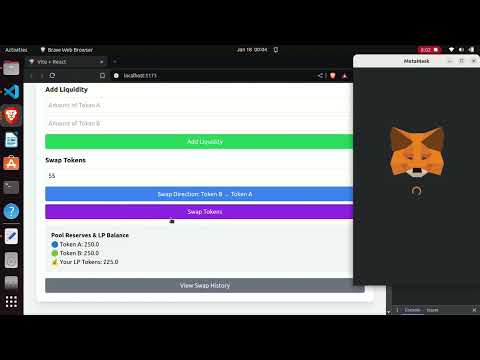
Experience the power of Peer2play in action! Try out the live version of the app and explore its features:
This project is a decentralized application (DApp) that demonstrates the functionality of a liquidity pool on the Ethereum blockchain. It includes the deployment of two ERC20 tokens, a liquidity pool smart contract, and features such as adding/removing liquidity and token swapping. The DApp is built using Solidity, Hardhat, and React.js for a seamless user experience.
- TokenA deployed to:
0x903e8025d61Cc5E6F7bBD3bB8E841d025E18CD91 - TokenB deployed to:
0xd859f69c72db8fb25059C2F7679d99660ef592e7 - LiquidityPoolFactory deployed to:
0xB240eFC0391c53E41Db1F6992B6a1Fbb0b98dFbd - LiquidityPoolRouter deployed to:
0x123260d5b10d7481d8C5767C6c908fa4457E9258 - Liquidity Pool created for:
- TokenA:
0x2163A74F785943Fc5851F8D265f8Cc90542766E3 - TokenB:
0x5b99d19f051B0f80b4F37f6119F5Cb880f1293Fd
- TokenA:
-
Create LiquidityPool
Users can provide token addresses and create a liquidity pool. -
Add Liquidity
Users can provide liquidity to the pool by depositing both tokens in equal value. -
Remove Liquidity
Users can withdraw their share of liquidity, receiving both tokens proportionately. -
Swap Tokens
Users can swap one token for another using the liquidity pool, following the automated market maker (AMM) model. -
Token Details
Users can see the Token details dynamically and all amount. -
View Pool
Users can see all the created pool address.
The smart contract architecture consists of four primary contracts: TokenA, TokenB, LiquidityPool, and LiquidityPoolToken. These contracts interact with each other to provide functionality for the liquidity pool, token swapping, and liquidity management.
- TokenA and TokenB are ERC20 tokens representing the two assets in the liquidity pool.
- These tokens are minted at the time of contract deployment, with a total supply of 1 million tokens each.
- These tokens are used for the swapping and liquidity provision in the pool.
- The LiquidityPool contract manages the core logic of adding liquidity, removing liquidity, and swapping tokens.
- It accepts
TokenAandTokenBas its assets and manages the balance of these tokens in the pool. - Add Liquidity: When users add liquidity, they provide an equal value of both tokens (TokenA and TokenB). The contract calculates the amount of liquidity pool (LP) tokens to mint for the user based on the share of liquidity they are providing relative to the total liquidity in the pool. If the pool is empty (first liquidity), it mints an initial amount of LP tokens.
- Remove Liquidity: Users can remove their liquidity by redeeming LP tokens. The contract burns the LP tokens and returns the appropriate proportion of TokenA and TokenB based on the amount of LP tokens the user holds relative to the total supply of LP tokens.
- Swap: The contract allows users to swap between TokenA and TokenB. It calculates the amount of the output token based on the current reserve ratios and the amount of input tokens provided by the user. The swap is subject to a small fee (0.3% is applied), which is deducted before the output amount is calculated.
- The LiquidityPoolToken is an ERC20 token representing a user's share in the liquidity pool.
- When users add liquidity, the contract mints new LP tokens proportional to their contribution to the pool. The more liquidity a user provides, the more LP tokens they will receive.
- The LP tokens are used as a claim to a user's portion of the liquidity in the pool. These tokens are burnt when users remove liquidity, and the equivalent amount of TokenA and TokenB is transferred back to them.
- Only the LiquidityPool contract can mint or burn these tokens, ensuring that only liquidity providers can manage LP tokens based on their liquidity share.
- The LiquidityPoolFactory contract acts as a factory for creating new liquidity pools between any two tokens.
- It checks if a pool already exists for a given pair of tokens and prevents the creation of duplicate pools.
- When a new pool is created, it deploys a new instance of the
LiquidityPoolcontract and stores the mapping between the two tokens and the newly created pool address.
- ReentrancyGuard: The
LiquidityPoolcontract usesReentrancyGuardfrom OpenZeppelin to prevent reentrancy attacks, ensuring that the liquidity addition, removal, and swapping operations are secure. - Initial LP Token Minting: If the pool is empty, the contract mints LP tokens based on the first liquidity deposit, ensuring that the LP token holders' share in the pool is appropriately tracked.
- Token Swapping Fees: A 0.3% fee is applied to each token swap, which helps incentivize liquidity providers and maintain the pool’s health.
- Security: The contract ensures that only the LiquidityPool contract can mint and burn LP tokens, preventing malicious actors from manipulating liquidity token supply.
This architecture provides a decentralized and secure way to manage liquidity pools and token swaps on the Ethereum blockchain.
- Node.js
- Hardhat
- MetaMask browser extension
The project includes a React-based frontend that provides:
- 👛 Wallet connection
- 💧 Liquidity provision interface
- 💱 Swap interface
- 📊 Pool share and balance display
- Clone the repository
git clone https://github.com/Manufg07/Peer2play.git- Install dependencies
npm install- Compile contracts
npx hardhat compile- Deploy contracts
npx hardhat run scripts/deploy.js - Start frontend
npm run devCreate a .env file with the following variables:
PRIVATE_KEY=your_private_key
This project is licensed under the MIT License. See the LICENSE file for more details.
- 🍴 Fork the repository
- 🌿 Create your feature branch
- 💾 Commit your changes
- 🚀 Push to the branch
- 📬 Open a pull request
For questions and support, please open an issue in the repository.