





A powerful VSCode-based editor extension that accelerates TypeScript development by generating structured, customizable files with a single click.
Auto TS Generator empowers you to scaffold TypeScript classes, interfaces, enums, functions, React components, Node/Express/Fastify modules and servers, and more, directly from VSCode, VSCodium, WindSurf, Cursor, or any compatible editor.
| Feature | Description |
|---|---|
| Customizable Templates | Define your own boilerplate for classes, interfaces, enums, services, components, and more. |
| Dynamic Variables | Over 30 template placeholders, naming formats (PascalCase, kebab-case, etc.), dates, metadata. |
| Smart Generate | Use a single Auto TS: Generate command to pick what to scaffold from one contextual flow. |
| Auto Import | Automatically add new exports to barrel files or insert import statements in open files. |
| Context-Aware Target Resolution | Reuses the active folder/file context and selected workspace so generation starts where you are already working. |
| Rich Command Palette | Commands for generating class, interface, enum, type, function, variable and framework artifacts (React, Node, Express, Fastify). |
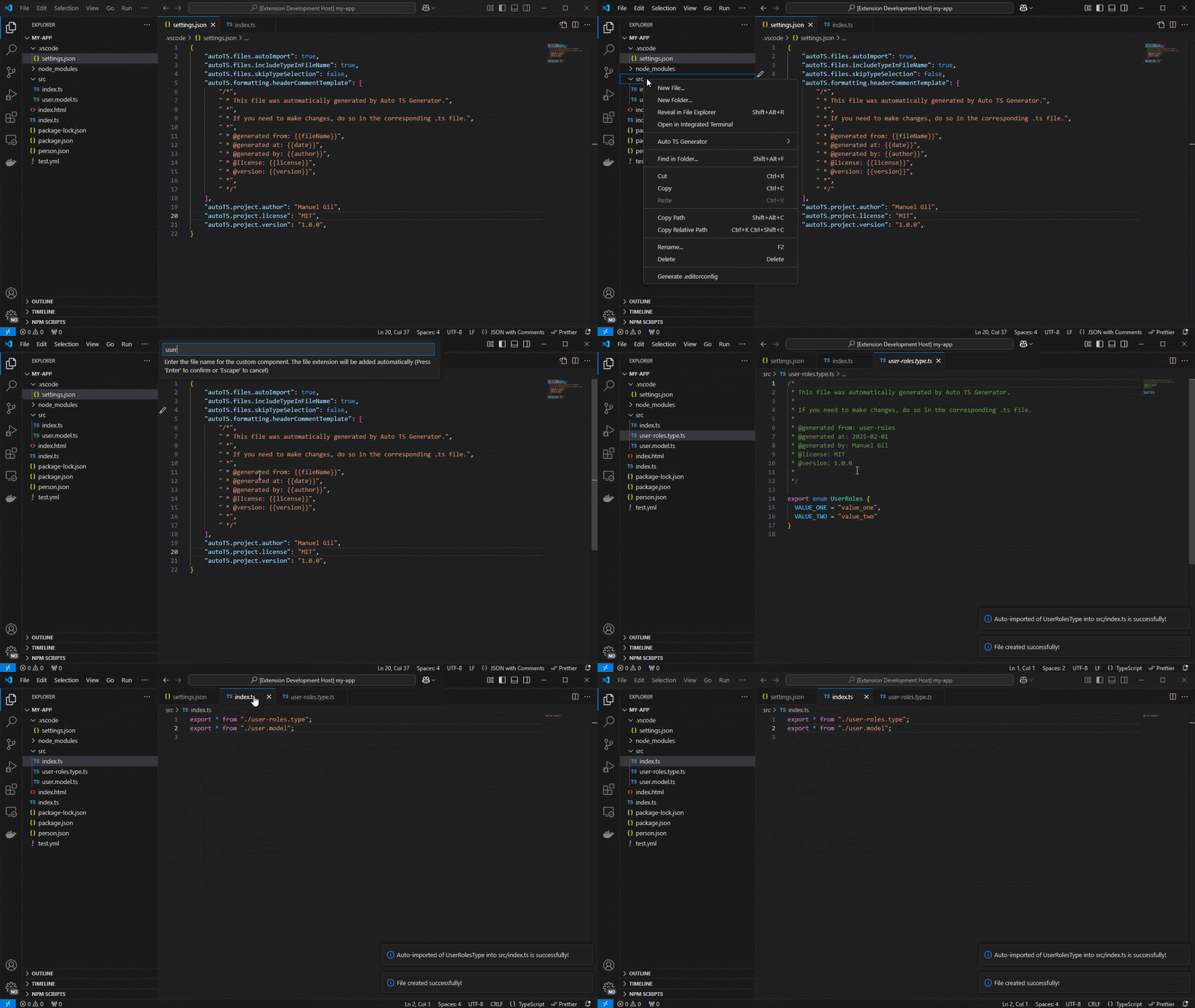
| Context Menu Integration | Right-click on any folder in Explorer, choose Auto TS Generator, and pick your artifact. |
| Project-Level Configuration | Control file extensions, formatting, naming conventions, header comments, and more via settings.json. |
| VSCode-based Editor Support | Compatible with VSCode, VSCodium, WindSurf, Cursor, and any editor implementing the VSCode extension API. |
| Version & Update Notifications | First-run welcome message, release notes prompt after upgrades, and auto-check for new releases. |
-
Explorer Context Menu Right-click on a folder → Auto TS Generator → select a file type:
- Generic: Class · Interface · Enum · Type · Function · Variable
- Custom Component: Your own user-defined template
- Node: Module · Server
- Express: Controller · Middleware · Route · Server
- Fastify: Controller · Middleware · Route · Server
- React: Functional Component
All generation commands remain available from this menu. Context signals are used to improve ordering and recommendations, not to hide commands.
-
Command Palette Press
Ctrl+Shift+P(Windows/Linux) orCmd+Shift+P(macOS), typeAuto TS, and select any of the above commands.Recommended primary entry point:
- Auto TS: Generate → select a file type in one place.
- Smart Generate shows grouped options (Recommended and Other), keeps all options visible, and prioritizes them based on project context.
- The extension may suggest a recommended option based on your project setup.
-
Automatic Update Check On activation, the extension compares its version with the Marketplace's latest. If a newer version exists, you'll be prompted to update.
-
Open VS Code Command Palette
- Windows:
Ctrl + Shift + P - macOS:
Cmd + Shift + P
- Windows:
-
Open Workspace Settings
- Type
Preferences: Open Workspace Settings (JSON).
- Type
-
Add Configuration to
.vscode/settings.json{ "autoTS.enable": true, "autoTS.files.defaultLanguage": "TypeScript", "autoTS.files.fileExtension": "ts", "autoTS.files.skipFolderConfirmation": true, "autoTS.files.includeTypeInFileName": false, "autoTS.files.skipTypeSelection": true, "autoTS.files.autoImport": true, "autoTS.files.defaultBarrelFileName": "index", "autoTS.formatting.useSingleQuotes": true, "autoTS.formatting.excludeSemiColonAtEndOfLine": false, "autoTS.formatting.keepExtensionOnExport": false, "autoTS.formatting.endOfLine": "lf", "autoTS.formatting.useStrict": false, "autoTS.formatting.headerCommentTemplate": [], "autoTS.formatting.insertFinalNewline": true, "autoTS.project.author": "Jane Doe", "autoTS.project.owner": "Jane Doe", "autoTS.project.maintainers": "Jane Doe, John Doe", "autoTS.project.license": "MIT", "autoTS.project.version": "1.0.0", "autoTS.templates.customComponents": [ { "name": "Service", "description": "Generates a service file", "type": "service", "template": ["import { Injectable } from '@angular/core';", "", "@Injectable({", " providedIn: 'root'", "})", "export class {{fileNamePascalCase}}Service {", "", " constructor() { }", "", "}"] }, { "name": "Component", "description": "Generates a component file", "type": "component", "template": ["import { Component, OnInit } from '@angular/core';", "", "@Component({", " selector: 'app-{{fileName}}',", " templateUrl: './{{fileName}}.component.html',", " styleUrls: ['./{{fileName}}.component.scss']", "})", "export class {{fileNamePascalCase}}Component implements OnInit {", "", " constructor() { }", "", " ngOnInit(): void { }", "", "}"] } ] } -
Restart VS Code to apply the settings.
You can customize the behavior of Auto TS Generator by modifying the settings in your .vscode/settings.json file. Below is a list of configurable options:
autoTS.enable: Toggle the extension on or off. Default istrue.autoTS.files.defaultLanguage: Set the default language for generated files. Default isTypeScript.autoTS.files.fileExtension: Set the file extension for generated files. Default is.ts.autoTS.files.skipFolderConfirmation: Skip the folder confirmation dialog when creating files. Default istrue.autoTS.files.includeTypeInFileName: Add the type to the file name (e.g.,myNewFile.component). Default isfalse.autoTS.files.skipTypeSelection: Skip the type selection dialog when creating files. Default istrue.autoTS.files.autoImport: Automatically imports generated files. Default istrue.autoTS.files.defaultBarrelFileName: Default name for barrel files (e.g.,index). Default isindex.autoTS.formatting.useSingleQuotes: Format code with single quotes. Default istrue.autoTS.formatting.excludeSemiColonAtEndOfLine: Exclude semicolons at the end of lines. Default isfalse.autoTS.formatting.keepExtensionOnExport: Keep file extension on exports. Default isfalse.autoTS.formatting.endOfLine: Set the end-of-line character (e.g.,lf). Default islf.autoTS.formatting.useStrict: Enable strict mode in generated files. Default isfalse.autoTS.formatting.headerCommentTemplate: Custom header comment template for generated files. Default is an empty array.autoTS.formatting.insertFinalNewline: Insert a final newline at the end of files. Default istrue.autoTS.project.author: Set the author of the project. Default is an empty string.autoTS.project.owner: Set the owner of the project. Default is an empty string.autoTS.project.maintainers: Set the maintainers of the project. Default is an empty string.autoTS.project.license: Set the license of the project. Default isMIT.autoTS.project.version: Set the version of the project. Default is1.0.0.autoTS.templates.customComponents: Custom templates for generating components (e.g., services, components). Default is an empty array.
You can modify these settings to suit your project's requirements and coding standards.
To minimize prompts and speed up generation, keep these defaults enabled:
{
  "autoTS.files.skipFolderConfirmation": true,
  "autoTS.files.autoImport": true
}
Benefits:
- Fewer interactive steps per generated file
- Faster export/barrel updates without manual edits
- Better flow when generating multiple files in sequence
The extension also keeps your selected workspace folder in multi-root setups and automatically resolves generation context from your active editor when possible.
Add user-defined templates under autoTS.templates.customComponents:
name: Template name (e.g.,Service).description: Brief description.type: File type (e.g.,service).template: Array of strings representing file content; use template variables.
| Variable | Description | Example Value |
|---|---|---|
{{fileName}} |
Original file name | myNewFile |
{{fileNameCamelCase}} |
CamelCase | myNewFile |
{{fileNamePascalCase}} |
PascalCase | MyNewFile |
{{fileNameKebabCase}} |
kebab-case | my-new-file |
{{fileNameSnakeCase}} |
snake_case | my_new_file |
{{fileNameConstantCase}} |
CONSTANT_CASE | MY_NEW_FILE |
{{fileNameDotCase}} |
dot.case | my.new.file |
{{fileNamePathCase}} |
path/case | my/new/file |
{{fileNameSentenceCase}} |
Sentence case | My new file |
{{fileNameLowerCase}} |
Lowercase | my new file |
{{fileNameTitleCase}} |
Title Case | My New File |
{{fileNamePluralCase}} |
Pluralized | myNewFiles |
{{fileNameSingularCase}} |
Singularized | myNewFile |
{{fileNameWithTypeAndExtension}} |
File name + type + extension | myNewFile.component.ts |
{{fileNameWithType}} |
File name + type | myNewFile.component |
{{fileNameWithExtension}} |
File name + extension | myNewFile.ts |
{{folderName}} |
Parent folder name | src/components |
{{fileType}} |
File type (component, service, etc.) | component |
{{fileTypeName}} |
File type in Title Case | Service |
{{fileTypeNameCamelCase}} |
File type in camelCase | service |
{{fileTypeNamePascalCase}} |
File type in PascalCase | Service |
{{fileTypeNameKebabCase}} |
File type in kebab-case | service |
{{fileTypeNameSnakeCase}} |
File type in snake_case | service |
{{fileTypeNameConstantCase}} |
File type in CONSTANT_CASE | SERVICE |
{{fileTypeNameDotCase}} |
File type in dot.case | service |
{{fileTypeNamePathCase}} |
File type in path/case | service |
{{fileTypeNameSentenceCase}} |
File type in Sentence case | Service |
{{fileTypeNameLowerCase}} |
File type in lowercase | service |
{{fileTypeNameUpperCase}} |
File type in uppercase | SERVICE |
{{fileTypeNamePlural}} |
File type plural | services |
{{fileTypeNameSingular}} |
File type singular | service |
{{fileTypeWithExtension}} |
File type + extension | service.ts |
{{fileExtension}} |
File extension | ts |
{{date}} |
Current date | 2025-01-31 |
{{year}} |
Current year | 2025 |
{{time}} |
Current time | 12:34:56 |
{{timestamp}} |
Unix timestamp | 1672531199 |
{{timestampISO}} |
ISO timestamp | 2025-01-31T12:34:56Z |
{{author}} |
Project author | Jane Doe |
{{owner}} |
Project owner | Jane Doe |
{{maintainers}} |
Project maintainers | Jane Doe, John Doe |
{{license}} |
Project license | MIT |
{{version}} |
Project version | 1.0.0 |
- Open your VSCode-based editor (VSCode, VSCodium, WindSurf, Cursor).
- Go to Extensions (
Ctrl+Shift+X/Cmd+Shift+X). - Search for "Auto TS Generator" (author: Manuel Gil).
- Click Install.
- (Optional) Clone or download the repo and open it to test the latest dev version.
-
VSCode Marketplace https://marketplace.visualstudio.com/items?itemName=imgildev.vscode-typescript-generator
-
Open VSX https://open-vsx.org/extension/imgildev/vscode-typescript-generator
-
GitHub Repository https://github.com/ManuelGil/vscode-typescript-generator
Auto TS Generator is open-source and welcomes community contributions:
-
Fork the GitHub repository.
-
Create a new branch:
git checkout -b feature/your-feature
-
Make your changes, commit them, and push to your fork.
-
Submit a Pull Request against the
mainbranch.
Before contributing, please review the Contribution Guidelines for coding standards, testing, and commit message conventions. Open an Issue if you find a bug or want to request a new feature.
We are committed to providing a friendly, safe, and welcoming environment for all, regardless of gender, sexual orientation, disability, ethnicity, religion, or other personal characteristic. Please review our Code of Conduct before participating in our community.
For a complete list of changes, see the CHANGELOG.md.
- Manuel Gil – Owner – @ManuelGil
For a complete list of contributors, please refer to the contributors page.
- GitHub:
- X (formerly Twitter):


-
Auto Barrel Automatically generates and maintains barrel (
index.ts) files for your TypeScript projects. -
Angular File Generator Generates boilerplate and navigates your Angular (9→20+) project from within the editor, with commands for components, services, directives, modules, pipes, guards, reactive snippets, and JSON2TS transformations.
-
NestJS File Generator Simplifies creation of controllers, services, modules, and more for NestJS projects, with custom commands and Swagger snippets.
-
NestJS Snippets Ready-to-use code patterns for creating controllers, services, modules, DTOs, filters, interceptors, and more in NestJS.
-
T3 Stack / NextJS / ReactJS File Generator Automates file creation (components, pages, hooks, API routes, etc.) in T3 Stack (Next.js, React) projects and can start your dev server from VSCode.
-
Drizzle ORM Snippets Collection of code snippets to speed up Drizzle ORM usage, defines schemas, migrations, and common database operations in TypeScript/JavaScript.
-
CodeIgniter 4 Spark Scaffolds controllers, models, migrations, libraries, and CLI commands in CodeIgniter 4 projects using Spark, directly from the editor.
-
CodeIgniter 4 Snippets Snippets for accelerating development with CodeIgniter 4, including controllers, models, validations, and more.
-
CodeIgniter 4 Shield Snippets Snippets tailored to CodeIgniter 4 Shield for faster authentication and security-related code.
-
Mustache Template Engine - Snippets & Autocomplete Snippets and autocomplete support for Mustache templates, making HTML templating faster and more reliable.
For developers who work with .vsix files for offline installations or distribution, the complementary One-Click VSIX extension is recommended, available for both Chrome and Firefox.
One-Click VSIX integrates a direct "Download Extension" button into each VSCode Marketplace page, ensuring the file is saved with the
.vsixextension, even if the server provides a.ziparchive. This simplifies the process of installing or sharing extensions offline by eliminating the need for manual file renaming.
This project is licensed under the MIT License. See the LICENSE file for details.


