How batcontrol works
Batcontrol is an intelligent battery management system that optimizes your home energy storage by predicting energy prices, solar production, and consumption patterns. It automatically controls your battery inverter to minimize electricity costs.
The fundamental idea is simple: charge your battery when electricity is cheap and use stored energy when electricity is expensive. However, the implementation requires sophisticated forecasting and decision-making logic.
- Forecasting Engines: Gather predictions for prices, solar production, and consumption
- Logic Engine: Calculates optimal battery control decisions
- Inverter Interface: Controls your battery inverter
- External APIs: Integrates with MQTT, evcc, and Home Assistant
Batcontrol runs in a continuous loop, evaluating conditions every 3 minutes:
1. Fetch Forecasts → 2. Calculate Optimal Strategy → 3. Control Inverter → 4. Wait 3 Minutes → Repeat
Batcontrol combines three critical forecasts to make intelligent decisions:
- Source: Dynamic tariff providers (Tibber, aWATTar, evcc)
- Data: Hourly electricity prices for the next 24-48 hours
- Purpose: Identifies when electricity is cheapest for charging
- Source: Solar forecast APIs (Forecast.Solar, Solarprognose, evcc)
- Data: Expected PV generation based on weather predictions
- Configuration: Your PV system specifications (kWp, orientation, location)
- Purpose: Predicts available solar energy
- Source: Load profile CSV file scaled to your annual consumption
- Data: Expected household energy usage patterns
- Purpose: Estimates energy demand throughout the day
The key metric is Net Consumption = Consumption - Solar Production:
- Positive values: You need energy from grid/battery
- Negative values: You have surplus solar energy
Based on the forecasts and current battery state, batcontrol puts your inverter into one of four modes:
- When: Energy is currently expensive OR battery is sufficiently charged
-
Behavior:
- Battery can discharge to meet household demand
- Surplus solar energy charges battery (respects
max_pv_charge_rate) - Excess energy feeds into grid
-
Always Active: When SOC >
always_allow_discharge_limit(typically 90%)
-
Requires: version 0.8.0+ , Logic type
nextmust be selected inbattery_control.type - When: Peak shaving is enabled, PV is producing, and the battery should not fill up too quickly
-
Behavior:
- Battery discharge is allowed (handles household demand normally)
- PV charging is rate-limited so the battery fills gradually instead of hitting 100% early in the day
- Excess PV energy that cannot be stored at the limited rate feeds into the grid
- Purpose: Preserve free battery capacity so the battery can absorb maximal solar energy later in the day, avoiding unnecessary grid feed-in during midday PV peaks
- When: Prices are rising and stored energy will be more valuable later
-
Behavior:
- Battery does not discharge
- Grid provides additional energy needed
- Direct solar consumption continues normally
- Purpose: Preserve battery energy for expensive periods
- When: Current prices are significantly lower than future prices
-
Behavior:
- Battery charges from grid at configured rate (
max_grid_charge_rate) - Charging stops at
max_charging_from_grid_limit(typically 89%)
- Battery charges from grid at configured rate (
- Calculation: Estimates required energy for upcoming expensive hours
- Efficiency: Accounts for 10-20% charge/discharge losses
min_price_difference (absolute): Minimum price difference in Euro to justify grid charging
- Example: 0.05 means current price must be ≥5 cents lower than future price
min_price_difference_rel (relative): Percentage-based price difference threshold
- Example: 0.10 means current price must be ≥10% lower than future price
- Helps avoid inefficient charging during high-price periods
Final threshold: max(min_price_difference, current_price × min_price_difference_rel)
Expert Mode offers additional refinements:
- Price Rounding: Configurable precision for price comparisons
- Softened Charging: Earlier charging with relaxed price requirements
- Charge Rate Multiplier: Compensates for charging inefficiencies
always_allow_discharge_limit (default: 90%)
- Above this SOC, battery always discharges freely
- Prevents over-charging and ensures availability
max_charging_from_grid_limit (default: 89%)
- Maximum SOC for grid charging
- Must be lower than discharge limit to prevent oscillation
min_recharge_amount (default: 100Wh) (since 0.5.3)
- Minimum amount of energy that is needed to be recharged before starting to recharge.
- That prevents ditching between discharge + recharge on an increasing price situation.
The system validates configuration to prevent problematic behavior:
-
always_allow_discharge_limitmust be >max_charging_from_grid_limit - If violated,
max_charging_from_grid_limitis automatically lowered
- Purpose: Coordinate with electric vehicle charging
- Function: Can lock battery discharge when car is charging
- Configuration: Monitors charging status and adjusts battery limits
- Real-time Data: Battery state, prices, forecasts
- Remote Control: Override modes and parameters
- Auto-Discovery: Automatic Home Assistant entity creation
- Timeout: If APIs fail for >10 minutes, defaults to discharge mode
- Fallback Strategy: Ensures battery remains usable during outages
- Recovery: Automatically resumes normal operation when APIs return
- Runtime Checks: Validates parameter relationships
- Automatic Corrections: Adjusts conflicting settings
- Comprehensive Logging: Detailed operation logs for troubleshooting
- Hardware Setup: Configure inverter connection and credentials
- Location Setup: PV system specifications and geographic location
- Consumption Profile: Annual usage and load pattern
- Price Provider: Dynamic tariff API configuration
- Battery Limits: Discharge and charging thresholds
- Fine-Tuning: Expert parameters and external integrations
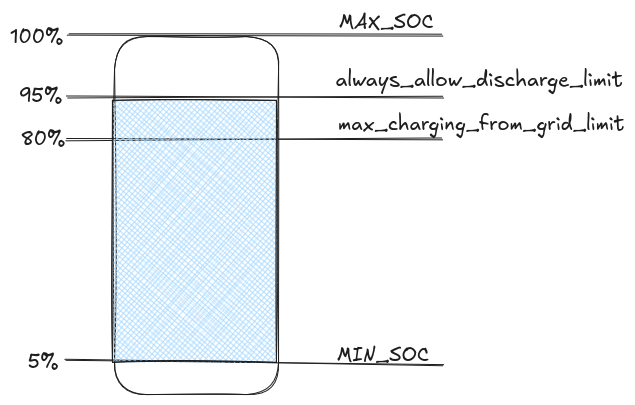
This diagram illustrates the relationship between the key battery SOC limits and how they control charging/discharging behavior.