
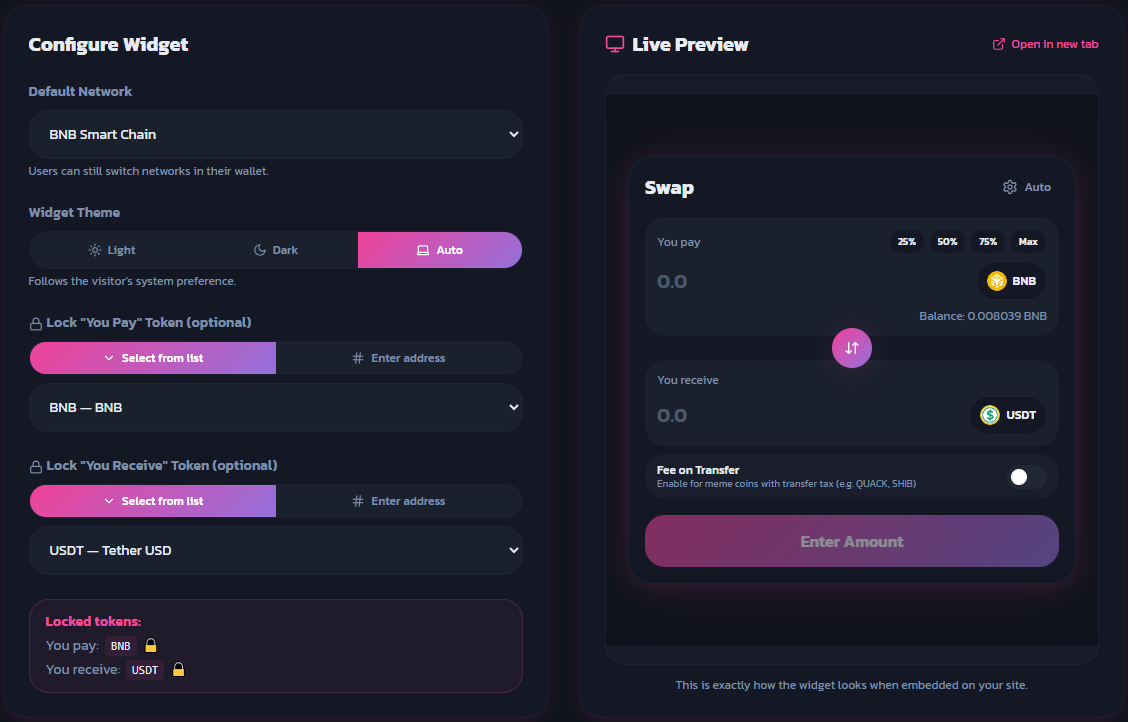
This guide walks you through embedding the Mcoins Swap Widget into your website in a few simple steps.
Select the blockchain network by setting the chain parameter in the embed URL:
| Network | chain value |
|---|---|
| BSC (Binance Smart Chain) | 56 |
| Polygon | 137 |
| Base Chain (ETH) | 8453 |
| Pulsechain | 369 |
You can pre-lock one or both tokens by adding lockA and/or lockB to the URL. Each value can be either a token symbol (e.g. BNB) or a contract address (e.g. 0x291FdaF5E4a0D6c27E84A3242E4dD2c0720b9c99).
Leave these parameters out to let users choose their own tokens freely.
Before publishing, open your page in a browser and confirm the widget renders correctly. You can also use browser DevTools to inspect the iframe.
Place the following <iframe> snippet wherever you want the widget to appear:
<iframe
  src="https://www.mcoins.xyz/widget?chain=56&lockA=BNB&lockB=0x291FdaF5E4a0D6c27E84A3242E4dD2c0720b9c99&theme=dark"
  width="480"
  height="550"
  style="border:none; border-radius:16px; box-shadow:0 4px 32px rgba(0,0,0,0.12);"
  title="McoinSwap Widget"
  allow="clipboard-write"
></iframe>| Parameter | Required | Description | Example |
|---|---|---|---|
chain |
Yes | Blockchain network ID | 56 |
lockA |
No | Token A symbol or contract address | BNB |
lockB |
No | Token B symbol or contract address | 0x291Fda... |
theme |
No | Widget color theme (dark or light) |
dark |
BSC, both tokens locked, dark theme:
https://www.mcoins.xyz/widget?chain=56&lockA=BNB&lockB=0x291FdaF5E4a0D6c27E84A3242E4dD2c0720b9c69&theme=dark
Polygon, no tokens locked, light theme:
https://www.mcoins.xyz/widget?chain=137&theme=light
Base Chain, Token A locked only:
https://www.mcoins.xyz/widget?chain=8453&lockA=ETH&theme=dark
If you need further assistance, please contact our support team.