Scaffold and maintain context files for AI coding agents.


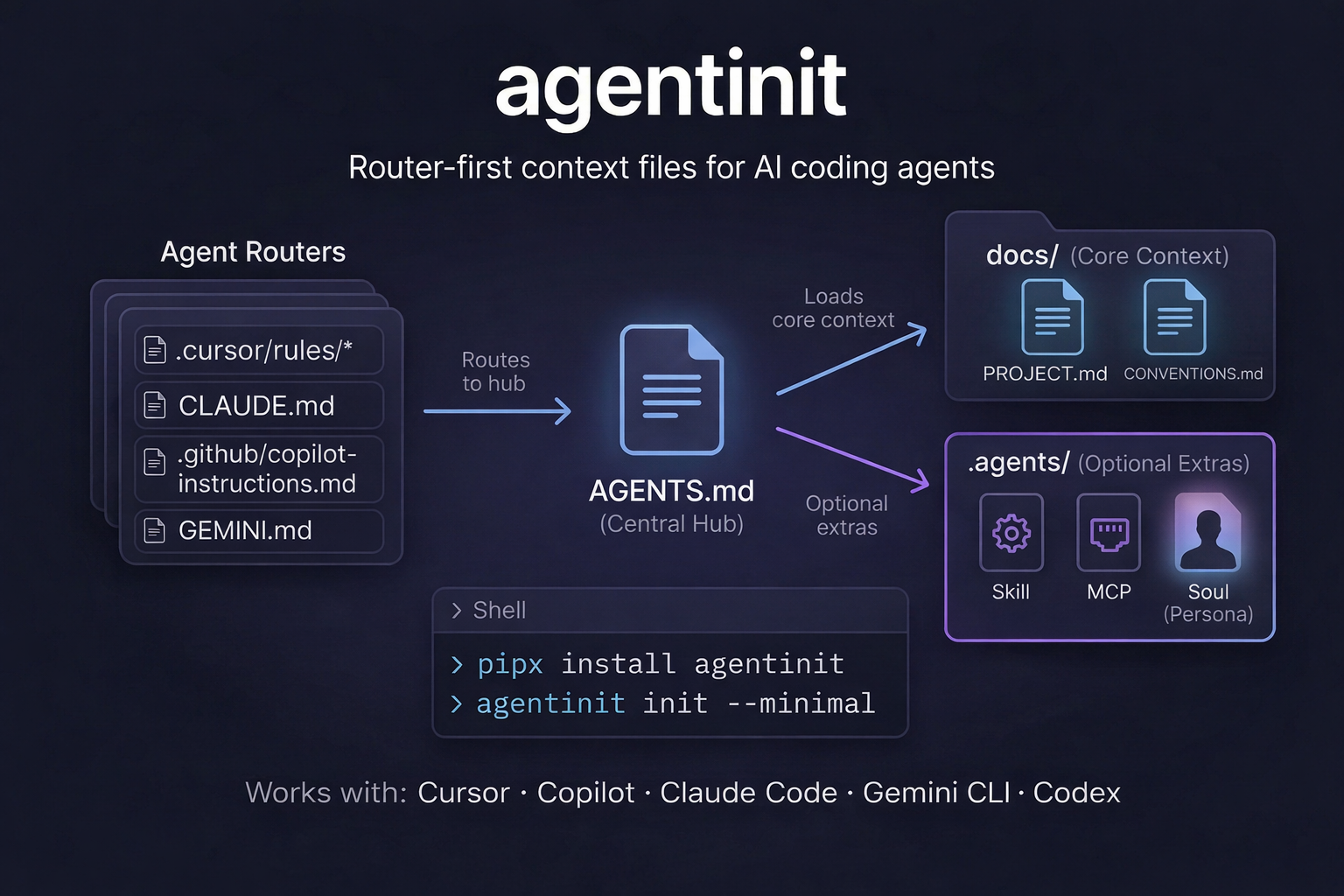
agentinit generates a structured set of context files that modern AI coding assistants (Claude Code, Cursor, GitHub Copilot, Gemini CLI) read automatically. It uses a router-first architecture: you write your project rules once in AGENTS.md, and agentinit keeps the vendor-specific files in sync.
No runtime dependencies. Pure Python standard library. Works on Linux, macOS, and Windows.
AI coding agents perform better when they have clear, structured context about your project. Without it, they guess at your stack, conventions, and constraints.
agentinit solves this by:
- One source of truth -- Write project rules in
AGENTS.md. Vendor files (CLAUDE.md,GEMINI.md,.cursor/rules/,.github/copilot-instructions.md) are generated routers that import it. - Low-drift workflow --
sync --checkandstatus --checkdetect when files fall out of date. Run them in CI to catch drift early. - Lean context model -- Keep always-loaded files short (under 300 lines). Push details into
docs/where agents load them on demand. - Deterministic output -- No LLM calls, no network requests. Every command produces the same output from the same input.
Requires Python 3.10 or later.
# With pipx (recommended, installs in an isolated environment)
pipx install agentinit

# With pip
pip install agentinit

# Verify
agentinit --versioncd your-project
agentinit initThis creates the full set of context files:
your-project/
├── AGENTS.md                          # Primary agent instructions (source of truth)
├── CLAUDE.md                          # Claude Code router → imports AGENTS.md
├── GEMINI.md                          # Gemini CLI router → imports AGENTS.md
├── llms.txt                           # Project discovery index
├── .claude/rules/                     # Claude Code modular rules
│   ├── coding-style.md
│   ├── testing.md
│   └── repo-map.md
├── .cursor/rules/project.mdc          # Cursor rule routing
├── .github/copilot-instructions.md    # GitHub Copilot context
├── .contextlintrc.json                # Lint configuration
└── docs/
    ├── PROJECT.md                     # Stack, commands, layout, constraints
    ├── CONVENTIONS.md                 # Style, naming, testing, git workflow
    ├── TODO.md                        # Task tracking for agents
    ├── DECISIONS.md                   # Architecture decision records
    └── STATE.md                       # Session handoff notes
For smaller projects, generate only the essential files:
agentinit init --minimalyour-project/
├── AGENTS.md
├── CLAUDE.md
├── llms.txt
└── docs/
├── PROJECT.md
└── CONVENTIONS.md
- Open
docs/PROJECT.mdand describe your project, stack, and commands. - Fill in
docs/CONVENTIONS.mdwith your team's standards. - Run your coding agent -- it reads
AGENTS.md(or its vendor-specific router) automatically.
Track the generated files in git so your agents can find them:
git add AGENTS.md CLAUDE.md GEMINI.md llms.txt docs/agentinit uses a router-first design. Each AI tool has its own context file format, but the content should be consistent. Instead of maintaining multiple files manually, agentinit generates thin router files that all point back to AGENTS.md:
AGENTS.md            ← You edit this (source of truth)
  ├── CLAUDE.md      ← @AGENTS.md  (auto-generated router)
  ├── GEMINI.md      ← @AGENTS.md  (auto-generated router)
  ├── .cursor/rules/ ← @AGENTS.md  (auto-generated router)
  └── .github/copilot-instructions.md  (auto-generated router)
When you run agentinit sync, it regenerates the router files from templates. When you run agentinit sync --check, it exits with code 1 if any router has drifted from the template -- useful in CI to prevent silent staleness.
The docs/ directory holds detailed project context that agents load on demand. This keeps the always-loaded router files short and focused.
| Command | Description |
|---|---|
agentinit init |
Add missing context files to the current directory |
agentinit init --minimal |
Generate only the minimal file set |
agentinit minimal |
Shortcut for init --minimal |
agentinit new <name> |
Create a new project directory and scaffold context files |
agentinit remove |
Delete agentinit-managed files (with confirmation) |
Common flags for init, minimal, and new:
| Flag | Effect |
|---|---|
--detect |
Auto-detect stack and commands from pyproject.toml, package.json, Cargo.toml, or go.mod |
--purpose "..." |
Set the project purpose non-interactively |
--prompt |
Run the interactive setup wizard (default on TTY) |
--translate-purpose |
Translate non-English purpose text to English for docs/ files |
--skeleton fastapi |
Copy a starter project boilerplate after scaffolding |
--force / --yes / -y |
Overwrite existing files without confirmation |
| Command | Description |
|---|---|
agentinit sync |
Regenerate vendor router files from templates |
agentinit sync --check |
Exit 1 if routers have drifted (CI mode) |
agentinit sync --diff |
Show unified diff for out-of-sync routers |
agentinit refresh-llms |
Regenerate llms.txt from project files |
agentinit add <type> <name> |
Install a modular resource (see below) |
agentinit remove --archive |
Move managed files to .agentinit-archive/ instead of deleting |
| Command | Description |
|---|---|
agentinit status |
Show missing files, incomplete content, and line budget warnings |
agentinit status --check |
Exit 1 if any issues found (CI mode) |
agentinit lint |
Run contextlint checks (broken refs, bloat, duplication) |
agentinit doctor |
Run all checks and suggest fix commands |
Add reusable agent instructions to your project:
# List available resources of a type
agentinit add skill --list

# Install a skill (copies to .agents/skills/ or .claude/skills/)
agentinit add skill code-reviewer
agentinit add skill testing
agentinit add skill frontend-reviewer

# Install MCP integration guides (copies to .agents/)
agentinit add mcp github
agentinit add mcp postgres

# Install security guardrails
agentinit add security

# Install agent personality definition
agentinit add soul
Each add command also appends a reference to the resource in AGENTS.md.
Add these checks to your CI pipeline to catch documentation drift:
# .github/workflows/ci.yml
- name: Check agent context
  run: |
    pip install agentinit
    agentinit sync --check    # Fail if router files drifted from templates
    agentinit status --check  # Fail if files are missing or incomplete
    agentinit lint            # Fail on broken refs, bloat, or duplication
For minimal-profile projects, sync --check and status --check auto-detect the profile. You can also force it with --minimal.
| Tool | Generated file | How it works |
|---|---|---|
| Claude Code | CLAUDE.md |
Router that @-imports AGENTS.md and docs/ files |
| Cursor | .cursor/rules/project.mdc |
Project-level rules pointing to AGENTS.md |
| GitHub Copilot | .github/copilot-instructions.md |
Repository-level instructions referencing AGENTS.md |
| Gemini CLI | GEMINI.md |
Router that imports AGENTS.md and docs/ files |
| llms.txt | llms.txt |
Standard discovery index with project summary and key files |
python3 -m venv .venv
. .venv/bin/activate
pip install -e . --group dev

# Run tests
python3 -m pytest tests/ -v

# Lint and format check
python3 -m ruff check agentinit tests cli
python3 -m ruff format --check agentinit tests cli
On distro-managed Python installs that enforce PEP 668, use a virtual environment instead of the system interpreter.
MIT