




High-performance distributed rate limiter using Redis + Token Bucket Algorithm. Perfect for protecting your APIs against abuse, DDoS attacks, and ensuring fair usage.
- 🪣 Token Bucket Algorithm - Industry-standard rate limiting with burst support
- ⚡ High Performance - Atomic Lua scripts with EVALSHA caching
- 🔄 Distributed - Works across multiple servers with Redis
- 🛡️ Fail-Open - Maintains availability even if Redis is down
- 📊 Prometheus Metrics - Built-in monitoring endpoint
- 🐳 Docker Ready - Production-ready containerization
- 🔒 Secure - Anti IP-spoofing, API key hashing, configurable trust proxy
- 📱 Interactive Dashboard - Beautiful real-time monitoring UI
✨ Try it live: https://atlas-rate-limiter.onrender.com
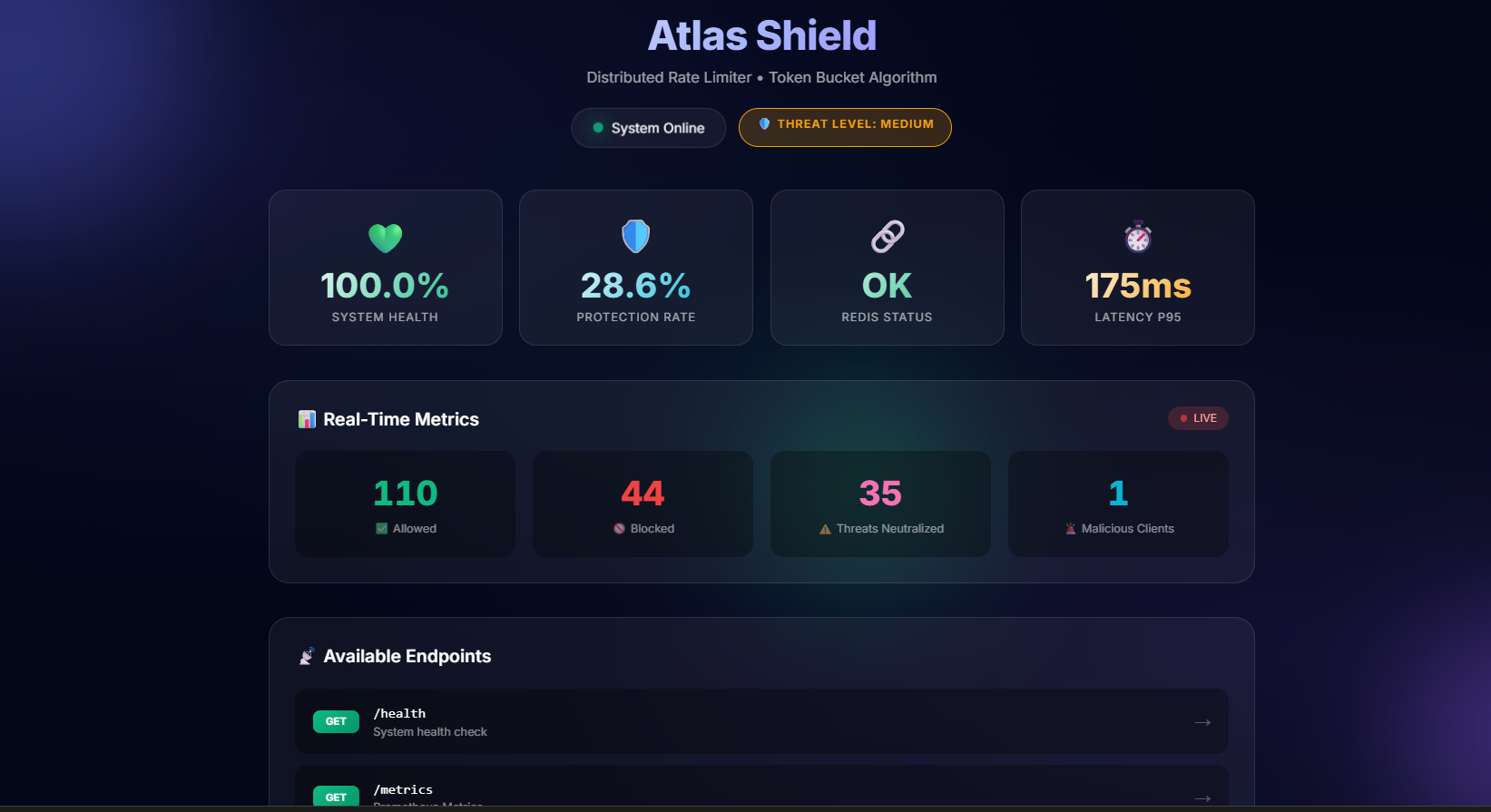
Interactive dashboard with real-time metrics, rate limiting statistics, and test endpoints
# 1. Configure .env
cp .env.example .env
# Edit .env with your Upstash credentials

# 2. Start container
docker-compose up -d

# 3. Access
open http://localhost:3000# 1. Install dependencies
npm install
# 2. Configure .env
cp .env.example .env
# 3. Run
npm start# Push to main triggers automatic deployment
git push origin main
# ✅ Automatic deployment via GitHub Actions!📚 Complete Guide: CI_CD_SETUP.md
# Configure these environment variables:
UPSTASH_REDIS_URL=redis://...
RATE_LIMIT_CAPACITY=100
RATE_LIMIT_REFILL_RATE=1
TRUST_PROXY=1 # ⚠️ Important!| Method | Endpoint | Rate Limit | Description |
|---|---|---|---|
GET |
/health |
None | Health check |
GET |
/metrics |
50 req/10s | Prometheus metrics |
GET |
/api/public |
100 req/10s | Public endpoint |
POST |
/api/login |
5 req/5s | Login (restrictive) |
GET |
/api/admin |
1000 req/10s | Admin (permissive) |
# Terminal 1: Run server
npm start

# Terminal 2: Execute test
node tests/load/loadTest.js
📚 Complete Testing Guide: TESTING.md
✅ Implemented:
- Secure Refill Rate (1 token/s default)
- Configurable Trust Proxy
/metricsendpoint protected with rate limit/api/no-limitroute restricted to development- Improved Redis reconnection (60 attempts, 10 min)
- Static file protection
- Dockerfile with non-root user
- API key hashing (SHA-256)
- Anti IP-spoofing
| Variable | Default | Description |
|---|---|---|
UPSTASH_REDIS_URL |
- | Required - Redis URL |
RATE_LIMIT_CAPACITY |
100 |
Bucket capacity (tokens) |
RATE_LIMIT_REFILL_RATE |
1 |
Tokens per second |
TRUST_PROXY |
false |
false/1/true |
PORT |
3000 |
Server port |
┌─────────────┐     ┌──────────────┐     ┌─────────────┐
│   Client    │────▶│  Express.js  │────▶│   Redis     │
│  Request    │     │  Middleware  │     │  (Upstash)  │
└─────────────┘     └──────────────┘     └─────────────┘
                           │
                    Token Bucket
                    Algorithm (Lua)
                           │
              ┌────────────┴────────────┐
              ▼                         ▼
         ✅ ALLOW                  🚫 429 BLOCK
         (has tokens)              (no tokens)
📚 Detailed Architecture: ARCHITECTURE.md
Why Lua Scripts?
- Atomicity: Token bucket operations (check + decrement) execute as a single atomic operation in Redis
- Performance: EVALSHA caching reduces network overhead by ~60%
- Race Conditions: Eliminates concurrent request conflicts in distributed environments
Why Behavioral Banning?
- Smart Detection: Differentiates between heavy legitimate users and malicious attackers
- Automatic Protection: Clients exceeding 10 violations/min are temporarily banned (10 min)
- Metrics Segregation: Separate tracking for standard blocks vs. malicious blocks
Performance Optimizations
- Circular Buffer: O(1) response time recording instead of O(n) array shifts
- Connection Pooling: ioredis maintains persistent connections with automatic reconnection
- Fail-Open Design: API remains available even if Redis is down (graceful degradation)
Security Measures
- Helmet.js: Automatic HTTP security headers (XSS, clickjacking, MIME sniffing protection)
- IP Extraction: Configurable
TRUST_PROXYprevents IP spoofing behind proxies/load balancers - API Key Hashing: SHA-256 hashing for identifying clients without storing sensitive data
curl http://localhost:3000/metrics# Available metrics
atlas_requests_allowed_total # Allowed requests
atlas_requests_blocked_total # Blocked requests (429)
atlas_active_clients # Unique active clients
atlas_block_rate_percent # Block rate percentage
atlas_response_time_ms # Response time (p50, p95, p99)
| Document | Description |
|---|---|
| ARCHITECTURE.md | Technical architecture & decisions |
| DEPLOY.md | Deployment guides (5 platforms) |
| TESTING.md | Complete testing checklist |
| CONTRIBUTING.md | Contribution guidelines |
| CI_CD_SETUP.md | CI/CD configuration |
Contributions are welcome! Please see our Contributing Guide for details.
# 1. Fork the project
# 2. Create a branch
git checkout -b feature/amazing-feature

# 3. Commit
git commit -m "feat: add amazing feature"

# 4. Push
git push origin feature/amazing-feature

# 5. Open a Pull Request- Redis - In-memory data store
- Upstash - Serverless Redis
- Express.js - Web framework
- ioredis - Redis client
This project is licensed under the MIT License - see the LICENSE file for details.
If this project helped you, please give it a ⭐ on GitHub!
Made with 💜 by Lucas