Nexpose support
Kvasir's support for Nexpose falls into a few categories:
- Generating and downloading Nexpose site reports
- Processing Nexpose XML reports
- Importing the Nexpose vulnerability database
Nexpose scanner settings are configured in the kvasir.yaml configuration file.
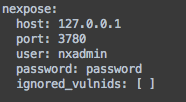
Setting values:
- host: IP/Hostname of Nexpose Console (default: localhost
- port: Listening port of Nexpose Console (default: 3780)
- user: Login name
- password: Password (note: will be stored in cleartext)
From the Administration menu bar select Nexpose -> Install/Update Vulndata.
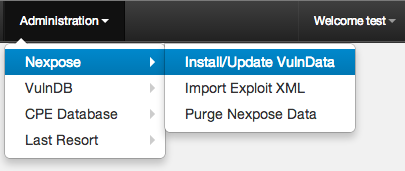
Enter your credentials and off you go! Grab a cup of your favorite beverage because it can take a while.
To import the results of Nexpose scans from the menu bar select Import -> Nexpose XML. If a valid Nexpose server and credentials are found in your user profile a list of Nexpose sites will be provided.
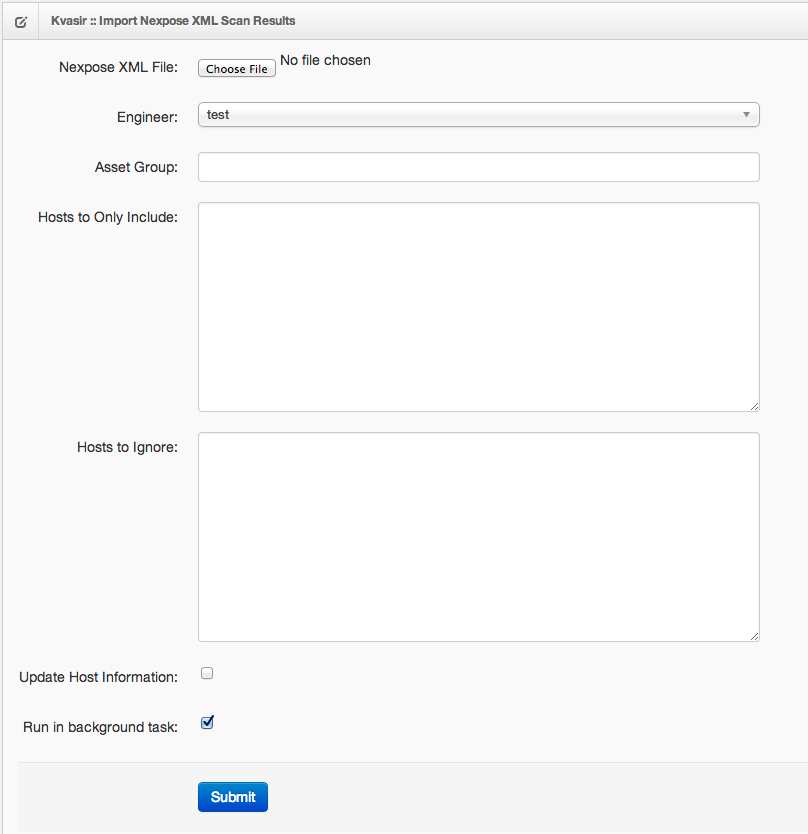
Setting values:
- Nexpose XML File: The Nexpose XML report file to import
- Nexpose Site: A list of Nexpose sites to generate a report and import
- Engineer: Engineer to assign hosts to
- Asset Group: Asset group to assign hosts to
- MSF Pro Workspace: Send Nexpose XML report to Metasploit Pro to be imported into this Workspace
- Hosts to Only Include: A list of IP Addresses that will be imported, all non-matching will be skipped
- Hosts to Ignore: A blacklist of IP Addresses to skip during importing
- Update Host Information: Update existing hosts, otherwise skip them
- Run in background task: Send to the scheduler to run in the background