

Keep your Ruff config consistent across multiple projects.
ruff-sync is a CLI tool that pulls a canonical Ruff configuration from an upstream pyproject.toml or ruff.toml (hosted anywhere — GitHub, GitLab, or any raw URL) and merges it into your local project, preserving your comments, formatting, and project-specific overrides.
- Documentation
- The Problem
- How It Works
- Quick Start
- Key Features
- Ruff Inspect (TUI)
- Configuration
- Pre-commit Integration
- CI Integration
- Agent Skill
- Troubleshooting
- API Reference
- Example Workflow
- Detailed Check Logic
- Dogfooding
- License
If you maintain more than one Python project, you've probably copy-pasted your [tool.ruff] config between repos more than once. When you decide to enable a new rule or bump your target Python version, you get to do it again — in every repo. Configs drift, standards diverge, and your "shared" style guide becomes a polite suggestion.
| Ecosystem | Mechanism | Limitation for Ruff users |
|---|---|---|
| ESLint | Shareable configs — publish an npm package, then extends: ["my-org-config"] |
Requires a package registry (npm). Python doesn't have an equivalent convention. |
| Prettier | Shared configs — same npm-package pattern, referenced via "prettier": "@my-org/prettier-config" in package.json |
Same — tightly coupled to npm. |
| Ruff | extend — extend from a local file path (great for monorepos) |
Only supports local paths. No native remote URL support (requested in astral-sh/ruff#12352). |
Ruff's extend is perfect inside a monorepo, but if your projects live in separate repositories, there's no built-in way to inherit config from a central source.
That's what ruff-sync does.
┌─────────────────────────────┐
│  Upstream repo              │
│  (your "source of truth")   │
│                             │
│  pyproject.toml             │
│    [tool.ruff]              │
│    target-version = "py310" │
│    lint.select = [...]      │
└──────────┬──────────────────┘
           │  ruff-sync downloads
           │  & extracts [tool.ruff]
           ▼
┌─────────────────────────────┐
│  Your local project         │
│                             │
│  pyproject.toml             │
│    [tool.ruff]  ◄── merged  │
│    # your comments kept ✓   │
│    # formatting kept ✓      │
│    # per-file-ignores kept ✓│
└─────────────────────────────┘
- You point
ruff-syncat the URL of your canonical configuration (repository, directory, or direct file). - It downloads the file and extracts the configuration (from
[tool.ruff]inpyproject.tomlor the top-level inruff.toml). - It merges the upstream config into your local project — updating values that changed, adding new rules, but preserving your local comments, whitespace, and any sections you've chosen to exclude (like
per-file-ignores).
No package registry. No publishing step. Just a URL.
See the Installation Guide for more detailed instructions.
With uv (recommended):
uv tool install ruff-syncWith pipx:
pipx install ruff-syncWith pip:
pip install ruff-syncThe Basic Sync
# Pull rules from a central repository into your current project
ruff-sync https://github.com/my-org/standards
Persistent Configuration
# If configured in pyproject.toml (see Configuration), simply run:
ruff-sync
Initializing a New Project
# Scaffold a new pyproject.toml if your directory is empty
ruff-sync https://github.com/my-org/standards --init
Syncing Subdirectories or Specific Files
ruff-sync https://github.com/my-org/standards/tree/main/configs/shared
ruff-sync https://github.com/my-org/standards/blob/main/pyproject.toml
Using Git (SSH/HTTP)
# Clones efficiently (depth 1, blob:none) to extract the config
ruff-sync git@github.com:my-org/standards.git
Excluding Specific Rules
# Exclude specific sections from being overwritten using dotted paths
ruff-sync --exclude lint.ignore
Checking for Drift (CI)
# Verify local config matches upstream. Exits 1 if config is out of sync.
# If opted in via --pre-commit, exits 2 if only the pre-commit hook is out of sync.
ruff-sync check https://github.com/my-org/standards

# Semantic check — ignores cosmetic differences like comments and whitespace
ruff-sync check --semantic
Validating before writing
# Validate the merged config with Ruff before writing to disk (opt-in)
ruff-sync https://github.com/my-org/standards --validate

# Strict mode — treat version mismatches and deprecated rules as hard failures
ruff-sync https://github.com/my-org/standards --strict
See the Usage documentation for more detailed examples and advanced workflows.
- 🏗️ Format-preserving merges — Uses tomlkit under the hood, so your comments, whitespace, and TOML structure are preserved. No reformatting surprises.
- 📂 Upstream Layers — Merge configurations from several sources sequentially (e.g., base company config + team-specific overrides).
- 🌐 GitHub & GitLab URL support — Automatically converts GitHub/GitLab repository URLs, tree (directory) URLs, or blob (file) URLs to raw content URLs. (See URL Resolution Guide)
- 🔍 Smart configuration discovery — Point at a directory and
ruff-syncwill automatically find your config. It checkspyproject.toml,ruff.toml, and.ruff.toml(in that order). - 📥 Git clone support — If the URL starts with
git@or uses thessh://,git://, orgit+ssh://schemes,ruff-syncwill perform an efficient shallow clone (using--filter=blob:noneand--no-checkout) to safely extract the configuration with minimal network traffic. - 🛡️ Selective exclusions — Keep project-specific overrides (like
per-file-ignoresortarget-version) from being clobbered by the upstream config. - 🌍 Works with any host — GitHub, GitLab, Bitbucket, private SSH servers, or any raw URL that serves a
pyproject.tomlorruff.toml. - 🤖 CI-ready
checkcommand — Verify that your local config is in sync without modifying anything. Exits 1 if out of sync, making it perfect for pre-merge gates. (See detailed logic) - 🧠 Semantic mode — Use
--semanticto ignore cosmetic differences (comments, whitespace) and only fail on real value changes. - 🔗 Pre-commit hook sync — Use
--pre-committo automatically keep yourruff-pre-commithook version in.pre-commit-config.yamlmatching your project's Ruff version. - ✅ Config validation — Use
--validateto run the merged config through Ruff before writing to disk;--strictupgrades warnings to hard failures. - 🦾 Agent Skill — Ships a bundled Agent Skill so AI coding agents can guide you through setup, configuration, and troubleshooting automatically.
- 📊 Multiple Output Formats — Supports
text,json, and GitHub Actionsgithub(inline annotations) formats for seamless integration with both human developers and CI/CD pipelines.
ruff-inspect is an experimental interactive Terminal User Interface for exploring your Ruff configuration and rule documentation — shipped as an optional extra.
# Install with TUI support
uv tool install "ruff-sync[tui]"

# Launch the inspector
ruff-inspect
Note
This feature is experimental and subject to change. See the Ruff Config Inspection page for full details.
Point ruff-sync at your upstream source and it will handle the rest. See the Full Configuration Guide for all available options.
You can configure ruff-sync itself in your pyproject.toml:
[tool.ruff-sync]
# The source of truth for your Ruff configuration
upstream = "https://github.com/my-org/standards"

# Automatically sync the pre-commit Ruff hook version
pre-commit-version-sync = true

# Use simple names for top-level keys, and dotted paths for nested keys
exclude = [
    "target-version",                      # Top-level [tool.ruff] key — projects target different Python versions
    "lint.per-file-ignores",                # Project-specific file overrides
    "lint.ignore",                         # Project-specific rule suppressions
    "lint.isort.known-first-party",         # Every project has different first-party packages
    "lint.flake8-tidy-imports.banned-api",  # Entire plugin section — project-specific banned APIs
    "lint.pydocstyle.convention",          # Teams may disagree on google vs numpy vs pep257
]
This sets the default upstream and exclusions so you don't need to pass them on the command line every time.
Note: Any explicitly provided CLI arguments will override the values in pyproject.toml.
Here are all the possible values that can be provided in [tool.ruff-sync] along with their explanations and defaults:
[tool.ruff-sync]
# The source of truth URL(s) for your Ruff configuration. (Required, unless passed via CLI)
# Accepts a single string URL or a list of URLs.
upstream = ["https://github.com/my-org/standards", "https://github.com/my-org/team-tweaks"]

# A list of config keys to exclude from being synced. (Default: ["lint.per-file-ignores"])
# Use simple names for top-level keys, and dotted paths for nested keys.
exclude = [
    "target-version",
    "lint.per-file-ignores",
]

# The branch, tag, or commit hash to use when resolving a Git repository URL. (Default: "main")
branch = "develop"

# The directory path within the repository where the config is located. (Default: "")
# Useful if the upstream config is not at the repository root.
path = "config/ruff"

# The local target directory or file to sync into. (Default: ".")
to = "."

# Keep the pre-commit Ruff hook version in sync with the project's Ruff version. (Default: false)
pre-commit-version-sync = trueEnsure your configuration is always in sync before every commit. Add this to your .pre-commit-config.yaml:
- repo: https://github.com/Kilo59/ruff-sync
  rev: v0.1.3  # Use the latest version
  hooks:
    - id: ruff-sync-check
See the Pre-commit Guide for more details.

The check command is designed for use in CI pipelines. Add it as a step to catch config drift before it merges. See the CI Integration Guide for more details.
# .github/workflows/ci.yaml
- name: Check ruff config is in sync
  run: |
    ruff-sync check --semantic --output-format github
With --semantic, minor reformatting of your local file won't cause a false positive — only actual rule or value differences will fail the check.
To see exactly what's drifted, omit --no-diff (the default) and the output will include a unified diff:
$ ruff-sync check --semantic
🔍 Checking Ruff sync status...
❌ Ruff configuration at pyproject.toml is out of sync!
--- local (semantic)
+++ upstream (semantic)
@@ -5,6 +5,7 @@
   "select": [
+    "PERF",
     "RUF",
     ...
   ]
Tip
See the Best Practices guide for recommendations on whether to make your CI checks blocking or informational.
ruff-sync ships a bundled Agent Skill at .agents/skills/ruff-sync-usage/. AI coding agents that support the Agent Skills format (GitHub Copilot, Claude Code, Cursor, etc.) will automatically use it to guide you through setup, configuration, CI integration, and troubleshooting — without you needing to explain the tool each time.
See the Agent Skill guide for details.
A typical setup for an organization:
- Create a "standards" repo with your canonical
pyproject.tomlcontaining your shared[tool.ruff]config. - In each project, run
ruff-syncpointing at that repo — either manually, in a Makefile, or as a CI step. - When you update the standard, re-run
ruff-syncin each project to pull the changes. Your local comments andper-file-ignoresstay intact.
# In each project repo:
ruff-sync https://github.com/my-org/python-standards
git diff pyproject.toml  # review the changes
git commit -am "sync ruff config from upstream"While ruff-sync is designed to sync from any repository or URL of your choosing, this repository also provides a few curated configurations in the configs/ directory that you can use directly. See the Pre-defined Configs Guide for more detailed examples and advanced usage.
An exhaustive configuration that explicitly enables and documents almost all available Ruff rules. Great for establishing a strict baseline.
# Directory URL (recommended)
ruff-sync https://github.com/Kilo59/ruff-sync/tree/main/configs/kitchen-sink

# Direct file URL (blob)
ruff-sync https://github.com/Kilo59/ruff-sync/blob/main/configs/kitchen-sink/ruff.toml

# Raw content URL
ruff-sync https://raw.githubusercontent.com/Kilo59/ruff-sync/main/configs/kitchen-sink/ruff.toml

# Git SSH URL (clones the repo)
ruff-sync git@github.com:Kilo59/ruff-sync.git --path configs/kitchen-sinkTailored for modern web applications. Includes rules for asyncio, security (flake8-bandit), and Pydantic-friendly naming conventions.
# Using the --path option with the repository root
ruff-sync https://github.com/Kilo59/ruff-sync --path configs/fastapi

# Directory URL
ruff-sync https://github.com/Kilo59/ruff-sync/tree/main/configs/fastapiSet your preferred standard as the default in your pyproject.toml:
[tool.ruff-sync]
upstream = "https://github.com/Kilo59/ruff-sync"
path = "configs/fastapi"By default, ruff-sync requires an existing configuration file (pyproject.toml or ruff.toml) to merge into. If you are starting a fresh project and want to initialize it with your organization's Ruff settings, you can use the --init flag to scaffold a new file automatically.
# Create a new pyproject.toml (or ruff.toml) pre-configured with upstream settings
ruff-sync https://github.com/my-org/standards --init
ruff-sync will automatically serialize the upstream URL (and any other CLI arguments like exclusions) into a new [tool.ruff-sync] section in your pyproject.toml so that future syncs can be performed simply by running ruff-sync. To prevent accidental credential leaks, ruff-sync will refuse to serialize this section if it detects a username or password in the upstream URL.
If you wish to update an existing configuration with a new upstream URL and save it permanently, use the --save flag:
ruff-sync https://github.com/my-org/new-standards --saveruff-sync seamlessly supports both pyproject.toml and standalone ruff.toml (or .ruff.toml) files. If your local target is a directory, it will look for configuration files in the following order: ruff.toml -> .ruff.toml -> pyproject.toml. If your upstream source or your local target is a ruff.toml, it will automatically adapt and sync the root configuration rather than looking for a [tool.ruff] section.
When you run ruff-sync check, it follows this process to determine if your project has drifted from the upstream source:
flowchart TD
    Start([Start]) --> Local[Read Local Configuration]
    Local --> Upstreams{For each Upstream}
    Upstreams --> Download[Download/Clone Configuration]
    Download --> Extract[Extract section if needed]
    Extract --> Exclude[Apply Exclusions]
    Exclude --> Merge[Merge into in-memory Doc]
    Merge --> Upstreams
    Upstreams -- Done --> Comparison

    subgraph Comparison [Comparison Logic]
        direction TB
        SemanticNode{--semantic?}
        SemanticNode -- Yes --> Unwrap[Unwrap TOML objects to Python Dicts]
        Unwrap --> CompareVal[Compare Key/Value Pairs]
        SemanticNode -- No --> CompareFull[Compare Full File Strings]
    end

    Merge --> Comparison

    CompareVal --> ResultNode{Ruff Sync Match?}
    CompareFull --> ResultNode

    ResultNode -- Yes --> Success([Exit 0: In Sync])

    ResultNode -- No --> Diff[Generate Diff]
    Diff --> Fail([Exit 1: Ruff Config Out of Sync])

    %% Styling
    style Start fill:#2563eb,color:#fff,stroke:#1d4ed8
    style Success fill:#16a34a,color:#fff,stroke:#15803d
    style Fail fill:#dc2626,color:#fff,stroke:#b91c1c
    style ResultNode fill:#ca8a04,color:#fff,stroke:#a16207
    style Comparison fill:none,stroke:#9e9e9e,stroke-dasharray: 5 5,stroke-width:2px
    style SemanticNode fill:#4b5563,color:#fff,stroke:#374151
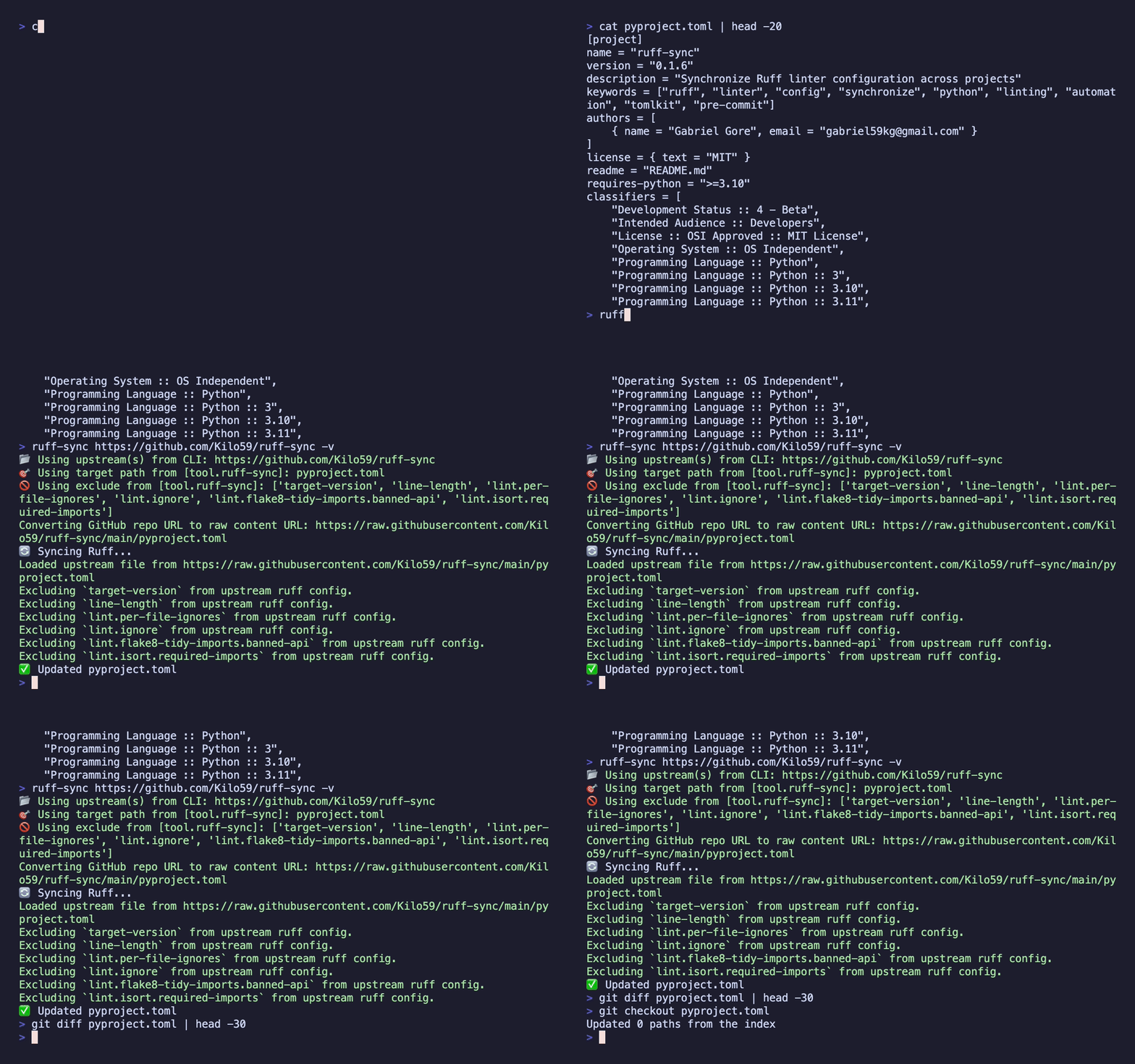
To see ruff-sync in action, this project automatically "dogfoods" its own configuration. Every pull request runs a ruff-sync check against the repository's own pyproject.toml using the --output-format github flag, providing real-time feedback and inline annotations whenever configuration drift is detected.
You can also run these checks manually or experiment with syncing:
Check if this project is in sync with its upstream:
./scripts/check_dogfood.shOr sync from a large upstream like Pydantic's config:
# Using a HTTP URL
./scripts/pull_dogfood.sh
# Using a Git URL
./scripts/gitclone_dogfood.sh
This will download Pydantic's Ruff configuration and merge it into the local pyproject.toml. You can then use git diff to see how it merged the keys while preserving the existing structure and comments.
To revert the changes after testing:
git checkout pyproject.toml