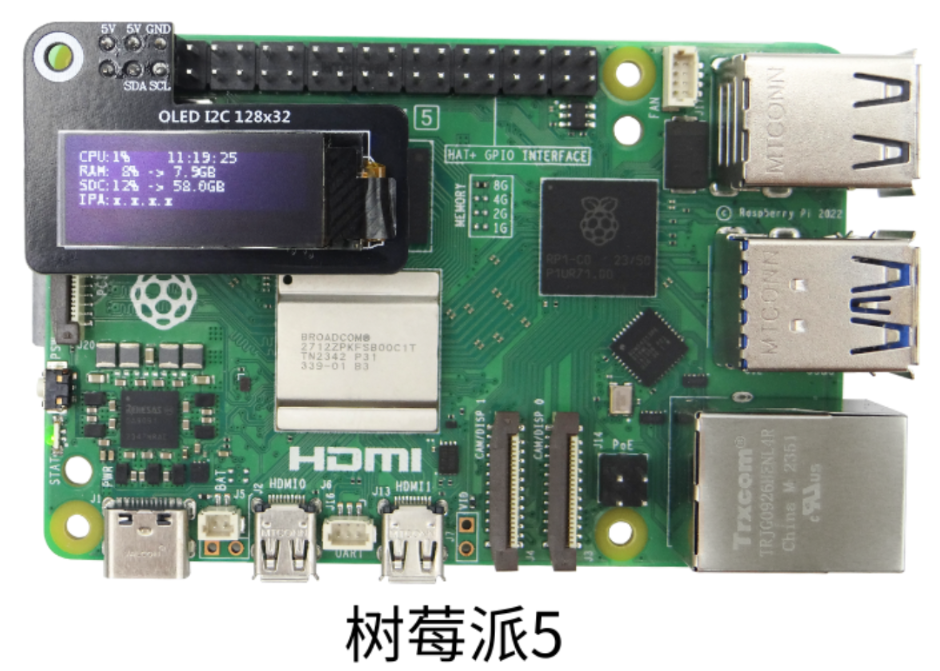
Jetson series controller
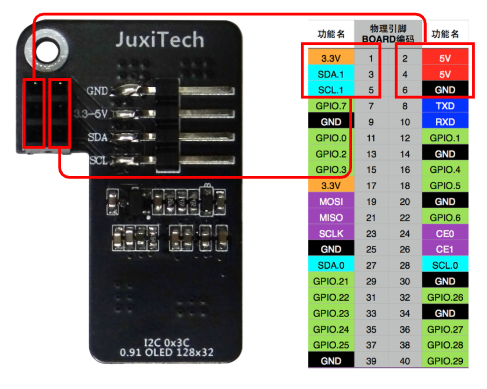
- GPIO pin diagram
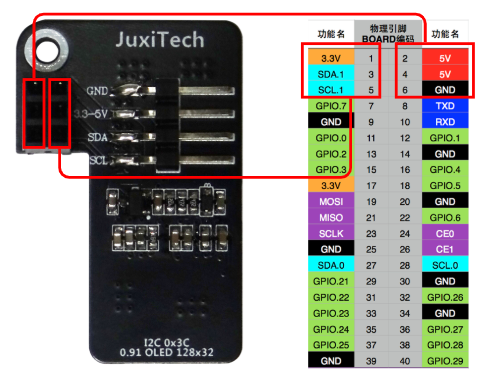
To test the I2C communication function using a 0.91-inch OLED screen, connect the wires as follows:
Note: Do not connect the pins incorrectly or cause a short circuit. Mistakes may damage the motherboard hardware!
- I2C Testing
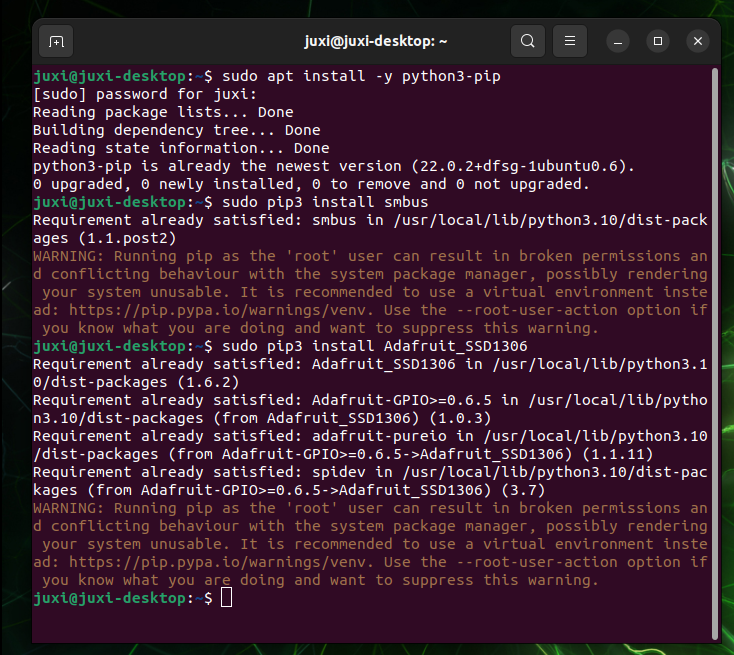
- Install dependencies
sudo apt install -y python3-pip
sudo pip3 install smbus
sudo pip3 install Adafruit_SSD1306
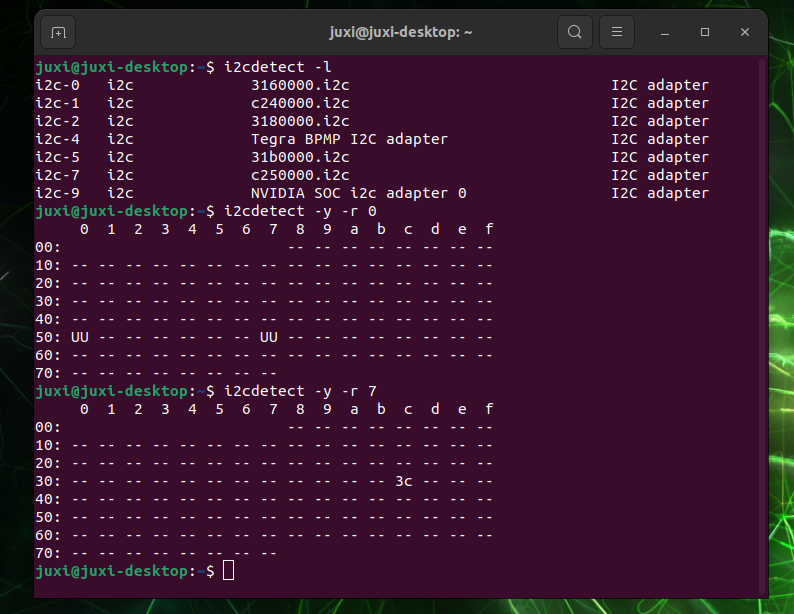
2. I2C devices During normal development, we need to find the device bus and device address that the I2C device is connected to. (1) Query the I2C bus Enter the following command in the terminal to list all buses of the device:
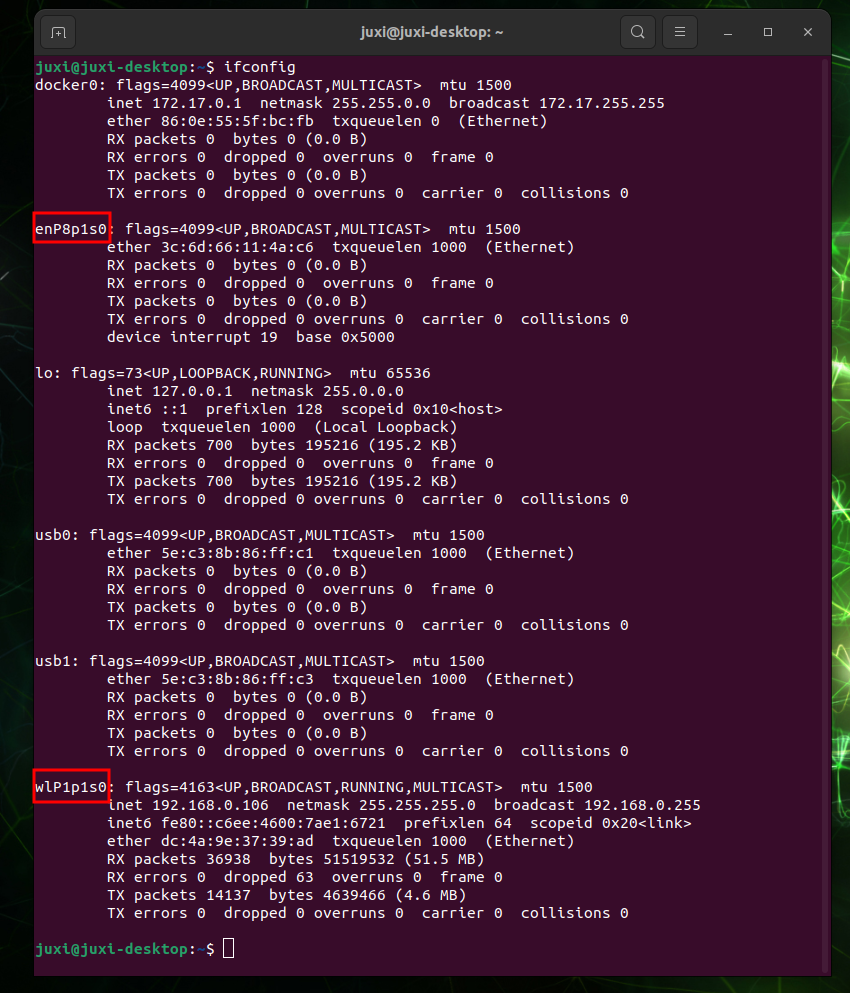
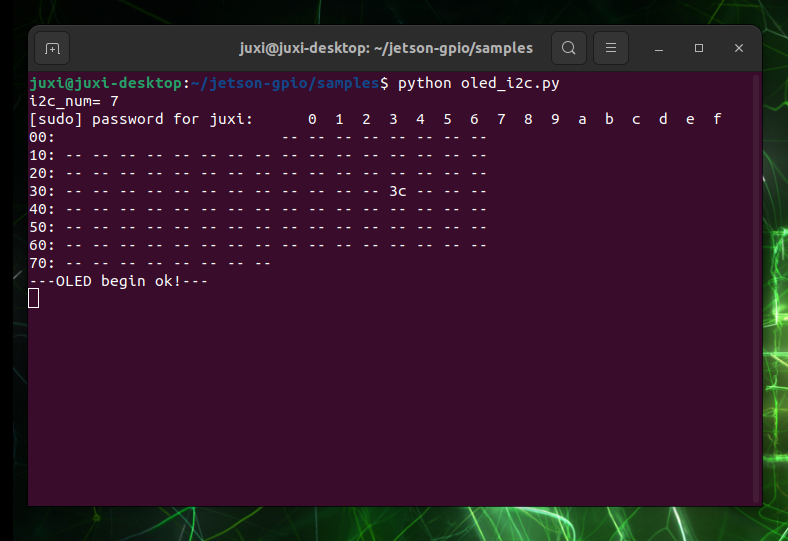
(2) Query I2C devices Entering the following command in the terminal will list the I2C devices on a specified bus: the I2C address corresponding to OLED is 0x3c.i2cdetect -li2cdetect -y -r * - Check IP address and port
Use
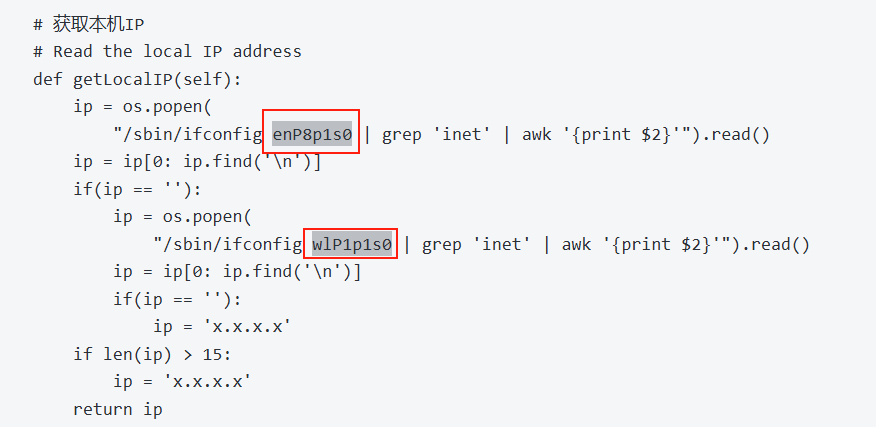
ifconfigto view IP address and port.Change the code according to the actual port.
- Experimental Results
- Create the Oled_i2c.py file.
sudo gedit Oled_i2c.py- Copy and paste the following code
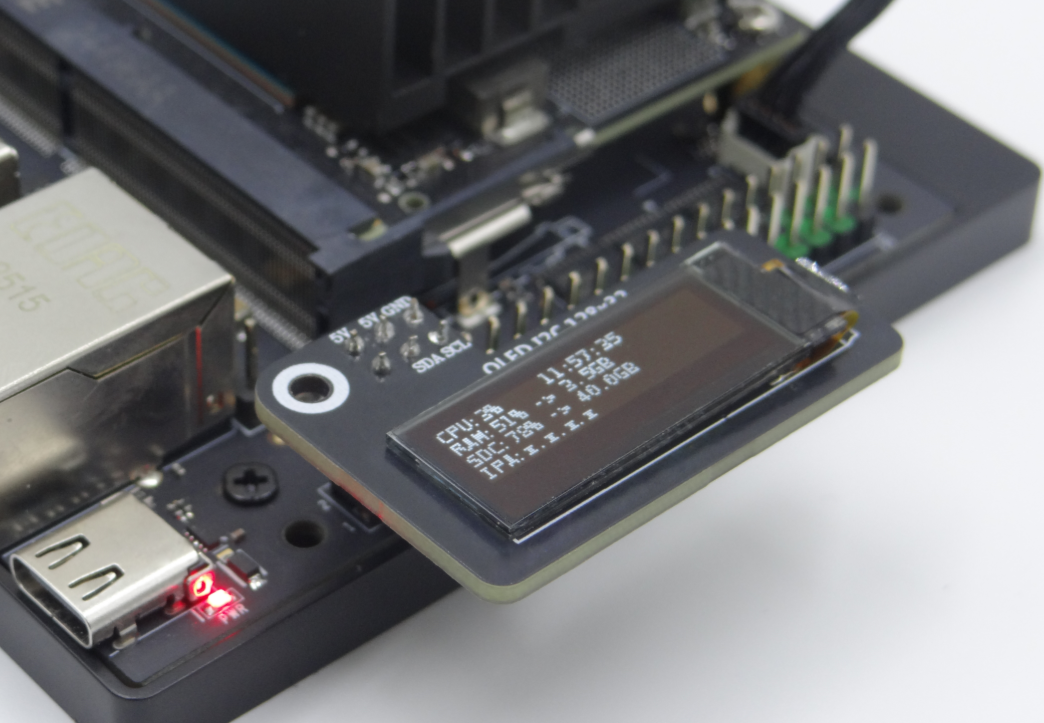
#!/usr/bin/env python3 # coding=utf-8 import time import os import sys i2c_num = 7 if len(sys.argv) > 1: if str(sys.argv[1]).isdigit(): i2c_num = int(sys.argv[1]) print("i2c_num=", i2c_num) passwd = "juxi cmd_i2c = "sudo i2cdetect -y -r " + str(i2c_num) os.system('echo %s | sudo -S %s' % (passwd, cmd_i2c)) import Adafruit_SSD1306 as SSD from PIL import Image from PIL import ImageDraw from PIL import ImageFont import subprocess class Juxi_OLED: def __init__(self, i2c_bus=1, debug=False): self.__debug = debug self.__i2c_bus = i2c_bus self.__top = -2 self.__x = 0 self.__total_last = 0 self.__idle_last = 0 self.__str_CPU = "CPU:0%" def __del__(self): if self.__debug: print("---OLED-DEL---") # Initialize the OLED. Returns True on success, False on failure. # Initialize OLED, return True on success, False on failure def begin(self): try: self.__oled = SSD.SSD1306_128_32( rst=None, i2c_bus=self.__i2c_bus, gpio=1) self.__oled.begin() self.__oled.clear() self.__oled.display() self.__width = self.__oled.width self.__height = self.__oled.height self.__image = Image.new('1', (self.__width, self.__height)) self.__draw = ImageDraw.Draw(self.__image) self.__font = ImageFont.truetype("DejaVuSansMono.ttf",8) # ImageFont.load_default() if self.__debug: print("---OLED begin ok!---") return True except: # if self.__i2c_bus == 1: # self.__i2c_bus = 8 # elif self.__i2c_bus == 8: # self.__i2c_bus = 1 if self.__debug: print("---OLED no found!---") return False # Clear the display. refresh=True refreshes immediately, refresh=False does not refresh. # Clear the display. Refresh =True Refresh immediately, refresh=False refresh not def clear(self, refresh=False): self.__draw.rectangle( (0, 0, self.__width, self.__height), outline=0, fill=0) if refresh: self.refresh() # Add characters. start_x and start_y represent the starting point. text is the character to add. # refresh=True refreshes immediately, refresh=False does not refresh. # Add characters. Start_x Start_y indicates the starting point. Text is the character to be added # Refresh =True Refresh immediately, refresh=False refresh not def add_text(self, start_x, start_y, text, refresh=False): if start_x > 128 or start_x < 0 or start_y < 0 or start_y > 32: if self.__debug: print("oled text: x, y input error!") return x = int(start_x + self.__x) y = int(start_y + self.__top) self.__draw.text((x, y), str(text), font=self.__font, fill=255) if refresh: self.refresh() # Write a line of text. refresh=True refreshes immediately, refresh=False does not refresh. # line=[1, 4] # Write a line of character text. Refresh =True Refresh immediately, refresh=False refresh not. def add_line(self, text, line=1, refresh=False): if line < 1 or line > 4: if self.__debug: print("oled line input error!") return y = int(8 * (line - 1)) self.add_text(0, y, text, refresh) # Refresh OLED to display content # Refresh the OLED to display the content def refresh(self): self.__oled.image(self.__image) self.__oled.display() # Read CPU usage # Read the CPU usage rate def getCPULoadRate(self, index): count = 10 if index == 0: f1 = os.popen("cat /proc/stat", 'r') stat1 = f1.readline() data_1 = [] for i in range(count): data_1.append(int(stat1.split(' ')[i+2])) self.__total_last = data_1[0]+data_1[1]+data_1[2]+data_1[3] + \ date_1[4]+date_1[5]+date_1[6]+date_1[7]+date_1[8]+date_1[9] self.__idle_last = data_1[3] elif index == 4: f2 = os.popen("cat /proc/stat", 'r') stat2 = f2.readline() data_2 = [] for i in range(count): data_2.append(int(stat2.split(' ')[i+2])) total_now = data_2[0]+data_2[1]+data_2[2]+data_2[3] + \ date_2[4]+date_2[5]+date_2[6]+date_2[7]+date_2[8]+date_2[9] idle_now = data_2[3] total = int(total_now - self.__total_last) idle = int(idle_now - self.__idle_last) usage = int(total - idle) usageRate = int(float(usage / total) * 100) self.__str_CPU = "CPU:" + str(usageRate) + "%" self.__total_last = 0 self.__idle_last = 0 # if self.__debug: # print(self.__str_CPU) return self.__str_CPU # Read system time # Read system time def getSystemTime(self): cmd = "date +%H:%M:%S" date_time = subprocess.check_output(cmd, shell=True) str_Time = str(date_time).lstrip('b\'') str_Time = str_Time.rstrip('\\n\'') # print(date_time) return str_Time # Read memory usage and total memory # Read the memory usage and total memory def getUsagedRAM(self): cmd = "free | awk 'NR==2{printf \"RAM:%2d%% -> %.1fGB \", 100*($2-$7)/$2, ($2/1048576.0)}'" FreeRam = subprocess.check_output(cmd, shell=True) str_FreeRam = str(FreeRam).lstrip('b\'') str_FreeRam = str_FreeRam.rstrip('\'') return str_FreeRam # Read free memory / total memory # Read free memory/total memory def getFreeRAM(self): cmd = "free -h | awk 'NR==2{printf \"RAM: %.1f/%.1fGB \", $7,$2}'" FreeRam = subprocess.check_output(cmd, shell=True) str_FreeRam = str(FreeRam).lstrip('b\'') str_FreeRam = str_FreeRam.rstrip('\'') return str_FreeRam # Read TF card space usage / Total TF card space # Read the TF card space usage/TOTAL TF card space def getUsagedDisk(self): cmd = "df -h | awk '$NF==\"/\"{printf \"SDC:%s -> %.1fGB\", $5, $2}'" Disk = subprocess.check_output(cmd, shell=True) str_Disk = str(Disk).lstrip('b\'') str_Disk = str_Disk.rstrip('\'') return str_Disk # Read available TF card space / Total TF card space # Read the free TF card space/total TF card space def getFreeDisk(self): cmd = "df -h | awk '$NF==\"/\"{printf \"Disk:%.1f/%.1fGB\", $4,$2}'" Disk = subprocess.check_output(cmd, shell=True) str_Disk = str(Disk).lstrip('b\'') str_Disk = str_Disk.rstrip('\'') return str_Disk # Get local IP # Read the local IP address def getLocalIP(self): ip = os.popen( "/sbin/ifconfig enP8p1s0 | grep 'inet' | awk '{print $2}'").read() ip = ip[0: ip.find('\n')] if(ip == ''): ip = os.popen( "/sbin/ifconfig wlP1p1s0 | grep 'inet' | awk '{print $2}'").read() ip = ip[0: ip.find('\n')] if(ip == ''): ip = 'x.x.x.x' if len(ip) > 15: ip = 'x.x.x.x' return ip # The main function of oled is called in a while loop, which enables hot-plugging functionality. # Oled mainly runs functions that are called in a while loop and can be hot-pluggable def main_program(self): state = False try: cpu_index = 0 state = self.begin() while state: self.clear() str_CPU = self.getCPULoadRate(cpu_index) str_Time = self.getSystemTime() if cpu_index == 0: str_FreeRAM = self.getUsagedRAM() str_Disk = self.getUsagedDisk() str_IP = "IPA:" + self.getLocalIP() self.add_text(0, 0, str_CPU) self.add_text(50, 0, str_Time) self.add_line(str_FreeRAM, 2) self.add_line(str_Disk, 3) self.add_line(str_IP, 4) # Display image. self.refresh() cpu_index = cpu_index + 1 if cpu_index >= 5: cpu_index = 0 time.sleep(.1) except: if self.__debug: print("!!!---OLED refresh error---!!!") pass if __name__ == "__main__": try: oled = Juxi_OLED(i2c_num, debug=True) while True: oled.main_program() time.sleep(2) except KeyboardInterrupt: oled.clear(True) you are welcome print(" Program closed! ") pass- After launching the program, the OLED display will show system information such as CPU usage, system time, and memory usage.
Raspberry Pie, Orange Pie
- Enable I2C option
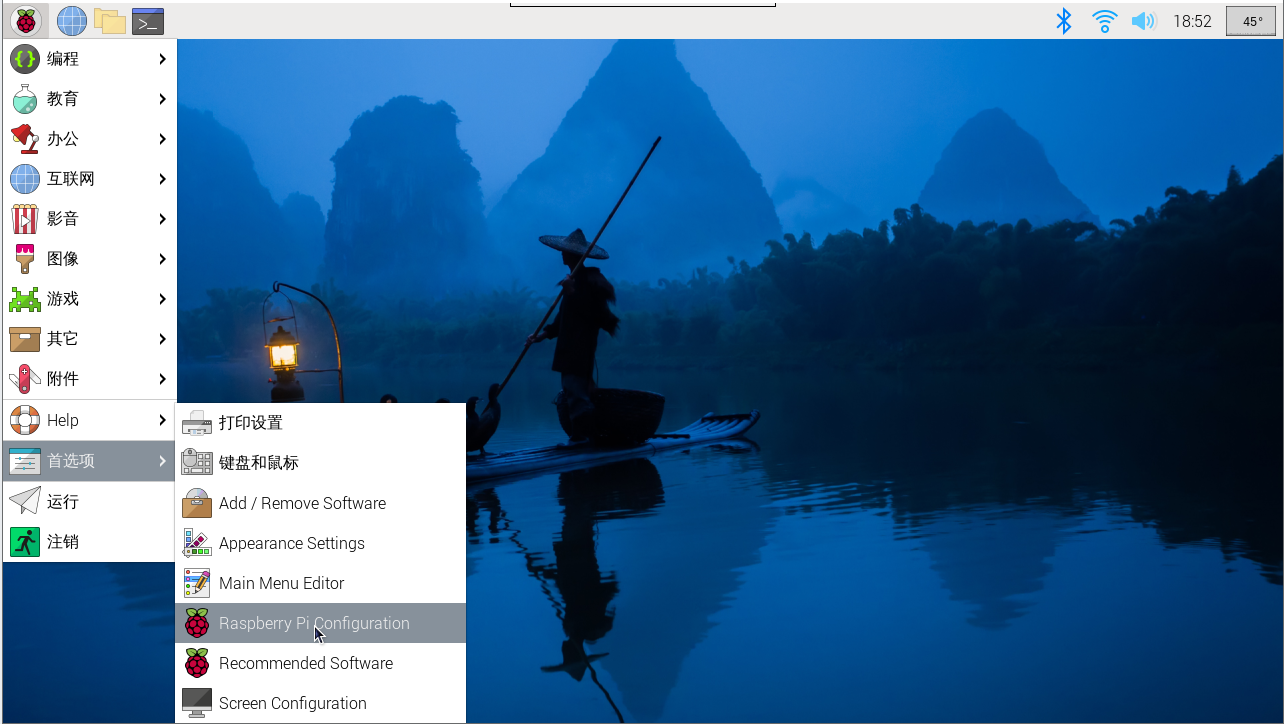
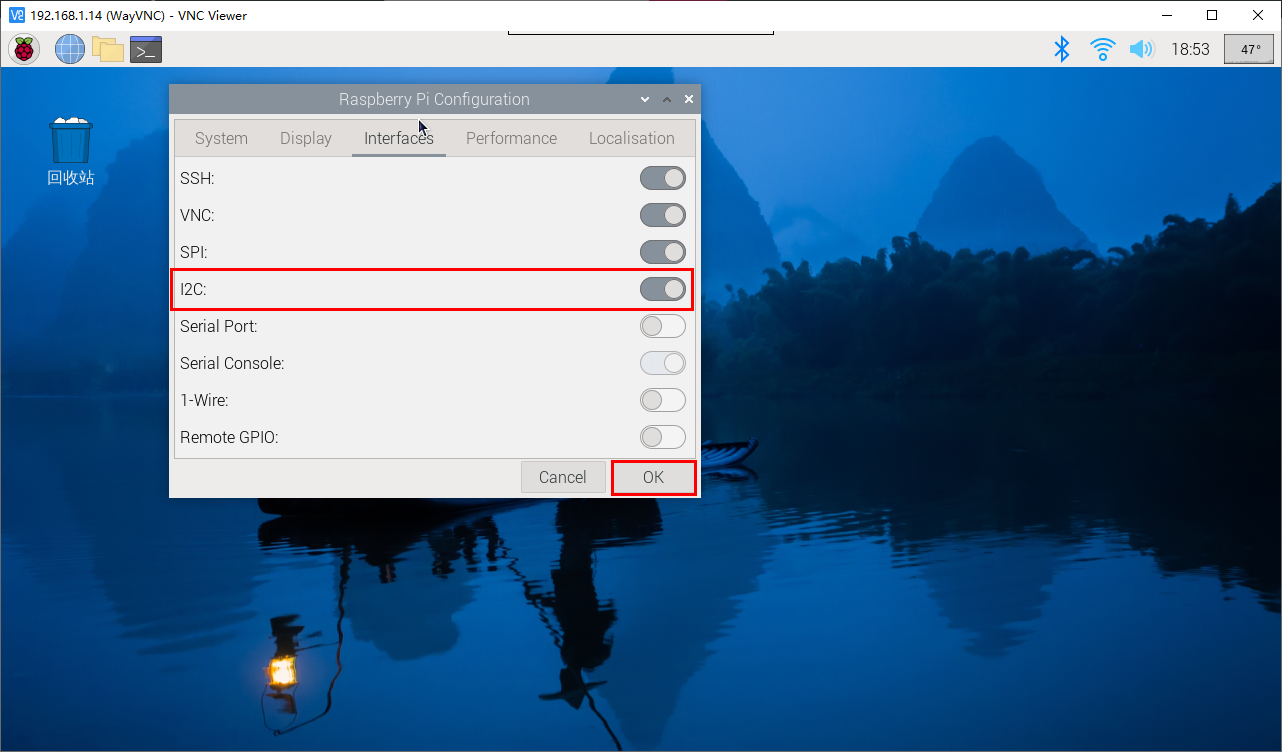
To access the Raspberry Pi system settings, select: Preferences → Raspberry Pi Configuration → Interfaces → find the I2C option and enable it. The system will then restart. (See the image below for reference.)
If you are in command mode, you can type sudo raspi-config to find the option to enable I2C, and then restart your system.
- Install I2C library files
sudo apt install -y python3-dev
sudo apt install -y python3-smbus i2c-tools
sudo apt install -y python3-pil
sudo apt install -y python3-pip
sudo apt install -y python3-setuptools
sudo apt install -y python3-rpi.gpio
sudo apt install -y python3-venv
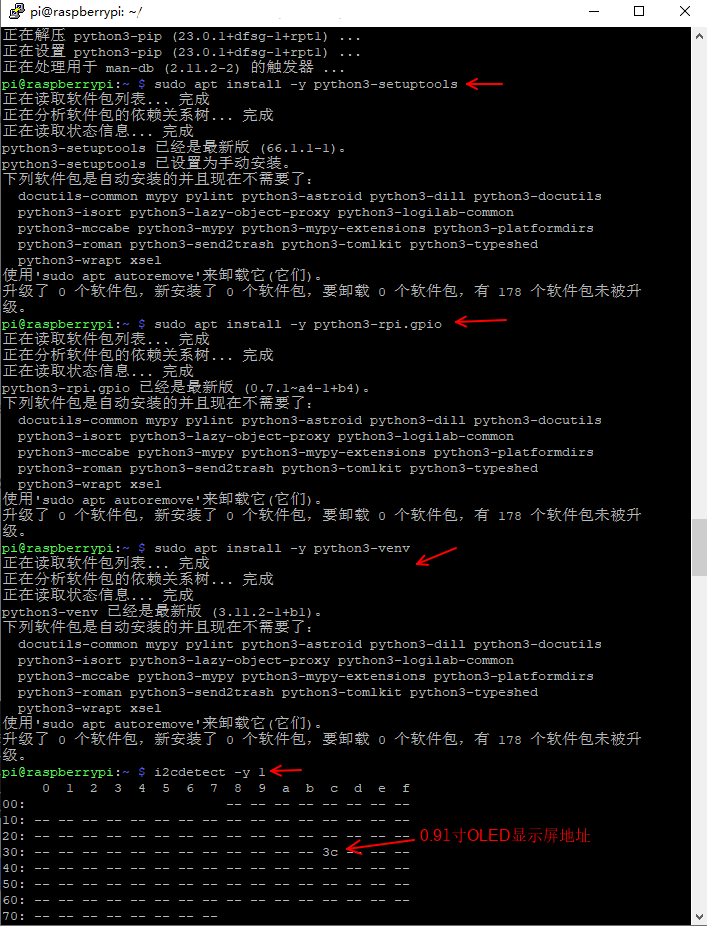
I'm using Python 3 here. After installing the I2C library, I use the i2cdetect command to check if the display module is recognized.
i2cdetect -y 1
The device has been detected at address "0x3c" (as shown in the image below). The default address for this type of device is hexadecimal.
- Font file configuration
The code uses the DejaVuSansMono.ttf font:
sudo apt-get install -y fonts-dejavu-core
Alternatively, modify the code to use a system font that is already present (such as ImageFont.load_default()).
- Permission Configuration
Ensure that the I2C device file permissions are correct:
`sudo chmod a+rw /dev/i2c-*` # This command applies temporarily; permanent effect requires configuring udev rules.
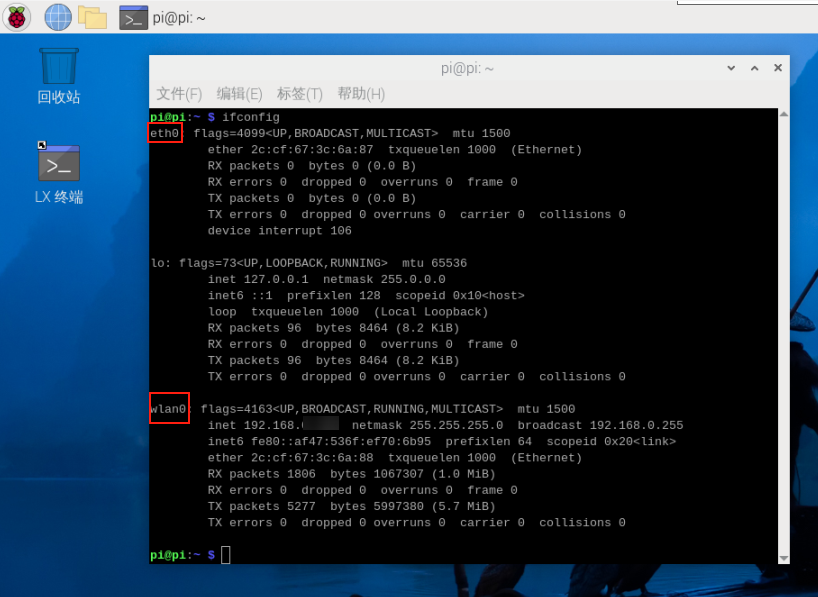
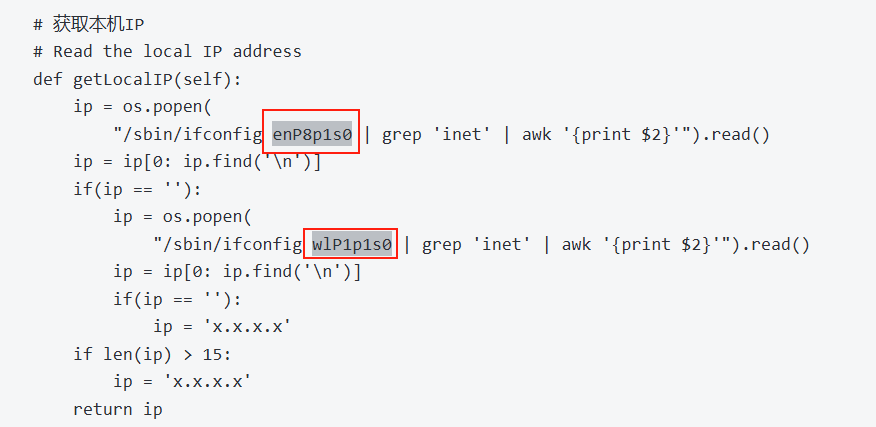
- Check IP address and port
Use ifconfig to view the actual IP address and port.
# (If net-tools is not installed) sudo apt install net-tools
ifconfig
- Create the Oled_i2c.py file
Create a file named Oled_i2c.py in the Home directory.
# (If gedit is not installed) sudo apt install gedit
sudo gedit Oled_i2c.py
Copy the following code, paste it into the file, save, and close.
#!/usr/bin/env python3
# coding=utf-8
import time
import os
import sys

i2c_num = 7
if len(sys.argv) > 1:
    if str(sys.argv[1]).isdigit():
        i2c_num = int(sys.argv[1])

print("i2c_num=", i2c_num)

passwd = "juxi
cmd_i2c = "sudo i2cdetect -y -r " + str(i2c_num)
os.system('echo %s | sudo -S %s' % (passwd, cmd_i2c))


import Adafruit_SSD1306 as SSD

from PIL import Image
from PIL import ImageDraw
from PIL import ImageFont

import subprocess


class Juxi_OLED:
    def __init__(self, i2c_bus=1, debug=False):
        self.__debug = debug
        self.__i2c_bus = i2c_bus
        self.__top = -2
        self.__x = 0

        self.__total_last = 0
        self.__idle_last = 0
        self.__str_CPU = "CPU:0%"


    def __del__(self):
        if self.__debug:
            print("---OLED-DEL---")

    # Initialize the OLED. Returns True on success, False on failure.
    # Initialize OLED, return True on success, False on failure
    def begin(self):
        try:
            self.__oled = SSD.SSD1306_128_32(
                rst=None, i2c_bus=self.__i2c_bus, gpio=1)
            self.__oled.begin()
            self.__oled.clear()
            self.__oled.display()
            self.__width = self.__oled.width
            self.__height = self.__oled.height
            self.__image = Image.new('1', (self.__width, self.__height))
            self.__draw = ImageDraw.Draw(self.__image)
            self.__font = ImageFont.truetype("DejaVuSansMono.ttf",8)    # ImageFont.load_default()
            if self.__debug:
                print("---OLED begin ok!---")
            return True
        except:
            # if self.__i2c_bus == 1:
            #     self.__i2c_bus = 8
            # elif self.__i2c_bus == 8:
            #     self.__i2c_bus = 1
            if self.__debug:
                print("---OLED no found!---")
            return False

    # Clear the display. refresh=True refreshes immediately, refresh=False does not refresh.
    # Clear the display.  Refresh =True Refresh immediately, refresh=False refresh not
    def clear(self, refresh=False):
        self.__draw.rectangle(
            (0, 0, self.__width, self.__height), outline=0, fill=0)
        if refresh:
            self.refresh()

    # Add characters. start_x and start_y represent the starting point. text is the character to add.
    # refresh=True refreshes immediately, refresh=False does not refresh.
    # Add characters.  Start_x Start_y indicates the starting point.  Text is the character to be added
    # Refresh =True Refresh immediately, refresh=False refresh not
    def add_text(self, start_x, start_y, text, refresh=False):
        if start_x > 128 or start_x < 0 or start_y < 0 or start_y > 32:
            if self.__debug:
                print("oled text: x, y input error!")
            return
        x = int(start_x + self.__x)
        y = int(start_y + self.__top)
        self.__draw.text((x, y), str(text), font=self.__font, fill=255)
        if refresh:
            self.refresh()

    # Write a line of text. refresh=True refreshes immediately, refresh=False does not refresh.
    # line=[1, 4]
    # Write a line of character text.  Refresh =True Refresh immediately, refresh=False refresh not.
    def add_line(self, text, line=1, refresh=False):
        if line < 1 or line > 4:
            if self.__debug:
                print("oled line input error!")
            return
        y = int(8 * (line - 1))
        self.add_text(0, y, text, refresh)

    # Refresh OLED to display content
    # Refresh the OLED to display the content
    def refresh(self):
        self.__oled.image(self.__image)
        self.__oled.display()

    # Read CPU usage
    # Read the CPU usage rate
    def getCPULoadRate(self, index):
        count = 10
        if index == 0:
            f1 = os.popen("cat /proc/stat", 'r')
            stat1 = f1.readline()
            data_1 = []
            for i in range(count):
                data_1.append(int(stat1.split(' ')[i+2]))
            self.__total_last = data_1[0]+data_1[1]+data_1[2]+data_1[3] + \
                date_1[4]+date_1[5]+date_1[6]+date_1[7]+date_1[8]+date_1[9]
            self.__idle_last = data_1[3]
        elif index == 4:
            f2 = os.popen("cat /proc/stat", 'r')
            stat2 = f2.readline()
            data_2 = []
            for i in range(count):
                data_2.append(int(stat2.split(' ')[i+2]))
            total_now = data_2[0]+data_2[1]+data_2[2]+data_2[3] + \
                date_2[4]+date_2[5]+date_2[6]+date_2[7]+date_2[8]+date_2[9]
            idle_now = data_2[3]
            total = int(total_now - self.__total_last)
            idle = int(idle_now - self.__idle_last)
            usage = int(total - idle)
            usageRate = int(float(usage / total) * 100)
            self.__str_CPU = "CPU:" + str(usageRate) + "%"
            self.__total_last = 0
            self.__idle_last = 0
            # if self.__debug:
            #     print(self.__str_CPU)
        return self.__str_CPU

    # Read system time
    # Read system time
    def getSystemTime(self):
        cmd = "date +%H:%M:%S"
        date_time = subprocess.check_output(cmd, shell=True)
        str_Time = str(date_time).lstrip('b\'')
        str_Time = str_Time.rstrip('\\n\'')
        # print(date_time)
        return str_Time

    # Read memory usage and total memory
    # Read the memory usage and total memory
    def getUsagedRAM(self):
        cmd = "free | awk 'NR==2{printf \"RAM:%2d%% -> %.1fGB \", 100*($2-$7)/$2, ($2/1048576.0)}'"
        FreeRam = subprocess.check_output(cmd, shell=True)
        str_FreeRam = str(FreeRam).lstrip('b\'')
        str_FreeRam = str_FreeRam.rstrip('\'')
        return str_FreeRam

    # Read free memory / total memory
    # Read free memory/total memory
    def getFreeRAM(self):
        cmd = "free -h | awk 'NR==2{printf \"RAM: %.1f/%.1fGB \", $7,$2}'"
        FreeRam = subprocess.check_output(cmd, shell=True)
        str_FreeRam = str(FreeRam).lstrip('b\'')
        str_FreeRam = str_FreeRam.rstrip('\'')
        return str_FreeRam

    # Read TF card space usage / Total TF card space
    # Read the TF card space usage/TOTAL TF card space
    def getUsagedDisk(self):
        cmd = "df -h | awk '$NF==\"/\"{printf \"SDC:%s -> %.1fGB\", $5, $2}'"
        Disk = subprocess.check_output(cmd, shell=True)
        str_Disk = str(Disk).lstrip('b\'')
        str_Disk = str_Disk.rstrip('\'')
        return str_Disk

    # Read available TF card space / Total TF card space
    # Read the free TF card space/total TF card space
    def getFreeDisk(self):
        cmd = "df -h | awk '$NF==\"/\"{printf \"Disk:%.1f/%.1fGB\", $4,$2}'"
        Disk = subprocess.check_output(cmd, shell=True)
        str_Disk = str(Disk).lstrip('b\'')
        str_Disk = str_Disk.rstrip('\'')
        return str_Disk

    # Get local IP
    # Read the local IP address
    def getLocalIP(self):
        ip = os.popen(
            "/sbin/ifconfig enP8p1s0 | grep 'inet' | awk '{print $2}'").read()
        ip = ip[0: ip.find('\n')]
        if(ip == ''):
            ip = os.popen(
                "/sbin/ifconfig wlP1p1s0 | grep 'inet' | awk '{print $2}'").read()
            ip = ip[0: ip.find('\n')]
            if(ip == ''):
                ip = 'x.x.x.x'
        if len(ip) > 15:
            ip = 'x.x.x.x'
        return ip

    # The main function of oled is called in a while loop, which enables hot-plugging functionality.
    # Oled mainly runs functions that are called in a while loop and can be hot-pluggable
    def main_program(self):
        state = False
        try:
            cpu_index = 0
            state = self.begin()
            while state:
                self.clear()
                str_CPU = self.getCPULoadRate(cpu_index)
                str_Time = self.getSystemTime()
                if cpu_index == 0:
                    str_FreeRAM = self.getUsagedRAM()
                    str_Disk = self.getUsagedDisk()
                    str_IP = "IPA:" + self.getLocalIP()
                self.add_text(0, 0, str_CPU)
                self.add_text(50, 0, str_Time)
                self.add_line(str_FreeRAM, 2)
                self.add_line(str_Disk, 3)
                self.add_line(str_IP, 4)
                # Display image.
                self.refresh()
                cpu_index = cpu_index + 1
                if cpu_index >= 5:
                    cpu_index = 0
                time.sleep(.1)
        except:
            if self.__debug:
                print("!!!---OLED refresh error---!!!")
            pass


if __name__ == "__main__":
    try:

        oled = Juxi_OLED(i2c_num, debug=True)
        while True:
            oled.main_program()
            time.sleep(2)
    except KeyboardInterrupt:
        oled.clear(True)
        you are welcome
        print(" Program closed! ")
        pass
- Create a virtual environment
# Install virtual environment tools (if not already installed) sudo apt-get install -y python3-venv

# Create a virtual environment
python3 -m venv oled_env

# Activate the virtual environment source oled_env/bin/activate # After activation, (oled_env) will be displayed before the command line # Install dependencies in the virtual environment
# Install using Alibaba Cloud image
pip install Adafruit_SSD1306 -i https://mirrors.aliyun.com/pypi/simple/

# Install Pillow (dependency library) at the same time
pip install pillow -i https://mirrors.aliyun.com/pypi/simple/

# Run the code (must be in a virtual environment)

# Navigate to the corresponding simple folder
cd /home/pi/oled-screen/luma.examples/examples
python3 oled_i2c.py # Default bus 7
# Or specify the bus (e.g., bus 1)
python3 oled_i2c.py 1
#If a permission error is displayed, check the sudo configuration or I2C device permissions.