This website is live at https://arcane-crag-98386.herokuapp.com/#/.

- React
- Redux
- AntDesign
- Linting: ESLint
- Node
- Express
- MongoDB Atlas
- mongoose
- Heroku
- jsonwebtoken
- Linting: ESLint
# Fork this repository (superproject) and clone your fork

$ cd trbc_01/
$ cd client/
$ npm install --force


# Fork the server submodule (trbc_01_server repository)

$ cd ../server
$ git init
$ git remote add origin <your-fork>.git
$ git pull origin master
$ npm install

$ cd ../
$ git add server
$ git commit -m 'commit message'
$ git push origin main

// Now your superproject fork's server directory should point to your submodule fork on Github. But if it doesn't, it is still fine and you may continue developing in these 2 git repositories separately, which are essentially the client and server.
# Create a .env file with MONGODB_URI, PORT, and TOKEN information

$ cd ../client/
$ npm start
$ cd ../server/
$ npm run dev
# Develop...

$ cd ../client/
$ npm run build
$ cp -r build ../server
$ cd ../server/
$ git add .
$ git commit -m 'commit message'
$ git push heroku master
$ cd ../server/
$ git push origin master
$ cd ../client/
$ git add .
$ git commit -m 'commit message'
$ git push origin main

# Make your pull requests:
# - One PR for trbc_01
# - One PR for trbc_01_server
$ git clone git@github.com:fillingthemoon/trbc_01.git
$ cd trbc_01/
$ git submodule init
$ git submodule update

$ cd client/
$ npm install --force
$ cd ../server/
$ npm install
# Create a .env file with MONGODB_URI, PORT, and TOKEN information

$ cd ..client/
$ npm start
$ cd ../server/
$ npm run dev
# Develop...

$ cd ../client/
$ npm run build
$ cp -r build ../server
$ cd ../server/
$ git add .
$ git commit -m 'commit message'
$ git push heroku master
$ cd ../server/
$ git push origin master
$ cd ../client/
$ git add .
$ git commit -m 'commit message'
$ git push origin main
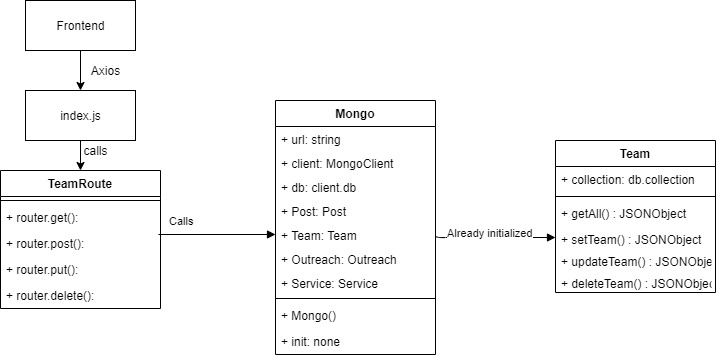
cd server
npm start
Our Team endpoint
http://localhost:8080/team
GET (Success Response)
[{
    "_id": "6043a8ae73aa4db5396c8360",
    "name": "Rev Adrian Limsssss",
    "designation": "Senior Pastor",
    "image": "https://trbcbucket.s3-ap-southeast-1.amazonaws.com/RevAdrianLim.jpg",
    "__v": 0
}]
POST (Body)
{
"name":"Ivan Lim",
"designation":"Caretaker",
"image": "s3://trbcbucket/IvanChow.jpg"
}
POST (Success)
[{
    "name": "Ivan Lim",
    "designation": "Caretaker",
    "image": "s3://trbcbucket/IvanChow.jpg",
    "_id": "604429422ddf340e909c5d1f"
}]
PUT (Body)
{
"_id": "604429422ddf340e909c5d1f",
"name":"Ivan Li m",
"designation":"Caretaker",
"image": "s3://trbcbucket/IvanChow.jpg"
}
PUT (Success)
{
"n": 1,
"nModified": 1,
"opTime": {
    "ts": "6936715780423680001",
    "t": 10
},
"electionId": "7fffffff000000000000000a",
"ok": 1,
"$clusterTime": {
    "clusterTime": "6936715780423680001",
    "signature": {
        "hash": "ts1MDZWtG3+pqu13oBVixUX/IRY=",
        "keyId": "6896689704586969092"
    }
},
"operationTime": "6936715780423680001"}
DELETE (Body)
{
"_id": "604429422ddf340e909c5d1f"
}