



A role-based task and schedule management platform for franchise organizations. Parent orgs can spawn and manage franchisee orgs, each with their own members, roles, tasks, and timetables.
Production deployment: friendchise.app
| Dashboard | Timetable |
|---|---|
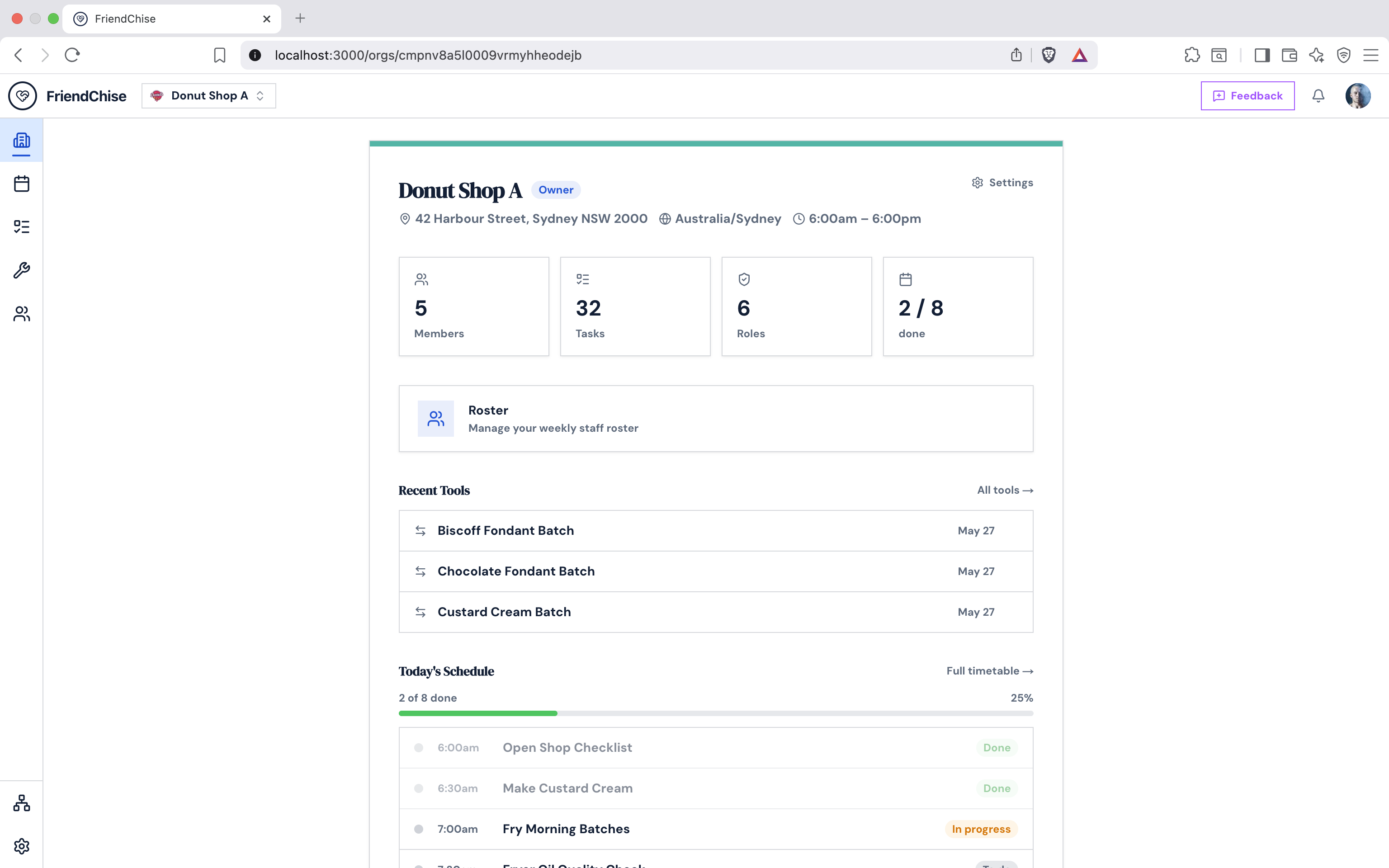 |
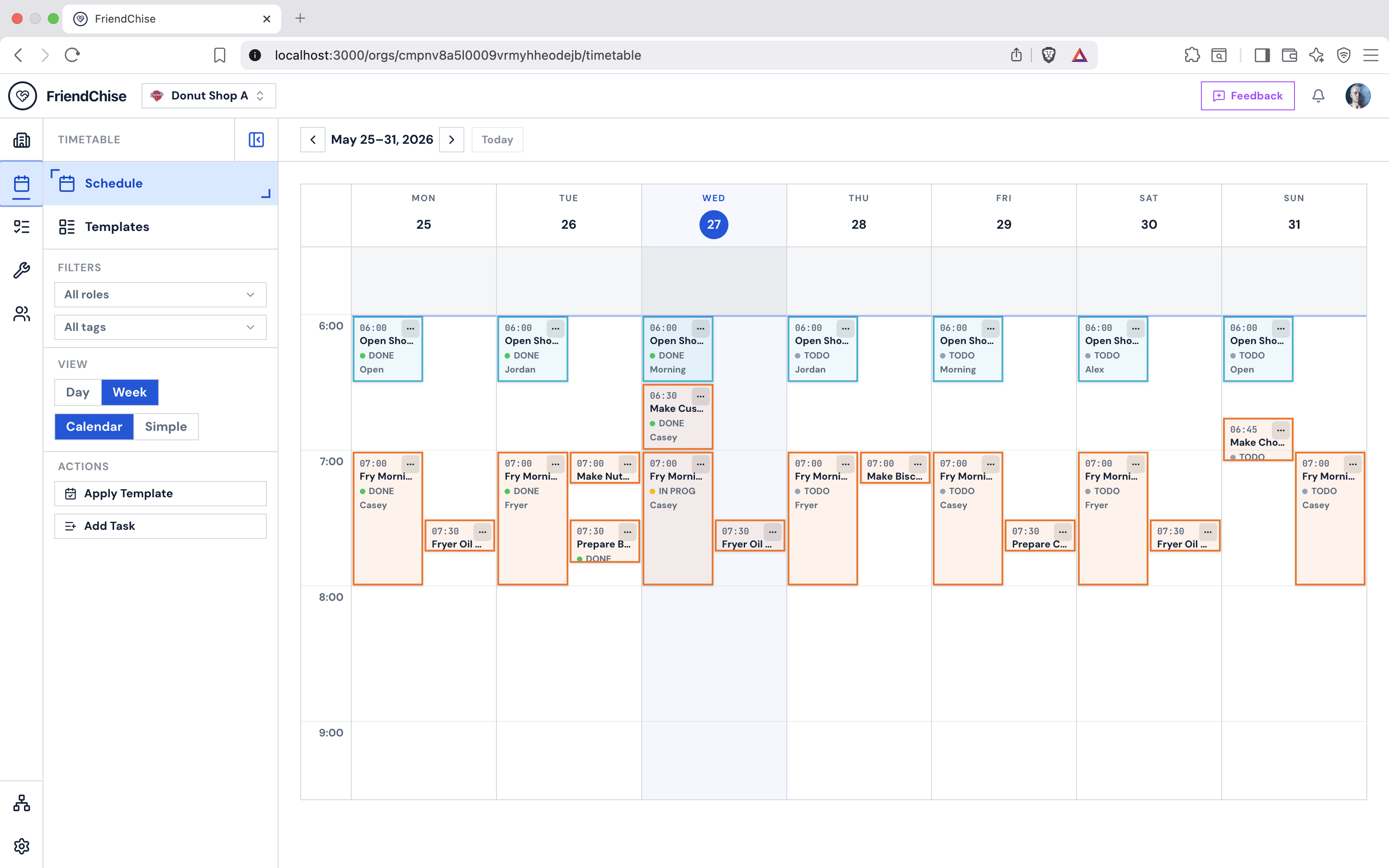 |
| Task Library (card view) | Task Comments & Voting |
|---|---|
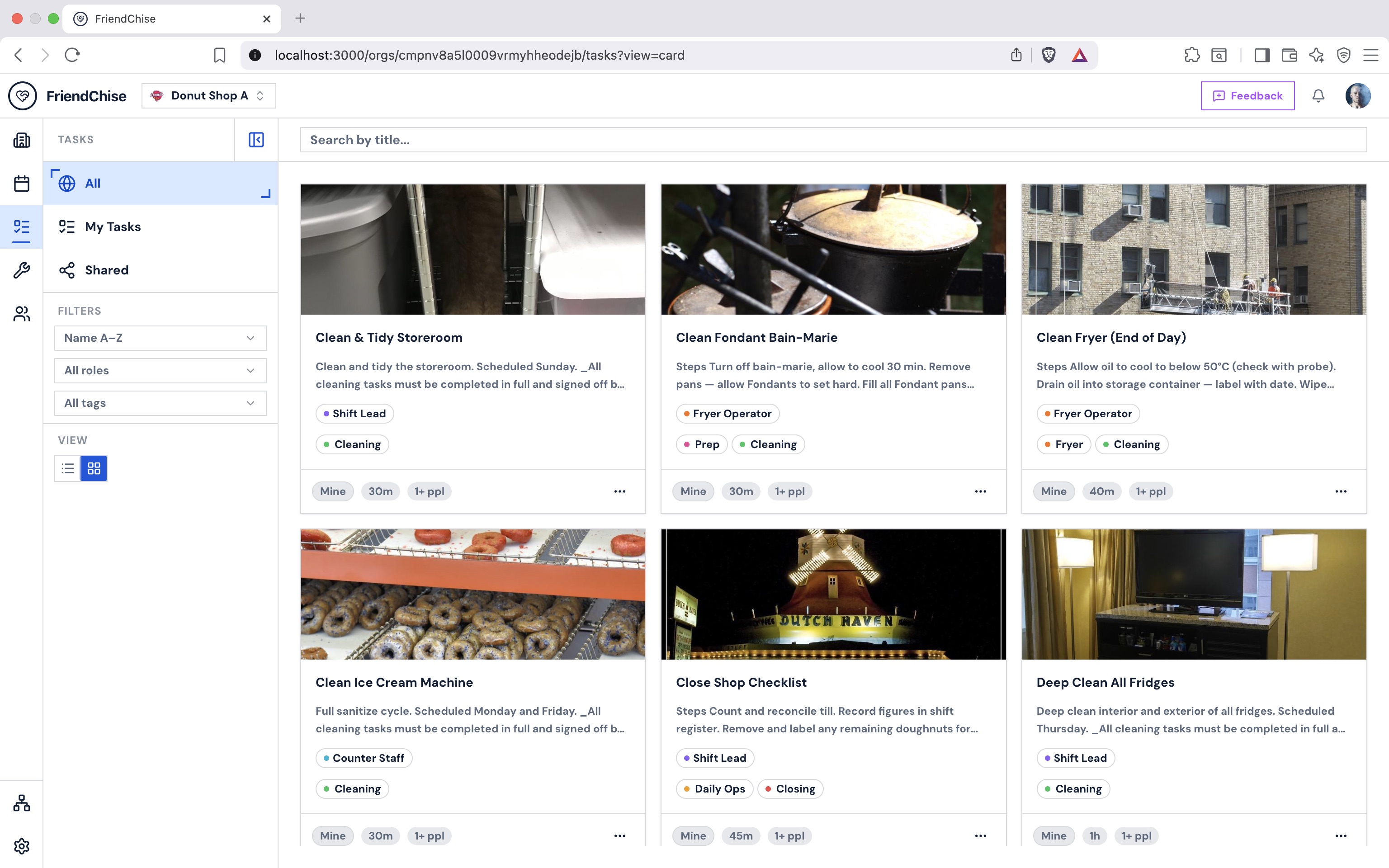 |
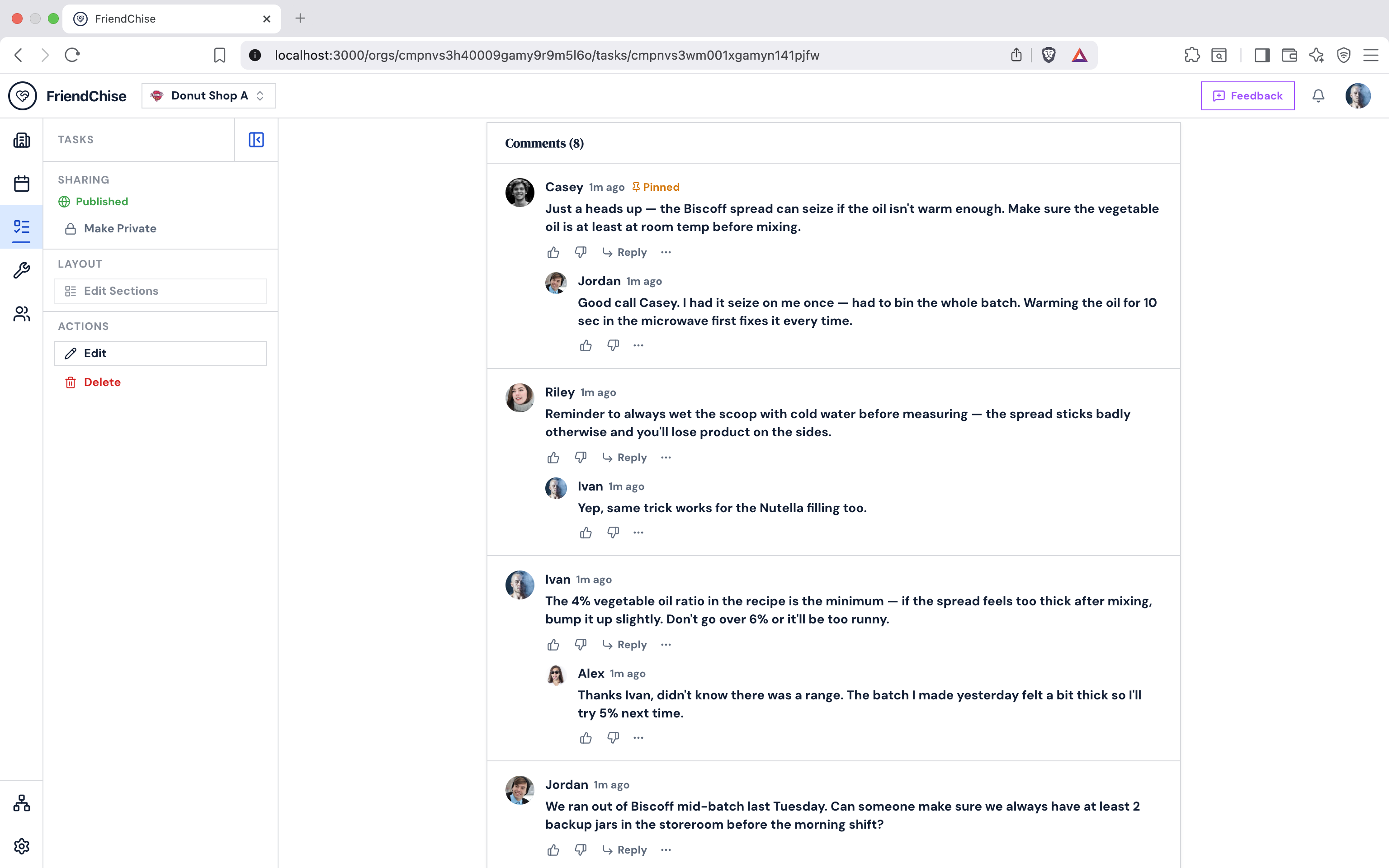 |
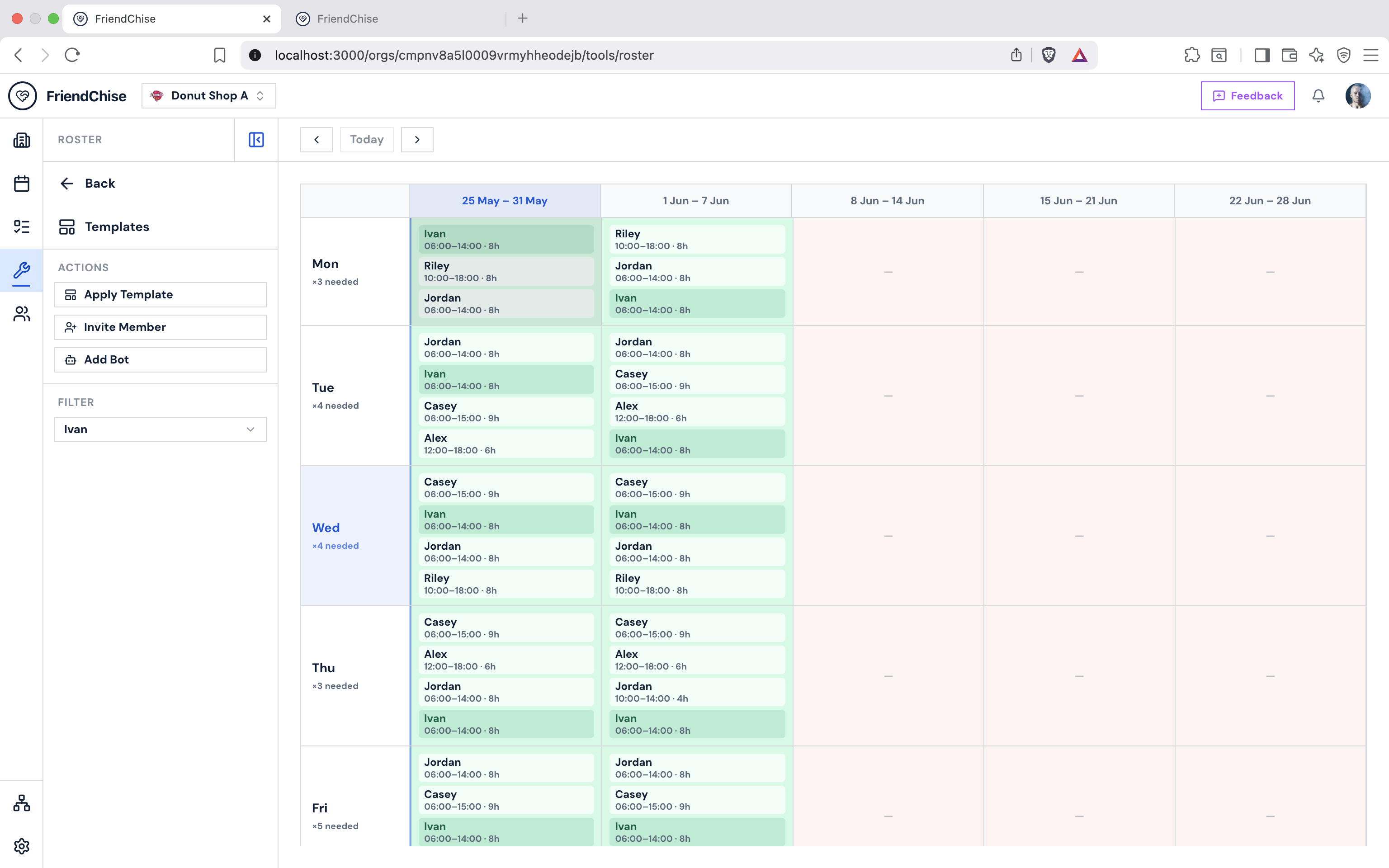
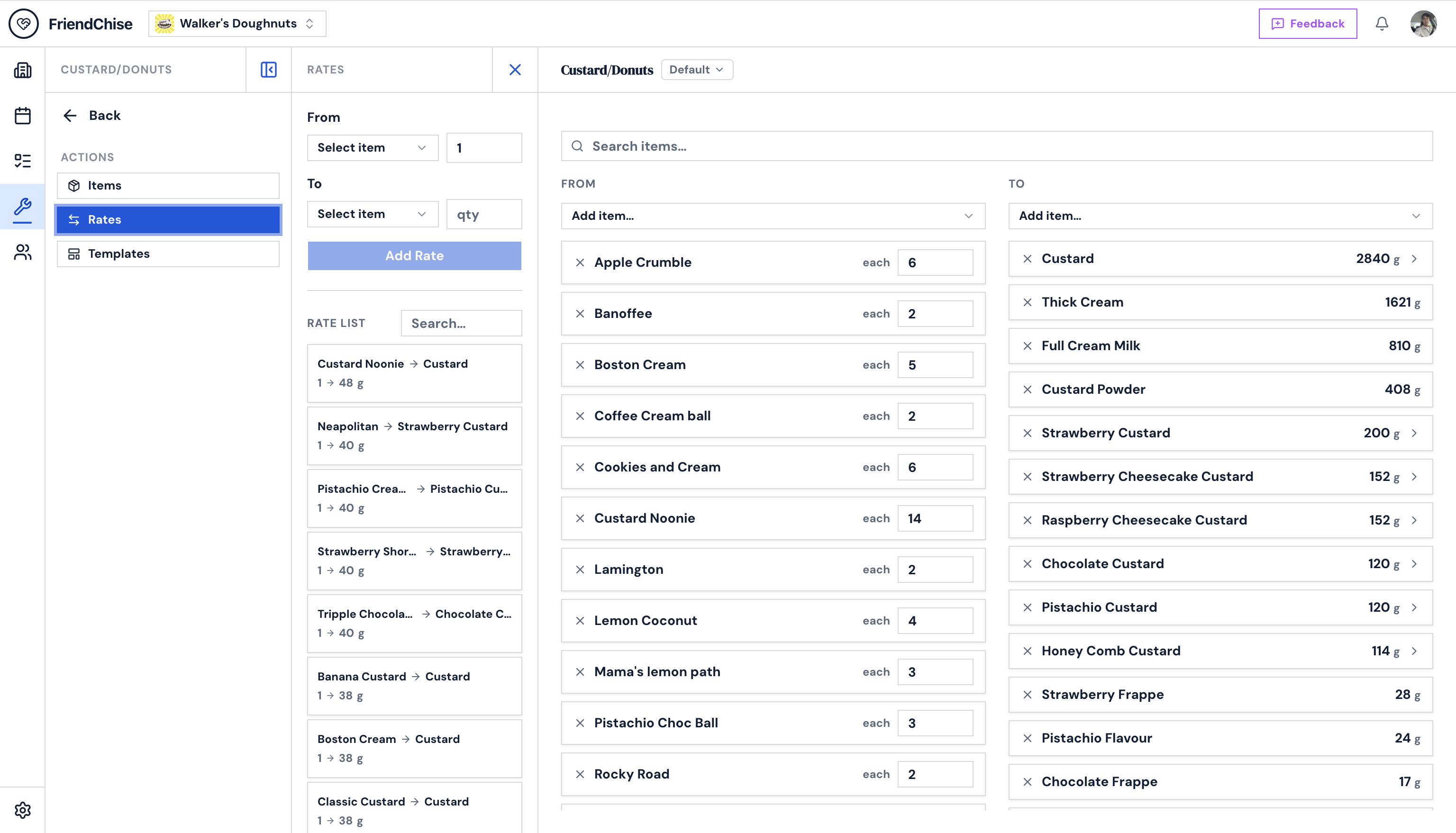
| Staff Roster | Conversion Tool |
|---|---|
 |
 |
- Next.js 16.1.6 (App Router, TypeScript, React 19)
- pnpm (package manager)
- PostgreSQL (Supabase) + Prisma ORM v7
- Auth.js v5 (NextAuth) — Google OAuth, JWT sessions
- Tailwind CSS v4 + shadcn/ui + Radix UI
- Sonner — toast notifications
- Zod v4 — schema validation
- react-markdown + remark-gfm — GFM markdown rendering for task descriptions
- browser-image-compression — in-browser image compression before upload (used for org logos, task images, and feedback screenshots)
- react-easy-crop — in-browser pan/zoom crop editor (used for org logos and task images)
- Vitest — unit + integration tests
- Playwright — E2E browser tests
- Sentry — error monitoring, performance tracing, session replay, and server-side logs
- Upstash Redis + @upstash/ratelimit — sliding-window rate limiting on all API routes and server actions
# Install dependencies
pnpm install

# Copy env and fill in values
cp .env.example .env

# Apply migrations and generate Prisma client
pnpm prisma migrate dev

# Seed with sample data
pnpm seed

# Start dev server
pnpm dev
For production deployments use
pnpm migrate:prod(loads.env, skips.env.local).
Required environment variables:
AUTH_SECRET=           # generate with: npx auth secret
AUTH_GOOGLE_ID=        # Google OAuth client ID
AUTH_GOOGLE_SECRET=    # Google OAuth client secret
AUTH_URL=              # e.g. http://localhost:3000
DATABASE_URL=          # PostgreSQL connection string

# Sentry — error monitoring (get from sentry.io > Settings > Auth Tokens)
SENTRY_AUTH_TOKEN=

# Upstash Redis — rate limiting (get from console.upstash.com > your database > REST API)
UPSTASH_REDIS_REST_URL=
UPSTASH_REDIS_REST_TOKEN=

# Supabase Storage — file uploads (org logos, task images, feedback screenshots)
# Get from Supabase dashboard > Settings > API
NEXT_PUBLIC_SUPABASE_URL=       # e.g. https://<project-ref>.supabase.co
SUPABASE_SECRET_KEY=            # service_role JWT (legacy eyJ... format)
Optional / local overrides (.env.local):
E2E_TEST_USER_EMAIL=      # Test user email for E2E tests and seeding (default: ivan@example.test)
SEED_DEV_IDENTIFIERS=     # Space-separated Supabase project refs to seed with dev data (seed.ts production path)
ADMIN_EMAIL= # (legacy) super-admin email override — superseded by the AdminUser DB tableProvider: PostgreSQL (Supabase), managed via Prisma ORM.
| Model | Description |
|---|---|
Organization |
Top-level tenant. Owns all other resources. Supports franchise hierarchy via parentId. |
User |
Auth account, identified by email. Linked to orgs via Membership. |
Membership |
Links a User to an Organization. Tracks workingDays and status (ACTIVE / RESTRICTED). |
Role |
Org-scoped role (e.g. Owner, Worker) with a required name, color (hex), and stable key. System roles have isDeletable: false. |
Permission |
Grants a PermissionAction enum value to a Role. One row per action per role. |
MemberRole |
Many-to-many junction between Membership and Role. A member can hold multiple roles. |
Task |
Reusable task definition (name, required color hex, duration, recurrence constraints, eligibility by role). |
TaskEligibility |
Links a Task to a Role, defining which roles can be assigned to it. |
Tag |
An org-scoped label with a name and color hex. isDefault: true protects built-in tags from deletion. Unique on (orgId, name). |
TaskTag |
Many-to-many junction between Task and Tag. Composite PK on (taskId, tagId). |
TimetableEntry |
A scheduled task occurrence with date, start/end times, status, and assignees. |
TimetableEntryAssignee |
Links a Membership to a TimetableEntry (many-to-many). |
TimetableSettings |
Per-org timetable display preferences (view type, start day, slot duration). |
TimetableTemplate |
A reusable schedule template with a cycleLengthDays. Contains TimetableTemplateEntry rows. |
TimetableTemplateEntry |
One time slot in a TimetableTemplate — which task, which day index, start/end times. |
TimetableTemplateEntryAssignee |
Pre-assigns a Membership to a TimetableTemplateEntry. |
RosterEntry |
One shift assignment: a membership assigned to a specific weekStart + dayIndex combination, with optional shiftStartMin/shiftEndMin. |
RosterDayConfig |
Per-org day configuration for the roster grid: recommendedSize (target headcount), optional openTimeMin/closeTimeMin for the default shift time range. |
RosterTemplate |
A reusable roster staffing pattern with a cycleWeeks (1–12). Contains RosterTemplateEntry rows that can be stamped onto the live roster. |
RosterTemplateEntry |
One shift slot in a RosterTemplate — which member, which weekIndex (0-based within the cycle), which dayIndex (0 = Mon … 6 = Sun), optional shiftStartMin/shiftEndMin. |
FranchiseToken |
One-time invite token issued by a parent org for a franchisee to join. |
Invite |
A member or franchise invite sent to a User. Carries a status (PENDING/ACCEPTED/DECLINED), snapshot fields for the org name and inviter name, and a JSON metadata blob with the roleIds/workingDays pre-filled for the accept step. Visible in the notification panel. |
Notification |
A generic in-app notification tied to a User. Stores a human-readable message and an optional seenAt timestamp. Used for invite-acceptance confirmations and other system events. |
AuditLog |
Append-only record of significant org mutations. Stores action (e.g. task.create), entityType, entityId, optional before/after JSON snapshots, the actorId who triggered the change, and a createdAt timestamp. Scoped per org. Actor is nullable (set to NULL on user deletion via onDelete: SetNull). Org deletion cascades all its logs. |
ToolItem |
An org-scoped ingredient / unit pair used in the Conversion tool (e.g. "Boston Cream", unit "doz"). Shared across all ConversionSets in the org. |
ConversionSet |
A named collection of conversion rates for an org (e.g. "Donut Batches"). Acts as the container for rates and templates. |
ConversionRate |
A directional rate between two ToolItems within a ConversionSet. Stored as a single rate scalar (toQty / fromQty). Bidirectional resolution is handled at query time. |
ConversionTemplate |
A named saved state of From/To item selections within a ConversionSet (e.g. "Default", "Monday Batch"). Each set always has a "Default" template created automatically. |
ConversionTemplateEntry |
One item slot in a ConversionTemplate. quantity is non-null for From items (the input quantity); null for To items (display-only calculated outputs). visible controls whether the item is shown. |
Feedback |
A user-submitted feedback item. Linked to a User and optionally an Organization. type is ISSUE or IDEA. message is free text. imageUrl is an optional Supabase Storage path (public bucket) for an attached screenshot. reviewed is an admin toggle. |
AdminUser |
Super-admin allow-list. Any User whose email appears here gains access to /admin/* routes and admin-only server actions. |
TaskInheritance |
Tracks which orgs have added a GLOBAL task to their library. Created when a franchisee clicks "Add" on a shared task; deleted when they remove it. The owning org also gets an auto-created row on task creation. Unique on (taskId, orgId). |
TaskSectionLayout |
Per-org, per-task section configuration. Stores type (e.g. "PICTURE", "DETAIL", "COMMENT"), display title, scope (ORG/GLOBAL), position (sort order), and visible flag. Defaults are seeded on task creation and copied from the parent org on inheritance. Unique on (taskId, orgId, type). |
TaskComment |
One comment on a task. Scoped to both a Task and an Organization (the commenter's org). Supports one level of threading via parentId. authorName/authorImage are snapshotted at post time so display survives account deletion (authorId set to NULL via onDelete: SetNull). Soft-deletable (isDeleted). Supports pinning (isPinned, pinnedAt) and inline editing (editedAt). Indexed on (taskId, orgId), parentId, and authorId. |
TaskCommentVote |
Up/down vote cast by a User on a TaskComment. Composite PK on (commentId, userId) prevents double-voting. type is VoteType (UPVOTE / DOWNVOTE). Cascades on comment and user deletion. |
ToolItemList |
An org-scoped named list of items (grid, checklist, table, or gallery display). Owns an optional ToolItemGridConfig and a set of ToolItemListEntry rows. Unique on (orgId, name). |
ToolItemGridConfig |
One-to-one optional config for a ToolItemList storing gridCols and gridRows (default 4×4). Cascade-deleted with its list. |
ToolItemListEntry |
One entry in a ToolItemList. References a ToolItem, stores a position (sort order) and amount. May have a ToolItemChecklistEntry recording whether it has been ticked off. |
ToolItemChecklistEntry |
Records that a ToolItemListEntry has been checked. Presence = checked; deletion = unchecked. Stores checkedAt. |
| Enum | Values |
|---|---|
PermissionAction |
MANAGE_MEMBERS, MANAGE_ROLES, MANAGE_TIMETABLE, MANAGE_TASKS, MANAGE_SETTINGS, VIEW_TIMETABLE |
EntryStatus |
TODO, IN_PROGRESS, DONE, SKIPPED, CANCELLED |
MembershipStatus |
ACTIVE, RESTRICTED |
InviteStatus |
PENDING, ACCEPTED, DECLINED |
InviteType |
MEMBER, FRANCHISE |
ViewType |
DAILY, WEEKLY |
FeedbackType |
ISSUE, IDEA |
VoteType |
UPVOTE, DOWNVOTE — used by TaskCommentVote |
TaskScope |
ORG (private — visible to owning org only), GLOBAL (shared — franchisees can discover and inherit) |
SectionScope |
ORG (section interaction limited to the viewing org), GLOBAL (shared back to the franchisor) |
ListDisplayType |
TABLE, GRID, CHECKLIST, GALLERY — default display mode for a ToolItemList |
# Create and apply a new migration
pnpm prisma migrate dev --name <migration-name>

# Regenerate the Prisma client after schema changes
pnpm prisma generate

# Apply pending migrations to the production database
pnpm migrate:prod

# Seed the database
pnpm seed
Never run
pnpm prisma migrate deploydirectly — it picks up.env.local(the dev DB). Always usepnpm migrate:prod, which explicitly loads.env(the production DB) and skips.env.local.
1. Add the model to prisma/schema.prisma
2. Create the migration file:
     pnpm prisma migrate dev --name <migration-name>
     # If the local dev DB has drift, use --create-only to generate the SQL without applying:
     pnpm prisma migrate dev --create-only --name <migration-name>
3. Deploy to CI (automatic — prisma migrate deploy runs on every push)
4a. If the table does NOT yet exist in production:
     pnpm migrate:prod
4b. If you already applied via db push (table already exists in production):
     pnpm exec dotenv -e .env -- prisma migrate resolve --applied <migration-name>
     pnpm migrate:prod   # should print "No pending migrations to apply"
| Migration | Description |
|---|---|
20260414033638_init |
Full initial schema — all models, enums, indexes |
20260414035009_add_invite_metadata |
Add metadata JSON field to Invite for storing roleIds/workingDays for the accept step |
20260414045652_add_invite_snapshots |
Add snapshot fields (orgName, inviterName) to Invite so cards render without joins |
20260415021658_invite_pending_unique |
Partial unique index on Invite(orgId, recipientId, type) where status = 'PENDING' — DB-level guard against duplicate pending invites |
| (schema push) | AuditLog model added (orgId, actorId, action, entityType, entityId, before, after, createdAt). Applied via pnpm prisma db push (dev DB had migration drift — no timestamped migration file). |
20260513023554_rename_template_to_timetable_template_add_roster |
Rename Template/TemplateEntry/TemplateEntryAssignee → TimetableTemplate/TimetableTemplateEntry/TimetableTemplateEntryAssignee using ALTER TABLE ... RENAME TO (data-safe). Add RosterEntry and RosterDayConfig tables with shift-time and day-config columns. |
20260513030121_add_shift_times_to_roster_entry |
Add shiftStartMin/shiftEndMin (nullable Int) to RosterEntry. |
20260513031027_add_open_close_time_to_roster_day_config |
Add openTimeMin/closeTimeMin (nullable Int) to RosterDayConfig. |
20260513122627_add_roster_template |
Add RosterTemplate and RosterTemplateEntry tables with cascade deletes and a composite unique index on (templateId, membershipId, weekIndex, dayIndex). |
20260513123326_roster_template_cycle_weeks |
Add cycleWeeks Int @default(1) to RosterTemplate. |
20260514000000_add_check_constraints |
DB-level CHECK constraints enforcing field bounds: time fields 0–1440, dayIndex 0–6, cycleWeeks 1–12. |
| (schema push) | Feedback model (userId, orgId?, type, message, imageUrl?, reviewed) and AdminUser model (email unique) added. Applied via prisma db push (dev DB had migration drift). |
| (schema push) | TaskInheritance (taskId, orgId, inheritedAt) and TaskSectionLayout (taskId, orgId, type, title, scope, position, visible) models added. Task.scope (TaskScope enum, default ORG) added. SectionScope enum added. Applied via prisma db push on the feat/task-inheritance-sections branch. |
| (schema push) | TaskComment and TaskCommentVote models added. VoteType enum (UPVOTE, DOWNVOTE) added. Task.comments, Organization.taskComments, User.taskComments/taskCommentVotes relations added. Applied via prisma db push on the feature/task-comment-section branch. |
Authentication is handled by Auth.js v5 (NextAuth) with Google OAuth as the provider.
- Route:
GET|POST /api/auth/[...nextauth](handled automatically by Auth.js) - Session strategy: JWT (tokens signed with
AUTH_SECRET, stored in a cookie — no DB reads for session lookup itself; authorization checks likerequireOrgPermissionstill query the DB to verify membership on each request) - The Prisma adapter stores
UserandAccountrecords in Postgres for OAuth account linking - The signed-in user's database
idis mapped fromtoken.subintosession.user.idso API routes and server actions can look upMembershiprecords for authorization
Configure your Google OAuth app at console.cloud.google.com and set the redirect URI to http://localhost:3000/api/auth/callback/google.
In NODE_ENV === "development" a second "dev" credentials provider is registered that accepts any seeded user email with no password. The sign-in page renders a DevUserPicker component — a searchable, scrollable list of the 9 seeded test accounts — so engineers can switch personas without OAuth.
| File | Purpose |
|---|---|
app/(auth)/signin/dev-user-picker.tsx |
Client component; renders the picker UI |
app/(auth)/signin/dev-sign-in-action.ts |
Server action; calls signIn("dev", { email, redirectTo }) |
The provider is registered in auth.ts and is excluded from production builds via a process.env.NODE_ENV guard.
Auth.js config is intentionally split into two files:
| File | Purpose |
|---|---|
auth.config.ts |
Edge-compatible config (no Prisma). Used by middleware for fast auth checks. |
auth.ts |
Full config with Prisma adapter and JWT session callback. Used by API routes and server components. |
This is required because Next.js middleware runs on the Edge runtime, which cannot import Node.js modules like @prisma/client.
proxy.ts is the auth middleware. It uses the edge-compatible authConfig to protect matched routes without hitting the database, and forwards the current pathname as an x-pathname request header so the server-rendered breadcrumb can read it without usePathname().
Auth guards live in lib/authz/ — a directory split by calling context. All three contexts share low-level DB helpers in _shared.ts.
| File | Used by | Returns on failure |
|---|---|---|
lib/authz/api.ts |
API route handlers | { ok: false, response: NextResponse } (401/403) |
lib/authz/page.ts |
Server page components | Calls redirect() directly |
lib/authz/action.ts |
Server actions | { ok: false } — no side effects |
Each context exposes three guards at increasing strictness:
| Guard | Requirement |
|---|---|
requireUser*() |
Caller must be signed in |
requireOrgMember*(orgId) |
Caller must be signed in and hold a Membership in the org |
requireOrgPermission*(orgId, p) |
Caller must be a member whose role(s) grant PermissionAction p |
requireSuperAdmin*() |
Caller's email must exist in the AdminUser table |
requireParentOrgOwner*(orgId) is also available in page and action contexts — it requires the caller to be the owner of an org with no parentId (i.e. a franchisor).
Users can submit feedback (bug reports or feature ideas) from anywhere in the app via the Feedback button in the navbar. Submissions are stored in the Feedback table and reviewed by admins at /admin/feedback.
- User clicks the Feedback button (top-right of the navbar).
- An
ActionSidebarpanel opens with a two-step form:- Step 1 — pick a type: Issue or Idea.
- Step 2 — write a message and optionally attach a screenshot.
- Screenshots are compressed client-side (max 1 MB / 1280px via
browser-image-compression), then uploaded directly from the browser to Supabase Storage (friendchise-publicbucket, pathfeedback/{userId}/{uuid}.{ext}) using a signed upload URL — bypassing Vercel's 4.5 MB body limit. - On submit,
submitFeedbackActionsaves the feedback row (with the optionalimageUrlstorage path).
Route: /admin/feedback
Access is controlled by the AdminUser table. To grant admin access, insert a row:
INSERT INTO "AdminUser" (id, email, "createdAt")
VALUES (gen_random_uuid(), LOWER(TRIM('your@email.com')), now());
Note: Emails are stored in normalized form (trimmed and lowercased) for consistent lookups.
The panel shows all feedback with type badges, user email, org name, timestamp, message, and screenshot thumbnail. Items can be marked reviewed/unreviewed (optimistic UI).
All routes are prefixed with /api. Permissions refer to PermissionAction enum values.
| Method | Path | Auth | Description |
|---|---|---|---|
POST |
/api/orgs |
Signed in | Create a new org. Bootstraps Owner + Default Member roles with permissions and adds the creator as Owner. |
| Method | Path | Auth | Description |
|---|---|---|---|
GET |
/api/orgs/[orgId]/is-parent-owner |
Signed in | Returns { isParentOwner: boolean } for the current user. |
| Method | Path | Auth | Description |
|---|---|---|---|
GET |
/api/orgs/[orgId]/memberships |
MANAGE_MEMBERS |
List all members of an org (includes user and roles). |
POST |
/api/orgs/[orgId]/memberships |
MANAGE_MEMBERS |
Add a user to an org by email. |
DELETE |
/api/orgs/[orgId]/memberships |
MANAGE_MEMBERS |
Remove a user from an org. |
| Method | Path | Auth | Description |
|---|---|---|---|
GET |
/api/orgs/[orgId]/tasks |
Member | List all task definitions for an org. |
POST |
/api/orgs/[orgId]/tasks |
MANAGE_TASKS |
Create a new task definition. |
DELETE |
/api/orgs/[orgId]/tasks |
MANAGE_TASKS |
Delete a task definition. |
| Method | Path | Auth | Description |
|---|---|---|---|
GET |
/api/orgs/[orgId]/task-instances |
Member | List timetable entries. Supports ?status= or ?completed=true|false (mutually exclusive). |
POST |
/api/orgs/[orgId]/task-instances |
MANAGE_TASKS |
Create a timetable entry from an existing task definition. |
GET |
/api/orgs/[orgId]/task-instances/[taskInstanceId] |
Member | Get a single timetable entry by ID. |
| Method | Path | Auth | Description |
|---|---|---|---|
GET |
.../assignees |
Member | List all assignees for a timetable entry (includes membership, user, role). |
POST |
.../assignees |
MANAGE_TIMETABLE |
Assign a member to a timetable entry. |
DELETE |
.../assignees |
MANAGE_TIMETABLE |
Remove a member from a timetable entry. |
| Method | Path | Auth | Description |
|---|---|---|---|
PATCH |
.../status |
MANAGE_TIMETABLE |
Update the status of a timetable entry (TODO, IN_PROGRESS, DONE, SKIPPED). |
app/
  (app)/                  # Authenticated app shell (navbar + sidebar layout)
    page.tsx              # Home / landing page
    layout.tsx            # Shared layout: SidebarProvider, NavBar, ActionSidebarSlot
    orgs/
      (organizations)/    # Route group: org-management pages (shared OrgManagementNav sidebar)
        layout.tsx        # Registers OrgManagementNav as page sidebar for all child routes
        page.tsx          # /orgs — organizations list (stub)
        new/              # Create org page
        join/             # Join as franchisee via one-time token
        invite/           # Invitations list (stub)
        _components/
          org-management-nav.tsx  # Page sidebar nav (Create, Join, Invite, List)
      [orgId]/
        page.tsx          # Org overview — stat cards, today's schedule, org header
        loading.tsx       # Overview page skeleton
        tools/            # Tools hub — sidebar with search + tool nav list
          page.tsx        # Server page; registers ToolsSidebarContent as page sidebar
          tools-client.tsx
          _components/
            tools-sidebar-content.tsx  # Nav links: Item List · Conversion · Roster + search
          item-list/      # Item List tool — catalogue lists for stations/jobs
            page.tsx      # Hub page: lists all ToolItemLists for the org; registers ItemListSidebarShell
            loading.tsx   # Hub loading skeleton
            layout.tsx    # Registers ItemListSidebarShell for all item-list routes
            _components/
              item-list-sidebar-shell.tsx  # Persistent sidebar shell (panel title + Back link)
              item-list-sidebar-content.tsx # Title row + Back link
              item-list-client.tsx          # Hub client: grid of item tiles with image + name
              item-detail-panel.tsx         # ActionSidebar panel: view/edit a ToolItem (name, unit, image)
            lists/        # List-of-lists index
              page.tsx    # Server page: fetches ToolItemLists; registers ItemListsSidebarContent
              loading.tsx # Lists index loading skeleton (toolbar + row placeholders)
              _components/
                item-lists-sidebar-content.tsx  # Sidebar: view toggle (list/card) + Create List
                item-lists-client.tsx           # Client: search, list/card views; inline edit, duplicate, delete via ⋯ dropdown
            [listId]/     # Individual list detail
              page.tsx    # Server page: resolves active ConversionSet from ?set= param (or cookie fallback); fetches entries + rates; renders ListDetailClient
              loading.tsx # List detail loading skeleton (sidebar + 4×4 grid placeholders)
              _components/
                list-detail-client.tsx        # Top-level detail client: toolbar, grid/checklist view switch
                list-detail-sidebar-content.tsx # Sidebar: view toggle, Add Item, grid-size controls, Apply Rates set picker (persisted via cookie `item-list-rates-prefs-{orgId}`)
                list-grid-view.tsx            # Grid view: item cells with image, name, amount, and live conversion rates
                list-checklist-view.tsx       # Checklist view: toggleable item rows
                add-item-to-list-panel.tsx    # ActionSidebar panel: search org items and add to list
                item-detail-panel.tsx         # ActionSidebar panel: edit entry amount
                item-rates-panel.tsx          # ActionSidebar panel: show all rates for a cell's item
          conversion/     # Conversion calculator tool
            page.tsx      # Server page: fetches all ConversionSets; registers ConversionSidebarContent
            conversion-client.tsx
            _components/
              conversion-sidebar-content.tsx  # Title + Back link + "Add Set" action button
              add-set-form.tsx                # Create / list ConversionSets
              edit-set-form.tsx               # Rename a ConversionSet
            [setId]/       # Set detail — calculator view
              page.tsx     # Server page: resolves active template from ?template= param; fetches entries; renders SetDetailClient with key={activeTemplateId}
              set-detail-client.tsx  # Calculator — two-column From/To grid; template dropdown in toolbar; DB-backed state via ConversionTemplateEntry
              _components/
                set-sidebar-content.tsx   # Sidebar: Items · Rates · Templates action buttons
                add-item-form.tsx         # Create ToolItem (org-scoped, shared across sets)
                add-rate-form.tsx         # Create/delete ConversionRate; unit abbreviation helper (≤4 chars kept, longer → first+last letter)
                add-template-form.tsx     # Create/delete/switch ConversionTemplate; URL-driven active state via ?template=<id>
          roster/         # Roster tool — weekly shift grid + templates
            page.tsx      # Server page; fetches week range, members, day configs; registers RosterSidebarContent
            _components/
              roster-sidebar-content.tsx  # Title row + Back + Templates link + Edit Day Config action
              roster-board-constants.ts   # Grid dimension constants (cell width, day labels) shared by board and template board
              roster-board.tsx            # Scrollable 7-row × N-week grid; each cell opens EditCellDialog
              roster-client.tsx           # Week navigation state + board rendering
              roster-page-client.tsx      # Combines RosterClient with sticky toolbar (week range label)
              edit-cell-dialog.tsx        # Dialog: assign members + shift start/end for one (week, day) cell
              edit-day-config-dialog.tsx  # Dialog: set recommendedSize + open/close times for a day column
              apply-template-panel.tsx    # ActionSidebar panel: pick template, start date, repeat count, force checkbox
            _utils/
              time-utils.ts              # Shared: formatMinutes, timeToMinutes, hoursWorked
            templates/
              page.tsx                   # Server page; lists all roster templates; registers RosterTemplatesSidebarContent
              _components/
                roster-templates-client.tsx         # Template list (card view); Create/Rename/Delete actions
                roster-templates-sidebar-content.tsx # Sidebar: Back link + Create Template action
              [templateId]/
                page.tsx                 # Server page; fetches template + entries + members
                _components/
                  roster-template-editor-client.tsx  # Cycle stepper (+ / − weeks), column-paged board; ResizeObserver for visible column count
                  roster-template-board.tsx          # Template grid: weekIndex columns × 7 day rows; each cell opens EditTemplateCellPanel in ActionSidebar
                  edit-template-cell-panel.tsx       # ActionSidebar panel: assign members + shift times for one (weekIndex, day) cell
        franchisee/       # Franchise management (parent org owners only)
        memberships/      # Members list, role filter, list/card toggle, invite/add actions
          layout.tsx            # Registers MembersSidebarShell for all memberships routes
          [memberId]/     # Member detail view (view-only, roles, working days, status)
            page.tsx
            edit/         # Edit member form (working days, roles)
            _components/
              member-toolbar-actions.tsx  # Restrict/Unrestrict + Delete confirm dialogs
          _components/
            members-sidebar-shell.tsx   # Persistent sidebar shell (panel title + List nav tab + sub-content slot)
            members-sidebar-content.tsx # Filters (role dropdown, list/card toggle) + MembersActions
            members-actions.tsx         # Invite Member + Add Bot buttons; ActionSidebar on desktop, Dialog on mobile
            invite-member-panel.tsx     # InviteMemberPanel (ActionSidebar form) + InviteMemberDialog (mobile popup)
            add-bot-panel.tsx           # AddBotPanel (ActionSidebar form) + AddBotDialog (mobile popup)
            members-view.tsx            # Client component: toolbar (search only), list/card views
            member-form.tsx             # Shared create/edit form (email, working days, RolePicker)
            role-picker.tsx             # Searchable role input — selecting auto-adds, no + button
        tasks/            # Task definition list + create form
          layout.tsx            # Registers TasksSidebarShell for all tasks routes
          [taskId]/       # Task detail view (links from timetable)
            edit/         # Edit task form (includes color picker)
            comments/     # Task comment section
              index.tsx             # Async server component — gates access, fetches comments, passes to client
              comment-section.tsx   # Client shell — owns reply/edit open state, calls router.refresh() after mutations
              comment-item.tsx      # One comment row — votes (optimistic), pin, edit, delete, reply
              comment-input.tsx     # Controlled textarea for posting/replying
              types.ts              # CommentFE type (ISO string dates, aggregated votes)
          task-form.tsx   # Shared create/edit form — title, color picker, image upload (crop dialog), eligibility
          _components/
            tasks-config.ts             # Shared sort constants (SortOption, SORT_OPTIONS) — plain module, no "use client"
            tasks-sidebar-shell.tsx     # Persistent sidebar shell (panel title + List nav tab + sub-content slot)
            tasks-sidebar-content.tsx   # Filters (sort dropdown, role filter, view toggle) + Create Task action
            task-table.tsx              # Client component: toolbar (search only), list/card views
        timetable/        # Weekly timetable, template selector, template editor
          layout.tsx            # Registers TimetableSidebarShell for all timetable routes
          page.tsx              # Server page: fetches week entries, permissions, roles
          _components/          # Page-specific components (sidebar, actions, filters)
            timetable-sidebar-shell.tsx   # Persistent sidebar shell with Schedule/Templates tabs
            timetable-sidebar-content.tsx # Filters + action buttons for the schedule page
            timetable-actions.tsx         # Apply Template + Add Task buttons (ActionSidebar on desktop, fallback on mobile)
            add-task-panel.tsx            # Two-mode panel: searchable/draggable task list → schedule form
            apply-template-dialog.tsx     # Form for applying a template to a date range
            role-filter-button.tsx        # Role filter dropdown (URL-state driven)
            timetable-view-picker.tsx     # Calendar/Simple + Day/Week segmented controls
            timetable-pref-redirect.tsx   # Restores mode/span from localStorage on first load
          _shared/              # Shared grid primitives (used by timetable + template editor)
            time-grid.tsx       # Drag-and-drop time grid
            task-panel.tsx      # Sidebar panel listing draggable tasks (mobile sheet + template editor)
            grid-utils.ts       # Pure utilities: snap, layout, date helpers
            types.ts            # Shared TypeScript types
          timetable-client/     # CalendarView / SimpleView client components
          templates/            # Template list and editor sub-pages
        settings/
          page.tsx        # Redirects to /settings/organization
          organization/   # Org info, timezone, hours, transfer, delete
          roles/          # Role list (MANAGE_ROLES)
            _components/
              role-form.tsx               # Shared create/edit form (name, color, permissions, task eligibility picker)
              roles-sidebar-content.tsx   # Page sidebar: "+ Create Role" button → opens RoleForm in ActionSidebar
            page.tsx                      # Registers RolesSidebarContent as page sidebar; table rendered by RolesClient
            roles-client.tsx              # Table of roles; row ··· menu Edit → ActionSidebar, Delete → AlertDialog
          tags/           # Tag list (MANAGE_TASKS)
            _components/
              tag-form.tsx                # Shared create/edit form (name, color)
              tags-sidebar-content.tsx    # Page sidebar: "+ Create Tag" button → opens TagForm in ActionSidebar
            page.tsx                      # Registers TagsSidebarContent as page sidebar; table rendered by TagsClient
            tags-client.tsx               # Table of tags; row ··· menu Edit → ActionSidebar, Delete → AlertDialog
          timetable/      # Timetable display settings (stub)
          notification/   # Notification preferences (stub)
  (auth)/
    signin/               # Google OAuth sign-in page; renders DevUserPicker in development
      dev-sign-in-action.ts  # Server action for dev credentials sign-in
      dev-user-picker.tsx    # Client component: searchable list of seeded test accounts
  actions/                # Server Actions (web UI mutations)
    orgs.ts
    memberships.ts
    tasks.ts              # createTaskAction, updateTaskAction — both require color hex
    templates.ts
    timetable-entries.ts
    franchisee.ts
    roles.ts
    tags.ts               # Tag CRUD mutations (createTag, updateTag, deleteTag) — all require MANAGE_TASKS
    roster.ts             # Roster entry and day-config mutations (requires MANAGE_MEMBERS)
    feedback.ts           # submitFeedbackAction — creates a Feedback row + optional screenshot upload
    tools.ts              # Conversion + Item List tool mutations — all require MANAGE_TASKS
                          #   Conversion: createConversionSetAction, deleteConversionSetAction, renameConversionSetAction, createToolItemAction…
                          #   Item List: createToolItemListAction, updateToolItemListAction, deleteToolItemListAction, duplicateToolItemListAction,
                          #              addToolItemListEntryAction, moveToolItemListEntryAction, removeToolItemListEntryAction,
                          #              updateToolItemListEntryAmountAction, toggleChecklistEntryAction, updateToolItemGridConfigAction
    storage.ts            # Image upload actions for task images (private) and org logos (public)
    task-comments.ts      # addCommentAction, editCommentAction, deleteCommentAction, voteCommentAction, pinCommentAction
  api/                    # REST API route handlers (session-authenticated)
    auth/[...nextauth]/
    orgs/
      route.ts
      [orgId]/
        is-parent-owner/
        memberships/
        tasks/
        task-instances/
          [taskInstanceId]/
            route.ts
            assignees/
            status/

components/
  layout/
    navbar.tsx                  # Top bar — h-12 server component; fetches org logos + notification counts server-side
    navbar-context-actions.tsx  # Route-aware action buttons
    sidebar.tsx                 # Global app sidebar: desktop hover-expand (w-12→w-52), mobile overlay
    sidebar-nav-item.tsx        # Shared nav link — variant="app" (icon-well) or variant="page" (inline)
    mobile-sidebar-context.tsx  # Boolean context for mobile sidebar overlay open/close state
    page-sidebar-context.tsx    # Slot-based page sidebar: RegisterPageSidebar + PageSidebarSlot + RegisterPageSidebarSubContent sub-content slot
    action-sidebar-context.tsx  # Transient action panel (ActionSidebarSlot) beside page sidebar; open/close via hook
    org-switcher.tsx            # Org selector dropdown — shows logo image when available, falls back to colored letter badge
    toolbar.tsx                 # h-12 sticky sub-header; cancels main padding with negative margins; left-pads when sidebar collapsed; uses useLayoutEffect to avoid height flash on load; children are optional (renders as empty bar)
    actions/
      tasks-actions.tsx
      members-actions.tsx
  ui/                           # shadcn/ui + Radix UI primitives
                                # image-crop-dialog.tsx — reusable pan/zoom crop dialog (react-easy-crop)
                                #   exports ImageCropConfig + ImageCropDialog
                                #   used by task-form.tsx (1:1 600×600) and settings-client.tsx (1:1 512×512)

lib/
  prisma.ts
  rbac.ts               # ROLE_KEYS constants (OWNER, DEFAULT_MEMBER)
  utils.ts
  supabase-storage.ts   # Server-only Supabase Storage REST helpers (no SDK)
                        #   Private bucket (task images): createSignedUploadUrl, createSignedReadUrl, deleteStorageFile
                        #   Public bucket (org logos):    createSignedUploadUrlPublic, getPublicUrl, deletePublicFile
  authz/
    _shared.ts
    api.ts
    page.ts
    action.ts
    index.ts
  services/
    types.ts
    audit-log.ts        # logAudit() write helper (Zod-validated) + getAuditLogs() read helper
    orgs.ts             # updateOrgImage(orgId, imageUrl | null) — sets Organization.image
    memberships.ts      # updateMembership rejects any roleId whose key === "owner"
    tasks.ts            # createTask / updateTask both require and persist color
    timetable-entries.ts
    assignees.ts
    templates.ts
    roles.ts
    franchise.ts
    invites.ts
    bots.ts
    tags.ts             # Tag CRUD — createTag, updateTag, deleteTag
    task-sections.ts    # TaskSectionLayout reads and updates (per-org section config)
    feedback.ts         # submitFeedback — creates Feedback row, resolves storage path
    roster.ts           # RosterEntry + RosterDayConfig CRUD, template-apply helper
    tools.ts            # ConversionSet · ToolItem · ConversionRate · ConversionTemplate · ConversionTemplateEntry CRUD
                        # ToolItemList CRUD: getToolItemLists, getToolItemListDetail, createToolItemList, updateToolItemList, deleteToolItemList, duplicateToolItemList
                        # ToolItemListEntry CRUD: addToolItemListEntry, addToolItemListEntryAtPosition, moveToolItemListEntry, removeToolItemListEntry, updateToolItemListEntryAmount
                        # Grid config: updateToolItemGridConfig
                        # Checklist: toggleChecklistEntry (presence = checked)
    task-comments.ts    # getTaskComments, canUserCommentOnTask, createComment, editComment, softDeleteComment, voteOnComment, setPinComment
  validators/
    org.ts
    membership.ts
    task.ts             # createTaskSchema / updateTaskSchema require color: /^#[0-9a-fA-F]{6}$/
    task-instance.ts
    assignee.ts
    role.ts
    task-comment.ts     # addCommentSchema (content + optional parentId), editCommentSchema (content only)

prisma/
  schema.prisma         # Role.color String (non-nullable), Task.color String (non-nullable)
  seed.ts               # 8 users · 3 orgs · 4 roles each · 6 tasks each · 5 members each; calls seedConversionData for Walker's Doughnuts tool items, conversion sets, and item lists
  seeds/
    walkers-doughnuts.ts  # Standalone seed function for the Walker's Doughnuts org: 40+ ToolItems, 3 ConversionSets with rates + templates, and 3 ToolItemLists
Significant org mutations are recorded in the AuditLog table. The service layer writes one row per meaningful event — reads, status-only changes, and low-signal operations are intentionally excluded.
| File | Purpose |
|---|---|
lib/services/audit-log.ts |
recordAudit(params, client?) — write helper that never throws; accepts optional Prisma client or transaction handle for atomic writes. getAuditLogs(orgId, limit?) — ordered read. |
recordAudit accepts an optional client parameter (either PrismaClient or Prisma.TransactionClient). When called inside a $transaction, pass the transaction handle (tx) to ensure the audit write is part of the same atomic operation. When called outside a transaction, omit the client parameter and the root Prisma client will be used. The function never throws — audit failures are logged to Sentry and never propagate to the caller.
| Action | Trigger |
|---|---|
org.create |
New standalone org created |
org.join_franchise |
Franchisee joined via token |
org.update |
Org settings changed (timezone, address, hours) |
org.transfer_ownership |
Ownership transferred to a different member |
org.delete |
Org permanently deleted by owner |
task.create |
Task definition created |
task.update |
Task definition updated |
task.delete |
Task definition deleted |
role.create |
Custom role created |
role.update |
Role name, color, or permissions changed |
role.delete |
Custom role deleted |
membership.create |
Member added to org |
membership.update |
Member working days or roles changed |
membership.status_change |
Member status toggled (ACTIVE / RESTRICTED) |
membership.delete |
Member removed from org |
invite.send |
Member or franchise invite sent |
invite.accept |
Invite accepted (member or bot-slot) |
template.create |
Template created or duplicated |
template.update |
Template renamed |
template.delete |
Template deleted |
bot.create |
Placeholder (bot) membership created |
bot.delete |
Placeholder membership deleted |
entry.create |
Live timetable entry created |
entry.delete |
Live timetable entry deleted |
franchisee.remove |
Franchisee org permanently removed by parent owner |
# Prisma Studio — table browser at localhost:5555
pnpm prisma studio
Or query directly in the Supabase SQL Editor:
SELECT al.action, al."entityType", al."entityId",
       al.before, al.after, al."createdAt",
       u.name AS actor
FROM "AuditLog" al
LEFT JOIN "User" u ON u.id = al."actorId"
WHERE al."orgId" = '<org-id>'
ORDER BY al."createdAt" DESC
LIMIT 100;File uploads are handled via Supabase Storage using direct browser-to-storage PUT requests (signed URLs), which avoids Vercel's 4.5 MB body limit.
| Bucket | Access | Used for | URL resolution |
|---|---|---|---|
friendchise-private |
Private | Task images | Short-lived signed read URL |
friendchise-public |
Public | Org logos | Permanent public URL |
Both buckets must exist in the Supabase project. NEXT_PUBLIC_SUPABASE_URL (the project URL) and SUPABASE_SECRET_KEY (the service_role JWT) are required env vars.
| File type | Path pattern | DB field |
|---|---|---|
| Task image | orgs/{orgId}/tasks/{taskId}/{uuid}.{ext} |
Task.imageUrl |
| Org logo | orgs/{orgId}/{uuid}.{ext} |
Organization.image |
Both fields store the bare storage path, not a full URL. URLs are resolved at display time:
- Task images →
createSignedReadUrl(path)(server-side, expires in 1 h) - Org logos →
getPublicUrl(path)(permanent; used in hub page, org switcher)
- Client calls a server action to get a signed upload URL (never exposing
SUPABASE_SECRET_KEYto the browser). - Browser
PUTs the file directly to the signed URL. - Client calls a second server action to save the storage path to the DB, which also deletes the previous file if one existed.
components/ui/image-crop-dialog.tsx is a shared dialog used by both org logo and task image upload. It is controlled via file: File | null — passing a File opens the dialog; null closes it.
| Prop | Type | Description |
|---|---|---|
file |
File | null |
The raw file selected by the user; null = dialog closed |
config |
ImageCropConfig |
{ aspect, outputWidth, outputHeight } — crop shape and size |
onCrop |
(f: File) => void |
Called with the cropped canvas output as a new File |
onCancel |
() => void |
Called when the user dismisses the dialog |
Crop configurations:
| Use case | aspect |
Output size | Match |
|---|---|---|---|
| Org logo | 1 |
512 × 512 | Round/square logo display |
| Task image | 1 |
600 × 600 | aspect-square task view display |
| Action | Permission | Description |
|---|---|---|
getSignedUploadUrl |
MANAGE_TASKS |
Returns signed URL for private bucket (task images) |
saveTaskImagePath |
MANAGE_TASKS |
Saves path to Task.imageUrl, deletes old file |
removeTaskImage |
MANAGE_TASKS |
Deletes file and clears Task.imageUrl |
getOrgLogoUploadUrl |
MANAGE_SETTINGS |
Returns signed URL for public bucket (org logos) |
saveOrgLogoPath |
MANAGE_SETTINGS |
Saves path to Organization.image, deletes old logo |
removeOrgLogo |
MANAGE_SETTINGS |
Deletes logo file and clears Organization.image |
| Function | Bucket | Description |
|---|---|---|
createSignedUploadUrl |
Private | Signed URL for browser to PUT a task image |
createSignedReadUrl |
Private | Short-lived signed URL to display a task image |
deleteStorageFile |
Private | Delete a task image (silent on failure) |
createSignedUploadUrlPublic |
Public | Signed URL for browser to PUT an org logo |
getPublicUrl |
Public | Permanent public URL for an org logo (no signing needed) |
deletePublicFile |
Public | Delete an org logo (silent on failure) |
next.config.ts includes a remotePatterns entry for *.supabase.co so next/image can serve Supabase Storage URLs:
{ protocol: "https", hostname: "*.supabase.co", pathname: "/storage/v1/object/public/**" }The Conversion tool (/orgs/[orgId]/tools/conversion) is a production-quantity calculator for franchise kitchens. It converts ingredient quantities between units using saved rates and named templates.
ConversionSet          — container scoped to an org (e.g. "Donut Batches")
  └─ ConversionRate    — directional rate between two ToolItems (stored as toQty/fromQty scalar)
  └─ ConversionTemplate— named saved calculator state (always has a "Default" template)
       └─ ConversionTemplateEntry — one item slot; quantity non-null = From item, null = To item
ToolItem               — org-scoped ingredient/unit pair, shared across all sets
The active template is encoded in the URL as ?template=<id>. When the param changes:
- The server page re-runs, resolves the template ID (URL → Default → first), and fetches its
ConversionTemplateEntryrows. SetDetailClientreceiveskey={activeTemplateId}, forcing a full remount with the new DB state.- The action sidebar stays open because it only closes on pathname changes (not query param changes).
All calculator state is persisted immediately to the database — there is no localStorage involvement:
| Action | DB write |
|---|---|
| Add a From item | upsertTemplateEntryAction with quantity = 0 |
| Change a From quantity (on blur) | upsertTemplateEntryAction with the new quantity |
| Remove a From/To item | removeTemplateEntryAction |
| Add a To item | upsertTemplateEntryAction with quantity = null |
add-rate-form.tsx abbreviates long unit strings in dropdowns: units ≤ 4 chars are shown as-is; longer units are condensed to first letter + last letter (e.g. grams → gs). The full unit is always stored in the DB unchanged.
| Function | Description |
|---|---|
getConversionSets(orgId) |
List all sets for an org |
getConversionSet(orgId, setId) |
Fetch a single set |
createConversionSet(orgId, name) |
Create a set |
deleteConversionSet(orgId, id) |
Delete a set |
renameConversionSet(orgId, id, name) |
Rename a set |
getToolItems(orgId) |
List all tool items for an org |
createToolItem(orgId, name, unit) |
Create a tool item |
deleteToolItem(orgId, id) |
Delete a tool item |
getConversionRates(orgId, setId) |
List all rates for a set (includes from/to item names and units) |
createConversionRate(orgId, setId, fromItemId, toItemId, fromQty, toQty) |
Create a rate; stored as toQty / fromQty |
deleteConversionRate(orgId, rateId) |
Delete a rate |
getConversionTemplates(orgId, setId) |
List all templates for a set |
createConversionTemplate(setId, name) |
Create a template |
deleteConversionTemplate(orgId, templateId) |
Delete a template |
getTemplateEntries(templateId) |
List all entries for a template |
upsertTemplateEntry(templateId, itemId, quantity, visible) |
Insert or update an entry |
deleteTemplateEntry(templateId, itemId) |
Remove an entry |
All write actions require MANAGE_TASKS permission.
| Action | Description |
|---|---|
createConversionSetAction |
Create a new set; auto-creates a "Default" template |
deleteConversionSetAction |
Delete a set and all its rates/templates |
renameConversionSetAction |
Rename a set |
createToolItemAction |
Create an org-scoped tool item |
deleteToolItemAction |
Delete a tool item |
createConversionRateAction |
Add a rate between two items |
deleteConversionRateAction |
Remove a rate |
createConversionTemplateAction |
Create a template |
deleteConversionTemplateAction |
Delete a template |
upsertTemplateEntryAction |
Save a calculator item slot (add/update) |
removeTemplateEntryAction |
Remove a calculator item slot |
The Roster tool (/orgs/[orgId]/tools/roster) is a shift-scheduling grid for managing weekly staff assignments. It supports live editing, reusable multi-week templates, and a one-click apply-to-roster workflow.
RosterDayConfig        — per-org day settings (recommendedSize, openTimeMin, closeTimeMin)
RosterEntry            — one shift: membership + weekStart + dayIndex + optional shift times
RosterTemplate         — reusable pattern with cycleWeeks (1–12)
  └─ RosterTemplateEntry — one slot: membership + weekIndex + dayIndex + optional shift times
| Function | Description |
|---|---|
getOrgSchedule(orgId) |
Returns org default openTimeMin, closeTimeMin, timezone |
hasRosterActivity(orgId) |
Returns true if the org has any roster entries, day configs, or templates |
getRosterEntries(orgId, weekStarts) |
Fetches entries for a list of week-start dates |
getRosterDayConfigs(orgId) |
Returns all day configs ordered by dayIndex |
getOrgMembersForRoster(orgId) |
Active members for the cell member picker |
setRosterCellMembers(orgId, weekStart, dayIndex, members) |
Replaces the member list for one (weekStart, dayIndex) cell in a transaction |
upsertRosterDayConfig(orgId, dayIndex, data) |
Upserts recommendedSize, openTimeMin, closeTimeMin for a day |
getRosterTemplates(orgId) |
Lists all templates with entry count |
getRosterTemplate(orgId, templateId) |
Fetches a single template with expanded entries |
createRosterTemplate(orgId, name, cycleWeeks) |
Creates a template; name must be unique within the org |
deleteRosterTemplate(orgId, templateId) |
Deletes a template and all its entries |
renameRosterTemplate(orgId, templateId, name) |
Renames with uniqueness check |
setRosterTemplateCellMembers(orgId, templateId, weekIndex, dayIndex, members) |
Replaces entries for one template cell in a transaction |
updateRosterTemplateCycleWeeks(orgId, templateId, cycleWeeks) |
Resizes the cycle; blocked if entries exist in the removed range |
clearRosterTemplateWeek(orgId, templateId, weekIndex) |
Deletes all entries in one week column of a template |
applyRosterTemplate(orgId, templateId, startMonday, cycleRepeats, force) |
Stamps the template onto the live roster starting from startMonday, repeating cycleRepeats times |
All write actions require MANAGE_MEMBERS permission.
| Action | Description |
|---|---|
setRosterCellMembersAction |
Replace members for a live roster cell |
upsertRosterDayConfigAction |
Save day config (recommended size + open/close times) |
createRosterTemplateAction |
Create a template; returns templateId on success |
deleteRosterTemplateAction |
Delete a template |
renameRosterTemplateAction |
Rename a template |
setRosterTemplateCellMembersAction |
Replace members for a template cell |
updateRosterTemplateCycleWeeksAction |
Resize the cycle (blocked if out-of-range entries exist) |
clearRosterTemplateWeekAction |
Clear all entries in one week column |
applyRosterTemplateAction |
Apply a template to the live roster; accepts ISO date string + repeat count + force flag |
- From the live roster page, click Apply Template in the sidebar.
- The
ApplyTemplatePanelshows a template picker, a start-date input (any day in the target week), and a repeat count. - On submit,
applyRosterTemplateActionnormalizes the date to the nearest Monday, runs a conflict check, and on conflict returns{ conflict: true }— the panel shows a confirmation asking to overwrite. - Confirming re-submits with
force: true, which deletes then re-creates all entries in the affected weeks atomically.
| Export | Description |
|---|---|
formatMinutes(min) |
Integer minutes → "HH:MM" string (e.g. 90 → "01:30") |
timeToMinutes(time) |
"HH:MM" string → integer minutes, or null for invalid input |
hoursWorked(start, end) |
Duration string (e.g. "7h 30m") from two nullable minute offsets |
The Item List tool (/orgs/[orgId]/tools/item-list) lets org managers build named lists of ToolItems for use at specific stations or jobs (e.g. a prep checklist or a grid of required doughnuts). Each list has a displayType — the view used when the list is opened.
ToolItemList           — named org-scoped list (displayType: GRID | CHECKLIST | TABLE | GALLERY)
  └─ ToolItemGridConfig — optional grid dimensions (gridCols × gridRows, default 4×4)
  └─ ToolItemListEntry  — one item slot (position, amount)
       └─ ToolItemChecklistEntry — presence = checked; deletion = unchecked
| Type | Description |
|---|---|
GRID |
Cell-based grid (columns × rows). Cells show item image, name, amount, and live conversion rates when a set is applied. |
CHECKLIST |
Vertical list with toggleable check state per entry. |
TABLE |
(Reserved — table view, not yet implemented.) |
GALLERY |
(Reserved — gallery view, not yet implemented.) |
A ConversionSet can be overlaid on the grid view. For each cell the sidebar calculates how much of each related item is needed based on the stored ConversionRates (displayed as ItemName: qty unit per 1 item). The selected set is encoded as ?set=<setId> in the URL and persisted client-side in cookie item-list-rates-prefs-{orgId} so the selection is automatically restored on the next visit.
Members with MANAGE_TASKS can:
- Create a list (from the sidebar on the lists index page)
- Rename / edit description — inline on the list card/row via the
⋯dropdown - Duplicate — deep copy: metadata + grid config + all entries; auto-named
"Name (copy)"or"Name (copy 2)"etc. - Delete — permanently removes the list and all entries (cascade)
| Function | Description |
|---|---|
getToolItemLists(orgId) |
List all lists for an org (with entry count) |
getToolItemListDetail(listId, orgId) |
Fetch a single list with all entries and item data |
createToolItemList(orgId, name, displayType, description?) |
Create a list |
updateToolItemList(orgId, listId, data) |
Rename and/or update description |
deleteToolItemList(orgId, listId) |
Delete a list and all entries |
duplicateToolItemList(orgId, listId) |
Deep-copy a list with a unique name |
addToolItemListEntry(listId, itemId, amount?) |
Append an entry |
addToolItemListEntryAtPosition(listId, itemId, position, amount?) |
Insert at a specific grid cell |
moveToolItemListEntry(listId, fromPosition, toPosition) |
Swap two cells |
removeToolItemListEntry(listId, entryId) |
Remove an entry |
updateToolItemListEntryAmount(entryId, amount) |
Update an entry's amount |
updateToolItemGridConfig(listId, gridCols, gridRows) |
Upsert grid dimensions |
toggleChecklistEntry(listEntryId) |
Toggle checked state (insert/delete ToolItemChecklistEntry) |
All write actions require MANAGE_TASKS.
| Action | Description |
|---|---|
createToolItemListAction |
Create a list |
updateToolItemListAction |
Rename and/or update description |
deleteToolItemListAction |
Delete a list permanently |
duplicateToolItemListAction |
Duplicate a list; returns { ok, list } |
addToolItemListEntryAction |
Add an item to a list |
addToolItemListEntryAtPositionAction |
Add an item at a specific grid cell |
moveToolItemListEntryAction |
Swap two cell positions |
removeToolItemListEntryAction |
Remove an item from a list |
updateToolItemListEntryAmountAction |
Update an entry's amount |
updateToolItemGridConfigAction |
Save grid dimensions |
toggleChecklistEntryAction |
Toggle a checklist item's checked state |
Task comments are threaded discussions attached to a task definition. Any member whose org is in the same franchise network as the task's owning org can comment.
franchiseRoot(org) = org.parentId ?? org.id
canComment         = franchiseRoot(taskOrg) === franchiseRoot(userOrg)
Org members with MANAGE_TASKS can additionally pin and delete any comment.
- Threaded replies — one level deep (top-level comments + inline replies)
- Voting — up/down votes per comment; one vote per user enforced by composite PK
- Pinning — managers can pin a top-level comment to the top of the thread
- Inline editing — authors can edit their own comment content;
editedAtis set - Soft delete — deleted comments show a "[deleted]" tombstone; replies are preserved
- Author snapshot —
authorNameandauthorImageare captured at post time so comments display correctly even if the author's account is later deleted
| Function | Description |
|---|---|
canUserCommentOnTask(taskId, userOrgId) |
Franchise root check — returns true if allowed |
getTaskComments(taskId) |
All top-level comments + one level of replies (asc) |
createComment(taskId, orgId, authorId, authorName, authorImage, input) |
Insert a new comment or reply with author snapshot |
editComment(taskId, commentId, authorId, input) |
Update content and set editedAt; author-only guard |
softDeleteComment(commentId) |
Sets isDeleted = true; content replaced at render |
voteOnComment(commentId, userId, type) |
Upserts a TaskCommentVote; removes vote if same type toggled |
setPinComment(commentId, isPinned) |
Toggles isPinned and pinnedAt |
| Action | Auth requirement | Description |
|---|---|---|
addCommentAction |
Franchise member | Post a new comment or reply |
editCommentAction |
Comment author | Edit content of own comment |
deleteCommentAction |
Author or MANAGE_TASKS |
Soft-delete a comment |
voteCommentAction |
Franchise member | Cast or toggle an up/down vote |
pinCommentAction |
MANAGE_TASKS |
Pin or unpin a top-level comment |
| File | Type | Description |
|---|---|---|
index.tsx |
Server | Async gate + hydration — parallel-fetches comments, canComment, canManage |
comment-section.tsx |
Client | Stateful shell — owns reply/edit open state; calls router.refresh() on change |
comment-item.tsx |
Client | One comment row — votes (optimistic), pin, edit, delete, reply |
comment-input.tsx |
Client | Controlled textarea for new comments or replies |
types.ts |
— | CommentFE type (ISO string dates, aggregated vote counts, one-level replies) |
| Path | Used by | Location |
|---|---|---|
| Server Actions | Web UI forms and buttons | app/actions/ |
| API Routes | Session-authenticated HTTP endpoints | app/api/ |
Both are thin wrappers — they handle auth, validate input, then delegate to lib/services/. The service layer holds all database logic and is shared between both paths.
Server Actions call revalidatePath to invalidate the Next.js cache so server-rendered pages reflect the latest data without a full page reload.
| Route | Guard | Description |
|---|---|---|
/ |
Signed in | Hub — org cards with logo images (falls back to colored initial badge); recent org banner |
/signin |
— | Google OAuth sign-in |
/orgs/new |
Signed in | Create a new organization |
/orgs/join |
Signed in | Join an existing org as a franchisee using a one-time token |
/orgs/[orgId] |
requireOrgMemberPage |
Org overview — stat cards (members, tasks, roles, today's schedule completion), today's schedule list, org header (name, address, timezone, settings link for owner) |
/orgs/[orgId]/tools |
requireOrgMemberPage |
Tools hub — sidebar with search + nav links (Item List, Conversion, Roster); content area stub |
/orgs/[orgId]/tools/item-list |
requireOrgMemberPage |
Item List hub — grid of org ToolItems; sidebar: Back link + Add/Edit Item |
/orgs/[orgId]/tools/item-list/lists |
requireOrgMemberPage |
List-of-lists index — search, list/card toggle; managers can create, rename, duplicate, and delete lists via ⋯ dropdown |
/orgs/[orgId]/tools/item-list/lists/[listId] |
requireOrgMemberPage |
List detail — grid or checklist view of entries; sidebar: view toggle, Add Item, grid-size controls, Apply Rates set picker (selection persisted in cookie item-list-rates-prefs-{orgId}) |
/orgs/[orgId]/tools/conversion |
requireOrgMemberPage |
Conversion tool — lists all ConversionSets for the org; sidebar: Back + "Add Set" action |
/orgs/[orgId]/tools/conversion/[setId] |
requireOrgMemberPage |
Conversion calculator — two-column From/To grid with live calculations; template switcher dropdown in toolbar; template state persisted in DB via ConversionTemplateEntry; sidebar: Items · Rates · Templates actions |
/orgs/[orgId]/tools/roster |
requireOrgMemberPage |
Roster tool — scrollable weekly shift grid (Mon–Sun rows × multi-week columns); week navigation; Edit Day Config + Apply Template actions in sidebar |
/orgs/[orgId]/tools/roster/templates |
requireOrgMemberPage |
Roster template list — card view; MANAGE_TIMETABLE holders can create, rename, and delete templates |
/orgs/[orgId]/tools/roster/templates/[templateId] |
requireOrgMemberPage |
Roster template editor — cycle-week stepper, column-paged board (7 day rows × cycleWeeks columns); clicking a cell opens the member/shift-time panel |
/orgs/[orgId]/franchisee |
requireParentOrgOwnerPage |
Franchise management — invite tokens + franchisee list |
/orgs/[orgId]/tasks |
requireOrgMemberPage |
Task definition list — sort, role filter, list/card toggle in sidebar; search in toolbar; Create Task action in sidebar (managers only) |
/orgs/[orgId]/tasks/new |
requireOrgPermissionPage MANAGE_TASKS |
Create task — includes color picker |
/orgs/[orgId]/tasks/[taskId] |
requireOrgMemberPage |
Task detail view — description, color, image preview (aspect-square); clicking a task name in the timetable navigates here |
/orgs/[orgId]/tasks/[taskId]/edit |
requireOrgPermissionPage MANAGE_TASKS |
Edit task — color picker pre-filled with current color |
/orgs/[orgId]/memberships |
requireOrgMemberPage |
Member list — role filter, list/card toggle in sidebar; search in toolbar; Invite Member + Add Bot in sidebar (ActionSidebar on desktop, Dialog on mobile) |
/orgs/[orgId]/memberships/new |
requireOrgPermissionPage MANAGE_MEMBERS |
Invite a new member by email (standalone page, also accessible from sidebar action) |
/orgs/[orgId]/memberships/[memberId] |
requireOrgMemberPage |
Member detail view — avatar, roles (multi-badge), working days, status, join date |
/orgs/[orgId]/memberships/[memberId]/edit |
requireOrgPermissionPage MANAGE_MEMBERS |
Edit member — working days, roles (owner role excluded from picker) |
/orgs/[orgId]/timetable |
requireOrgMemberPage |
Timetable — calendar or simple mode, week navigation |
/orgs/[orgId]/timetable/templates |
requireOrgMemberPage |
Timetable template list — card or list view; MANAGE_TASKS holders can rename, duplicate, and delete |
/orgs/[orgId]/timetable/templates/new |
requireOrgMemberPage |
Create a new timetable template |
/orgs/[orgId]/timetable/templates/[templateId] |
requireOrgMemberPage |
Template editor — Calendar (drag-and-drop grid) or Simple (day table) view; cycle-length controls |
/orgs/[orgId]/settings |
— | Redirects to /settings/organization |
/orgs/[orgId]/settings/organization |
requireOrgPermissionPage MANAGE_SETTINGS |
Org settings — logo upload (crop dialog, 512×512 square, public bucket), org info, timezone, hours, transfer, delete |
/orgs/[orgId]/settings/roles |
requireOrgPermissionPage MANAGE_ROLES |
Role list with page sidebar — "+ Create Role" opens the form in the action sidebar; row ··· menu "Edit" also opens in action sidebar |
/orgs/[orgId]/settings/timetable |
— | Timetable display settings (stub) |
/orgs/[orgId]/settings/notification |
— | Notification preferences (stub) |
All /orgs/[orgId]/* pages are guarded by at least requireOrgMemberPage — users not in the org are redirected.
In-app notifications are implemented via the Invite and Notification models and a bell icon in the navbar.
- The
NavBarserver component fetches all visible invites and an unseen count for the session user on every render. - Visibility window:
PENDINGinvites are always shown;ACCEPTED/DECLINEDinvites are shown for 7 days after being handled, then disappear naturally. - Unseen badge: the bell shows a red count badge for invites where
seenAt IS NULL. Clicking the bell callsmarkInvitesSeenActionto clear it. - Panel: a
Popoveron desktop, a bottomSheeton mobile (useIsMobilehook). - Invite types:
MEMBER(org membership invite) andFRANCHISE(franchise join invite). Each type shows different actions in theInviteCard. - Snapshot fields (
orgName,inviterName) are captured at invite creation so the card renders without additional DB joins.
A parent org can spawn franchisee orgs using a one-time invite token flow:
- Franchisor generates a token via the Franchisee page — stores a
FranchiseTokenwithinvitedEmailandexpiresAt. - The invitee visits
/orgs/newand submits the token (viajoinFranchiseserver action). - On join, all roles, tasks, and timetable settings are cloned from the parent into the new child org (
lib/services/franchise.ts). - The joining user is assigned as the franchisee org's Owner.
- The parent org owner can view all child orgs and pending tokens, extend/revoke tokens, and remove franchisees.
- Org color accents — both the hub page (
/) org cards and the org overview page (/orgs/[orgId]) derive a deterministic accent color from the org name via a seeded palette (orgColor(name)hashes the character codes mod 9). The hub card uses the color for the initials badge background and a top color bar; the overview page renders ah-1.5color bar at the top of the card. No extra DB field is required. - Sidebar architecture — Three context layers work together:
MobileSidebarContext— boolean open/close state for the global app sidebar overlay on mobile.AppSidebar— desktop hover-expand strip (w-12→w-52); mobile fixed overlay. UsesSidebarNavItem variant="app".
- PageSidebarContext — slot-based system for page-level sidebars.
layout.tsxcalls<RegisterPageSidebar>to mount a persistent shell; pages call<RegisterPageSidebarSubContent>to swap only the inner filters/actions without unmounting the shell (eliminates sidebar flicker on navigation). Open/closed state persisted inlocalStorage. - Shell + sub-content pattern — Tasks and Members each have a
*-sidebar-shell.tsx(client, registered inlayout.tsx) that renders the panel title, nav tabs, and ausePageSidebarSubContent()slot. The per-page sidebar content (*-sidebar-content.tsx) is registered viaRegisterPageSidebarSubContentinpage.tsxand fills that slot. - ActionSidebar for member actions — "Invite Member" and "Add Bot" in the members sidebar open an
ActionSidebarSlotpanel on desktop (button highlights blue while active) and aDialogpopup on mobile. The dialog is mounted in the same component tree as the button so it is not unmounted when the mobile sidebar overlay closes. - Unified height system —
h-12(48px) is used consistently across: navbar inner row, toolbar, sidebar nav items, page sidebar title rows, and open/close buttons. This ensures every horizontal element lines up on a shared baseline. - Sidebar nav — Active state uses prefix matching; Overview uses exact matching. The nav contains: Overview, Timetable, Tasks, Tools, Members.
- Colors required — Both
Role.colorandTask.colorare non-nullable in the schema and enforced by Zod validators (/^#[0-9a-fA-F]{6}$/). Create and edit forms render a native<input type="color">with a hex label. The color is submitted as a hidden<input name="color">so it flows throughFormData. - Task form color picker — Lazy
useState(() => dv?.color ?? randomHex())initializer prevents React purity errors on random defaults. - Member pages — Split into view (
[memberId]/page.tsx) and edit ([memberId]/edit/page.tsx) routes. Both shareMemberForm. The toolbar on the detail page provides Edit and an Actions ▼ dropdown (Restrict / Unrestrict / Delete with confirm dialogs). - Role picker — Searchable text input with a dropdown. Selecting a role auto-adds it; no
+button. The owner role is never shown in the picker (filtered in the edit page query and enforced in the service layer). - Owner role guard — Three layers: (1) DB query filters it from
allRoleson the edit page, (2)updateMembershiprejects anyroleIdwhose key is"owner", (3) the new-member query usesNOT: { key: "owner" }. - Clicking tasks in timetable — In Calendar view the task title inside each block is a
<Link>to the task detail page. In Simple (table) view the task name cell is a<Link>; clicking elsewhere in the row still opens the edit popup. - Timetable simple view — Replaced the
<table>layout with flex rows. Each row has a colored accent bar (w-1 self-stretch rounded-full, color frominst.taskColor), a monospace time column, the task name (linked, truncated, line-through when done/skipped), assignee initials chips (max 3 + "+N" overflow, hidden on mobile), a compact duration label (formatDuration— e.g."45m","1h 30m"), and a status badge pill. A small status dot replaces the badge on mobile (sm:hidden). The edit button fades out on hover focus for desktop. - Mobile page sidebar X close button — The mobile overlay for the page sidebar (
PageSidebarSlot) includes anabsolutepositioned X button (top-right corner) to close the panel. It is positioned in the outerfixedcontainer (not the scrollable inner div) so it stays visible while the user scrolls the sidebar content. - Form validation — server-action errors rendered inline with
aria-invalid/aria-describedbyplus a Sonner toast summary. - Timetable — Calendar and Simple mode toggle, week navigation via
?week=and?mode=params. Calendar view uses absolute positioning for task blocks; overlapping tasks get side-by-side columns. Status colours: gray = TODO, amber = IN_PROGRESS, green = DONE, red = SKIPPED. - Fixed toolbar / scroll containment —
h-dvhonSidebarProvider+overflow-hiddenonSidebarInsetkeep the body from scrolling so toolbars can stay visually fixed. The<main>element is the actual scroll container. Child pages that need a pinned toolbar useflex flex-col h-fullon their root, a static<Toolbar>at the top, and aflex-1 overflow-autodiv below it for the scrollable list. Negative horizontal margins on the scrollable div cancel<main>'s padding so the list extends edge-to-edge. - Template editor — Two view modes (Calendar / Simple) toggled via a segmented control and persisted in
localStorage. Calendar mode shows a drag-and-drop time grid; tasks are dragged from a sidebar panel (desktop) or a bottom sheet (mobile); adaptive column count based on container width viaResizeObserver. Simple mode shows a day-by-day table sorted by start time; clicking a row opens an inline popup to adjust time and assignees. Both modes share day/week navigation and +/− cycle-length controls. - Roster tool — A scrollable week-by-week shift assignment grid. Days (Mon–Sun) are rows; each week column represents one calendar week identified by its Monday
weekStartdate. Clicking a cell opens a dialog to assign org members and optional shift start/end times. Day columns carry a configurablerecommendedSizebadge and optional open/close time range. Week navigation shifts the visible window by one week. - Roster templates — Reusable multi-week staffing patterns. A template has a
cycleWeeks(1–12); the editor shows a 7-row × cycleWeeks-column grid. Clicking a cell opens anActionSidebarpanel to assign members and shift times. The +/− stepper adds/removes week columns — removing a column is blocked when entries exist in the last week. Applying a template (via the Apply Template panel on the live roster page) stamps the pattern starting from a selected Monday, repeating itNtimes; a conflict check prevents overwriting existing entries unless the force checkbox is ticked. - Template list management — MANAGE_TASKS holders see a ··· dropdown on each template (card and list view) with Rename (inline Dialog), Duplicate ("Copy of …" with collision suffix), and Delete (AlertDialog confirmation). Mutations call
revalidatePathso the list refreshes without a full reload. - Task descriptions — Task descriptions are stored as GFM markdown and rendered via
react-markdown+remark-gfmon the task detail page. The task list (card and table views) strips markdown via a lightweightstripMd()helper for plain-text previews. - Task table —
TaskTableclient component: search, sort (name/duration/people), role filter, row···menu (Edit / Duplicate / Delete with confirm). Clicking the row navigates to the task detail page (keyboard accessible —role="button"+tabIndex=0). In "All" and "Shared" modes each task row shows an ownership badge: Mine (org owns it), Franchise (inherited from parent), or Available (franchise global, not yet added). - Roles page — System roles show a
systembadge and cannot be deleted; Owner also cannot be edited. "+ Create Role" in the page sidebar opens anActionSidebarpanel with the full role form (name, color, permissions, task eligibility). The row···menu's "Edit" item opens the same form pre-filled in the action sidebar — no standalone/newor/[roleId]/editpages. On success the panel closes androuter.refresh()updates the table in place. - Role security —
createRoleandupdateRolevalidatetaskIdsagainst tasks scoped toorgIdinside a transaction. Cross-tenant IDs abort the transaction with anINVALIDerror.
| Feature | Required permission |
|---|---|
| View timetable | VIEW_TIMETABLE |
| Drag entries, add from task sidebar, Actions dropdown | MANAGE_TIMETABLE |
Update a task's status via ··· popup |
any org member |
Full edit (time, assignees, delete) via ··· popup |
MANAGE_TIMETABLE |
A Filter dropdown in the toolbar lets users narrow the timetable to tasks whose TaskEligibility includes a selected role. The filter is stored in the URL (?roleId=) so it persists across week navigation.
Any TODO entry whose local date is before today (org timezone) is displayed as SKIPPED in both Calendar and Simple views without mutating the database.
Every timetable block has a ··· menu button. Clicking it opens a Dialog:
- All members — can update the task's status.
- MANAGE_TIMETABLE holders — additionally see a time input, an assignee list, and a Delete button.
Live TimetableEntry rows are stored in UTC (date = UTC midnight, startTimeMin/endTimeMin = UTC minutes from that midnight). The server page converts to the org's local timezone before passing instances to the client. Template entries remain in local wall-clock minutes and are converted on applyTemplate.
endTimeMin is capped at 1440 (= 24:00 midnight) to support 24/7 schedules.
Creates 3 sample organizations each with realistic data:
| Org | Owner | Members | Custom roles | Tasks |
|---|---|---|---|---|
| Donut Shop A | Ivan | Jordan, Casey, Riley, Alex | Fryer Operator, Counter Staff | 6 |
| Coffee House B | Ivan | Riley, Morgan, Jordan, Taylor | Head Barista, Kitchen Hand | 6 |
| Bakery C | Jordan | Casey, Riley, Morgan, Sam | Head Baker, Pastry Chef | 6 |
All orgs also have Owner and Default Member system roles. Members can hold multiple roles. Each org has a timetable template and ~14 historical timetable entries plus today and tomorrow entries.
Users: Ivan, Jordan, Casey, Riley, Morgan, Alex, Taylor, Sam.
scripts/seed-walkers-doughnuts.ts is a standalone seed for the Walker's Doughnuts org (60 tasks — frappes, hot drinks, food prep, cleaning). Task descriptions are written in GFM markdown (ingredients, method steps, notes).
# First run — creates the org from scratch
npx tsx scripts/seed-walkers-doughnuts.ts

# Re-run (safe) — upserts roles/permissions/membership and replaces all tasks
npx tsx scripts/seed-walkers-doughnuts.ts

# Full reset — deletes the org and all related data, then recreates from scratch
npx tsx scripts/seed-walkers-doughnuts.ts --reset
The script reads DATABASE_URL from .env (then .env.local override). The owner email defaults to E2E_TEST_USER_EMAIL or ivan@example.test.
# Unit tests (Vitest)
pnpm test
pnpm test:watch
pnpm test:coverage

# Scoped unit test runs
pnpm test:services
pnpm test:validators
pnpm test:actions
pnpm test:api

# Integration tests (Vitest — hits the real dev database; reseeds before each run)
pnpm test:integration

# E2E tests (Playwright — requires a running dev server and seeded DB)
pnpm test:e2e
Integration tests live in __tests__/integration/ and run sequentially against the live dev database (DATABASE_URL). They require INTEGRATION_TEST_USER_EMAIL (or fall back to the seed user). The global setup reseeds the dev database before each run to guarantee a clean baseline.
| Test file | Service covered | Tests |
|---|---|---|
__tests__/integration/lib/services/orgs.test.ts |
orgs.ts |
2 |
__tests__/integration/lib/services/memberships.test.ts |
memberships.ts |
6 |
__tests__/integration/lib/services/roles.test.ts |
roles.ts |
7 |
__tests__/integration/lib/services/tasks.test.ts |
tasks.ts |
8 |
__tests__/integration/lib/services/timetable-entries.test.ts |
timetable-entries.ts |
14 |
__tests__/integration/lib/services/assignees.test.ts |
assignees.ts |
8 |
__tests__/integration/lib/services/templates.test.ts |
templates.ts |
18 |
__tests__/integration/lib/services/invites.test.ts |
invites.ts |
11 |
__tests__/integration/lib/services/bots.test.ts |
bots.ts |
13 |
__tests__/integration/lib/services/audit-log.test.ts |
audit-log.ts |
6 |
CI runs on every push/PR to master via GitHub Actions (.github/workflows/ci.yml):
- check job — type-check, lint, unit tests (no DB required)
- e2e job (needs
check) — spins up a Postgres 16 service container, runs migrations + dev seed, then runs Playwright against the Next.js dev server
Playwright test state is saved to playwright/.auth/ (gitignored). The global.setup.ts skips reseeding when CI=true (already seeded by the workflow).
The docs/ folder contains long-form documentation that doesn't belong in this README:
| Path | Description |
|---|---|
docs/v1/UAT.md |
User Acceptance Testing checklist for the v1 feature set |
docs/v1/v1-smoke-test/smoke-test-{1..4}.md |
Manual smoke test reports run against production |
Error monitoring and performance tracking is handled by Sentry via @sentry/nextjs.
- Error monitoring — unhandled exceptions on server, edge, and client are captured with full stack traces and request context
- Performance tracing — distributed traces across server actions, API routes, and the client;
tracesSampleRate: 1in development (lower this in production) - Session Replay — video-like reproduction of user sessions leading up to an error (10% of sessions sampled; 100% on error)
- Logs — server-side logs forwarded to Sentry via
enableLogs: true - Source maps — uploaded at build time via
withSentryConfig; requiresSENTRY_AUTH_TOKENin Vercel env vars - Global error boundary —
app/global-error.tsxcatches top-level React errors and reports them before rendering the fallback UI
Sentry config files:
| File | Purpose |
|---|---|
sentry.server.config.ts |
Server-side init (tracing, logs, PII) |
sentry.edge.config.ts |
Edge runtime init |
instrumentation.ts |
Next.js instrumentation hook (wires server/edge configs) |
instrumentation-client.ts |
Client-side init (tracing, replay, logs) |
Required env var for source map uploads:
SENTRY_AUTH_TOKEN=   # Required whenever source maps are uploaded at build time (e.g., in CI/CD or on hosting platforms such as Vercel)
# Source map upload is performed by withSentryConfig during buildWork in progress. Fully implemented: service layer (all 10 services with 93 integration tests), REST API, auth, member management (list, view, edit, restrict, delete, convert-to-bot), task management (list, view, create, edit with color; ownership badges; card keyboard navigation), timetable view (calendar + simple, task links; simple view redesigned as flex rows with color accent bars, assignee chips, duration labels, status badge pills, and mobile status dots), timetable templates (create, rename, duplicate, delete, calendar/simple editor, cycle-length controls, apply to timetable), org settings, role management (list, create, edit, delete, task eligibility, color — all via action sidebar panels; no standalone create/edit pages), franchise management, required colors on tasks and roles, async breadcrumbs with name resolution, fixed-toolbar scroll containment on members and tasks pages, audit log (DB table + Zod-validated service layer, all significant mutations instrumented — UI pending), tasks/members/roles page sidebar redesign (shell + sub-content pattern matching timetable architecture, URL-param-driven filters, ActionSidebar panels for Invite Member + Add Bot + Create Role + Edit Role with mobile Dialog fallback), task comments (threaded comments with replies, voting, pinning, soft delete, inline edit — franchise-scoped permission model), mobile page sidebar X close button, org color accent bars (hub + overview), task filter/sort/view preferences persisted to both localStorage and cookies (server-side redirect on first load, no client round-trip), roster tool permissions corrected to MANAGE_MEMBERS.
Not yet started: schedule generation (automatic cycle-based rotation), worker "Today" checklist, completion stats, timetable/notification settings pages, real-time notification refresh, audit log UI (activity feed page).
Implemented: acceptance notification back to inviter (see notifyInviteAccepted in lib/services/invites.ts).