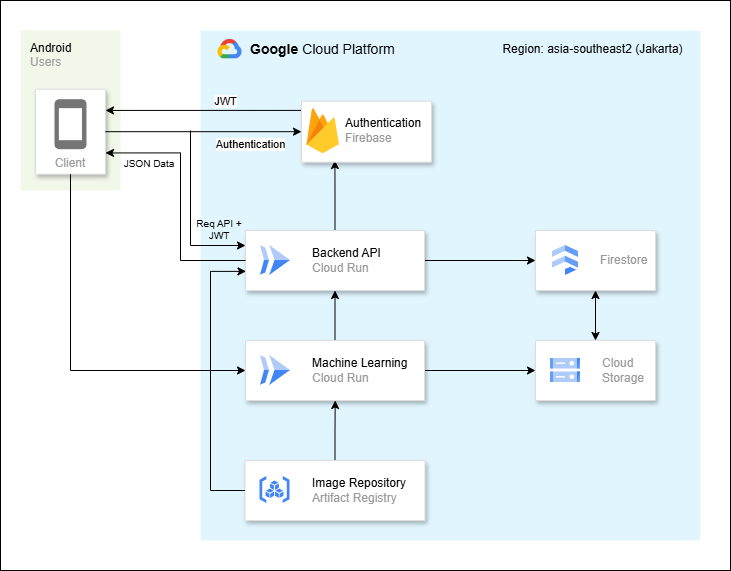
Since we are using Firebase & Cloud Firestore in GCP services, we need to configure The Firebase Admin SDK to interact with Firebase from our local environment. To set GOOGLE_APPLICATION_CREDENTIALS environment variable you can follow these steps at the following link: https://firebase.google.com/docs/admin/setup#initialize_the_sdk_in_non-google_environments
- Clone repository
git clone https://github.com/GymLens/Cloud-Computing.git- Install dependencies
go mod tidy- Set up the environment variables by creating a .env file (refer to .env section below).
touch .env- Run the application
make run- Navigate to http://localhost:8080/api/ping
The following environment variables are required to run the GymLens backend:
PORT: The port on which the server will listen.GOOGLE_APPLICATION_CREDENTIALS: The credentials for the GCP.FIREBASE_API_KEY: The secret key for Firebase token generation and validation.
Make sure to set these variables in the .env file before running the application.
Cloud-Computing
├── api
│   └── user.go
├── bin
│   └── GymLens
├── cmd
│   └── app
│       └── main.go
├── config
│   └── config.go
├── db
│   └── db.go
├── internal
│   └── server
│       ├── controller
│       │   ├── auth.go
│       │   └── user.go
│       ├── middleware
│       │   ├── auth_middleware.go
│       │   └── config.go
│       ├── router
│       │   └── router.go
│       └── server.go
├── models
│   └── user.go
├── pkg
│   └── auth
│       └── auth.go
├── scripts
│   └── GOOGLE_APPLICATION_CREDENTIALS (.json file)
├── .env
├── Dockerfile
├── go.mod
├── go.sum
└── MakefileWe published our API documentation using Postman, you can view it here.