
The totem platform currently has 2 apps: RealTime Deep Fake, sdxl art.
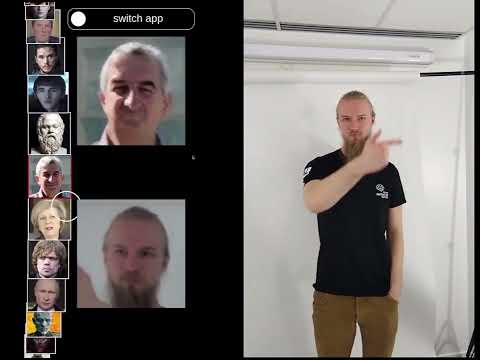
Click on previous image for demo video.
This app is a real time deep fake app. It uses a pre-trained model, called first-order motion, to detect faces and control them with a the camera. It uses the gosai app "totem_app" and teh script "app.py" to run. The script requires different dependencies then GOSAI, so it is run as a sepearte script not a part of the GOSAI.
This app uses sdxl turbo by stability.ai to generate art. It uses the gosai app "totem_app" and the script "sdxl_api". The sdxl turbo model requires 9 GB of Vram and thus runs on the dgx. The sdxl endpoint can be found here.
-
the deep fake app requires <2GB of Vram and can run on the totem platform
-
the sdxl art app requires 9GB of Vram and can only run on the dgx
Please refer to the GOSAI tutorial for installation.
! Note ! : This platform has specific drivers that are only available on the branch Nstas/totem-dev. Can be found here.
The external dependencies for the totem platform are: Docker and Conda.
The installation process is tested for buntu 20+.
-
clone the repo at the totem branch
git clone -b Nstas/totem-dev https://github.com/GOSAI-DVIC/gosai.git -
clone the platform repo and rename it to home
cd gosai git clone https://github.com/GOSAI-DVIC/totem.git home -
install the dependencies
make install -
run the demo
make stop && make boot
If you are startign the app on the totem platform:
ctr+alt+T: to open teh terminal./start_totem_demo.sh: to start the demo !!
If you are starting the app on your own machine:
ctr+alt+T: to open a terminalcd /path/to/gosai: to go to the gosai root directorymake stop && make boot: to launch the gosai demo