湘农打卡小助手
一个基于
- python3
- requests
- selenium
- chrome
- 某位众所周知的大佬的健康码模拟项目
的湖南农业大学自动打卡脚本。
支持:
- 完全自动打卡,只需一次性设定
- 多账号批量打卡
- 保存输入文件以供定期调用
- 全自动批量生成提交健康码截图
-
下载安装 python3
https://www.python.org/downloads/ -
安装 python库 requests, requests-toolbelt, selenium
打开 bash 或 powershell 输入
pip3 install requests
pip3 install requests-toolbelt
pip3 install selenium
若报错请检查环境变量。
-
安装 Chrome (已安装直接跳过这一步)
-对于 Windowshttps://www.google.cn/chrome/-对于 Debian 系 Linux ,以 root 执行以下命令:
cd /root/
mkdir chrome && cd ./chrome
wget https://dl.google.com/linux/direct/google-chrome-stable_current_amd64.deb
dpkg -i ./google-chrome-stable_current_amd64.deb
apt --fix-broken install
google-chrome -version
记住执行完后出现的 Chrome 版本。如 107 。
-
安装 ChromeDriver
-对于 Windows
打开 Chrome 访问chrome://version/
记住执行完后出现的 Chrome 版本。如 107 。
打开 Chrome 访问https://chromedriver.storage.googleapis.com/index.html
找到对应的版本,下载chromedriver_win32.zip解压到 Chrome 的安装目录即可(一般是C:\Program Files\Google\Chrome\Application)。-对于 Linux
用有 GUI 的系统(比如 Windows )打开 Chrome
访问https://chromedriver.storage.googleapis.com/index.html
找到对应的版本,复制chromedriver_linux64.zip的下载链接。
以 root 依次执行以下命令:cd /root/ mkdir chromewebdriver && cd ./chromewebdriver wget [刚才复制的链接] unzip ./chromedriver_linux64.zip && rm ./chromedriver_linux64.zip chmod +x ./chromedriver mv chromedriver /usr/local/share/chromedriver ln -s /usr/local/share/chromedriver /usr/bin/chromedriver -
下载脚本
-对于 Windows ,直接从 releases 里下载解压到你喜欢的地方。-对于 Linux ,以 root 执行以下命令:
cd /root/ git clone https://github.com/GangFaDeShenMe/HUNAU-Auto-Clockin.git -
安装字体
-对于 Windows ,直接双击pf_r.ttf点击安装即可。-对于 Linux ,执行以下命令:
cd /root/HUNAU-Auto-Clockin/
mkdir -p /usr/share/fonts/chinese/
cp pf_r.ttf /usr/share/fonts/chinese/
cd /usr/share/fonts/chinese/
fc-cache -fv
-
执行
python3 ./dk.py -h查看用法。
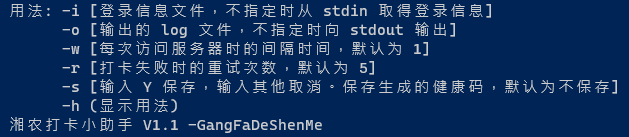
若指定生成健康码,生成的健康码会以身份证前后四位 + .png的格式保存在脚本目录下。 -
第一次运行脚本时,请直接双击打开脚本,根据提示输入对应信息。
例如:

然后保存文件:

这样下次启动脚本时,只需要执行
python ./dk.py -i 1.txt就可以自动读取上次保存的信息。
-
设置自动运行
命令行参数里带上
-i [在此写上带路径的文件名]和-o [在此写上带路径的文件名]可指定输入文件和输出文件。注意使用绝对路径。-对于 Windows ,参考这篇文章
https://blog.csdn.net/u012849872/article/details/82719372-对于 Linux ,在脚本目录以 root 执行下列命令:
crontab -e在文件末新增如下代码,记得把路径改成实际路径。
0 0 * * * cd /root/HUNAU-Auto-Clockin/ && python3 /root/HUNAU-Auto-Clockin/dk.py -i /root/HUNAU-Auto-Clockin/input.txt -o /root/HUNAU-Auto-Clockin/output.txt依次按
Ctrl+XYEnter来保存设置。
如上设置表示在每天的零点自动执行cd /root/HUNAU-Auto-Clockin/ && python3 /root/HUNAU-Auto-Clockin/dk.py -i /root/HUNAU-Auto-Clockin/input.txt -o /root/HUNAU-Auto-Clockin/output.txt命令。