Rock bridge
Welcome to the tools-rock_bridge wiki! (Work in progress ...)
TASTE-Rock bridge is a middleware tool which communicate both frameworks generating code for each platform and letting them to be compiled and run together.
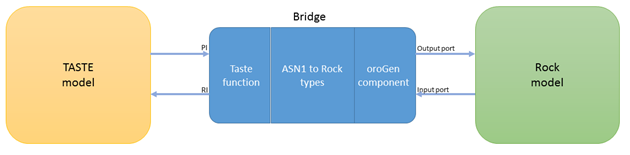
The bridge is composed by three components, as is shown in Figure 6 1:
- A TASTE function in a complete model, that is created with its RIs and PIs interfaces as the developer wants, the only restriction is that each interfaces must have one, and only one, parameter.
- An oroGen component, auto-generated by the tool´s binary.
- Types conversion functions between ASN1 and Rock types, this functions are required to change the data types between a taste interface to an orogen port. Once the bridge is created, user should create an orocos script in ruby that connects and initializes the oroGen components, including the bridge one, as a typical Rock execution. The TASTE model must be built as a shred library to allow the task of the oroGen component call RIs interfaces functions to send data from an input port to an RI and initialize the entire model. Also, the bridge function of the TASTE model knows the instance of the oroGen task to call functions when a PI is called to transform the parameter type and send it through an output port to another oroGen component.
Having loaded the environment variables of ESROCOS: From the main directory, run amake and the executable will be installed.
To understand the process easyly there are some files/folders in tools/rock_bridge/test that is going to be used as a tutorial, copy the content of this folder to (for example) ~/Desktop/rock_bridge_tutorial to avoid overwriting original files):
$ cp -R ~/esrocos_workspace/tools/rock_bridge/test/ ~/Desktop/rock_bridge_tutorial/
$ cd ~/Desktop/rock_bridge_tutorial/camera_simulator; amake
- Create your TASTE model
- One function will be the bridge (PI->output_port and RI->input_port)
- One parameter per interface (this will be checked anyways)
- In deployment view bind the bridge function (and others you want) to a x86.linux_dll partition.
- Build your model.
$ cd ~/Desktop/rock_bridge_tutorial/taste_clean; ./build-script.sh
- Run create_rock_bridge script (no matter where):
- 1st param: absolute path to your taste model skeletons.
- 2nd param: The name of the function that will be the bridge.
- 3rd param: absolute path to iv.py (usually absolute-path-taste-model/binary.c/iv.py)
- 4th param: absolute path to shared-library.so (usually absolute-path-taste-model/binary.c/binaries/x86_linux.so)
- Check [INFO] or [ERROR] messages during the process.
$ cd ~/Desktop/rock_bridge_tutorial
$ create_rock_bridge ~/Desktop/rock_bridge_tutorial/taste_clean camera_rock_bridge ~/Desktop/rock_bridge_tutorial/taste_clean/binary.c/iv.py ~/Desktop/rock_bridge_tutorial/taste_clean/binary.c/binaries/x86_partition.so
- Re-build your TASTE model:
cd ~/Desktop/rock_bridge_tutorial/taste_clean; ./build-script.sh
- Now, you have created (and installed) a Rock orogen task that initialize the taste model and ports are connected to its interfaces.
$ cd ~/Desktop/rock_bridge_tutorial/scripts; ruby SimCamera-Taste.rb
Copyright © 2017 EUROPEAN SPACE ROBOTICS CONTROL AND OPERATING SYSTEM (ESROCOS)
This project has received funding from the European Union’s Horizon 2020 research and innovation programme under grant agreement No 730080
