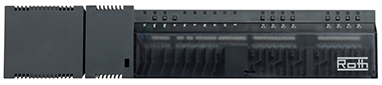
Roth make a series of "Touchline" controllers for under floor heating systems, the older versions (pre 2021), only support a wired ethernet control port, newer versions support wireless. These are coupled with wireless (not WiFI) thermostats for control, each controller can attach upto 36 thermostats. As each controller can support upto 8 circuits, the design allows the controllers to be cascaded to add extra circuits, using a single Master with multiple slaves units. By default each controller is a slave, to activate the Master you have to press the "Master" button on the controller.
The older versions have a web interface based on a java module, which unfortunately does not work on modern browsers as the Java web launch feature has been removed. For those with Android or IoS devices a Touchline application exists to allow you to set the thermostats remotely.
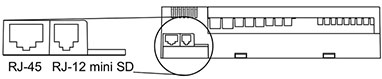
To connect the wired-only Roth controller to my network I used a Vonets VAR11N_300 Wireless/Ethernet bridge. The ethernet side is connected to the ethernet port of the touchline and the wireless is configured to connect to the (IoT?) WiFi SSID of your network. Other connection options are shown on page 42 of the Manual. You may have to change the default IP address of the touchline controller. If there are multiple controllers you need to designate one as a master by pressing the "Master" button, the network connection is only needed on the designated master.
Data from the controller can be accessed using the web interface call points readVal.cgi and writeVal.cgi. e.g.
Read Value: http://xxx.xxx.xxx.xxx/cgi-bin/readVal.cgi?variable
Write Value: http://xxx.xxx.xxx.xxx/cgi-bin/writeVal.cgi?variable=value
CD = Global Variables
Rx = Regulator
Gx = Thermostat
HW = Network Interface
| Variable | Values | Description |
|---|---|---|
| hw.IP | xxx.xxx.xxx.xxx | IP Address of Device |
| hw.NM | 255.255.255.0 | Netmask of IP |
| hw.Addr | M1-M2-M3-M4-M5-M6 | MAC address of Interface |
| hw.DNS1 | dd1.dd1.dd1.dd1 | IP address of DNS entry #1 |
| hw.DNS2 | dd2.dd2.dd2.dd2 | IP address of DNS entry #2 |
| hw.GW | zzz.zzz.zzz.zzz | Default route |
| hw.HostName | ROTH-M4M5M6 | Hostname (default ROTH-last_6_digits_of_MAC) |
| totalNumberOfDevices | 0-35 | Number of thermostats attached, 4 would indicate thermostats 0-3 |
| numberOfSlaveControllers | 0 | Number of slave controllers attached |
| VPI.href | http://myroth.ininet.ch/remote/t_R0.uniqueID/ | URL of remote access point, see uniqueID below |
| VPI.state | 99 | Remote access point status |
| isMaster | 1 | Is this a master or slave (push master button for this to work) |
| Status | Server: Roth/1.0 (powered by SpiderControl TM), CGI=0, ILR=0, V.1.0, ILR2=0, V.2.00, ILR3=1, V.1.00 | Status of webserver components |
| CD.uname | Username (only certain FW versions) | |
| CD.upass | 1234 | User interface password (default 1234) |
| STELL-APP | 1.42 | Module version (RO) |
| STELL-BL | 1.20 | Module version (RO) |
| STM-BL | 1.20 | Module version (RO) |
| R0.DateTime | EPOCH datetime | Date/time since 1970 e.g. 1703956882 or " Sat Dec 30 15:33:54 CET 2023", can be updated |
| R0.ErrorCode | 0 | Current error |
| R0.OPModeRegler | 0 | ??? |
| R0.Safety | 0 | ??? |
| R0.SystemStatus | 0 | System status, 0=off, 1=running |
| R0.Taupunkt | 0 | Dew point; is the temperature to which the air must cool for it to become completely saturated with water |
| R0.WeekProgWarn | 1 | ??? |
| R0.kurzID | 69 | Short ID, same as Gx.kurzID |
| R0.numberOfPairedDevices | 4 | Number of paired devices, same as 'totalNumberOfDevices' |
| R0.uniqueID | 16 Digit UUID | Unique identifier, used to construct VPI.href |
These parameters can be updated using the writeVal.cgi?variable=value
e.g.
http://xxx.xxx.xxx.xxx/cgi-bin/writeVal.cgi?variable=value
x indicates the thermostat index (0 to totalNumberofDevices-1) e.g. G0
| Variable | Values | Description |
|---|---|---|
| Gx.name | Name of thermostat, if set | |
| Gx.RaumTemp | 2094 | Room temperature, 20.94 |
| Gx.SollTemp | 2000 | Room set temperature, 20.00 |
| Gx.SollTempMaxVal | 2600 | Max temperature allowed for SollTemp, 26.00 |
| Gx.SollTempMinVal | 1600 | Min temperature allowed for SollTemp, 16.00 |
| Gx.TempSIUnit | 0 | Temperature scale, 0=C, 1=F |
| Gx.OPMode | 0-2 | Operation Mode: 0=Normal, 1=Night, 2=Vacation |
| Gx.WeekProg | 1-3 | Weekly Program, 1=Pro 1, 2=Pro 2, 3=Pro 3 |
| Gx.OPModeEna | 0-1 | Thermostat enabled (1) or disabled (0) |
| Gx.WeekProgEna | 1 | Weekly program mode enabled |
| Gx.kurzID | 1 | Short ID = Thermostat Index = x |
| Gx.ownerKurzID | 69 | Owner Short ID??? Same for all thermostats |
Each thermostat has 3 OPModes (Normal, Night, Vacation) and 3 Weekly programs (Pro 1, Pro 2, Pro 3).
For the purposes of illustration the examples use environment variables. Before use set the following:
# Set these variable
IP=192.168.x.x      # The IP of your controller
TH=0                # Thermostat number (0-35)
URL=http://${IP}/cgi-bin

# Read current values
printf "%-10s:\t" "OPMode";curl ${URL}/readVal.cgi?G${TH}.OPMode;printf "\n%-10s:\t" "WeekProg";curl ${URL}/readVal.cgi?G${TH}.WeekProg;printf "\n"| Mode | Values | Example |
|---|---|---|
| Day | Gx.OPMode=0, Gx.WeekProg=0 | curl ${URL}/writeVal.cgi?G${TH}.OPMode=0;curl ${URL}/writeVal.cgi?G${TH}.WeekProg=0; |
| Night | Gx.OPMode=1, Gx.WeekProg=0 | curl ${URL}/writeVal.cgi?G${TH}.OPMode=1;curl ${URL}/writeVal.cgi?G${TH}.WeekProg=0; |
| Holiday | Gx.OPMode=2, Gx.WeekProg=0 | curl ${URL}/writeVal.cgi?G${TH}.OPMode=2;curl ${URL}/writeVal.cgi?G${TH}.WeekProg=0; |
| Pro 1 Day | Gx.OPMode=0, Gx.WeekProg=1 | curl ${URL}/writeVal.cgi?G${TH}.OPMode=0;curl ${URL}/writeVal.cgi?G${TH}.WeekProg=1; |
| Pro 1 Night | Gx.OPMode=1, Gx.WeekProg=1 | curl ${URL}/writeVal.cgi?G${TH}.OPMode=1;curl ${URL}/writeVal.cgi?G${TH}.WeekProg=1; |
| Pro 1 Holiday | Gx.OPMode=2, Gx.WeekProg=1 | curl ${URL}/writeVal.cgi?G${TH}.OPMode=2;curl ${URL}/writeVal.cgi?G${TH}.WeekProg=1; |
| Pro 2 Day | Gx.OPMode=0, Gx.WeekProg=2 | curl ${URL}/writeVal.cgi?G${TH}.OPMode=0;curl ${URL}/writeVal.cgi?G${TH}.WeekProg=2; |
| Pro 2 Night | Gx.OPMode=1, Gx.WeekProg=2 | curl ${URL}/writeVal.cgi?G${TH}.OPMode=1;curl ${URL}/writeVal.cgi?G${TH}.WeekProg=2; |
| Pro 2 Holiday | Gx.OPMode=2, Gx.WeekProg=2 | curl ${URL}/writeVal.cgi?G${TH}.OPMode=2;curl ${URL}/writeVal.cgi?G${TH}.WeekProg=2; |
| Pro 3 Day | Gx.OPMode=0, Gx.WeekProg=3 | curl ${URL}/writeVal.cgi?G${TH}.OPMode=0;curl ${URL}/writeVal.cgi?G${TH}.WeekProg=3; |
| Pro 3 Night | Gx.OPMode=1, Gx.WeekProg=3 | curl ${URL}/writeVal.cgi?G${TH}.OPMode=1;curl ${URL}/writeVal.cgi?G${TH}.WeekProg=3; |
| Pro 3 Holiday | Gx.OPMode=2, Gx.WeekProg=3 | curl ${URL}/writeVal.cgi?G${TH}.OPMode=2;curl ${URL}/writeVal.cgi?G${TH}.WeekProg=3; |
| Purpose | cmdline |
|---|---|
| Read current date/time | curl ${URL}/readVal.cgi?R0.DateTime |
| Set Date/Time | curl ${URL}/writeVal.cgi?R0.DateTime=$(date +%s) |
| Set name of thermostat 0 | curl ${URL}/writeVal.cgi?G0.name=My_Thermostat |
| Set Temp of thermostat 0 to 20.54 C | curl ${URL}/cgi-bin/writeVal.cgi?G0.SollTemp=2054 |
| Read Temp of thermostat 0 | curl ${URL}/readVal.cgi?G0.SollTemp |
| Set thermostat 0 mode to night | curl ${URL}/writeVal.cgi?G0.OPMode=1 |
| Program 1 Day mode | curl ${URL}/writeVal.cgi?G${TH}.OPMode=0;curl ${URL}/writeVal.cgi?G${TH}.WeekProg=1; |
The easiest way to find the API variables for the older controllers, not the SL version, is to download the firmware, unpack it and examine the file "Roth.tcr".
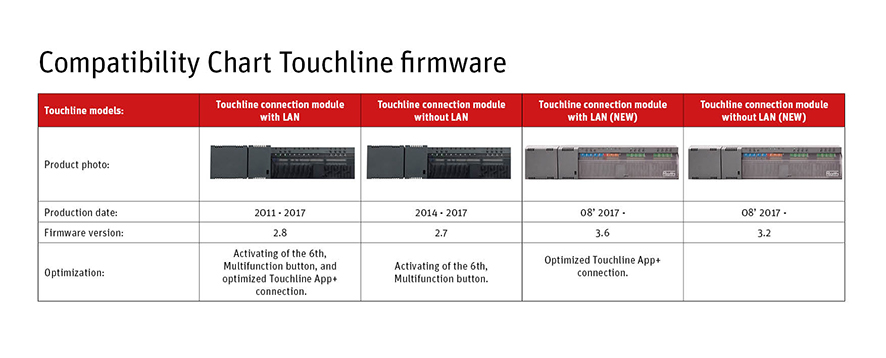
Source: https://www.roth-uk.com/support/software-and-firmware-updates
The "Roth.tcr" file contains a list of the (potential) API calls that can be used with readVal.cgi and writeVal.cgi calls. Not all of these are implemented in the Touchline build and the unimplemented ones return a 404 error or zero length response.
CD.reset;CD.reset; ; ; ; ; ; ; ; ; ;
CD.save;CD.save; ; ; ; ; ; ; ; ; ;
CD.submit;CD.submit; ; ; ; ; ; ; ; ; ;
CD.submit.err;CD.submit.err; ; ; ; ; ; ; ; ; ;
CD.uname;CD.uname; ; ; ; ; ; ; ; ; ;
CD.upass;CD.upass; ; ; ; ; ; ; ; ; ;
CD.ureg;CD.ureg; ; ; ; ; ; ; ; ; ;
G#CO_myGx#.TempSIUnit;G#CO_myGx#.TempSIUnit; ; ; ; ; ; ; ; ; ;
G#CO_myGx#.WeekProg;G#CO_myGx#.WeekProg; ; ; ; ; ; ; ; ; ;
G0+#COFF_devicePageOffset#.TempSIUnit;G0+#COFF_devicePageOffset#.TempSIUnit; ; ; ; ; ; ; ; ; ;
G0+@COFF_configPageOffset@.kurzID;G0+@COFF_configPageOffset@.kurzID; ; ; ; ; ; ; ; ; ;
G0+@COFF_configPageOffset@.name;G0+@COFF_configPageOffset@.name; ; ; ; ; ; ; ; ; ;
.
.
R0.DateTime;R0.DateTime; ; ;Int; ; ; ; ; ; ;
R0.ErrorCode;R0.ErrorCode; ; ; ; ; ; ; ; ; ;
R0.OPModeRegler;R0.OPModeRegler; ; ; ; ; ; ; ; ; ;
R0.Safety;R0.Safety; ; ; ; ; ; ; ; ; ;
R0.SystemStatus;R0.SystemStatus; ; ; ; ; ; ; ; ; ;
R0.Taupunkt;R0.Taupunkt; ; ; ; ; ; ; ; ; ;
R0.WeekProgWarn;R0.WeekProgWarn; ; ; ; ; ; ; ; ; ;
R0.kurzID;R0.kurzID; ; ; ; ; ; ; ; ; ;
R0.numberOfPairedDevices;R0.numberOfPairedDevices; ; ; ; ; ; ; ; ; ;
.
.
Note: the '+#COFF_devicePageOffset#' translates into the index of the thermostat e.g. if there are 5 thermostats, the devicePageOffset is from 0-4
Finding the possible API call points (/cgi-bin) requires analysis of the Firmware files, specifically the Java applet that is called when you access the web interface of the controller.
- Download and Unzip the firmware file into a directory
- find the main .jar file, which has the name IMasterx_y_z.jar e.g.
IMaster6_21_00.jar(depends on the FW version) - Unzip the .jar e.g.
unzip IMaster6_21_00.jar - Search the files for 'cgi-bin' e.g.
strings *.class | grep cgi-bin | sort | uniq
&cgi-bin/alarm.cgi?list=0&action=config
&cgi-bin/alarm.exe?list=0&action=config
,cgi-bin/trend.cgi?trendsList=0&action=config
,cgi-bin/trend.exe?trendsList=0&action=config
/cgi-bin/GetSrvInfo.exe
/cgi-bin/ILRReadValues.cgi
/cgi-bin/ILRReadValues.exe
/cgi-bin/OrderValues.exe?
/cgi-bin/ReadFile.cgi?
/cgi-bin/ReadFile.exe?
/cgi-bin/readVal.cgi?
/cgi-bin/readVal.exe?
/cgi-bin/writeVal.cgi?
/cgi-bin/writeVal.exe?
4cgi-bin/trend.cgi?trendsList=0&action=reinitTrending
4cgi-bin/trend.exe?trendsList=0&action=reinitTrending
6cgi-bin/trend.cgi?trendsList=0&action=clearTrdLogFiles
6cgi-bin/trend.exe?trendsList=0&action=clearTrdLogFiles
cgi-bin/alarm.cgi?list=
cgi-bin/alarm.exe?list=
cgi-bin/trend.cgi?trendNr=
cgi-bin/trend.exe?trendNr=
Note: On the 6_21_0 firmware The list included references to 'trendingAlarming.dll', which is not present in any of the sources.
Not all of these call points are implemented in the Touchline build and the unimplemented ones return either a 404 error.
| Call point | Method | Status | Description |
|---|---|---|---|
| /cgi-bin/readVal.cgi | GET | OK | Read Value |
| /cgi-bin/writeVal.cgi | GET | OK | Write Value |
| /cgi-bin/GetSrvInfo.exe | GET | OK | Embedded web server info |
| /cgi-bin/ILRReadValues.cgi | GET | Blank | Headers but no content |
| /cgi-bin/ILRReadValues.cgi | POST | OK | XML name/value pairs (see below) |
| /cgi-bin/alarm.cgi | GET | 404 | Not found |
| /cgi-bin/alarm.exe | GET | 404 | Not found |
| /cgi-bin/ILRReadValues.exe | GET | 404 | Not found |
| /cgi-bin/OrderValues.exe | GET | 404 | Not found |
| /cgi-bin/ReadFile.cgi | GET | 404 | Not found |
| /cgi-bin/ReadFile.exe | GET | 404 | Not found |
| /cgi-bin/readVal.exe | GET | 404 | Not found |
| /cgi-bin/trend.cgi | GET | 404 | Not found |
| /cgi-bin/trend.exe | GET | 404 | Not found |
| /cgi-bin/writeVal.exe | GET | 404 | Not found |
The /cgi-bin/ILRReadValues.cgi end point differs from the others in that it uses POST instead of GET and the body of the POST must contain an XML formatted item_list of the variables to be queried. It returns an XML formatted list of variable names and there values. This permits the caller to query multiple variables in one call, which is faster than reading each variable individually. If the variable name(s) match it adds a value group associated with the variable name.
HTTP headers used on POST:
- "Content-Type: text/xml" (mandatory)
- "User-Agent: Roth-Touchline.../1.05" (optional but does not affect the return value)
e.g.
curl -s -X POST -H "Content-Type: text/xml" -H "User-Agent: Roth-Touchline.../1.05" -d "${REQ}" http://IP/cgi-bin/ILRReadValues.cgi
where "${REQ}" contains the XML encoded list of variables to be queried (see examples below)
HTTP POST Body/data format (pretty print XML, the one line version also works):
<item_list_size>
  # items
</item_list_size>
<item_list>
  <i><n> ---Variable name --- </n></i>
  <i><n> ---Variable name --- </n></i>
<item_list>
(you can add other tags before and after this to make it easier to parse, they have no impact on the results, invalid entries are ignore)
e.g. POST to query the number of attached thermostats:
<body>
   <version>1.0</version>
   <item_list_size>
     1
   </item_list_size>
   <item_list>
      <i>
         <n>totalNumberOfDevices</n>
      </i>
   </item_list>
</body>
HTTP return format (XML), appends entry to each :
<item_list_size>
  # items
</item_list_size>
<item_list>
  <i><n> ---Variable name --- </n><v> --- Variable value ---</v></i>
  <i><n> ---Variable name --- </n><v> --- Variable value ---</v></i>
<item_list>
e.g. HTTP return for a system with 4 thermostats attached:
<body>
   <version>1.0</version>
   <item_list_size>
     1
   </item_list_size>
   <item_list>
      <i>
         <n>totalNumberOfDevices</n>
         <v>4</v>
      </i>
   </item_list>
</body>
In the examples below the <body><version>1.0</version> prefix and </body> suffix have been added to the POST body.
| POST Body | POST Return | Description |
|---|---|---|
<body><version>1.0</version><item_list_size>1</item_list_size><item_list><i><n>totalNumberOfDevices</n></item_list></body> |
<body><version>1.0</version><item_list_size>1</item_list_size><item_list><i><n>totalNumberOfDevices</n><v>4</v></i></item_list></body> |
Number of thermostats attached, 4 would indicate thermostats 0-3 |
<body><version>1.0</version><item_list_size>29</item_list_size><item_list><i><n>totalNumberOfDevices</n></i><i><n>CD.name</n></i><i><n>CD.upass</n></i><i><n>STELL-APP</n></i><i><n>STELL-BL</n></i><i><n>ST-APP</n></i><i><n>STM-BL</n></i><i><n>hw.IP</n></i><i><n>hw.Addr</n></i><i><n>hw.DNS1</n></i><i><n>hw.DNS2</n></i><i><n>hw.GW</n></i><i><n>hw.NM</n></i><i><n>hw.HostName</n></i><i><n>numberOfSlaveControllers</n></i><i><n>VPI.href</n></i><i><n>VPI.state</n></i><i><n>isMaster</n></i><i><n>Status</n></i><i><n>R0.DateTime</n></i><i><n>R0.ErrorCode</n></i><i><n>R0.OPModeRegler</n></i><i><n>R0.Safety</n></i><i><n>R0.SystemStatus</n></i><i><n>R0.Taupunkt</n></i><i><n>R0.WeekProgWarn</n></i><i><n>R0.kurzID</n></i><i><n>R0.numberOfPairedDevices</n></i><i><n>R0.uniqueID</n></i></item_list></body> |
<body><version>1.0</version><item_list_size>29</item_list_size><item_list><i><n>totalNumberOfDevices</n><v>4</v></i><i><n>CD.name</n><v></v></i><i><n>CD.upass</n><v>1234</v></i><i><n>STELL-APP</n><v>1.42</v></i><i><n>STELL-BL</n><v>1.20</v></i><i><n>ST-APP</n><v></v></i><i><n>STM-BL</n><v>1.20</v></i><i><n>hw.IP</n><v>192.168.x.x</v></i><i><n>hw.Addr</n><v>5C-XX-XX-XX-XX-XX</v></i><i><n>hw.DNS1</n><v>192.168.x.x</v></i><i><n>hw.DNS2</n><v>192.168.x.x/v></i><i><n>hw.GW</n><v>192.168.x.x</v></i><i><n>hw.NM</n><v>255.255.0.0</v></i><i><n>hw.HostName</n><v>ROTH-00CCC8</v></i><i><n>numberOfSlaveControllers</n><v>0</v></i><i><n>VPI.href</n><v>http://myroth.ininet.ch/remote/t_AAAAAAAAA/</v></i><i><n>VPI.state</n><v>99</v></i><i><n>isMaster</n><v>1</v></i><i><n>Status</n><v></v></i><i><n>R0.DateTime</n><v>1760123686</v></i><i><n>R0.ErrorCode</n><v>0</v></i><i><n>R0.OPModeRegler</n><v>0</v></i><i><n>R0.Safety</n><v>0</v></i><i><n>R0.SystemStatus</n><v>0</v></i><i><n>R0.Taupunkt</n><v>0</v></i><i><n>R0.WeekProgWarn</n><v>0</v></i><i><n>R0.kurzID</n><v>69</v></i><i><n>R0.numberOfPairedDevices</n><v>4</v></i><i><n>R0.uniqueID</n><v>XXXXXXXXXXXXXXX</v></i></item_list></body> |
Retrieve all controller parameters (no thermostats) |
<body><version>1.0</version><item_list_size>81</item_list_size><item_list><i><n>totalNumberOfDevices</n></i><i><n>CD.name</n></i><i><n>CD.upass</n></i><i><n>STELL-APP</n></i><i><n>STELL-BL</n></i><i><n>ST-APP</n></i><i><n>STM-BL</n></i><i><n>hw.IP</n></i><i><n>hw.Addr</n></i><i><n>hw.DNS1</n></i><i><n>hw.DNS2</n></i><i><n>hw.GW</n></i><i><n>hw.NM</n></i><i><n>hw.HostName</n></i><i><n>numberOfSlaveControllers</n></i><i><n>VPI.href</n></i><i><n>VPI.state</n></i><i><n>isMaster</n></i><i><n>Status</n></i><i><n>R0.DateTime</n></i><i><n>R0.ErrorCode</n></i><i><n>R0.OPModeRegler</n></i><i><n>R0.Safety</n></i><i><n>R0.SystemStatus</n></i><i><n>R0.Taupunkt</n></i><i><n>R0.WeekProgWarn</n></i><i><n>R0.kurzID</n></i><i><n>R0.numberOfPairedDevices</n></i><i><n>R0.uniqueID</n></i><i><n>G0.name</n></i><i><n>G0.RaumTemp</n></i><i><n>G0.SollTemp</n></i><i><n>G0.SollTempMaxVal</n></i><i><n>G0.SollTempMinVal</n></i><i><n>G0.SollTempStepal</n></i><i><n>G0.TempSIUnit</n></i><i><n>G0.WeekProg</n></i><i><n>G0.WeekProgEna</n></i><i><n>G0.OPMode</n></i><i><n>G0.OPModeEna</n></i><i><n>G0.kurzID</n></i><i><n>G0.ownerKurzID</n></i><i><n>G1.name</n></i><i><n>G1.RaumTemp</n></i><i><n>G1.SollTemp</n></i><i><n>G1.SollTempMaxVal</n></i><i><n>G1.SollTempMinVal</n></i><i><n>G1.SollTempStepal</n></i><i><n>G1.TempSIUnit</n></i><i><n>G1.WeekProg</n></i><i><n>G1.WeekProgEna</n></i><i><n>G1.OPMode</n></i><i><n>G1.OPModeEna</n></i><i><n>G1.kurzID</n></i><i><n>G1.ownerKurzID</n></i><i><n>G2.name</n></i><i><n>G2.RaumTemp</n></i><i><n>G2.SollTemp</n></i><i><n>G2.SollTempMaxVal</n></i><i><n>G2.SollTempMinVal</n></i><i><n>G2.SollTempStepal</n></i><i><n>G2.TempSIUnit</n></i><i><n>G2.WeekProg</n></i><i><n>G2.WeekProgEna</n></i><i><n>G2.OPMode</n></i><i><n>G2.OPModeEna</n></i><i><n>G2.kurzID</n></i><i><n>G2.ownerKurzID</n></i><i><n>G3.name</n></i><i><n>G3.RaumTemp</n></i><i><n>G3.SollTemp</n></i><i><n>G3.SollTempMaxVal</n></i><i><n>G3.SollTempMinVal</n></i><i><n>G3.SollTempStepal</n></i><i><n>G3.TempSIUnit</n></i><i><n>G3.WeekProg</n></i><i><n>G3.WeekProgEna</n></i><i><n>G3.OPMode</n></i><i><n>G3.OPModeEna</n></i><i><n>G3.kurzID</n></i><i><n>G3.ownerKurzID</n></i></item_list></body> |
<body><version>1.0</version><item_list_size>81</item_list_size><item_list><i><n>totalNumberOfDevices</n><v>4</v></i><i><n>CD.name</n><v></v></i><i><n>CD.upass</n><v>1234</v></i><i><n>STELL-APP</n><v>1.42</v></i><i><n>STELL-BL</n><v>1.20</v></i><i><n>ST-APP</n><v></v></i><i><n>STM-BL</n><v>1.20</v></i><i><n>hw.IP</n><v>192.168.x.x</v></i><i><n>hw.Addr</n><v>5C-XX-XX-XX-XX-XX</v></i><i><n>hw.DNS1</n><v>192.168.x.x</v></i><i><n>hw.DNS2</n><v>192.168.x.x/v></i><i><n>hw.GW</n><v>192.168.x.x</v></i><i><n>hw.NM</n><v>255.255.0.0</v></i><i><n>hw.HostName</n><v>ROTH-00CCC8</v></i><i><n>numberOfSlaveControllers</n><v>0</v></i><i><n>VPI.href</n><v>http://myroth.ininet.ch/remote/t_AAAAAAAAA/</v></i><i><n>VPI.state</n><v>99</v></i><i><n>isMaster</n><v>1</v></i><i><n>Status</n><v></v></i><i><n>R0.DateTime</n><v>1760123686</v></i><i><n>R0.ErrorCode</n><v>0</v></i><i><n>R0.OPModeRegler</n><v>0</v></i><i><n>R0.Safety</n><v>0</v></i><i><n>R0.SystemStatus</n><v>0</v></i><i><n>R0.Taupunkt</n><v>0</v></i><i><n>R0.WeekProgWarn</n><v>0</v></i><i><n>R0.kurzID</n><v>69</v></i><i><n>R0.numberOfPairedDevices</n><v>4</v></i><i><n>R0.uniqueID</n><v>XXXXXXXXXXXXXXX</v></i><i><n>G0.name</n><v>Kitchen</v></i><i><n>G0.RaumTemp</n><v>1401</v></i><i><n>G0.SollTemp</n><v>2000</v></i><i><n>G0.SollTempMaxVal</n><v>2200</v></i><i><n>G0.SollTempMinVal</n><v>2000</v></i><i><n>G0.SollTempStepal</n><v></v></i><i><n>G0.TempSIUnit</n><v>0</v></i><i><n>G0.WeekProg</n><v>0</v></i><i><n>G0.WeekProgEna</n><v>1</v></i><i><n>G0.OPMode</n><v>1</v></i><i><n>G0.OPModeEna</n><v>1</v></i><i><n>G0.kurzID</n><v>1</v></i><i><n>G0.ownerKurzID</n><v>69</v></i><i><n>G1.name</n><v>Living Room</v></i><i><n>G1.RaumTemp</n><v>1390</v></i><i><n>G1.SollTemp</n><v>1600</v></i><i><n>G1.SollTempMaxVal</n><v>3000</v></i><i><n>G1.SollTempMinVal</n><v>500</v></i><i><n>G1.SollTempStepal</n><v></v></i><i><n>G1.TempSIUnit</n><v>0</v></i><i><n>G1.WeekProg</n><v>0</v></i><i><n>G1.WeekProgEna</n><v>1</v></i><i><n>G1.OPMode</n><v>1</v></i><i><n>G1.OPModeEna</n><v>1</v></i><i><n>G1.kurzID</n><v>2</v></i><i><n>G1.ownerKurzID</n><v>69</v></i><i><n>G2.name</n><v>Hall</v></i><i><n>G2.RaumTemp</n><v>1370</v></i><i><n>G2.SollTemp</n><v>1600</v></i><i><n>G2.SollTempMaxVal</n><v>3000</v></i><i><n>G2.SollTempMinVal</n><v>500</v></i><i><n>G2.SollTempStepal</n><v></v></i><i><n>G2.TempSIUnit</n><v>0</v></i><i><n>G2.WeekProg</n><v>0</v></i><i><n>G2.WeekProgEna</n><v>1</v></i><i><n>G2.OPMode</n><v>1</v></i><i><n>G2.OPModeEna</n><v>1</v></i><i><n>G2.kurzID</n><v>3</v></i><i><n>G2.ownerKurzID</n><v>69</v></i><i><n>G3.name</n><v>Downstairs Bathroom</v></i><i><n>G3.RaumTemp</n><v>1372</v></i><i><n>G3.SollTemp</n><v>1600</v></i><i><n>G3.SollTempMaxVal</n><v>3000</v></i><i><n>G3.SollTempMinVal</n><v>500</v></i><i><n>G3.SollTempStepal</n><v></v></i><i><n>G3.TempSIUnit</n><v>0</v></i><i><n>G3.WeekProg</n><v>0</v></i><i><n>G3.WeekProgEna</n><v>1</v></i><i><n>G3.OPMode</n><v>1</v></i><i><n>G3.OPModeEna</n><v>1</v></i><i><n>G3.kurzID</n><v>4</v></i><i><n>G3.ownerKurzID</n><v>69</v></i></item_list></body> |
Query all variables on a 4 thermostat system |
There are various ways to post process the XML list into something more accessible. For the sake of example we will use shell script and cmd line utilities, similar results maybe obtained used python or other languages.
If we assumed that the POST REQuest was contained in a shell variable ${RES}, the result of the query might be captured as follows:
RES=$(curl -s -X POST -H "Content-Type: text/xml" -H "User-Agent: Roth-Touchline.../1.05" -d "${req}" http://IP/cgi-bin/ILRReadValues.cgi)
- Bash conversion to key=value pairs:
printf "$RES" | sed -e 's/<v>/=/g' -e 's/>/>\n/g' -e 's/<\/n>\n//g' -e 's/<\/v>//g' | grep '='
- XSLT conversion using the template my.xslt (see below):
printf "${RES}" | xsltproc --nodtdattr --nonet --novalid my.xslt
- Key=value XSLT:
cat <<_EOF_ >my.xslt
<?xml version="1.0" encoding="UTF-8"?>
<xsl:stylesheet version="1.0" xmlns:xsl="http://www.w3.org/1999/XSL/Transform">
<xsl:output method="text" omit-xml-declaration="yes"/>
<xsl:template match="/">
<xsl:for-each select="body/item_list/i">
<xsl:value-of select="n" />
<xsl:text>=</xsl:text>
<xsl:value-of select="v" />
<xsl:text>
</xsl:text>
</xsl:for-each>
</xsl:template>
</xsl:stylesheet>
_EOF_
printf "${RES}" | xsltproc --nodtdattr --nonet --novalid my.xslt
- Create shell script arrays of the key and value pairs (run the XLST conversion then call the output in your script)
cat <<_EOF_ >my.xslt
<?xml version="1.0" encoding="UTF-8"?>
<xsl:stylesheet version="1.0" xmlns:xsl="http://www.w3.org/1999/XSL/Transform">
<xsl:output method="text" omit-xml-declaration="yes"/>
<xsl:template match="/">
<xsl:for-each select="body/item_list/i">
<xsl:text>aFIELDNAM[\${iCNT}]=</xsl:text>
<xsl:value-of select="n" />
<xsl:text>;</xsl:text>
<xsl:text>aFIELDVAL[\${iCNT}]="</xsl:text>
<xsl:value-of select="v" />
<xsl:text>";</xsl:text>
<xsl:text>iCNT=\$((iCNT+1))</xsl:text>
<xsl:text>
</xsl:text>
</xsl:for-each>
</xsl:template>
</xsl:stylesheet>
_EOF_
printf "${RES}" | xsltproc --nodtdattr --nonet --novalid my.xslt
For convenience the API calls have been encapsulated in the bash script 'rothread.sh' that:
- Allows entry of temperatures in decimal x.y format i.e. 18.54 instead of 1854
- Implements a status print of all variables
- Logs the output to files in /var/tmp
- Builds an arrays of field names/values to allow this to be called from other scripts
| cmd line | Description |
|---|---|
rothread.sh -h |
Show help |
rothread.sh -s |
Show status of all variables |
rothread.sh -w G0.OPMode=1 |
Set Thermostat #0 to Night mode |
rothread.sh -w G1.SollTemp=19.54 |
Set required Temperature to 19.54 on Thermostat #2 |
rothread.sh -w R0.Datetime=$(date +%s) |
Set controller Date/Time to current on Linux |
The firmware file for the newer Touchline SL controllers has a different format to the older Touchline BL/PL controllers. The file appears to be encoded and does not reveal anything about the internal contents.
I have not tested this script against the newer Touchline SL; if you have one of these controllers please let me know your results.

The Roth IoS/Android application does not request the IP address of the master controller, so how does it find it?
Step 1: The client app sends a UDP unicast broadcast (255.255.255.255) to port 5000 (upnp) contained the payload "SEARCH R*\r\n":
0000  ff ff ff ff ff ff 28 8f f6 65 d4 cd 08 00 45 00   ......(..e....E.
0010  00 28 ca 53 00 00 40 11 ea 41 c0 a8 05 88 ff ff   .(.S..@..A......
0020  ff ff cd 7c 13 88 00 14 2c 52 53 45 41 52 43 48   ...|....,RSEARCH
0030  20 52 2a 0d 0a 00 00 00 00 00 00 00                R*.........
Step 2: The Roth controller responds with a UDP unicast broadcast from port 5000 to the client port identified in the previous step:
0000  ff ff ff ff ff ff 00 17 13 3b a3 09 08 00 45 00   .........;....E.
0010  00 bc 08 59 00 00 80 11 6c 1d c0 a8 05 13 ff ff   ...Y....l.......
0020  ff ff 13 88 d1 7f 00 a8 12 4d 52 31 30 30 00 a0   .........MR100..
0030  00 45 00 20 00 00 c0 a8 07 19 c0 a8 07 01 ff ff   .E. ............
0040  ff 00 c0 a8 07 01 c0 a8 05 2c 5c c2 13 00 d8 18   .........,\.....
0050  00 00 00 00 00 00 00 00 00 00 52 4f 54 48 2d 46   ..........ROTH-F
0060  46 44 38 31 38 00 00 00 00 00 00 00 00 00 68 74   FD818.........ht
0070  74 70 3a 2f 2f 31 39 32 2e 31 36 38 2e 35 2e 31   tp://192.168.7.1
0080  39 2f 00 00 00 00 00 00 00 00 00 00 00 00 00 00   9/..............
0090  00 00 00 00 00 00 00 00 00 00 00 00 00 00 00 00   ................
00a0  00 00 00 00 00 00 00 00 00 00 00 00 00 00 00 00   ................
00b0  00 00 00 00 00 00 00 00 00 00 00 00 00 00 53 ff   ..............S.
00c0  71 06 49 89 49 53 18 46 02 87                     q.I.IS.F..
Step 3: The payload part of this contains the name of the controller (ROTH-FFD918) and the IP (192.168.7.19 / C0 A8 07 13 at offset 0x36), it uses this to connect. The service URL is specified here as http://192.168.7.19 (this version of the FW does not use SSL).
0020                                 52 31 30 30 00 a0             R100..
0030   00 45 00 20 00 00 c0 a8 07 19 c0 a8 07 01 ff ff   .E. ............
0040   ff 00 c0 a8 07 01 c0 a8 05 2c 5c c2 13 00 d8 18   .........,\.....
0050   00 00 00 00 00 00 00 00 00 00 52 4f 54 48 2d 46   ..........ROTH-F
0060   46 44 38 31 38 00 00 00 00 00 00 00 00 00 68 74   FD818.........ht
0070   74 70 3a 2f 2f 31 39 32 2e 31 36 38 2e 35 2e 31   tp://192.168.7.1
0080   39 2f 00 00 00 00 00 00 00 00 00 00 00 00 00 00   9/..............
0090   00 00 00 00 00 00 00 00 00 00 00 00 00 00 00 00   ................
00a0   00 00 00 00 00 00 00 00 00 00 00 00 00 00 00 00   ................
00b0   00 00 00 00 00 00 00 00 00 00 00 00 00 00 53 ff   ..............S.
00c0   71 06 49 89 49 53 18 46 02 87                     q.I.IS.F..
Caveat: This method of discovery by the application only works when you are directly connected to the same broadcast domain. It does not work over a routed network or via a VPN connection, as these filter broadcast traffic.