py-opw-kinematics is a Python wrapper for the rs-opw-kinematics library, providing an interface for solving inverse and forward kinematics of six-axis industrial robots with a parallel base and spherical wrist. Designed for convenience and performance, this wrapper is suitable for robotics simulation, control, and trajectory planning directly from Python.
- scipy Integration: Uses
scipy.spatial.transform.RigidTransformfor poses, giving you access to all rotation representations (Euler, quaternions, rotation vectors) and SLERP interpolation. - High Performance: Capable of batch operations for maximum efficiency. For example, 100,000 inverse kinematic solutions can be computed in just 0.4 seconds.
- Full Rust Integration: Uses Rust for the core kinematic calculations, offering speed and robustness while allowing access through Python.
- Singularity Handling: Manages kinematic singularities such as J5 = 0 or 180.
- Inverse kinematics (single and batch)
- Batch IK considers previous state to find closest solution
- Forward kinematics outputs all link frames, not just end effector
- Optional tool offset parameter for TCP calculations
- Stateless API - pure kinematics library
- External axes handling (handled by higher-level coordination layer)
- Collision detection (separate concern, e.g. py-parry3d)
- Parallelogram linkage mechanics (handled by higher-level coordination layer)
- Euler angle / rotation conversions (use
scipy.spatial.transform.Rotation)
Install using pip:
pip install py-opw-kinematicsRequires scipy >= 1.16 for RigidTransform support.
For optional DataFrame support in batch operations:
pip install py-opw-kinematics[polars] # or [pandas]Note: Rust is required to compile the underlying Rust library if not using pre-built binaries.
This library uses seven kinematic parameters (a1, a2, b, c1, c2, c3, and c4). This solver assumes that the arm is at zero when all joints stick straight up in the air, as seen in the image below. It also assumes that all rotations are positive about the base axis of the robot. No other setup is required.
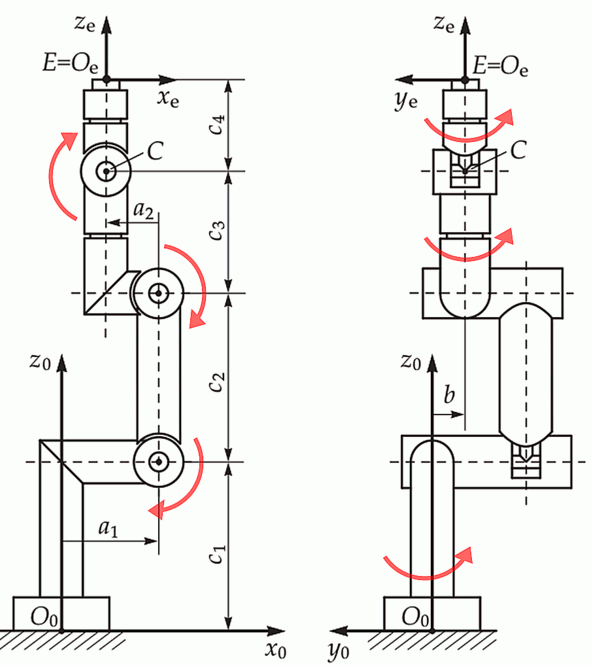
To use the library, create a KinematicModel instance with the appropriate values for the 7
kinematic parameters and any joint offsets required to bring the paper's zero position (arm up in Z) to the
manufacturer's position. The direction of each of the axes can be flipped with the flip_axes parameter if your robot's axes do not match the convention in the paper.
from py_opw_kinematics import KinematicModel, Robot
from scipy.spatial.transform import RigidTransform, Rotation
import numpy as np

# Define robot geometry
kinematic_model = KinematicModel(
    a1=400,
    a2=-250,
    b=0,
    c1=830,
    c2=1175,
    c3=1444,
    c4=230,
    offsets=(0, 0, 0, 0, 0, 0),
    flip_axes=(True, False, True, True, False, True),
)

# Create robot (degrees=True means joint angles are in degrees)
robot = Robot(kinematic_model, degrees=True)

# Define end effector transform
ee_rotation = Rotation.from_euler("xyz", [0, -90, 0], degrees=True)
ee_transform = RigidTransform.from_components(rotation=ee_rotation, translation=[0, 0, 0])

# Forward kinematics
joints = (10, 0, -90, 0, 0, 0)
pose = robot.forward(joints, ee_transform=ee_transform)

print(f"Position: {np.round(pose.translation, 2)}")
print(f"Rotation (XYZ Euler): {np.round(pose.rotation.as_euler('XYZ', degrees=True), 2)}")

# Inverse kinematics
solutions = robot.inverse(pose, ee_transform=ee_transform)
print(f"Found {len(solutions)} IK solutions")
for sol in solutions:
    print(f"  {np.round(sol, 2)}")
Output:
Position: [2042.42 -360.13 2259.  ]
Rotation (XYZ Euler): [  0.   0. -10.]
Found 4 IK solutions
  [ 10.   0. -90.   0.   0.   0.]
  [ 10.    90.76 -20.4    0.   69.6    0.  ]
  [  10.    0.  -90. -180.    0.  180.]
  [  10.     90.76  -20.4  -180.    -69.6   180.  ]
from py_opw_kinematics import interpolate_poses
from scipy.spatial.transform import RigidTransform, Rotation
import numpy as np

# Define keyframes as XYZABC (G-code style)
xyzabc = np.array([
    [1800, -500, 1000,  0,  0,  0],
    [2100,  500, 2000, 10, 10, 10],
])

# Convert to RigidTransform
keyframes = RigidTransform.from_components(
    translation=xyzabc[:, :3],
    rotation=Rotation.from_euler("xyz", xyzabc[:, 3:], degrees=True),
)

# Interpolate: SLERP for rotation, linear for translation
trajectory = interpolate_poses([0, 1], keyframes, np.linspace(0, 1, 1000))

# Batch IK for entire trajectory (current_joints helps find closest solution)
joints = robot.batch_inverse(
    poses=trajectory,
    current_joints=(0, 0, -90, 0, 0, 0),
    ee_transform=ee_transform,
)
print(f"Shape: {joints.shape}")  # (1000, 6)

# Batch FK to verify
poses_back = robot.batch_forward(joints, ee_transform=ee_transform)
print(f"Poses: {len(poses_back)}") # 1000This library is part of an ecosystem for robotics simulation and visualization:
- py-parry3d (PyPI) - Collision detection using parry3d (Rust + PyO3). Use link frames from
py-opw-kinematicsto check for collisions. - threejs-viewer (PyPI) - Web-based 3D viewer with WebSocket interface for visualizing robot poses and meshes.
This project builds on the Rust library rs-opw-kinematics by Bourumir Wyngs, which itself draws inspiration from:
- The 2014 research paper: An Analytical Solution of the Inverse Kinematics Problem of Industrial Serial Manipulators with an Ortho-parallel Basis and a Spherical Wrist, authored by Mathias Brandstotter, Arthur Angerer, and Michael Hofbaur (ResearchGate link).
- The C++ project opw_kinematics, which provided valuable insights for validation and testing.
The py-opw-kinematics library itself is licensed under MIT.
The image opw.png, used for documentation purposes, is sourced from opw_kinematics and is licensed under the Apache License 2.0.
We welcome contributions! Please see our Contributing Guidelines for more details on how to get started.